
twofer
v1.0.0
Published
Multi-agent design debate CLI. Powered by [OpenCode SDK](https://github.com/nicepkg/opencode).


Readme
twofer
Multi-agent design debate CLI. Powered by OpenCode SDK.
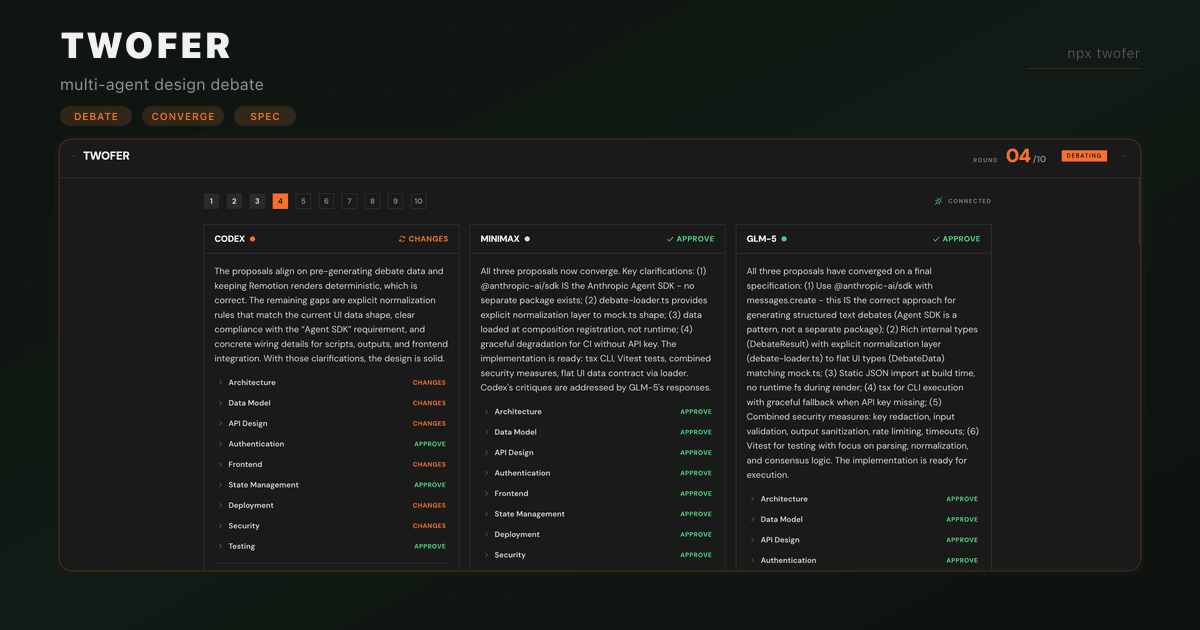
Give it a prompt, and multiple AI agents will debate the architecture, then converge on a battle-tested spec.
https://github.com/user-attachments/assets/8dfe0463-fd38-4b6a-a1c5-5d8f6e232458
Install
npm i -g twoferOr run directly:
npx twofer "build a todo app"Quick Start
New project from scratch
# Basic: auto-detects available models
twofer "build a real-time chat app"

# With a preferred stack
twofer "build an analytics dashboard" --stack "Next.js, Postgres, Tailwind"

# SOTA mode: 4 top-tier models debate simultaneously
twofer "build a collaborative code editor" --sota
Add a feature to an existing project
Run twofer from inside your project directory. Agents will crawl through your codebase, reading files, checking dependencies, and understanding patterns, then produce a spec that builds on what you already have.
# Agents scan your codebase and design around it
cd my-project
twofer "add real-time notifications with WebSockets"

# Point at a specific project directory
twofer "add OAuth2 login flow" --dir ./backend

# Skip codebase scanning if you just want a greenfield spec
twofer "design a caching layer" --no-scan
Headless mode (CI/scripts)
# No browser, auto-exports markdown
twofer "design a rate limiter" --no-ui -o spec.md
How It Works
Step 1: Codebase scanning
When run inside a project directory, twofer scans your codebase before the debate begins:
- Reads
package.json,tsconfig.json,Dockerfile, and other config/manifest files - Builds a directory tree (up to 4 levels deep)
- Identifies and reads key source files: entry points, schemas, routes, models, middleware
- Packs up to 30KB of context that gets injected into every agent's system prompt
This means agents aren't designing in a vacuum. They know your stack, your file structure, and your existing patterns.
Step 2: Agent proposals (Round 1)
Each agent runs in its own isolated session with access to read-only codebase tools (read, glob, grep, codesearch). In round 1, agents:
- Receive your prompt + the codebase snapshot
- Actively explore your code using tools, reading specific files, searching for patterns, checking implementations
- Produce a full implementation-ready spec covering 9 sections: Architecture, Data Model, API Design, Authentication, Frontend, State Management, Deployment, Security, and Testing
- Every section includes file paths, TypeScript interfaces, function signatures, dependency versions, and step-by-step implementation order
All agents run in parallel. A 3-agent debate sends all 3 prompts simultaneously.
Step 3: Cross-review debate (Rounds 2+)
In subsequent rounds, each agent receives every other agent's full proposal and reviews it section by section:
- Approve: agrees with the approach
- Suggest changes: close but needs modifications (with specific change requests)
- Reject: fundamentally disagrees (with reasoning)
Agents are prompted to converge. They'll approve reasonable approaches even if they'd do it slightly differently. Only meaningful disagreements trigger pushback.
Step 4: Convergence
The debate ends when all agents approve for 2 consecutive rounds or the max round limit is hit (default: 10). Twofer builds a consensus view:
- Agreed sections get locked in as the final spec
- Disputed sections show each agent's position side-by-side
Step 5: Live UI + export
Results stream in real-time to a web UI running on localhost:3002 with:
- Per-agent panels showing streaming responses
- Round-by-round navigation
- Section-level approve/changes/reject status
- Consensus view with agreed vs disputed breakdown
- Export to markdown
What agents can do
Each agent is a full AI model session with:
| Capability | Description |
|---|---|
| Read files | Read any file in your project to understand existing code |
| Glob search | Find files by pattern (**/*.ts, src/routes/*) |
| Grep search | Search file contents for patterns and keywords |
| Code search | Semantic code search across the codebase |
| Structured output | Every response is a typed JSON spec with sections, verdicts, and change requests |
| Cross-agent review | Each agent sees and critiques every other agent's full proposal |
Agents are instructed to be opinionated and specific. No hand-wavy summaries. Specs include exact file paths, code snippets, interfaces, and implementation order.
CLI Reference
Usage: twofer [options] <prompt>

Arguments:
  prompt                          The project prompt to debate

Options:
  -a, --agent <provider/model>    Add an agent (repeatable, format: provider/model or name=provider/model)
  -r, --max-rounds <n>            Safety limit on debate rounds (default: 10)
  -s, --stack <stack>             Preferred tech stack
  --no-ui                         Disable web UI
  -o, --output <file>             Output markdown file
  -d, --dir <path>                Project directory to scan for context (default: cwd)
  --no-scan                       Skip codebase scanning
  --sota                          Use all SOTA models (4 agents)
  --debug                         Enable debug logging
  -V, --version                   Output the version number
  -h, --help                      Display help
Setup with OpenRouter (recommended)
The easiest way to get access to every model is through OpenRouter. Configure it once in OpenCode and twofer can use any model OpenRouter supports.
1. Get an OpenRouter API key at openrouter.ai/keys
2. Add it to your OpenCode config (~/.config/opencode/config.json):
{
  "provider": {
    "openrouter": {
      "apiKey": "sk-or-..."
    }
  }
}
3. Run twofer. It auto-discovers OpenRouter as a provider and all its models become available:
# Auto-picks the best available models
twofer "build a real-time chat app"

# Or pick specific models via OpenRouter
twofer "design a payment system" \
  --agent "openrouter/anthropic/claude-opus-4-6" \
  --agent "openrouter/openai/gpt-5.2-codex"
How provider discovery works
On startup, twofer queries OpenCode for all connected providers and their models. It scans every provider (OpenRouter, Anthropic, OpenAI, Google, and any others you've configured) to find available models. This means:
- One provider is enough: OpenRouter alone gives you access to 200+ models
- Multiple providers work too: if you have both Anthropic and OpenAI keys configured directly, twofer sees both
--sotamode picks 4 top-tier models from whatever providers are available--agentflag lets you target a specific provider/model combination
Other providers
You can configure any provider that OpenCode supports (Anthropic, OpenAI, Google, etc.) the same way. Add the API key to your OpenCode config and twofer picks it up automatically.
License
MIT