
type-ahead-mention
v3.0.0
Published
Autocomplete for {{template.variables}} in React: prompt templates, email merge tags, and workflow builders. Nested objects, arrays, value previews, and unknown-variable highlighting.

Maintainers
 rahul.patwa0328
Readme
type-ahead-mention
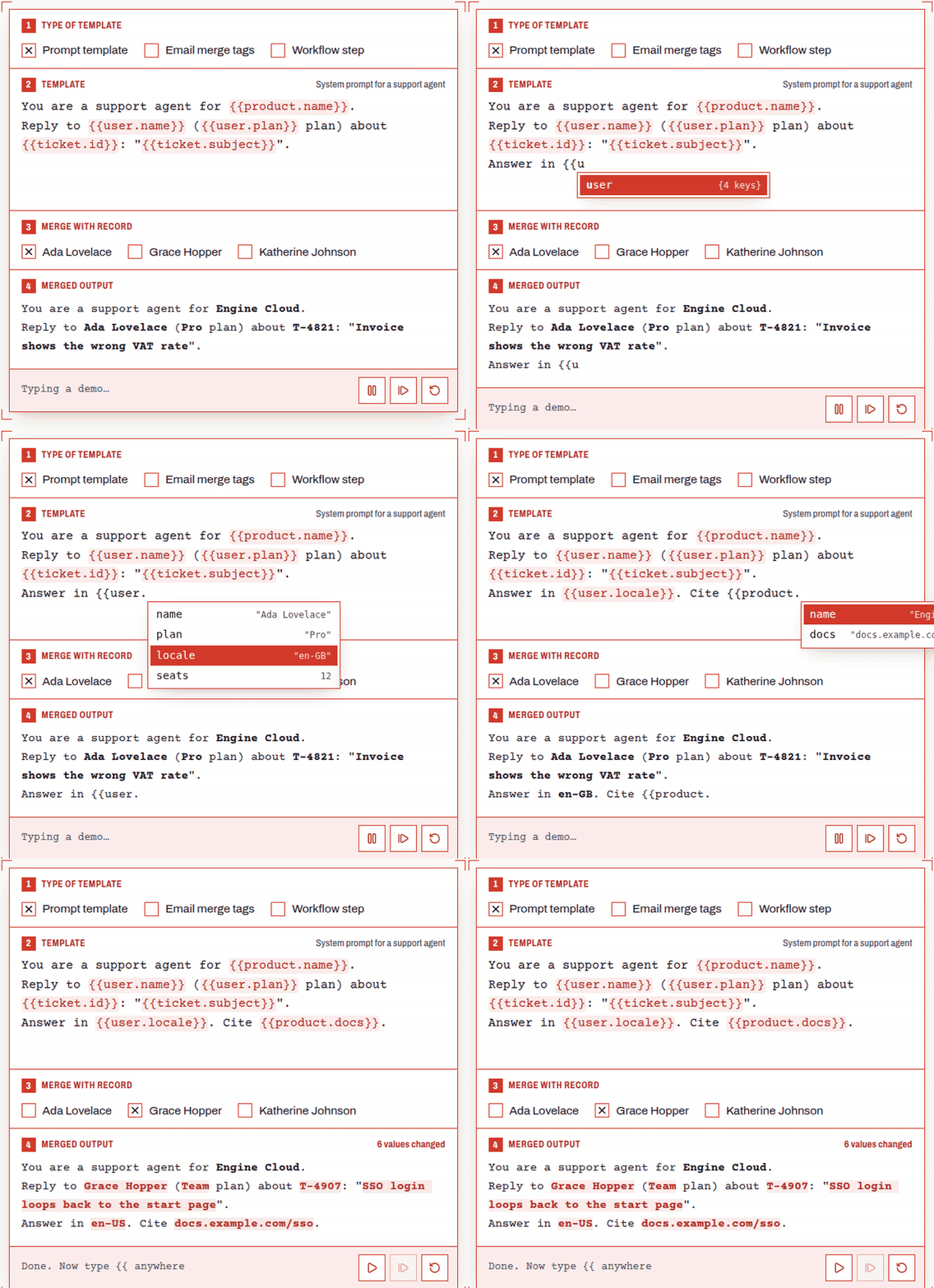
Autocomplete for {{template.variables}} in React. Type {{user. and see the real value of every key in your data. Drill into nested objects and arrays, get unknown variables underlined as you type, and @mention people with async search and avatars. Built for prompt templates, email merge tags and workflow builders.


npm install type-ahead-mentionThat's the only install; React 18 or 19 is the only peer.
Size
You pay only for what you render:
| You use | First load (min + gzip) | Later |
|---|---|---|
| resolveTemplate, validateTemplate, … | 0.8 kB | |
| useMentionSuggestions (your own <textarea>) | 5.7 kB | |
| <TemplateTextarea> (light field, no CodeMirror) | 6.7 kB | |
| <MentionInput> (full editor) | 7.1 kB | ~100 kB of CodeMirror, fetched the first time it renders |
<MentionInput> shows a <TemplateTextarea> with the same value right away, which is already usable, and swaps in the editor when CodeMirror arrives. Call preloadEditor() to start the download earlier, e.g. on hover or route change.
Which one? Start with <TemplateTextarea>. Switch to <MentionInput> for long documents, exact chip behaviour, undo history across chips, or CodeMirror extensions.
Quick start
import { useState } from 'react';
import { MentionInput, useMentionResolver } from 'type-ahead-mention';

const data = {
  user: { name: 'Ada Lovelace', plan: 'Pro' },
  ticket: { id: 'T-4821', messages: [{ text: 'Hi!' }] },
};

export function PromptEditor() {
  const [template, setTemplate] = useState('Reply to {{user.name}}');
  const preview = useMentionResolver(template, data); // "Reply to Ada Lovelace"

  return (
    <>
      <MentionInput value={template} onChange={setTemplate} suggestions={data} multiline />
      <pre>{preview}</pre>
    </>
  );
}
What it does
- Completes paths into your data.
{{lists the top-level keys; picking an object adds a.and opens its keys; picking a leaf closes the variable with}}. - Previews values. Each suggestion shows its value (
"Ada Lovelace",{3 keys},[2 items]), and the side panel shows the full JSON. - Arrays by index.
{{ticket.messages.0.text}}. - Flags typos. Variables whose path isn't in the data get a wavy underline, and
validateTemplate()gives you the same list on the server. - Your syntax.
delimiters={{ open: '${', close: '}' }},[[ ]], or@with no closing delimiter. - Input or textarea. Single-line by default: Enter never adds a line, pasted newlines become spaces, and
onSubmitfires on Enter. Passmultilinefor textarea behaviour (Mod-Enter submits). - @mentions. Async search with avatars; picks are stored as
@[Ada Lovelace](u_42)and shown as chips that delete as one unit. - Keyboard first. ↑/↓ to move, Enter or Tab to accept, Esc to close.
- Themeable. Light, dark or
auto, and every color, radius and padding is a--tam-*CSS variable. - Light option.
<TemplateTextarea>does all of this on a real<textarea>(6.7 kB, no CodeMirror), anduseMentionSuggestions()adds it to your own<input>or<textarea>.
<MentionInput>
| Prop | Type | Default | |
|---|---|---|---|
| value | string | required | The template text |
| onChange | (value: string) => void | required | Called on every edit |
| suggestions | object | required | Data to suggest from. Nested objects and arrays work. |
| multiline | boolean | false | Textarea behaviour |
| delimiters | { open: string; close: string } | { open: '{{', close: '}}' } | Variable syntax |
| showValues | boolean | true | Value preview next to each suggestion |
| highlight | boolean | true | Show variables as chips |
| validate | boolean | true | Underline paths that aren't in suggestions |
| mentions | MentionSource \| MentionSource[] | | @mentions: see below |
| colorScheme | 'light' \| 'dark' \| 'auto' | 'light' | Built-in themes |
| placeholder | string | | |
| onSubmit | (value: string) => void | | Enter (single-line) or Mod-Enter (multiline) |
| onFocus / onBlur | () => void | | |
| disabled / readOnly / autoFocus | boolean | false | |
| id, aria-label, aria-describedby | string | | Applied to the editable element |
| style / className | | | Applied to the outer box |
| extensions | Extension[] | | Extra CodeMirror extensions |
@mentions
import { MentionInput, replaceMentions, type MentionSource } from 'type-ahead-mention';

// Keep the source stable (module scope or useMemo) so results stay cached
const people: MentionSource = {
  trigger: '@', // default
  search: async (query, { signal }) => {
    const res = await fetch(`/api/users?q=${encodeURIComponent(query)}`, { signal });
    return res.json(); // [{ id, label, avatar?, description? }]
  },
  debounce: 150, // default, ms
  getItem: (id) => userCache.get(id), // optional: avatars for chips in saved text
};

<MentionInput value={text} onChange={setText} suggestions={data} mentions={people} />;- While a search is pending the list shows Searching…; an empty result shows No matches. Results are cached per query, and the previous request is aborted through
signal. - A pick is stored as
@[Ada Lovelace](u_42)(the same format react-mentions uses) and shown as a chip. The cursor skips over it and Backspace removes it whole. - Pass several sources for several triggers, e.g.
[{ trigger: '@', search: users }, { trigger: '#', search: channels }]. - The trigger only fires at the start of a line or after a space or
(, so email addresses don't open the list.
parseMentions('Ask @[Ada](u_42)');                 // [{ trigger: '@', label: 'Ada', id: 'u_42', from: 4, to: 16, raw }]
replaceMentions('Ask @[Ada](u_42)');               // 'Ask @Ada'
replaceMentions('Ask @[Ada](u_42)', (m) => `<@${m.id}>`); // 'Ask <@u_42>'
Mentions work the same in <TemplateTextarea> and useMentionSuggestions. There, the stored text stays visible with the brackets and id dimmed, and Backspace still removes a mention whole.
Ref handle
const ref = useRef<MentionInputHandle>(null);

ref.current?.insertVariable('user.name'); // inserts {{user.name}} at the cursor
ref.current?.openSuggestions();
ref.current?.acceptSuggestion(); // → false if the list isn't open
ref.current?.moveSuggestion(1); // highlight the next row
ref.current?.isSuggesting();
ref.current?.focus();
ref.current?.view; // the CodeMirror EditorView, or null until it has loaded
Theming
The component injects a small stylesheet once. Override any of these on the component (via style or className) or on an ancestor:
.my-editor {
  --tam-accent: #0a7cff;     /* focus ring, caret */
  --tam-border: #d0d5dd;
  --tam-bg: #fff;
  --tam-text: #101828;
  --tam-muted: #667085;
  --tam-radius: 8px;
  --tam-padding: 8px 12px;
  --tam-var-bg: #e8f1ff;     /* variable chips */
  --tam-var-text: #0a58ca;
  --tam-invalid: #d92d20;    /* unknown variables */
  --tam-popup-bg: #fff;
  --tam-selected-bg: #e8f1ff;
}
Template helpers
These are plain functions with no React, so you can use them on the server:
import { resolveTemplate, validateTemplate, parseTemplate, getValueAtPath } from 'type-ahead-mention';

resolveTemplate('Hi {{ user.name }} ({{user.nick}})', data);
// → "Hi Ada Lovelace ({{user.nick}})"   (unknown paths are kept by default)

resolveTemplate(template, data, {
  missing: 'empty',                      // or 'keep', or (variable) => string
  format: (value) => String(value),      // defaults: primitives → String, objects → JSON
  delimiters: { open: '${', close: '}' },
});

validateTemplate('Hi {{user.nmae}}', data);
// → { valid: false, unknown: [{ path: 'user.nmae', raw: '{{user.nmae}}', from: 3, to: 16 }] }

parseTemplate('{{ a.b }} and {{c[0]}}'); // paths are normalized: 'a.b', 'c.0'
getValueAtPath(data, 'order.items[0].qty'); // → { found: true, value: 2 }
useMentionResolver(template, data, options?) is resolveTemplate wrapped in useMemo.
Type-safe paths
import type { TemplatePath } from 'type-ahead-mention';

type Path = TemplatePath<typeof data>; // 'user' | 'user.name' | 'ticket.messages.0.text' | …<TemplateTextarea>: the light field
It takes the same props as <MentionInput> (except extensions), plus rows. It's a real <textarea> over a backdrop that draws the highlights, so the browser keeps handling typing, IME, spellcheck and undo.
import { TemplateTextarea } from 'type-ahead-mention';

<TemplateTextarea value={text} onChange={setText} suggestions={data} mentions={people} multiline rows={4} />;
Your own <input> / <textarea>: useMentionSuggestions
The list renders in a portal, follows the caret, and has combobox/listbox ARIA.
import { useMentionSuggestions } from 'type-ahead-mention';

function Field() {
  const { getInputProps, SuggestionPopper } = useMentionSuggestions({
    data,
    defaultValue: 'Hello {{',
    // or controlled: value, onChange
    mentions: people, // optional
  });
  return (
    <>
      <textarea {...getInputProps<HTMLTextAreaElement>()} />
      {SuggestionPopper}
    </>
  );
}
It also returns value, setValue, options, activeIndex, isOpen, select(index) and close() if you'd rather render the list yourself.
Already using CodeMirror?
import { templateVariables } from 'type-ahead-mention/codemirror';

new EditorView({
  extensions: [basicSetup, templateVariables({ data, delimiters: { open: '{{', close: '}}' } })],
});
Upgrading from v2
@uiw/react-codemirror,react-popper,@popperjs/coreandget-caret-positionare no longer needed. You can uninstall them.<MentionInput>now loads CodeMirror on demand;ref.current.viewisnulluntil it has loaded.codeMirrorPropsis replaced byextensionsand the ref handle.- The
styleprop now styles the outer box without a double border. Theme with--tam-*variables. useMentionSuggestions(initialValue, data)still works, but preferuseMentionSuggestions({ data, defaultValue }).useMentionResolvernow tolerates{{ spaces }}and JSON-stringifies objects instead of leaving the placeholder.
See the CHANGELOG for everything else.
Is this the right tool?
Use it when your users write plain-text templates against structured data, optionally mentioning people: prompts, notifications, merge tags, webhook bodies, chat messages. If you need rich text (bold, lists, embeds), use Tiptap or Lexical instead; this library is plain text by design.
License
MIT © Rahul Patwa