npm package discovery and stats viewer.

Discover Tips

  • General search

    [free text search, go nuts!]

  • Package details

    pkg:[package-name]

  • User packages

    @[username]

Sponsor

Optimize Toolset

I’ve always been into building performant and accessible sites, but lately I’ve been taking it extremely seriously. So much so that I’ve been building a tool to help me optimize and monitor the sites that I build to make sure that I’m making an attempt to offer the best experience to those who visit them. If you’re into performant, accessible and SEO friendly sites, you might like it too! You can check it out at Optimize Toolset.

About

Hi, 👋, I’m Ryan Hefner  and I built this site for me, and you! The goal of this site was to provide an easy way for me to check the stats on my npm packages, both for prioritizing issues and updates, and to give me a little kick in the pants to keep up on stuff.

As I was building it, I realized that I was actually using the tool to build the tool, and figured I might as well put this out there and hopefully others will find it to be a fast and useful way to search and browse npm packages as I have.

If you’re interested in other things I’m working on, follow me on Twitter or check out the open source projects I’ve been publishing on GitHub.

I am also working on a Twitter bot for this site to tweet the most popular, newest, random packages from npm. Please follow that account now and it will start sending out packages soon–ish.

Open Software & Tools

This site wouldn’t be possible without the immense generosity and tireless efforts from the people who make contributions to the world and share their work via open source initiatives. Thank you 🙏

© 2026 – Pkg Stats / Ryan Hefner

typescript-to-gdscript

v0.1.2

Published

Convert TypeScript to GDScript for Godot game engine

Downloads

459

Readme

typescript-to-gdscript

Write Godot 4 scripts in TypeScript. Get autocomplete and type-checking for the full Godot API, live IDE squiggles from the converter and Godot CLI, and clean .gd output with source maps so stack traces still point at your .ts.

Why

GDScript is great for getting things on screen, but its type system and tooling are intentionally lightweight. The bigger a project gets, the more that costs you: typos surface at runtime, refactors are risky, and autocomplete only goes so far. TypeScript was built for exactly this problem, and it has had a decade of investment poured into making large codebases safe to change.

This project lets you write GDScript-shaped code in TypeScript — same engine semantics, same API, same mental model — while gaining the things TypeScript does better:

  • Catch errors before you run the game. A misspelled property, a wrong argument type, a null you forgot to check — the type checker flags it as you type, not three scenes deep into playtesting.
  • Autocomplete and inline docs for the entire Godot API. All 916+ engine classes are fully typed, so you get accurate completions, signatures, and hover docs for every method, property, and signal.
  • Refactor with confidence. Rename a method, change a signature, find every usage — TypeScript's tooling makes project-wide changes safe and mechanical instead of a manual grep-and-pray.
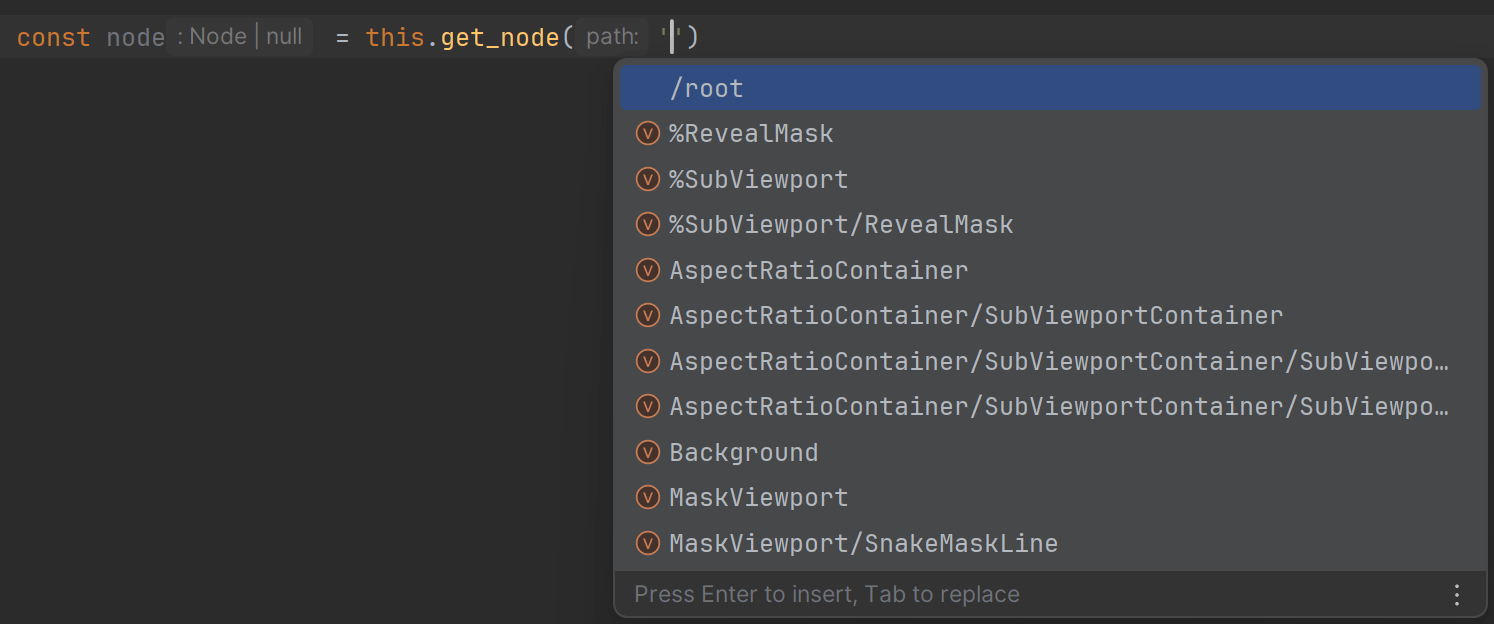
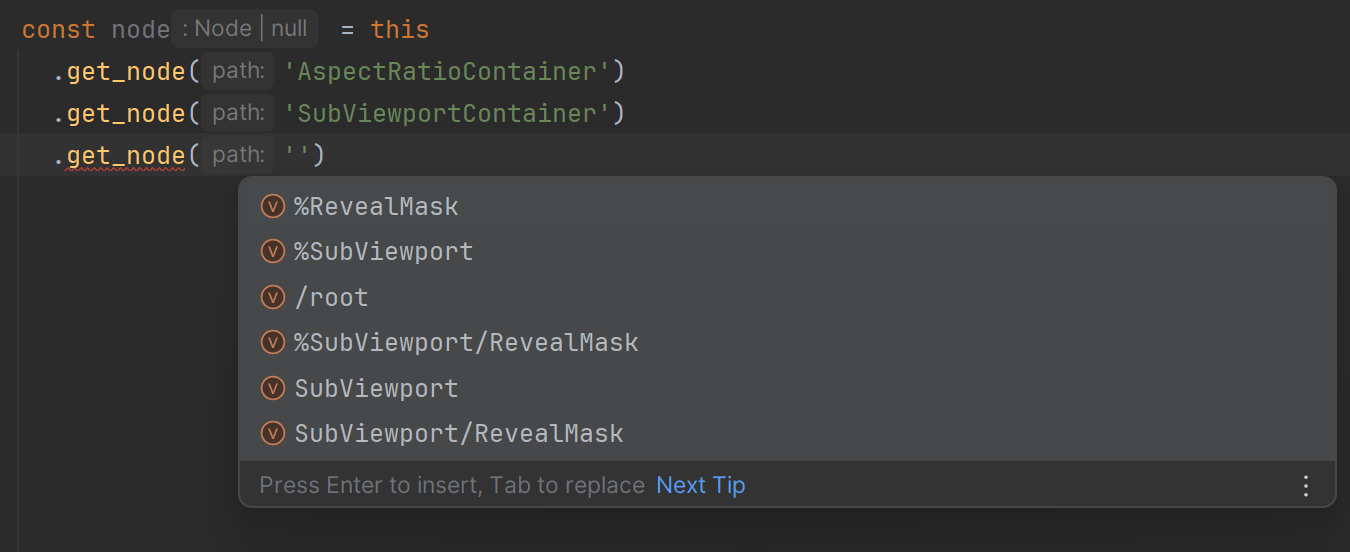
  • Scene-aware typing. get_node("Player/Sprite") returns the actual node type from your .tscn, group queries return typed arrays, and res:// paths are checked against files that really exist.
  • Use the editor you already know. WebStorm, Rider, VS Code — any TS-capable IDE gives you first-class diagnostics, navigation, and formatting out of the box.

The output is clean, idiomatic .gd you can read and ship — TypeScript is the authoring layer, not a runtime dependency. The philosophy is "write like GDScript, but with strong types, linting, and autocomplete": only GDScript-supported features and API are exposed, and TS-only constructs that have no Godot equivalent are deliberately restricted.

Main features

  • Type-safe Godot API — all 900+ engine classes generated as .d.ts from the official Godot XML docs, with nullable reference types where appropriate
  • Live IDE diagnostics — TypeScript language service plugin surfaces converter and Godot CLI errors as squiggles, on unsaved buffers
  • Watch mode — auto-convert on save and keep typings in sync (it watches your .tscn scenes and assets too), then run a debounced full-project check (TypeScript + converter + Godot CLI)
  • Source maps — Godot script parse errors, runtime errors and stack traces map back to your TypeScript line/column
  • Scene and path typingsget_node(), get_parent(), get_child(), load(), preload() and group queries typed from your project files
  • gd namespace — strongly-typed helpers for GDScript-only constructs (signals, decorators, match, operator overloading)
  • Addons supported — typings for third-party GDScript addons, consumable from TypeScript
  • GD → TS migration — one-shot bulk converter for existing projects

Showcase

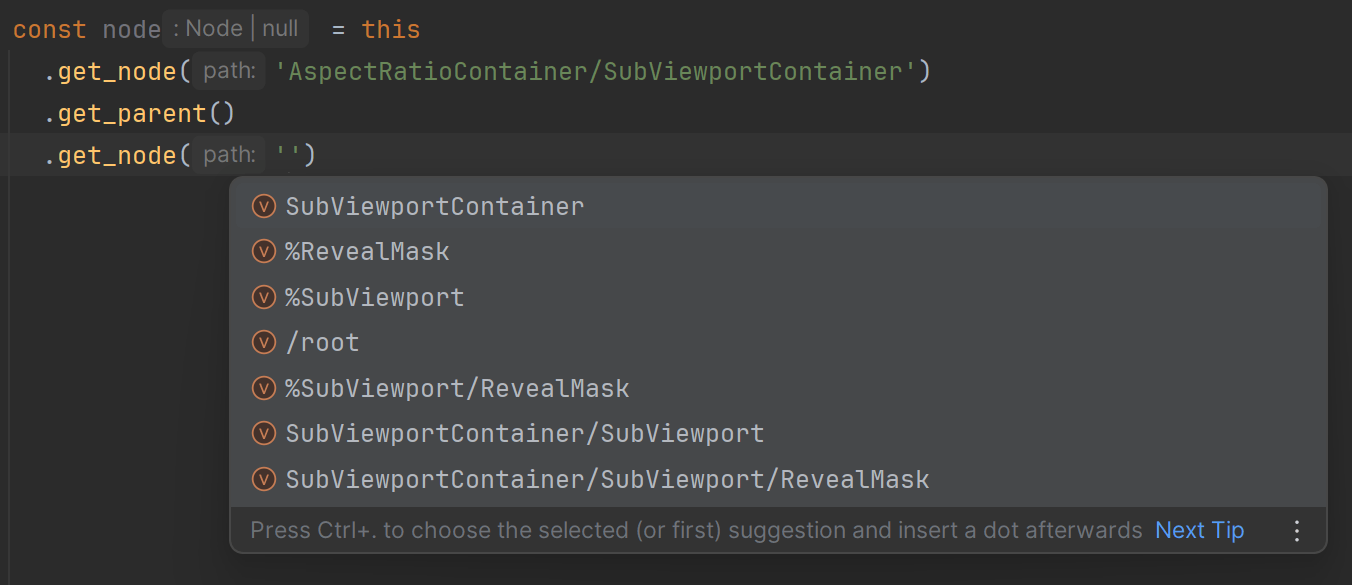
Given this scene structure:
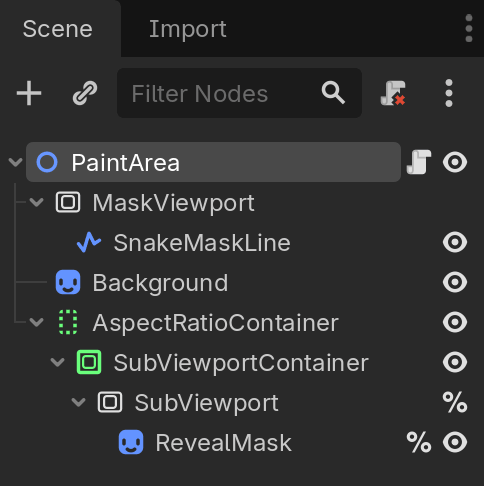
You get type hints for this:
…or this:
…or even this:
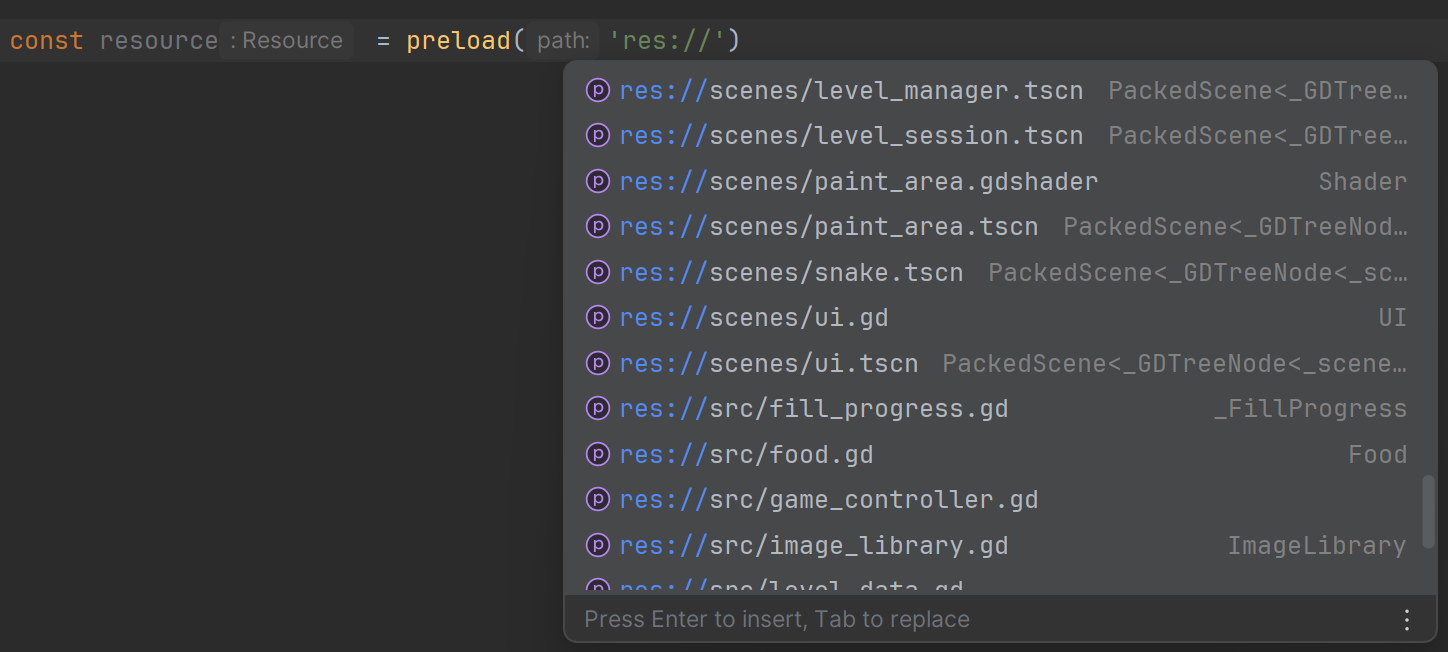
preload() is typed too:
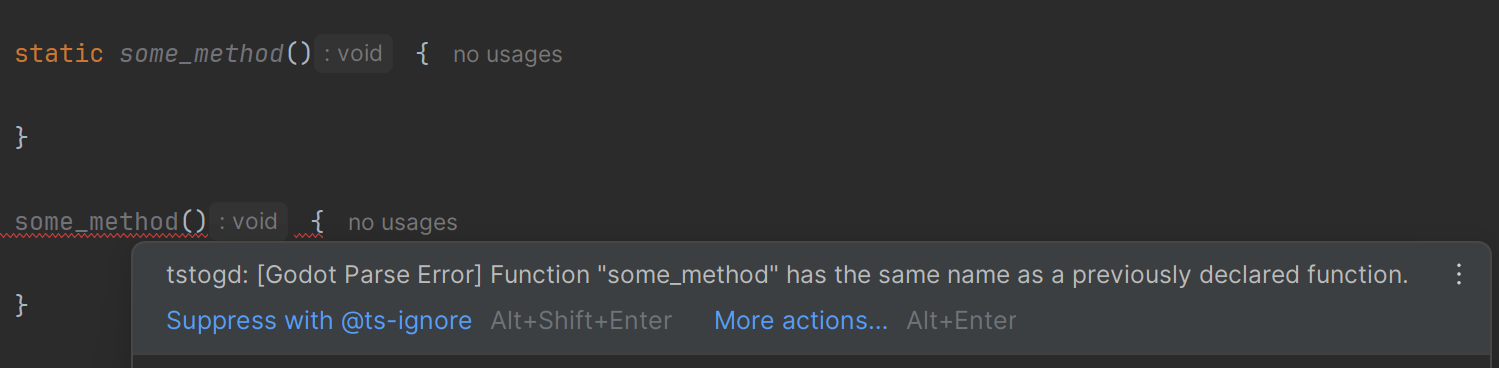
GDScript doesn't allow a static and an instance member to share the same name — though TypeScript does. Your IDE surfaces the GDScript error at the exact spot in your .ts:
For edge cases — like using the result of && as a value — you get a converter error instead, because logical operations in GDScript always return a boolean:

You also get all of these errors (along with the TypeScript errors themselves) from the convert CLI command.

Quick start

npm install typescript-to-gdscript # or another preferred package manager
tstogd init # interactive: writes tstogd.json + tsconfig.json + installs typescript

Then:

  1. Write a .ts class in your TS source dir (default src/).
  2. tstogd convert — emits .gd into your output dir (default scripts/), regenerates all typings, and runs a full diagnostic check.
  3. Attach the .gd file in Godot as you normally would. Configure Godot's external editor to point at your IDE for TS language server and one-click jump-to-source (guide).

That's the whole loop — convert and watch are the only commands you need in normal use. Each one converts your code and regenerates every typing (scene, script, resource, addon) in the same pass, so get_node() paths, res:// references, and group queries stay in sync without any extra step. Most projects never run another CLI command.

For day-to-day work, run tstogd watch: it auto-converts on save, watches your .tscn scenes and assets so scene typings refresh the instant you change the tree in Godot, and runs a debounced full-project check feeding live IDE diagnostics.

Requirements

  • Node.js 22+ — required (the package uses require(esm) semantics; older Node can't load the ESM plugin)
  • TypeScript ≥ 5.9 — installed automatically by tstogd init, or add it as a dev dependency yourself
  • Godot ≥ 4.0 — recommended on PATH, or set godotPath / GODOT_PATH. Needed for the Godot diagnostic pass. Set disableGodotLint: true in tstogd.json to opt out.

Manual setup (without tstogd init)

Setup tstogd.json and tsconfig.json in your project - for full template and field reference see docs/configuration.md.

Migration from existing GDScript

Have an existing GDScript project? Bulk-convert it to TypeScript with tstogd initial-convert-gd-to-ts.

CLI

In everyday use you only need these three:

tstogd init                # one-time interactive scaffold (tsconfig + tstogd.json + ts-plugin)
tstogd convert             # convert TS → GD + regenerate all typings + full diagnostic check
tstogd watch               # the same, continuously: auto-convert on save, live diagnostics

Note: watch self-heals — when an edit causes new errors in other files, those files are reconverted automatically. For a guaranteed full refresh of every .gd, run tstogd convert after a watch session.

convert and watch already regenerate every typing (scene, script, resource, addon) as part of the run — there is no separate "generate typings" step to remember. The commands below cover one-off or advanced situations, and most projects never touch them:

tstogd generate-typings    # regenerate typings standalone (convert/watch do this for you)
tstogd clear-cache         # clear the conversion cache (e.g. after upgrading the converter)

Full reference in docs/cli.md. Specialized commands:

Writing code

One class per file

Each .ts file must contain exactly one class. Named classes (class Foo) are global in GDScript via class_name Foo. Classes whose name starts with _ (e.g. _Foo) emit anonymous .gd files reachable only via preload(...) (see docs/transform-rules.md#anonymous-classes for more information).

Types

  • int, float — type aliases for number. Plain number converts to GDScript float.
  • bool — alias for boolean, also a cast: bool(x) → GDScript bool(x). Same for String(x).
  • Dictionary<K, V> — generic, with typed get / set / keys / values. {} literals keep dictionary methods via the Object interface. Untyped Dictionary is <unknown, unknown>.
  • let and const both convert to GDScript var. Use let — TS var is restricted (GDScript var ≈ TS let, not TS var).
  • undefined is restricted — use null. Plain objects (interfaces, object literals) are Dictionaries in GDScript: member reads convert to obj.get("foo"), which returns null for a missing key instead of crashing. Writes and class-instance access stay direct.
  • TSOnly<T> — type-level wrapper, stripped at conversion.
  • Only types GDScript actually has get an annotation. Godot classes/value types and your own class_name classes (including ones imported from another file) keep their type; plain interfaces, object, type aliases, and unknown/unresolved names have the annotation omitted (bare untyped var x / func f(x)) rather than emitting a bogus GD type. See docs/transform-rules.md#type-annotations--what-gets-emitted.

For comments, async, this / self, logical operators, and constructor mapping, see docs/transform-rules.md.

Cheat sheet

Basics for writing scripts For advanced helpers and the deep dive, see the full cheat sheet in docs/transform-rules.md.

// Use imports instead of global classes for better DX
// Can be changed by `converterOptions.generateGlobalClassTypes` config option
import { PlayerSprite, type PlayerSpriteState } from './PlayerSprite';

// Inner classes, class-level constants & enums.
// A `namespace Player` merged with class `Player`
// lifts each exported member onto the class.
export namespace Player {
  export const MAX_HP = 100;

  export enum State {
    IDLE,
    RUNNING,
  }

  export class Bullet extends Node2D {
    damage: int = 10;
  }
}

export class Player extends CharacterBody2D {
  // Statics (mutable); for constants use the namespace
  static MAX_INSTANCES = 8;

  // Field decorators. `@exports` aliases `@export`
  // (a TS reserved word); other annotations are 1:1
  @exports speed: float = 200.0;
  @export_range(0, 100) health: int = 100;
  @onready sprite: PlayerSprite = this.get_node('Sprite');
  @onready sprite_state: PlayerSpriteState = this.sprite.get_state();

  // Signals; tuple labels become GD arg names
  health_changed = gd.signal<[from: int, to: int]>();
  died = gd.signal();

  // Constructor replaces _init
  constructor(speed: float = 200.0) {
    this.speed = speed;
  }

  // Getters / setters (native TS accessors)
  get score(): int {
    return this.score;
  }
  set score(v: int) {
    this.score = v;
  }

  // Async / await; Promise<T> unwraps to T
  async long_task(): Promise<int> {
    await this.get_tree().create_timer(1).timeout;
    return 42;
  }

  _process(delta: float) {
    // Operators
    let eq = this.health === 0;
    let ternary = eq ? 1 : 2;

    // Math on value types (Vector2, Color, …) needs gd.ops
    let pos = gd.ops.add(this.position, Vector2(1, 0));
    // Also available: add, sub, mul, div, rem, eq, ne, gt, gte, lt, lte, plus (unary), minus (unary)

    // Type casting / checking
    // self.get_node("Body") as CharacterBody2D
    let body = gd.as(this.get_node('Body'), CharacterBody2D);
    if (body instanceof CharacterBody2D) {
      /* body is CharacterBody2D */
    }
    if (gd.is(this.health, int)) {
      /* health is int */
    }

    // Object construction instead of Player.Bullet.new()
    let bullet = new Player.Bullet();

    // Dictionaries (other keys: gd.dict)
    let stats = { name: 'Hero', hp: 100 };

    // Strings, StringName, NodePath
    let greet = `Hi ${this.name}!`;
    let path = NodePath('Body/Sprite');
    let sig = StringName('died');

    // Control flow
    for (let s of range(3)) print(s);

    // Match (TS switch round-trips with GD match)
    switch (this.health) {
      case 0:
        this.died.emit();
      default:
        print('alive');
    }
  }

  _ready() {
    this.health_changed.connect(this._on_health_changed);
    this.health_changed.emit(0, 100);
  }

  _on_health_changed(from: int, to: int) {
    /* ... */
  }
  die() {
    /* ... */
  }
}
extends CharacterBody2D
class_name Player

const MAX_HP = 100

enum State { IDLE, RUNNING }

class Bullet extends Node2D:
	var damage: int = 10

# Statics (mutable); for constants use the namespace
static var MAX_INSTANCES = 8
# Field decorators. `@exports` aliases `@export`
# (a TS reserved word); other annotations are 1:1
@export
var speed: float = 200.0
@export_range(0, 100)
var health: int = 100
@onready
var sprite: PlayerSprite = self.get_node("Sprite")
@onready
var spriteState = self.sprite.get_state()
# Signals; tuple labels become GD arg names
signal health_changed(from: int, to: int)
signal died

# Constructor replaces _init
func _init(speed: float = 200.0):
	self.speed = speed

var score: int:
	get:
		return score
	set(v):
		score = v

# Async / await; Promise<T> unwraps to T
func long_task() -> int:
	await self.get_tree().create_timer(1).timeout
	return 42

func _process(delta: float):
	# Operators
	var eq = self.health == 0
	var ternary = 1 if eq else 2
	# Math on value types (Vector2, Color, …) needs gd.ops
	var pos = (self.position + Vector2(1, 0))
	# Also available: add, sub, mul, div, rem, eq, ne, gt, gte, lt, lte, plus (unary), minus (unary)
	# Type casting / checking
	# self.get_node("Body") as CharacterBody2D
	var body = self.get_node("Body") as CharacterBody2D
	if body is CharacterBody2D:
		pass
	if self.health is int:
		pass
	# Object construction instead of Player.Bullet.new()
	var bullet = self.Bullet.new()
	# Dictionaries (other keys: gd.dict)
	var stats = {
		"name": "Hero",
		"hp": 100,
	}
	# Strings, StringName, NodePath
	var greet = "Hi " + str(self.name) + "!"
	var path = NodePath("Body/Sprite")
	var sig = StringName("died")
	# Control flow
	for s in range(3):
		print(s)
	# Match (TS switch round-trips with GD match)
	match self.health:
		0:
			self.died.emit()
		_:
			print("alive")

func _ready():
	self.health_changed.connect(self._on_health_changed)
	self.health_changed.emit(0, 100)

func _on_health_changed(from: int, to: int):
	pass

func die():
	pass

Useful global types

Each interface maps a string literal (a res:// path or group name) to the type it resolves to — index it directly, e.g. GodotResources["res://player.tres"] or GodotScripts["res://player.gd"]:

  • GodotResources — any asset path → its resource type (PackedScene<Root>, typeof Class, or the concrete Resource subclass)
    • GodotResourceName (= keyof GodotResources) — any res://… asset
  • GodotScripts.gd path → typeof <Class> (the script constructor)
    • GodotScriptName (= keyof GodotScripts) — a .gd path
  • GodotScenes.tscn path → the scene's root node type
    • GodotSceneName (= keyof GodotScenes) — a .tscn path
  • GodotSceneTrees.tscn path → the tree type, for indexing descendants directly
    • GodotSceneTreeName (= keyof GodotSceneTrees) — same set as GodotSceneName, for the tree rather than the root
  • GodotGroups — group name → union of the node types in that group
    • GodotGroupName (= keyof GodotGroups) — a group identifier ("enemies", …)

The Godot-typed load(), preload(), get_node(), and autoload singletons all index these under the hood.

That types are resolved lazily, so each alias automatically picks up new entries as more files are converted. Typos in resource paths or group names become compile-time errors instead of silent runtime failures:

class AssetLoader extends Node {
  preload_asset(path: GodotResourceName) {
    return load(path);
  }

  count_in_group(group: GodotGroupName): int {
    return this.get_tree().get_nodes_in_group(group).size();
  }

  _ready() {
    this.preload_asset('res://Player.tscn'); // ✅ typed
    this.preload_asset('res://does_not_exist.png'); // ❌ error
    this.count_in_group('enemies'); // ✅ typed
    this.count_in_group('typo'); // ❌ error
  }
}

What's not supported

Destructuring, for...in, ??, ?., spread in calls, top-level let/const, multiple classes per file, undefined types, string enums, Promise.then/.catch/.finally. Full list with reasons: docs/transform-rules.md#restrictions.

Documentation

  • Configuration — full tstogd.json and tsconfig.json reference, advanced anonymous-class details
  • Transform rules — primitive types, operators, comments, async / Promise, Callables, constants & statics, enums, inner classes, decorators / @exports, abstract classes, signals, GD-side shorthand literals ($, %, &, ^), super, member ordering, logical operators, anonymous classes, imports, restrictions / unsupported TS features
  • CLI reference — every command and every flag
  • gd namespace — full helper API and rules
  • GD-to-TS migrationinitial-convert-gd-to-ts and the post-conversion helpers
  • Typings & scene typingsgenerate-* commands and the typings tree layout
  • IDE integration — TypeScript language service plugin and open-editor
  • Development — building, testing, regenerating Godot typings

FAQ

You have a few escape hatches, in order of preference:

  • Inject raw GDScript with gd.eval(...) for expressions/statements, or the // @gd.eval: magic comment for places where a call doesn't fit (before the class, between members, as a statement-level annotation). The string is emitted verbatim into the .gd.
  • Keep that file as hand-written GDScript. Place the .gd outside your gdDir so the converter never overwrites it, and write a .d.ts next to it (or in your typings dir) so TypeScript still sees a typed view of the class. The rest of your project keeps importing it normally.

Either way, please open a GitHub issue with a small before/after example — most conversion gaps are fixable, and a real case is the fastest way to get it handled.

Addon typings are produced by automatic GD→TS conversion, which can't always get a third-party addon perfect. To fix it:

  1. Move that addon's generated typings out of the auto-generated typings folder (so a re-run won't regenerate over your edits).
  2. Fix the .ts / .d.ts by hand.
  3. Add the addon to exclude in tstogd.json so it's skipped on future runs.

And again — open a GitHub issue so the addon-conversion path can be improved for your case.

The package ships typings for one stock Godot version. If your engine's built-in classes differ (older release, newer release, a fork, or custom C++ modules), generate typings that match your build with tstogd generate-gdscript-global-typings and point your project at them. The custom-build walkthrough covers the tsconfig.json + tstogd.json wiring step by step.

Open a GitHub issue — bug reports and feature ideas are both welcome. PRs are very welcome too; see docs/development.md to get a dev environment running.

License

MIT