
ul-logging-client
v1.0.3
Published
Centralized log shipper client supporting REST, gRPC, and file-based ECS logging
Downloads
88

Maintainers
 pankajkapoor-ul
Readme
Logger Service Documentation
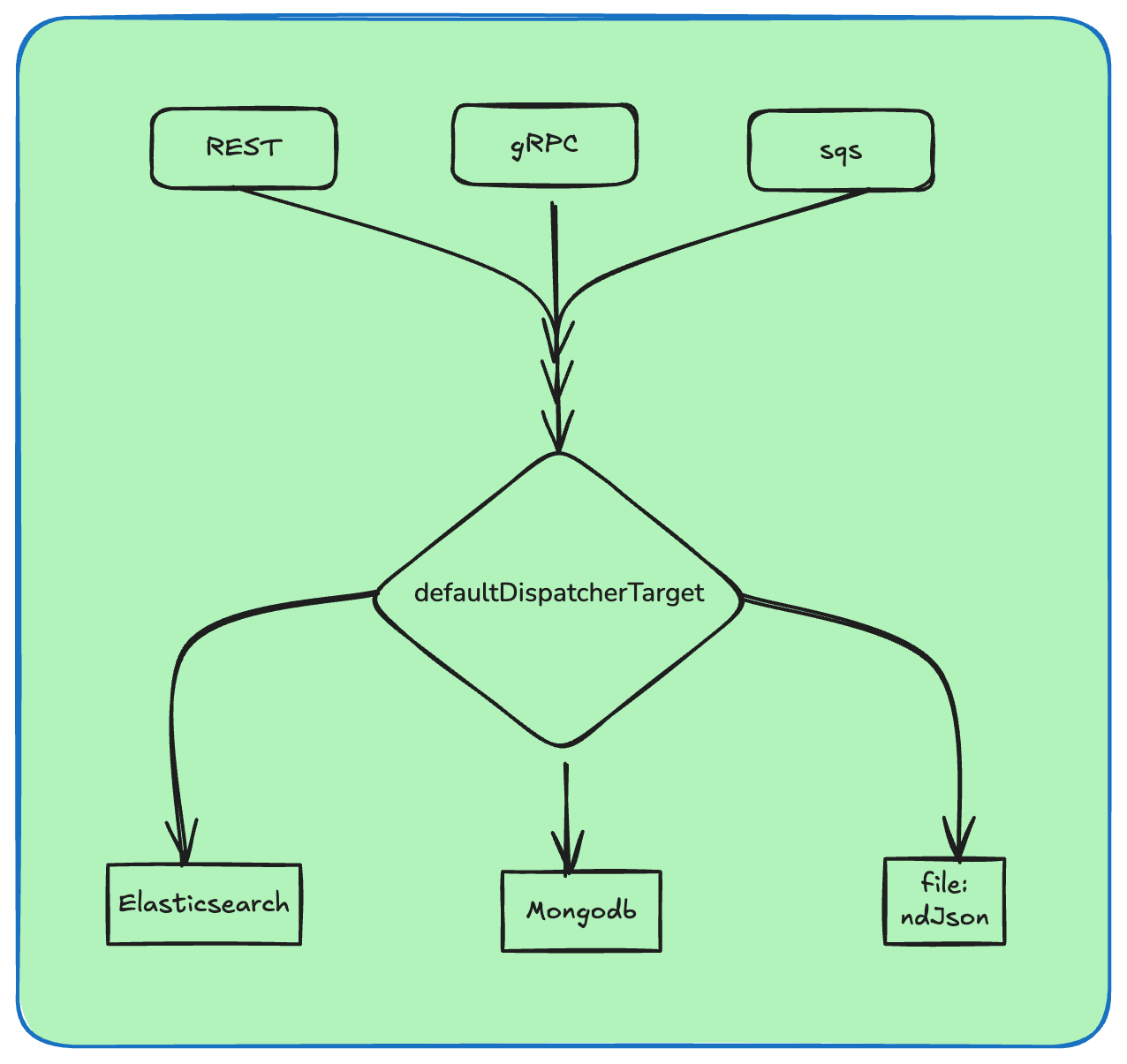
A flexible logging service for Node.js applications that supports multiple logging modes (REST, File) with enriched metadata, semantic logging, and specialized handlers for APIs, webhooks, and queues.
Installation
npm install ul-logging-clientQuick Start
Basic Setup
const { createLogger, apiLoggingMiddleware } = require('ul-logging-client');
const express = require('express');

const app = express();
app.use(express.json());

// Initialize logger
const logger = createLogger({
    mode: 'rest',
    endpoint: 'http://localhost:3000/api/v1/logs',
    serviceName: 'user-service',
    defaultDispatcherTarget: 'elasticsearch'
});

// Apply middleware
app.use(apiLoggingMiddleware(logger));
Configuration Options
REST Mode
const logger = createLogger({
    mode: 'rest',                              // Logging mode: send logs to remote endpoint
    endpoint: 'http://localhost:3000/api/v1/logs',  // Remote logging service endpoint
    serviceName: 'user-service',               // Identifier for your service
    defaultDispatcherTarget: 'elasticsearch'   // Target system (e.g., elasticsearch, datadog)
});
gRPC Mode (Recommended)
const logger = createLogger({
    mode: 'grpc',
    endpoint: 'localhost:50051',
    serviceName: 'user-service',
    defaultDispatcherTarget: 'elasticsearch',
    grpcOptions: {
        secure: false,
        // rootCert: fs.readFileSync('./ca.pem'), // Just passing the buffer/string
        // clientCert: fs.readFileSync('./client.pem'),
        // clientKey: fs.readFileSync('./key.pem'),
        // This is where the magic happens
        channelConfigs: {
            'grpc.max_send_message_length': 10 * 1024 * 1024, // Allow 10MB logs
            'grpc.keepalive_time_ms': 60000,                  // Ping every 60s
            'grpc.keepalive_timeout_ms': 20000,               // Wait 20s for ping response
            'grpc.http2.min_time_between_pings_ms': 10000,    // Prevent "ping flooding"
        }
    } //optional
});
File Mode
In This Mode it will create file in ndjson format
const logger = createLogger({
    mode: 'file',
    filePath: 'public/ullogs',
    fileName: 'user-service.log', //local
    serviceName: 'user-service'
});
SQS (Amazon Simple Queue Service) - Mode (Recommended for High volume log)
const logger = createLogger({
    mode: 'sqs',
    serviceName: 'user-service',
    aws: {
        region: 'eu-west-2',
        credentials: {
            accessKeyId: 'XXXXXXXXXXXXXX',
            secretAccessKey: 'xxxxxxxxxxxxxxxx',
        },
        queueUrl: 'https://sqs.eu-west-2.amazonaws.com',
    },
    defaultDispatcherTarget: 'elasticsearch'
});
Logging Methods
1. Basic Logging (logger.log())
Minimal Logging
logger.log({
    message: 'Background job completed',
    event_type: 'job'
});
Enriched/Semantic Logging
logger.log({
    level: 'info',                    // Log level: 'info', 'error', 'warn', 'debug'
    message: 'Background job completed',
    event_type: 'job',                // Category of event
    metadata: { name, email }         // Additional context data
});
API Logging Guide
A structured approach to logging API requests with two strategies: minimal and enriched logging.
Overview
This guide helps you choose the right logging strategy for your use case. Two approaches are provided:
- Minimal Logging: Low-effort, lightweight approach for non-critical operations
- Enriched Logging: Detailed, auditable approach for critical business operations
Comparison
| Aspect | Minimal | Enriched | |--------|---------|----------| | Human Readable | ⚠️ Basic | ✅ Clear | | Searchable by Action | ❌ No | ✅ Yes | | Debug-Friendly | ⚠️ Limited | ✅ Strong | | Audit-Friendly | ❌ Weak | ✅ Strong | | Future Analytics | ❌ Hard | ✅ Easy | | Effort to Write | ✅ Very Low | ⚠️ Slightly More |
Minimal Logging
Use this approach for low-priority operations where full audit trails aren't necessary.
Syntax
logger.api(req, res, {
    message: 'User created'
});
When to Use
- Health checks
- Ping endpoints
- Internal utilities
- Temporary logging
Enriched Logging
Use this approach for critical operations that require auditability and searchability.
Syntax
logger.api(req, res, {
    message: 'User created',
    event_action: 'create_user',
    context: {
        user_id: 'vivek'
    }
});
When to Use
- Create / update / delete operations
- Payments
- Authentication
- User actions
- Anything audited
Output Format
Logs are formatted using the Elastic Common Schema (ECS) standard for compatibility with Elasticsearch and other observability platforms.
Minimal Logging Example
{
  "@timestamp": "2026-02-06T10:06:01.089Z",
  "ecs": {
    "version": "1.12.0"
  },
  "log": {
    "level": "info"
  },
  "service": {
    "name": "user-service"
  },
  "http": {
    "request": {
      "method": "POST",
      "body": {
        "name": "vivek",
        "email": "[email protected]"
      }
    },
    "response": {
      "status_code": 200
    }
  },
  "message": "User created",
  "event": {
    "category": ["api"]
  },
  "url": {
    "path": "/boka"
  }
}
Enriched Logging Example
{
  "@timestamp": "2026-02-06T10:07:36.226Z",
  "ecs": {
    "version": "1.12.0"
  },
  "log": {
    "level": "info"
  },
  "service": {
    "name": "user-service"
  },
  "http": {
    "request": {
      "method": "POST",
      "body": {
        "name": "vivek",
        "email": "[email protected]"
      }
    },
    "response": {
      "status_code": 200
    }
  },
  "message": "Create user API called",
  "event": {
    "action": "create_user",
    "category": ["api"]
  },
  "url": {
    "path": "/boka"
  },
  "labels": {
    "user_id": "alex"
  }
}
Key Differences
The enriched log includes two additional important fields:
- event.action: Standardized action identifier (e.g.,
create_user) enabling searchability and analytics - labels: Context data (e.g.,
user_id) for debugging and audit trails
Benefits
Minimal Approach
- ✅ Fastest to implement
- ✅ Minimal overhead
- ✅ Suitable for high-frequency, low-value logs
Enriched Approach
- ✅ Searchable and filterable logs
- ✅ Complete audit trail
- ✅ Analytics-ready structure
- ✅ Strong debugging capabilities
- ✅ Compliance-friendly
Standards
This logging system uses the Elastic Common Schema (ECS) version 1.12.0, which provides a standardized format for:
- Log aggregation across services
- Elasticsearch integration
- Compatibility with observability platforms
- Future analytics and reporting
Decision Tree
Is this a critical operation?
├─ Yes → Use Enriched Logging
│   (create, update, delete, payments, auth)
└─ No → Use Minimal Logging
    (health checks, pings, utilities)
Error Logging Example
if (!name || !email) {
    logger.log({
        level: 'error',
        message: 'Validation failed: Missing name or email',
        event_type: 'api'
    });
    return res.status(400).json({ error: 'Name and email are required' });
}
2. API Logging (logger.api())
Minimal API Logging
logger.api(req, res, {
    message: 'User created'
});
Enriched/Semantic API Logging
logger.api(req, res, {
    message: 'Create user API called',
    event_action: 'create_user',      // Specific action being performed
    context: {
        user_id: 'alex'                // Additional context about the request
    }
});
Note: The middleware automatically logs API requests/responses. Use logger.api() for manual enrichment.
3. Webhook Logging (logger.webhook())
Option 1: Simple Webhook Log
logger.webhook(req, res, {
    provider: 'stripe',                // Webhook provider name
    event_action: 'payment.success',   // Type of webhook event
    message: 'Stripe webhook received'
});
Option 2: With Payload & Metadata
logger.webhook(req, res, {
    provider: 'stripe',
    event_action: 'payment.success',
    message: 'Stripe webhook received',
    context: {
        event_id: req.body.id          // Extract relevant event data
    },
    data: req.body                     // Full webhook payload
});
Option 3: Failure Case
logger.webhook.fail(req, res, {
    provider: 'stripe',
    event_action: 'payment.success',
    error: err.message                 // Log webhook processing errors
});
4. Queue Logging (logger.queue)
Publish Event
logger.queue.publish('email-send', {
    userId: 'u1'
});
Consume Event
logger.queue.consume('email-send', {
    userId: 'u1'
});
Log Queue Failure
logger.queue.fail('email-send', new Error('SMTP down'));Complete Example
const { createLogger,apiLoggingMiddleware } = require('ul-logging-client');
const express = require('express');

const app = express();
const port = 8005;

app.use(express.json());

// Initialize logger
const logger = createLogger({
    mode: 'rest',
    endpoint: 'http://localhost:3000/api/v1/logs',
    serviceName: 'user-service',
    defaultDispatcherTarget: 'elasticsearch'
});

// Apply logging middleware
app.use(apiLoggingMiddleware(logger));

// Example endpoint
app.post('/boka', (req, res) => {
    const { name, email } = req.body;

    // Validation with error logging
    if (!name || !email) {
        logger.log({
            level: 'error',
            message: 'Validation failed: Missing name or email',
            event_type: 'api'
        });
        return res.status(400).json({ error: 'Name and email are required' });
    }

    // Enriched API logging
    logger.api(req, res, {
        message: 'Create user API called',
        event_action: 'create_user',
        context: {
            user_id: name
        }
    });

    res.status(201).json({
        message: 'Data received successfully',
        data: { name, email }
    });
});

app.listen(port, () => {
    console.log(`Server running at http://localhost:${port}`);
});
Common Logging Patterns
Pattern 1: API Request/Response Logging
app.post('/users', (req, res) => {
    // Middleware handles automatic logging
    // Enhance with manual logging if needed
    logger.api(req, res, {
        message: 'User creation initiated',
        event_action: 'create_user'
    });
});
Pattern 2: Background Job Logging
async function processJob() {
    try {
        logger.log({
            level: 'info',
            message: 'Job started',
            event_type: 'job',
            metadata: { jobId: '123' }
        });

        // ... do work ...

        logger.log({
            level: 'info',
            message: 'Job completed successfully',
            event_type: 'job',
            metadata: { jobId: '123', duration: '5s' }
        });
    } catch (error) {
        logger.log({
            level: 'error',
            message: 'Job failed',
            event_type: 'job',
            metadata: { jobId: '123', error: error.message }
        });
    }
}
Pattern 3: Webhook Processing with Error Handling
app.post('/webhooks/stripe', (req, res) => {
    try {
        // Process webhook
        logger.webhook(req, res, {
            provider: 'stripe',
            event_action: req.body.type,
            context: {
                event_id: req.body.id
            },
            data: req.body
        });
    } catch (err) {
        logger.webhook.fail(req, res, {
            provider: 'stripe',
            event_action: req.body.type,
            error: err.message
        });
    }
});
Pattern 4: Queue Operations Logging
// Publishing to queue
async function sendEmail(userId) {
    logger.queue.publish('email-send', {
        userId,
        timestamp: new Date()
    });
}

// Consuming from queue
async function processEmails() {
    logger.queue.consume('email-send', {
        userId: 'u1'
    });
}

// Handling queue failures
async function handleQueueError(queueName, error) {
    logger.queue.fail(queueName, error);
}
Logging Via Middleware request response
Middleware just gives you auto logging, Incoming request ↓ middleware (start timer) ↓ controller logic ↓ response sent ↓ middleware logs API
How Users Consume It (Clean & Intuitive)
const express = require('express');
const { createLogger,webhookLoggingMiddleware } = require('ul-logging-client');


const app = express();
app.use(express.json());

const logger = createLogger({
  mode: 'rest',
  endpoint: 'http://localhost:3000/api/v1/logs',
  serviceName: 'payment-service'
});

app.post(
  '/webhook/stripe',
  webhookLoggingMiddleware(logger, { provider: 'stripe' }),
  (req, res) => {
    res.status(200).json({ received: true });
  }
);
Log Levels
error- Error conditions that need immediate attentionwarn- Warning conditions that should be reviewedinfo- Informational messages about normal operationsdebug- Detailed debug information for troubleshooting
Best Practices
- Always include
event_typeorevent_action- Helps categorize and filter logs - Add meaningful context - Use metadata to include relevant business data
- Log at appropriate levels - Use error level for failures, info for successful operations
- Include error messages - Capture exception details for troubleshooting
- Use the middleware - It automatically logs all API requests/responses
- Enrich when needed - Use manual logging calls for domain-specific context
Environment Setup
Ensure your logging service endpoint is running:
# If using REST mode, the endpoint must be accessible
# Example: http://localhost:3000/api/v1/logs
For file mode, ensure the directory exists:
mkdir -p /Users/your_directory/www/ul-logger/Troubleshooting
| Issue | Solution |
|-------|----------|
| Logs not appearing | Verify endpoint is accessible (REST mode) or file path exists (file mode) |
| Middleware not logging | Ensure apiLoggingMiddleware is applied before route handlers |
| Missing context | Always pass context object in enriched logging calls |
| Queue operations failing | Verify queue system is running and accessible |
API Reference
createLogger(config)
Creates and returns a logger instance.
Parameters:
config.mode(string) - 'rest' or 'file'config.endpoint(string) - Remote endpoint for REST modeconfig.filePath(string) - File path for file modeconfig.serviceName(string) - Service identifierconfig.defaultDispatcherTarget(string) - Target system for dispatching logs
Returns: Logger instance with methods: log(), api(), webhook(), queue
License
MIT License
Copyright (c) 2026 Universityliving
Permission is hereby granted, free of charge, to any person obtaining a copy of this software and associated documentation files (the "Software"), to deal in the Software without restriction, including without limitation the rights to use, copy, modify, merge, publish, distribute, sublicense, and/or sell copies of the Software, and to permit persons to whom the Software is furnished to do so, subject to the following conditions:
The above copyright notice and this permission notice shall be included in all copies or substantial portions of the Software.
THE SOFTWARE IS PROVIDED "AS IS", WITHOUT WARRANTY OF ANY KIND, EXPRESS OR IMPLIED, INCLUDING BUT NOT LIMITED TO THE WARRANTIES OF MERCHANTABILITY, FITNESS FOR A PARTICULAR PURPOSE AND NONINFRINGEMENT. IN NO EVENT SHALL THE AUTHORS OR COPYRIGHT HOLDERS BE LIABLE FOR ANY CLAIM, DAMAGES OR OTHER LIABILITY, WHETHER IN AN ACTION OF CONTRACT, TORT OR OTHERWISE, ARISING FROM, OUT OF OR IN CONNECTION WITH THE SOFTWARE OR THE USE OR OTHER DEALINGS IN THE SOFTWARE.