
umi-doc
v1.0.26
Published
配合`umi`框架使用的文档工具 [项目地址](https://github.com/zhouJiecode/umi-doc)


Readme
umi doc工具
配合umi框架使用的文档工具 项目地址
优点
- 使用简单,针对每个组件编写一个文档文件,运行umi项目后访问
componentsPage路由即可 - 使用简单,此插件直接使用umi项目本身的webpack配置,无需任何额外webpack配置
- 提供
props,useCase两个组件分别用于解析属性和编写用例,编写文档方便 - 使用
MDX格式编写文件,清晰简洁 - 不给项目启动速度加负,除第一次启动项目,后续启动项目速度无限接近不使用此插件时
安装
yarn add umi-doc配置
在.umirc.ts中加上配置:
plugins: [
  'umi-doc'
],
// 注:此umi配置官方并不存在,是本插件生成的
docConfig: {
  // 本插件默认解析umi项目下src\components目录下的tsx文件,如果此目录中还存在一些不需要被解析的tsx文件或包含tsx文件的目录,可以使用此umi配置进行exclude
  // 注:此选项不作用于mdx文件,components下所有mdx均被解析
  docExclude: /common|tableColumn/,
  // 是否显示umi-doc内置header
  showDocHeader: false,
  // 是否使用自定义layout
  // 作用:如果某些组件的运行依赖本项目中存在一些全局状态或者全局组件,可以自定义layout来对他们进行声明或引入
  // 对umi项目来说,一般可以直接使用默认的src/layouts即可
  docLayout: path.resolve(__dirname, 'src/layouts'),
}
运行
正常启动umi项目即可,该工具会为umi新增一个路由:componentsPage,访问此路由即可
编写组件文档
文档格式是MDX,并且必须编写在components文件夹下
比如有一个组件:src\components\nameAndAge\index.tsx
type NameAndAgeProps = {
  name: string,
  age?: number
}

const NameAndAge = ({ name, age = 1 }: NameAndAgeProps) => {
  return <div>{name}的年龄是:{age}岁</div>
}

export default NameAndAge编写对应文档:src\components\nameAndAge\nameAndAge.mdx
---
title: NameAndAge 姓名和年龄
des: 显示客户的姓名和年龄
importStatement: import NameAndAge from 'nameAndAge'
---

import { Props, UseCase } from '@@/doc'
import NameAndAge from './index'

<UseCase
  title="基础用法"
  des="可以这么用"
>
  <NameAndAge name='张三' />
</UseCase>

<UseCase
  title="另外的用法"
  des="也可以这么用"
>
  <NameAndAge name='李四' age={26} />
</UseCase>

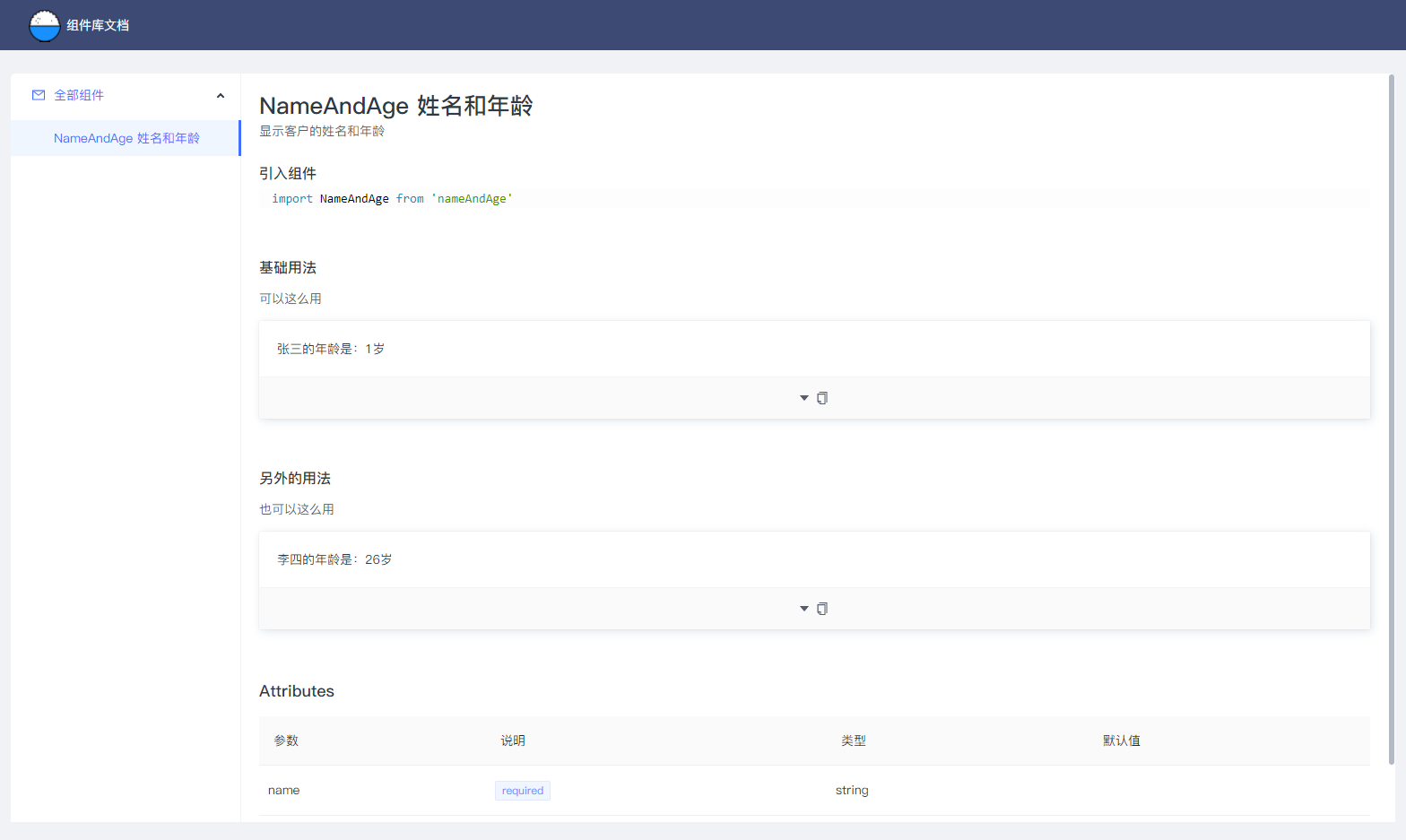
<Props of={ NameAndAge } />访问componentsPage路由后会出现如下页面:
MDX文档中的js
某些组件可能要通过js预取数据以模拟真实情况,就需要在mdx中编写js获取数据
本插件支持:MDX中包裹在<!-- js start -->和<!-- js end -->之间的代码会被当js执行
如下编写即可:
---
title: membersSelect 选择客户下拉框
des: 选择客户下拉框
importStatement: import MembersSelect from 'membersSelect'
---

import { Props, UseCase } from '@@/doc'
import { Spin } from 'antd'
import { useEffect, useState } from 'react'
import { debounce } from 'utils/helper'
import MembersSelect from './index'

<!-- js start -->
// 获取员工列表
const [userList, setUserList] = useState([])
const [fetchingUserList, setFetchingUserList] = useState(false)
const fetchAssitList = async(searchName) => {
  setFetchingUserList(true)
  try {
    const rs = [{
      avatarUrl: 'http://wework.qpic.cn/bizmail/83S0BJQhebRzylXFvcN1S1ibEiaYvORoIk43jO5Z7l3rSiaA4oa5VzGjw/0',
      name: '木木|客户成功经理',
      userId: 222,
    }, {
      avatarUrl: 'http://wework.qpic.cn/bizmail/slLBzAPmdCJIhv9iaQQ6O18VU0L6NfaNNEMibMASoJO96sGaC53OKFhA/0',
      name: '刘秀',
      userId: 248,
    }]
    setUserList(rs)
    return rs
  } finally {
    setFetchingUserList(false)
  }
}
useEffect(() => {
  fetchAssitList(undefined)
}, [])
<!-- js end -->

<UseCase
  title="基础用法"
  des="默认单选"
>
  <MembersSelect hasDefaultItem={ true } placeholder="请选择群主" style={{ width: '360px' }} />
</UseCase>

<UseCase
  // 这里可以传入预取数据的js代码,最终会在文档的代码预览中展示出来
  prefixCode={`// 获取员工列表
  const [userList, setUserList] = useState([])
  const [fetchingUserList, setFetchingUserList] = useState(false)
  const fetchAssitList = async(searchName: string | undefined) => {
    setFetchingUserList(true)
    try {
      const rs = [{
        avatarUrl: 'http://wework.qpic.cn/bizmail/83S0BJQhebRzylXFvcN1S1ibEiaYvORoIk43jO5Z7l3rSiaA4oa5VzGjw/0',
        name: '木木|客户成功经理',
        userId: 222,
      }, {
        avatarUrl: 'http://wework.qpic.cn/bizmail/slLBzAPmdCJIhv9iaQQ6O18VU0L6NfaNNEMibMASoJO96sGaC53OKFhA/0',
        name: '刘秀',
        userId: 248,
      }]
      setUserList(rs)
      return rs
    } finally {
      setFetchingUserList(false)
    }
  }
  useEffect(() => {
    fetchAssitList(undefined)
  }, [])`}
  title="基础用法"
  des="多选,数据由组件库外部获取或过滤"
>
  <MembersSelect
    searchOutside={ true }
    memberList={ userList }
    mode="multiple"
    placeholder="请选择员工"
    disabled={ false }
    showArrow={ true }
    style={{ width: '430px' }}
    notFoundContent={ fetchingUserList ? <Spin size="small" /> : undefined }
    onSearch={ debounce((fetchAssitList), 200) }
    onBlur={ debounce(() => fetchAssitList(undefined), 200) }
    optionDisabledFilter={
      option => false
    }
  />
</UseCase>

<Props of={ MembersSelect } />
组件
Props
| 属性 | 描述 | | ---- | ---- | | of | 要解析的组件,必填 | | name | 属性表名(生成页面后显示在属性表上的标题) |
UseCase
| 属性 | 描述 | | ---- | ---- | | title | 用例标题,必填 | | des | 用例描述 | | prefixCode | 前置代码,比如一些获取数据的js代码 | | wrapStyle | 自定义容器样式 |