
umi-plugin-mpa-pug
v0.3.2
Published
MPA(multiple-page application) plugin for umi.


Readme
umi-plugin-mpa-pug
该插件 Fork umi-plugin-mpa 仓库,做了一下几点的修改,以便无缝迁移项目用。



- ✔︎ 支持 pug 模板,html 模板
- ✔︎ 支持只有 html 文件,没有 js 文件,生成页面
- ✔︎ 自动识别 jsx 文件作为 entry 入口,识别 pug/html 文件,生成 html 文件 (jsx 如果必须注入到 html 中,才有用,不会自动生成 html)
- ✔︎ 多页面中 umi-plugin-react 的 fastclick , hd 不起作用,因此该插件支持 fastclick,px2rem 功能
- ✔︎ 支持添加页面前缀路径,方便多个前端整个做 nginx 代理
Why
ejs 不支持模板继承的功能,因此替换成功能更强的 pug 模板
使用场景:react 页面,在加载 JS 的时候,增加一个 Loading 效果
为了支持一些简单的页面,只有 html,没有 js。 因此生成的页面,是遍历 pug/html 列表生成,而不是遍历 entry 入口生成。
mpa 页面不支持 umi-plugin-react 的 fastclick 功能
因为 fastclick 是放在 umi.js 下,单页面并不会去引用打包该文件,因此 fastclick 就算是开启了,也没用引入到文件中。
Installation
$ yarn add umi-plugin-mpa-pugUsage
Config it in .umirc.js or config/config.js,
export default {
  plugins: ['umi-plugin-mpa-pug'],
};
with options,
export default {
  plugins: [['umi-plugin-mpa-pug', options]],
};
Features
约定 index.jsx 文件,会作为 webpack 入口文件被打包,避免把组件也打包出一个 js 文件
支持给每个页面注入公共代码
比如数据打点,错误统计,一些所有页面都需要的通用逻辑,比如再微信内,都默认静默授权
自定义 JS 文件注入到 HTML 中的规则
默认是 同一目录下,同名文件则注入
只是在自定义注入方法
{
  html: {},
  // 返回 html 和 js 的路径
  injectCheck:(html,js)=>{
    return html === js  // 默认 同一目录,同名文件
  }
}
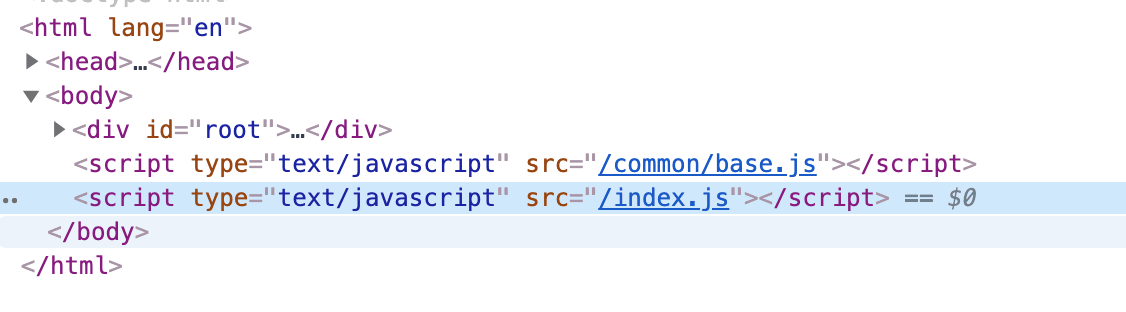
给所有页面增加公共代码
{
  html: {
    commonChunks:{
        'common/base': path.resolve(__dirname,'./common/base.js')
    }
  },
}
最终效果,类似这样
Options
不建议使用的 Options 项,是因为该插件还没有去适配这块的内容,不知道是否可行。如果非要使用的话,建议先使用 [umi-plugin-mpa]
interface IOption {
  // 页面前缀 www.xxx.com/{prefixPath}/index.html , 作用:微前端,方便项目做 nginx 代理
  // 比如:/m/ 开头的代理 指定前端项目中
  prefixPath?: string;
  fastclick?: boolean; //暂未使用该变量,统一加入
  debugTool?: boolean; //暂未使用该变量,统一加入
  deepPageEntry?: boolean; // 遍历子文件夹寻找jsx,pug 文件
  splitChunks?: object | boolean; // 抽离公共代码包
  injectCheck?: Function; // html 和 js 的匹配规则
  pagesPath?: string; // 页面代码目录
  commonChunks?: IEntry[]; // 公共代码包
  selectEntry?: boolean | object; // 开发环境,可打包指定页面
  entry?: object; // 自定义入口,暂时用不到
  px2rem?: {
    rootValue: number | string, // 默认16px
  };
  html?: {
    // 扩展html-wepback-plugin 参数
    template?: string,
  };
}
注:
- 值为 Object 时会用于覆盖默认的 inquirer 配置,详见https://github.com/SBoudrias/Inquirer.js#question
- 适用于 entry 量大的项目,只在 dev 时开启
- 由于使用了 deasync-promise,所以在入口选择界面上按 Ctrl+C 退出会失败,且进程清理不干净。这时需手动强制退出相关 node 进程。