
underwire
v0.0.7
Published
Dependency tracking system


Readme
Underwire v0.0.3
A minimal dependency graph manager and viewer built with Hapi and React.
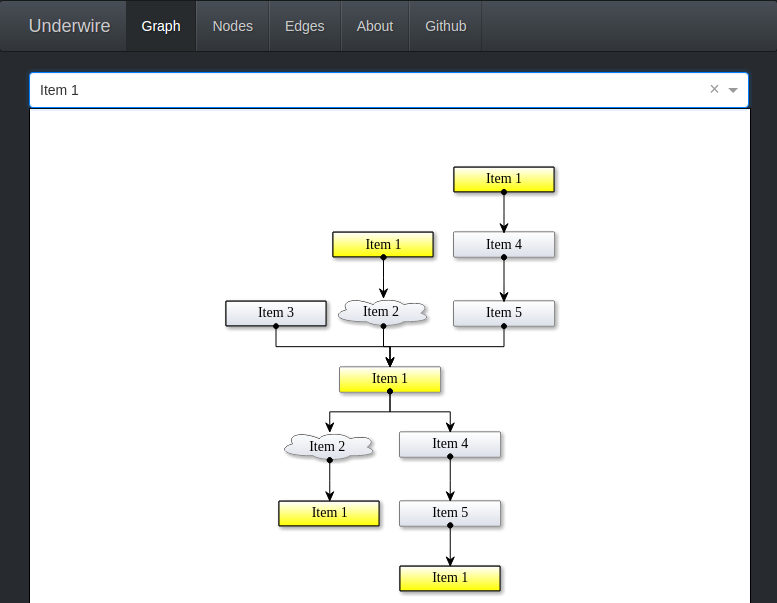
What?
Underwire is a dependency graph viewer and manager system. It provides realtime updates to connected clients via Websockets and allows for systems to publish their connections dynamically.
What this really means is that with Underwire and a little bit of code you can do some cool things like pull outbound connections from your application or service logs and visualize what your complete SOA looks like.
You could also parse your code into an AST, normalize the AST and push it to Underwire to visualize the code flow and reuse patterns.
Really the possibilities are endless.
Why?
Many years ago in a land far far away there was a piece of spaghetti that a company called a SOA. No one knew what called what, no one knew who did what, and no one could prove just how bad overall the setup was.
An idea came about to take the configuration files from each service and review them for what called what.
This proved time consuming and tedious.
A crazy developer sat in a corner and thought that manual parsing was the worst way to do this. So he built a simple concept that parsed the files looking for things that resembled connection strings between services. Then built a simple UI on top of this and thus a system was born.
The company created a team to build and manage this concept into a product. Life was good. Then things changed, the team was disbanded, and the product died. No matter how much everyone begged it was kept internal and closed source.
Fast forward many many years later. Another need is noticed for a system that provides simple insights into the dependencies of systems. This time the crazy developer decides to build the system on his own time, and thus Underwire is born.
Install
npm install -g underwireor
Clone the repo, then npm install from the source folder.
Usage
Start the server
npm startNavigate to http://localhost:8080/
Then either use the UI to add nodes and edges, or use the fake data script to create some sample data for you to play with.
scripts/fakedata.shDebug
Start the server in development module
npm run devhttp://localhost:8080/
Make changes, see them on your screen.
API
To view the API documentation; install Underwire, start the application and then navigate to http://localhost:8080/documentation