
uni-toasts
v1.0.3
Published
<uni-toasts /> is a robust Web Component built on the foundation of the uniopen design language. Its primary capability is delivering seamless message notifications across applications. By utilizing the provided attributes and properties, developers can f


Readme
uni-toast


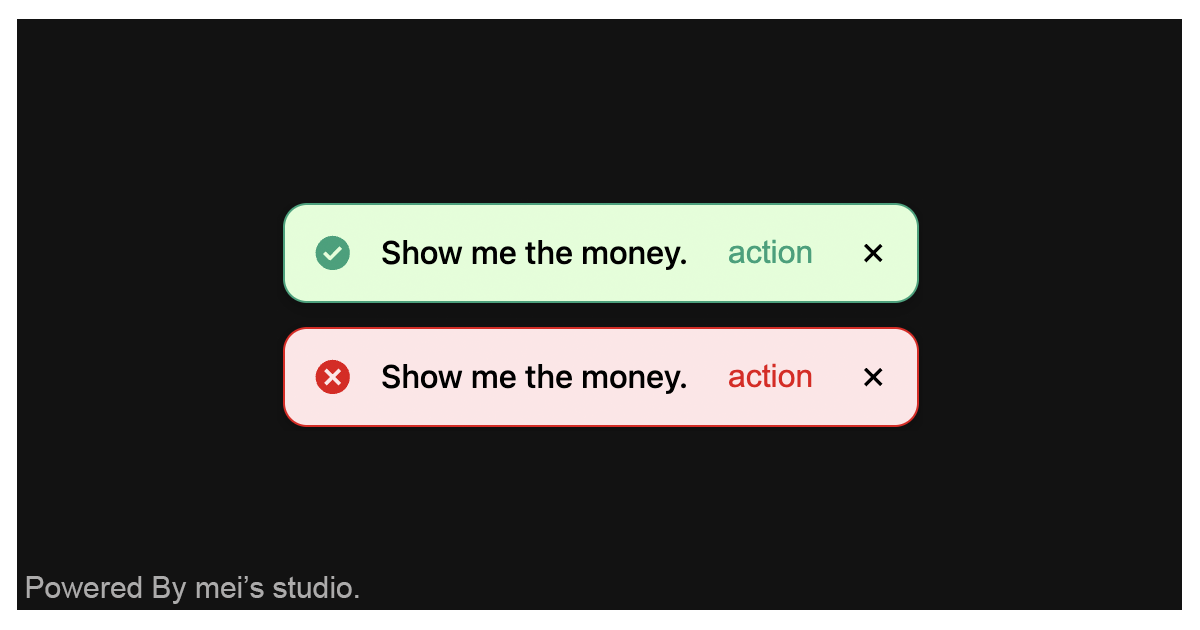
<uni-toasts /> is a robust Web Component built on the foundation of the uniopen design language. Its primary capability is delivering seamless message notifications across applications.
By utilizing the provided attributes and properties, developers can finely tune the rendering and behavior of individual toasts to match specific UI requirements. Furthermore, the component natively supports multi-toast stacking, offering a sophisticated presentation layer that elevates the overall messaging experience into something diverse and engaging.
Basic Usage
<uni-toasts /> is a web component. All we need to do is put the required script into your HTML document. Then follow <uni-toasts />'s html structure and everything will be all set.
Required Script
<script
  type="module"
  src="https://unpkg.com/uni-toasts/mjs/wc-uni-toasts.js">
</script>
Structure
Put <uni-tab-group /> into HTML document. It will have different functions and looks with attribute mutation.
<uni-toasts
  maxcount="3"
  autodismiss
></uni-toasts>
JavaScript Instantiation
<uni-toasts /> could also use JavaScript to create DOM element. Here comes some examples.
<script type="module">
import { UniToasts } from 'https://unpkg.com/uni-toasts/mjs/wc-uni-toasts.js';

// use DOM api
const nodeA = document.createElement('uni-toasts');
document.body.appendChild(nodeA);
nodeA.maxcount = 3;

// new instance with Class
const nodeB = new UniToasts();
document.body.appendChild(nodeB);
nodeB.maxcount = 3;

// new instance with Class & default config
const config = {
  maxcount: 3,
  autodismiss: true
};
const nodeC = new UniToasts(config);
document.body.appendChild(nodeC);
</script>
Style Customization
Developers could apply styles to decorate <uni-toasts />'s looking.
<style>
uni-toasts {
  --uni-toasts-axis-y: 76px;
}
</style>
Attributes
<uni-toasts /> component exposes a curated set of attributes, enabling developers to dynamically adjust the user interface. This provides the flexibility to tailor the component’s appearance to seamlessly adapt to any given context.
maxcount
The
maxcountattribute defines the maximum number of toast notifications allowed to be displayed simultaneously on the screen. When the number of active toasts exceeds this specified limit, the oldest notification will be automatically dismissed to make room for the new one. This attribute enforces a strict validation range, accepting integer values from a minimum of2to a maximum of20. If an invalid value is supplied or omitted, the component defaults to3.<uni-toasts maxcount="3" > </uni-toasts>autodismiss
The
autodismissattribute determines whether toast notifications are automatically cleared after a specific duration. Each notification carries a predefined lifespan based on its content type: standard messages persist for3 seconds, while notifications containing an action button extend their visibility to6 secondsto allow for user interaction. Enforcing this attribute activates the automatic cleanup mechanism. By default, this feature is disabled.<uni-toasts autodismiss > </uni-toasts>
Properties
| Property Name | Type | Description |
| ----------- | ----------- | ----------- |
| maxcount | Integer | Getter / Setter maxcount. maxcount defines the maximum number of toast notifications allowed to be displayed simultaneously on the screen. When the number of active toasts exceeds this specified limit, the oldest notification will be automatically dismissed to make room for the new one. This attribute enforces a strict validation range, accepting integer values from a minimum of 2 to a maximum of 20. If an invalid value is supplied or omitted, the component defaults to 3. |
| autodismiss | Boolean | Getter / Setter autodismiss. autodismiss attribute determines whether toast notifications are automatically cleared after a specific duration. Each notification carries a predefined lifespan based on its content type: standard messages persist for 3 seconds, while notifications containing an action button extend their visibility to 6 seconds to allow for user interaction. Enforcing this attribute activates the automatic cleanup mechanism. By default, this value is false. |
Method
| Mathod Signature | Description |
| ----------- | ----------- |
| show(content = '', option = {}) | The show method is the primary programmatic interface for dispatching notifications. To trigger a message, simply pass the desired string to the content parameter. Advanced behaviors and styles can be further configured through the optional option object. The option parameter currently supports three properties: stat, action, and params. These properties allow developers to alter the visual state of the toast, render an interactive action button, and define the custom parameters to be passed back to the accompanying callback function. |
Here comes the example.
<script type="module">
const uniToasts = document.querySelector('uni-toasts');

uniToasts.show(
  'Show me the money',
  {
    stat: 'valid', // (String). Typically accepts state tokens such as 'valid' or 'invalid'
    action: 'action', // (String). The label text for the interactive action button. If omitted, no button will be rendered.
    params: {
      url: 'https://tw.bid.yahoo.com'
    } // (Object). A payload containing custom data properties to be passed back when the action button's event or callback is captured.
  }
);
</script>