
unnamed-js
v2.3.3
Published
A minimal node http server framework

Maintainers
 martsalazar
Readme
Unnamed.js
A minimal node http server framework by Mart Anthony Salazar
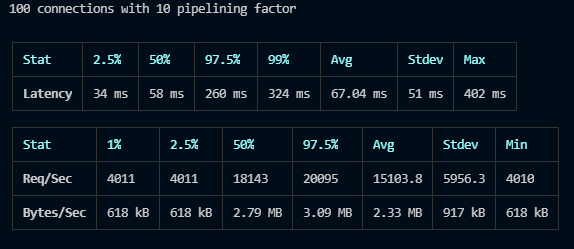
Latency comparison
API Benchmark results using autocannon for API load testing
| Rank | Framework | Req/Byte count | Time taken | Data read | | ---- | ---------- | -------------- | ---------- | --------- | | 1 | Fastify | 87k requests | 5.21s | 13.1mb | | 2 | Unnamed.js | 77k requests | 5.21s | 11.6mb | | 3 | Koa.js | 56k requests | 5.12s | 8.29mb | | 4 | Express.js | 37k requests | 5.1s | 7.77mb |
Getting started
- Install the unnamed-js package using yarn or npm
npm i unnamed-js- In your main script, call the unnamed function and assign it to a variable There are 2 ways to start the server, if you passed the options when calling the method, the server will automatically start.
const unnamed = require("unnamed-js");

const server = unnamed({
  port: 3000,
  init: () => {
    // This will run as the server initializes
    console.log("App is running");
  },
});
or you can start the server manually
const server = unnamed();
const PORT = 3000;
server.startServer(PORT, callback);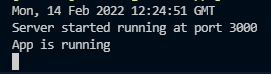
Middlewares
- Middleware functions are methods that have access to the request object and the response object.
server.middleware(cors("*"));server.middleware((request, response) => {
request.user = user;
});Routes
This framework supports the 5 commonly-used HTTP request methods. The methods can be accessed through the returned server object
- GET
- POST
- PUT
- PATCH
- DELETE
In the main script, you can use directly the http methods by destructuring the server object
const { GET, POST, PUT, PATCH, DELETE } = server;
GET("/", (req, res) => {
  res.send("Hello");
});
Request object
query - endpoint queries can be accessed through request.query object
- Sample endpoint: http://localhost:3000/user?name=mart&age=19
GET("/user", (request, response) => {
  res.send({
    username: request.query.name,
    age: request.query.age,
  });
});
params - Params object contains parameter values parsed from the URL path
- Sample endpoint: http://localhost:3000/user/123456
GET("/user/:id", (request, response) => {
  res.send({
    userId: request.params.id,
  });
});- body - The read-only body property of the Request interface contains a ReadableStream with the body contents that have been added to the request.
POST("/post", async (request, response) => {
  const post = await new Post(request.body).save();
  response.send(post);
});
Note: Unnamed.js has a built-in body parser that listens to data event and attaches to request object. You don't need to install external library such as body parser.
Response methods
- code() - This method sets the response status code. If you want to know more about HTTP status codes, visit MDN Web Documentation
- Syntax:
const status: number = 200; response.code(status); - send() - This method basically sends the HTTP response. The body parameter can be a String or a Buffer object or an object or an Array. It accepts a single parameter body that describe the body which is to be sent in the response. It also automatically parse the body into JSON if possible.
- Syntax:
const body = { id: 123456, name: Mart Anthony Salazar, age: 19 } response.send(body) - You can also render html using HTML String
response.send(`<input type="text" name="username" placeholder="Username" />`);HTML input tag rendered in unnamed-js response.send reduces the vulnerability in reflected xss attacks (tested using xsstrike)
- goto() - This method redirects the to the URL derived from the specified path.
Router for modular code
The server object comes up with a router() method to include routes from another javascript file.
- This takes a parameter of array of objects
- For example, you have two routers: auth and users
// app.js
server.router(require("./routes"));
// routes/index.js
const routes = [
{
prefix: "users",
router: require("./user.route"),
},
{
prefix: "auth",
router: require("./auth.route"),
},
];
module.exports = routes;- For the users route:
const userRoute = ({ GET, POST, PUT, PATCH, DELETE }) => {
  GET('/', (request, response)=>{
    response.send("User route)
  })
};

module.exports = userRoute;
Route Options
Here are some options you can define when registering a specificoute
- beforeEnter - an array of methods that will fire before entering the route, this can access the request and response objects
- Sample code:
const {verifyUser} = require('../utils/verify')

const checkAdmin = async(request,response)=>{
  const isAdmin = await verifyUser()
  if(!isAdmin) return response.code(401).send({msg:"You cannot access this route"})
}

const userRoute = ({ GET }) => {
  GET('/', {beforeEnter: [isAdmin]},(request, response)=>{
    response.send("User route)
  })
};

module.exports = userRoute;- bannedKeys - an array that will remove the matching keys in request body
- Sample code
const userRoute = ({ POST }) => {
  GET('/create', {bannedKeys:["address", "number"]},(request, response)=>{
    response.send("User route)
  })
};

module.exports = userRoute;