
unplugin-mediafit
v0.0.2
Published
转换图片、视频等资源成自己想要的样子,易扩展,响应式页面开发利器,内置 ffmpeg(处理视频)、sharp(处理图片)支持

Maintainers
 buddywang
Readme
unplugin-mediafit
如名 mediafit,转换图片、视频等资源成自己想要的样子,易扩展,响应式页面开发利器,内置 ffmpeg(处理视频)、sharp(处理图片)支持
功能
- 响应式开发利器,减少重复工作
- 一键转换图片、视频等资源文件(内置 3 个常用的
fitFunc,支持转换图片尺寸和格式,支持转换视频分辨率) - 易扩展,可自定义
fitFunc - 内置支持 sharp 和 ffmpeg(需要预先安装并提供命令行工具路径)
- 自由扩展,转换过程不限制只使用 sharp / ffmpeg,也不限制只转换图片/视频
名词
fitFunc:转换函数fitKit:转换函数集,key 是使用 对应 fitFunc 转换函数的标识
Sharp
The typical use case for this high speed Node.js module is to convert large images in common formats to smaller, web-friendly JPEG, PNG, WebP, GIF and AVIF images of varying dimensions.
极速的 node-api 图片处理工具,能将常见格式的大图像转换为较小的、网络友好的不同格式和尺寸的 JPEG、PNG、WebP、GIF 和 AVIF 图像。
FFmpeg
A complete, cross-platform solution to record, convert and stream audio and video.
用于录制、转换和流式传输音频和视频的完整的跨平台解决方案。
使用示例
在文件后缀名前面增加 query,格式
import xx from "xxx@fit:fitFuncKey(a=xx&b=xx).xx"
                   ^^^^^----------^^^^^^^^^^^
                   固定标识    |     自定义参数
                          fitFunc标识
由于涉及转换格式场景,暂时只考虑支持一个 fitfunc 函数调用
如下:
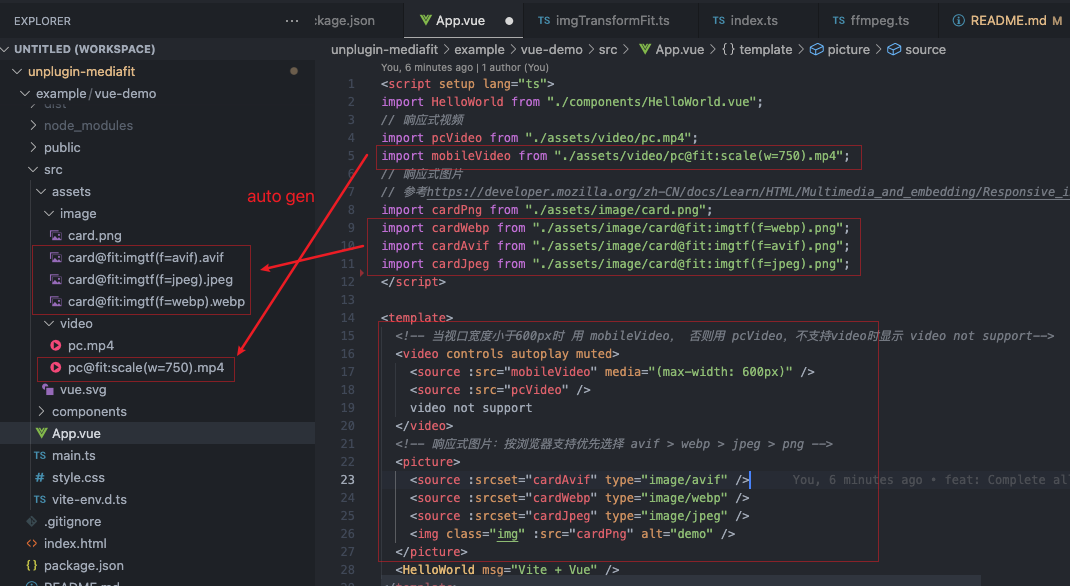
安装
npm i unplugin-mediafit支持 vite and rollup.
- [x] vite
// vite.config.ts
import mediaFit from "unplugin-mediafit/vite";

export default defineConfig({
  plugins: [
    mediaFit({
      /* options */
    }),
  ],
});- [ ] webpack(欢迎 pr)
- [ ] farm(欢迎 pr)
配置
interface IOptions {
  /**
   * 自定义fitFunc集合,key为使用时的缩写
   */
  fitKit?: { [key: string /**使用标识 */]: FitFunc };
  /**
   * 如需要使用ffmpeg, 请配置ffmpeg命令行工具路径,如果ffmpeg命令全局可用,传'ffmpeg'即可
   */
  ffmpegPath?: string;
}

interface IFitFuncParam {
  /**
   * 输入文件路径
   */
  inputFilePath: string;
  /**
   * 解析的参数对象,如 ...@fit:rs(w=11&h=22).. 得到{w: "11", h: "22"}
   */
  params: { [key: string]: string };
  /**
   * fitFunc函数上下文,提供sharp、ffmpeg、logger等工具
   */
  ctx: Readonly<{
    /**
     * 项目根路径
     */
    root: string;
    /**
     * process.env.NODE_ENV,development or production
     */
    mode: string | undefined;
    /**
     * https://sharp.pixelplumbing.com/
     */
    sharp: typeof sharp;
    /**
     * 简单封装了ffmpeg,可以像命令行一样调用ffmpeg
     */
    ffmpeg: Readonly<{
      run: (argsStr: string) => Promise<string>;
    }>;
    info: (str: string) => void;
    warn: (str: string) => void;
    error: (str: string) => never;
  }>;
  /**
   * 输出文件路径
   */
  outputFilePath: string;
}

type FitFunc = (param: IFitFuncParam) => void;
内置的 fitKit 包含 3 个常用 fitFunc,对应参数详情请看这里
builtInFitKit = {
  scale: videoScaleFit, // 基于ffmpeg, 调整视频分辨率,用法: @fit:scale(w=xx&h=xx)
  rs: imageResizeFit, // 基于sharp, 调整图片尺寸,用法: @fit:rs(w=xx&h=xx&f=cover...)
  imgtf: imgTransformFit, // 基于sharp, 转换图片格式、质量等等,用法:@fit:imgtf(f=png&q=80)
};
注意
- 需要转换格式时,参数用
f缩写 - 本插件设计工作在 dev 阶段,不应工作在 build 阶段