
usageflow
v1.0.0
Published
A lightweight Node.js package for usage tracking and limit enforcement in SaaS applications

Maintainers
 richardsondx
Readme
UsageFlow (In Development)
A lightweight Node.js package for usage tracking and limit enforcement in SaaS applications. UsageFlow integrates seamlessly with the saas-subscription-helper package by default, or you can build a custom (manual) Stripe integration if preferred.
Status: Not production-ready yet. Early adopters welcome.
Table of Contents
- Introduction
- Common Use Cases
- Installation
- Quick Start
- How It Works
- Supabase Schema
- Feature Limits & Usage Tracking
- Usage Adjustments & Resets
- Integrations
- Testing Your Setup
- License
- Contributing
- Author
Introduction
Building a SaaS application often requires tracking usage—whether for API calls, AI model tokens, or digital asset generation. UsageFlow provides:
- Easy usage logging: A straightforward way to track per-feature consumption.
- Limit enforcement: Check if a user is still within their plan quota.
- Plan integration: By default, uses
saas-subscription-helperor you can implement a custom Stripe workflow. - Advanced features: Includes user-specific limit adjustments, usage resets, usage audits, and more.
Focus on your core business logic without writing a custom usage tracking system from scratch.
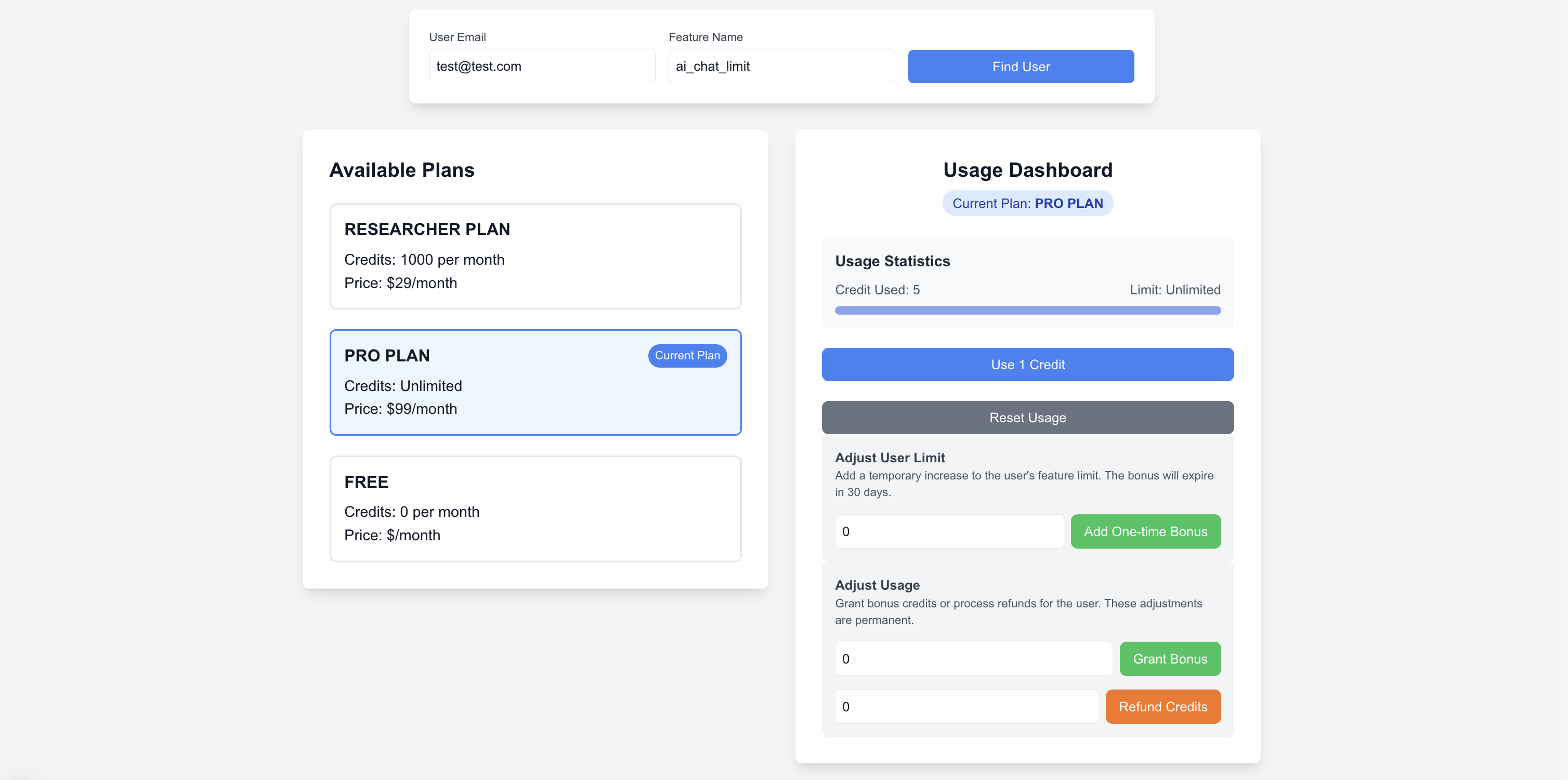 Check the
 /usage endpoint in then DEMO Project: https://github.com/richardsondx/subscription-helper-demo
Common Use Cases
1. Tiered Feature Access
Perfect for managing multi-tier subscriptions:
- Basic: 100 exports/month
- Pro: 1000 exports/month
- Enterprise: Unlimited exports
const canAccess = await usageFlow.authorize({
  userId: 'user-123',
  featureName: 'ai_chat_limit'
   });
The package automatically determines the user's plan and feature access based on their subscription
2. Credit-Based SaaS Applications
Perfect for platforms offering credit-based services like:
- Design tools with export credits
- API gateways with request quotas
- File processing services with conversion limits
await usageFlow.incrementUsage({
     userId: 'user-123',
  featureName: 'design-export',
  creditsUsed: 1
   });
3. AI Service Wrappers
Ideal for applications managing AI model usage:
- Track token consumption across GPT models
- Monitor image generation credits
- Enforce rate limits per model type
await usageFlow.incrementUsage({
     userId: 'user-123',
  featureName: 'gpt-4-completion',
  creditsUsed: response.usage.total_tokens,
  metadata: { model: 'gpt-4o-mini' }
});
Installation
Install UsageFlow:
npm install usageflowNote: This package is currently in development and not yet published to npm. Stay tuned for the initial release!
Install Required Peer Dependencies:
npm install @supabase/supabase-js stripe saas-subscription-helperVerify Node.js version: 14 or higher.
Quick Start
Initialize UsageFlow:
const UsageFlow = require('usageflow');

const usageFlow = new UsageFlow({
  supabaseUrl: 'https://your-supabase-instance',
  supabaseKey: 'your-supabase-service-key',
});
Track Usage:
await usageFlow.incrementUsage({
  userId: 'user-123',
  featureName: 'api-call',
  creditsUsed: 1
});
Fetch Usage:
const usage = await usageFlow.fetchUsage({
  userId: 'user-123',
  featureName: 'api-call'
});
console.log(usage);
// => { current: 50, limit: 100, remaining: 50, isUnlimited: false }
Enforce Limits:
const canAccess = await usageFlow.authorize({
  userId: 'user-123',
  featureName: 'api-call'
});
console.log(canAccess ? "Access granted" : "Limit exceeded. Upgrade required.");
Testing Your Setup
Test Connection
try {
  const isConnected = await usageFlow.connectionCheck();
  console.log(isConnected ? "Connection successful" : "Connection failed");
} catch (error) {
  console.error("Connection check error:", error.message);
}
How It Works
UsageFlow simplifies usage tracking and limit enforcement in your SaaS application:
- Initialize: Pass your Supabase configuration and optional settings
- Plan Configuration: Define plans and their feature limits in the database
- Track Usage: Log events as users consume features
- Enforce Limits: Check if users are within their quotas
- Manage Adjustments: Handle refunds, bonuses, or resets when needed
Supabase Schema
Security Tip: Enable Row Level Security (RLS) on all tables to protect user data.
Table Configuration
You can customize table names during initialization:
const usageFlow = new UsageFlow({
  supabaseUrl: 'your-supabase-url',
  supabaseKey: 'your-supabase-key',
  // Custom table names (optional)
  userPlansTable: 'custom_user_plans',
  usageEventsTable: 'custom_usage_events',
  usageFeatureLimitsTable: 'custom_feature_limits',
  userLimitAdjustmentsTable: 'custom_limit_adjustments'  // If enableUserAdjustments: true
});
Default table names if not specified:
user_plans- Stores subscription plansusage_events- Records usage tracking eventsusage_feature_limits- Defines feature limits per planuser_limit_adjustments- Stores user-specific limit adjustments (if enabled)
Required Tables
user_plansTable
CREATE TABLE user_plans (
    id SERIAL PRIMARY KEY,
    name TEXT NOT NULL,                    -- Plan name (e.g., "Basic Plan")
    stripe_price_id TEXT UNIQUE,           -- Stripe Price ID
    price_amount DECIMAL(10,2),            -- Price amount
    price_currency TEXT,                   -- Currency code
    is_free BOOLEAN DEFAULT FALSE,         -- Identifies free plans
    created_at TIMESTAMP DEFAULT NOW(),
    updated_at TIMESTAMP DEFAULT NOW()
);
Price & Plan Management
Free Plans:
- Set
is_free = TRUE - Leave
stripe_price_idas NULL - Example: Community or Basic tier
- Set
Paid Plans:
- Set
is_free = FALSE - Provide valid
stripe_price_idfrom Stripe - Example: Pro or Enterprise tiers
- Set
Price Syncing:
- Initial Setup:
- First-time plan and price setup must be done manually in your database
- Insert records into
user_planstable for each subscription tier - Define feature limits in
usage_feature_limitstable
- Automatic (with saas-subscription-helper):
- Price changes in Stripe automatically sync via webhooks
- No additional configuration needed
- Manual (if
manualStripeIntegration: true):- Handle price syncing in your own webhook
- Implement your own price update logic
- Initial Setup:
Note: For display purposes, prices are stored in the database, but actual billing always uses live Stripe prices. This ensures accurate billing while providing fast price display in your application.
usage_feature_limitsTable
CREATE TABLE usage_feature_limits (
    id SERIAL PRIMARY KEY,
    plan_id INT NOT NULL REFERENCES user_plans(id),
    feature_name TEXT NOT NULL,           -- Feature identifier
    limit_value INT NOT NULL,             -- -1 for unlimited
    created_at TIMESTAMP DEFAULT NOW(),
    updated_at TIMESTAMP DEFAULT NOW()
);usage_eventsTable
CREATE TABLE usage_events (
    id SERIAL PRIMARY KEY,
    user_id TEXT NOT NULL,                -- User's unique identifier
    feature_name TEXT NOT NULL,           -- Feature being used
    credits_used INT,                     -- Number of credits (NULL for resets)
    event_type TEXT NOT NULL
      CHECK (event_type IN ('usage', 'credit', 'reset', 'adjustment'))
      DEFAULT 'usage',
    metadata JSONB,                       -- Additional event data
    timestamp TIMESTAMP DEFAULT NOW()
);

-- Add indexes for performance
CREATE INDEX idx_usage_events_user_feature ON usage_events(user_id, feature_name);
CREATE INDEX idx_usage_events_timestamp ON usage_events(timestamp);
CREATE INDEX idx_usage_events_type ON usage_events(event_type);
Optional Tables
user_limit_adjustmentsTable (Required ifenableUserAdjustments: true)
CREATE TABLE user_limit_adjustments (
    id SERIAL PRIMARY KEY,
    user_id TEXT NOT NULL,                -- User's unique identifier
    feature_name TEXT NOT NULL,           -- Feature being adjusted
    amount INTEGER NOT NULL,              -- Adjustment amount (can be negative)
    type TEXT NOT NULL
      CHECK (type IN ('one_time', 'recurring')),
    start_date TIMESTAMP NOT NULL,        -- When adjustment becomes active
    end_date TIMESTAMP NOT NULL,          -- When adjustment expires
    metadata JSONB,                       -- Optional context (reason, etc.)
    created_at TIMESTAMP DEFAULT NOW()
);

-- Add indexes for performance
CREATE INDEX idx_limit_adjustments_user ON user_limit_adjustments(user_id);
CREATE INDEX idx_limit_adjustments_dates ON user_limit_adjustments(start_date, end_date);
This table enables:
- One-time limit bonuses (e.g., promotional offers)
- Recurring limit adjustments (e.g., grandfathered plans)
- Temporary limit increases (e.g., seasonal boosts)
- Custom enterprise limits
Feature Limits & Usage Tracking
Track Usage
// Regular usage tracking
await usageFlow.incrementUsage({
  userId: 'user-123',
  featureName: 'api-call',
  creditsUsed: 1,
  metadata: { type: 'standard_call' }
});

// Track with metadata
await usageFlow.incrementUsage({
  userId: 'user-123',
  featureName: 'ai_completion',
  creditsUsed: response.usage.total_tokens,
  metadata: {
    model: 'gpt-4o-mini',
    prompt_tokens: response.usage.prompt_tokens,
    completion_tokens: response.usage.completion_tokens
  }
});
Fetch Usage & Limits
// Get current usage with limits
const usage = await usageFlow.fetchUsage({
  userId: 'user-123',
  featureName: 'api-call'
});
console.log(usage);
// {
//   current: 50,        // Total credits used
//   limit: 100,         // Maximum allowed
//   remaining: 50,      // Credits remaining
//   isUnlimited: false  // Whether feature has no limit
// }

// Get detailed usage stats
const stats = await usageFlow.getUsageStats({
  userId: 'user-123',
  featureName: 'api-call',
  period: 'current_month',
  groupBy: 'day'  // 'hour', 'day', 'week', 'month'
});
console.log(stats);
// {
//   total: 150,
//   average: 10,
//   max: 25,
//   min: 5,
//   byPeriod: [
//     { date: '2024-01-01', total: 25 },
//     { date: '2024-01-02', total: 15 }
//   ]
// }
Available Period Options
When fetching usage data, you can specify these time periods:
current_month: From start of current monthlast_30_days: Rolling 30-day windowlast_28_days: Rolling 28-day windowcurrent_week: From start of current week
Usage Adjustments & Resets
Enabling User Adjustments
To use limit adjustments and bonuses, you must:
- Enable the feature in your configuration:
const usageFlow = new UsageFlow({
  supabaseUrl: 'your-supabase-url',
  supabaseKey: 'your-supabase-key',
  enableUserAdjustments: true  // Required for adjustments
});- Create the
user_limit_adjustmentstable in your database (see Supabase Schema)
Enable this feature when you need to:
- Offer promotional bonuses
- Grant compensation credits
- Create custom enterprise limits
- Provide seasonal or temporary limit increases
- Handle grandfathered plan features
Usage Adjustments
// Refund or deduct credits
await usageFlow.adjustUsage({
  userId: 'user-123',
  featureName: 'api-call',
  amount: -5,  // Negative for refunds
  metadata: { reason: 'service_error' }
});

// Grant bonus credits
await usageFlow.adjustUsage({
  userId: 'user-123',
  featureName: 'api-call',
  amount: 10,  // Positive for bonuses
  metadata: { reason: 'loyalty_reward' }
});
Reset Usage
// Reset specific feature
await usageFlow.resetFeatureUsage({
  userId: 'user-123',
  featureName: 'ai_chat_limit'
});

// Get usage since last reset
const usage = await usageFlow.getUsageSinceReset({
  userId: 'user-123',
  featureName: 'ai_chat_limit'
});
console.log(usage);
// {
//   total: 50,
//   lastResetDate: '2024-01-01T00:00:00Z',
//   preResetTotal: 150
// }
Configuration Options
| Option | Type | Default | Description |
|--------|------|---------|-------------|
| supabaseUrl | string | required | Your Supabase project URL |
| supabaseKey | string | required | Your Supabase service role key |
| manualStripeIntegration | boolean | false | Set to true if not using saas-subscription-helper |
| enableUserAdjustments | boolean | false | Enable user-specific limit adjustments and bonuses |
| debug | boolean | false | Enable detailed logging for debugging |
| userPlansTable | string | 'user_plans' | Custom name for plans table |
| usageEventsTable | string | 'usage_events' | Custom name for events table |
| usageFeatureLimitsTable | string | 'usage_feature_limits' | Custom name for limits table |
| userLimitAdjustmentsTable | string | 'user_limit_adjustments' | Custom name for adjustments table |
Integrations
Default: With saas-subscription-helper
This is the recommended integration method:
const usageFlow = new UsageFlow({
  supabaseUrl: 'your-supabase-url',
  supabaseKey: 'your-supabase-key',
  // manualStripeIntegration: false (default)
});- No extra configuration needed
- Plan and price syncing happen automatically
- Shared webhook endpoints handle all events
Advanced: Manual Stripe Integration
For custom Stripe integrations:
const usageFlow = new UsageFlow({
supabaseUrl: 'your-supabase-url',
supabaseKey: 'your-supabase-key',
manualStripeIntegration: true,
});
Handle price updates in your webhook:
// app/api/webhooks/route.js
import Stripe from 'stripe';

export async function POST(req) {
try {
 const event = stripe.webhooks.constructEvent(
   await req.text(),
   req.headers.get("stripe-signature"),
   process.env.STRIPE_WEBHOOK_SECRET
 );

 if (event.type === 'price.updated') {
   await usageFlow.syncPrice(event.data.object);
 }

 return new Response(JSON.stringify({ received: true }));
} catch (err) {
 return new Response(JSON.stringify({ error: err.message }), { status: 400 });
}
}
Required Webhook Events
| Event | Purpose | Required By |
|-------|----------|------------|
| price.updated | Syncs price changes | UsageFlow |
| customer.subscription.updated | Updates subscription status | saas-subscription-helper |
| Other subscription events | Manages subscription lifecycle | saas-subscription-helper |
Setting Up Webhooks
- Create Webhook Endpoint:
// app/api/webhooks/route.js
import Stripe from 'stripe';

export async function POST(req) {
  try {
    const event = stripe.webhooks.constructEvent(
      await req.text(),
      req.headers.get("stripe-signature"),
      process.env.STRIPE_WEBHOOK_SECRET
    );

    // UsageFlow needs the price.updated webhook to keep its internal price records
    // in sync with Stripe. When you update prices in Stripe (e.g. changing tiers,
    // limits or costs), this webhook ensures UsageFlow's usage tracking and limit
    // enforcement stays accurate with the latest pricing configuration.
    if (event.type === 'price.updated') {
      // UsageFlow automatically updates the price_amount and price_currency fields
      await usageFlow.syncPrice(event.data.object);
    }

    return new Response(JSON.stringify({ received: true }));
  } catch (err) {
    return new Response(JSON.stringify({ error: err.message }), { status: 400 });
  }
}- Test locally using Stripe CLI:
# Install Stripe CLI if you haven't already
brew install stripe/stripe-cli/stripe

# Login to Stripe
stripe login

# Forward webhooks to your local endpoint
stripe listen --forward-to localhost:3000/api/webhooks- Configure Stripe Webhook Settings:
- Go to Stripe Dashboard > Developers > Webhooks
- Add endpoint URL: https://your-domain.com/api/webhooks
- Select events to listen for:
- price.updated (for UsageFlow price syncing)
- customer.subscription.updated (for subscription management)
- Other events required by saas-subscription-helper
Using Edge Functions
Deploy webhooks on Supabase Edge Functions:
// supabase/functions/stripe-webhook/index.ts
import { serve } from 'https://deno.land/[email protected]/http/server.ts'

serve(async (req) => {
  try {
    await usageFlow.handleWebhook({
      rawBody: await req.text(),
      signature: req.headers.get("stripe-signature")
    });

    return new Response(JSON.stringify({ received: true }), {
      headers: { 'Content-Type': 'application/json' }
    });
  } catch (error) {
    return new Response(JSON.stringify({ error: error.message }), {
      status: 400,
      headers: { 'Content-Type': 'application/json' }
    });
  }
});
API Reference
| Method | Description | Parameters | Returns |
|--------|-------------|------------|---------|
| incrementUsage | Track feature usage for a user | - userId (string): User identifier- featureName (string): Feature being used- creditsUsed (number): Amount of credits to consume- metadata (object, optional): Additional context | Promise |
| adjustUsage | Adjust usage (refunds/bonuses) | - userId (string): User identifier- featureName (string): Feature to adjust- amount (number): Credits to add/remove- metadata (object): Must include reason | Promise |
| authorize | Check if user can access feature | - userId (string): User identifier- featureName (string): Feature to check | Promise |
| fetchUsage | Get usage details with limits | - userId (string): User identifier- featureName (string): Feature to check- period (string, optional): Time period | Promise<{ current: number, limit: number, remaining: number, isUnlimited: boolean}> |
| getTotalUsage | Get raw usage total | - userId (string): User identifier- featureName (string): Feature to check- period (string, optional): Time period | Promise |
| getUsageStats | Get detailed usage statistics | - userId (string): User identifier- featureName (string): Feature to analyze- period (string, optional): Time period- groupBy (string, optional): Grouping interval | Promise<{ total: number, average: number, max: number, min: number, byPeriod: Array<{ date: string, total: number }>}}> |
| getBatchUsageStats | Get stats for multiple users/features | - userIds (string[]): User identifiers- featureNames (string[]): Features to analyze- period (string, optional): Time period | Promise<Record<string, Record<string, UsageStats>>> |
| fetchFeatureLimit | Get feature limit for a plan | - planId (number): Plan identifier- featureName (string): Feature to check | Promise<number | null> |
| fetchFeatureLimitForUser | Get user's current feature limit | - userId (string): User identifier- featureName (string): Feature to check | Promise<number | null> |
| addLimitAdjustment | Add temporary/permanent limit adjustment | - userId (string): User identifier- featureName (string): Feature to adjust- amount (number): Adjustment amount- type ('one_time' | 'recurring'): Adjustment type- startDate (Date): When adjustment starts- endDate (Date): When adjustment ends | Promise |
| connectionCheck | Test database connectivity | None | Promise |
Period Options
The period parameter accepts these values:
'current_month'(default)'last_30_days''last_28_days''current_week'
GroupBy Options
The groupBy parameter accepts:
'hour''day'(default)'week''month'
Metadata Structure
The metadata object can include any JSON-serializable data. Common fields:
model: For AI-related featuresreason: Required for adjustmentstype: For categorizing usage
Error Handling
UsageFlow uses standardized error codes to help you handle errors consistently. Each method throws specific error types:
Error Types By Method
| Method | Possible Error Codes | Common Scenarios |
|--------|---------------------|------------------|
| incrementUsage | - USAGE_INVALID_PARAMS- USAGE_CONFIG_ERROR | - Missing/invalid userId (must be database ID)- Missing featureName- Database insert failure |
| adjustUsage | - USAGE_INVALID_PARAMS- USAGE_CONFIG_ERROR- USAGE_ADJUSTMENT_ERROR | - Missing required fields- Missing adjustment reason- Invalid adjustment amount |
| authorize | - USAGE_INVALID_PARAMS- USAGE_LIMIT_ERROR- USAGE_CONFIG_ERROR | - User not found- No plan assigned- Failed to fetch limits |
| fetchUsage | - USAGE_INVALID_PARAMS- USAGE_LIMIT_ERROR- USAGE_CONFIG_ERROR | - Invalid user/feature- Failed to fetch current usage- Failed to fetch limits |
| fetchFeatureLimitForUser | - USAGE_INVALID_PARAMS- USAGE_CONFIG_ERROR- USAGE_LIMIT_ERROR- USAGE_ADJUSTMENT_ERROR | - User not found- No plan assigned- Failed to apply adjustments |
| addLimitAdjustment | - USAGE_INVALID_PARAMS- USAGE_ADJUSTMENT_ERROR | - Invalid adjustment period- Adjustments not enabled |
Best Practices
- Always check error codes:
try {
  await usageFlow.incrementUsage(params);
} catch (error) {
  if (error instanceof UsageFlowError) {
    switch (error.code) {
      case ErrorCodes.USAGE_INVALID_PARAMS:
        // Handle validation errors
        break;
      case ErrorCodes.USAGE_CONFIG_ERROR:
        // Handle database/config issues
        break;
      // ... handle other codes
    }
  }
}- Use error details:
catch (error) {
  if (error instanceof UsageFlowError) {
    console.error(`${error.code}: ${error.message}`);
    console.error('Details:', error.details);
    // details includes contextual information
  }
}- Log database errors:
catch (error) {
  if (error.code === 'USAGE_CONFIG_ERROR') {
    console.error(
      'Database operation failed:',
      error.details.originalError,
      'Table:', error.details.table
    );
  }
}
Debug Mode
Enable detailed logging:
const usageFlow = new UsageFlow({
  supabaseUrl: 'your-url',
  supabaseKey: 'your-key',
  debug: true
});
TODO
The following test coverage improvements are planned:
- Add comprehensive unit test suite
- Add test coverage reporting
The goal is to achieve >80% test coverage across all core functionality to ensure reliability and catch potential issues early.
License
This project is licensed under the MIT License.
Contributing
Contributions are welcome! Feel free to:
- Open issues
- Submit pull requests
- Suggest improvements
- Report bugs
Author
Created by Richardson Dackam.
Follow on Twitter: @richardsondx