
use-a-hook
v0.3.2
Published
114 typed React hooks and a context state factory for SaaS applications. Tree-shakeable, SSR-aware, React-only runtime dependency.

Maintainers
 sannminwin
Readme
use-a-hook
114 React hooks, one context state factory, and fewer “wait, I built this last week” moments.
Building a SaaS app? Give your search box a breather, remember a teammate’s preferences, tame keyboard shortcuts, and keep a chat scrolled to the latest message. Pick the hook that solves today’s problem and keep building.
- React 18 and 19, with TypeScript types and editor hints.
- Import what you use. Individual entry points and tree-shakeable ESM; CommonJS is included too.
- React is the only runtime dependency. No UI kit, animation engine, or server cache comes along for the ride.
- 115 complete examples, with real use cases and plain-language API comments.
Try the live playground · Install and try it · Find a hook · Full API reference · Source and issues
Try it in your browser
Open the live playground — choose a demo, try it out, then open View code to copy a standalone React example. How it works explains the behavior and its limits.
| Try a workflow | What you can explore | | --- | --- | | Search and sort | Debounced search, sorting, and active-customer filtering. | | Autosave | Queued saves, a simulated failure, and manual retry. | | Keyboard shortcuts | Scoped shortcuts, key sequences, and protected form fields. | | Streaming chat | Scroll-away behavior and returning to the latest message. | | Saved preferences | Persisted appearance, row density, and preview language. |
The playground also includes the complete API reference for all 115 exports. The five interactive demos run in your browser; autosave and chat use local simulations, with no account or API key required.
Install
npm install use-a-hookYou need an existing React 18 or React 19 application. This package supplies reusable behavior; you provide the components and styling. The examples are TSX files, ready for a TypeScript React app. In a Next.js App Router project, keep hook consumers in a client component with 'use client' at the top.
Your first hook: the tiny reveal
The mission: show internal invoice notes only when a teammate asks. No treasure map required.
Copy this component into your app and render <InvoiceNotes />:
'use client';

import { useToggle } from 'use-a-hook';

export default function InvoiceNotes() {
  const [visible, toggle] = useToggle();
  return (
    <section>
      <button aria-expanded={visible} aria-controls="invoice-notes" onClick={toggle}>
        Internal notes
      </button>
      <p id="invoice-notes" hidden={!visible}>
        Client approved the revised delivery date.
      </p>
    </section>
  );
}
useToggle() starts at false. The first returned item, visible, is the current value. The second, toggle, flips it. The third is a setter, available when you want to choose a specific value. Call hooks at the top level of a component or another hook, rather than inside conditions or event handlers.
Give the search box a coffee break
The mission: let someone finish typing before updating the results. The input stays responsive; the results wait 300 milliseconds after the latest edit.
'use client';

import { useState } from 'react';
import { useDebouncedValue } from 'use-a-hook';

const customers = ['Ada Studio', 'Beacon Bakery', 'Cedar Design'];
export default function CustomerSearch() {
  const [query, setQuery] = useState('');
  const settled = useDebouncedValue(query, 300);
  const matches = customers.filter((name) =>
    name.toLowerCase().includes(settled.toLowerCase()),
  );
  return (
    <section>
      <input
        aria-label="Find customers"
        value={query}
        onChange={(event) => setQuery(event.target.value)}
      />
      <ul>
        {matches.map((name) => (
          <li key={name}>{name}</li>
        ))}
      </ul>
    </section>
  );
}
This demo filters a local list and makes no network requests. Debouncing a value does not cancel an existing request; use your data-fetching library’s cancellation and caching when connecting a real API.
A preference with a memory
The mission: remember whether your teammate likes compact table rows. Comfortable spacing should not require a daily negotiation.
'use client';

import { useLocalStorage } from 'use-a-hook';

export default function TableDensity() {
  const [dense, setDense, reset] = useLocalStorage(
    'demo-table-density',
    false,
    { fallbackToMemory: true }
  );
  return (
    <section>
      <label>
        <input
          type="checkbox"
          checked={dense}
          onChange={(event) => setDense(event.target.checked)}
        />{' '}
        Compact rows
      </label>
      <button onClick={reset}>Forget this preference</button>
      <p>Rows are {dense ? 'compact' : 'comfortable'}.</p>
    </section>
  );
}
The third returned value resets the preference. This demo opts into memory fallback: if browser storage is blocked, it still works in the current page, but the choice will not survive a reload. Stored data is JSON by default, so keep it small and use a custom serializer for other formats.
Let a milestone make an entrance
The mission: celebrate shipped projects with a short count-up, then let the browser get back to work.
'use client';

import { useCountUp, useReducedMotion } from 'use-a-hook';
export default function Milestone() {
  const reduced = useReducedMotion();
  const count = useCountUp(2500, { duration: reduced ? 0 : 1200 });
  return (
    <section>
      <p>
        Celebrating {Math.round(count.value).toLocaleString('en-US')} shipped
        projects!
      </p>
      <button
        onClick={() => {
          count.reset();
          count.resume();
        }}
      >
        Encore
      </button>
    </section>
  );
}
The demo respects reduced-motion preferences. Durations are in milliseconds. When the animation completes, its frame loop stops; the number does not need to rehearse all day.
What are you building?
| Today’s job | Hooks to start with |
| --- | --- |
| Search, filter, sort, and page through customers | useSearch, useFilteredList, useSortedList, usePagination |
| Render a long list or load the next batch | useVirtualList, useInfiniteLoader, useInfiniteScroll |
| Save drafts and show submission feedback | useAutosave, useSubmit, useDirty, useUnsavedChanges |
| Remember settings and switch languages | useLocalStorage, useTheme, useLocale, useTranslation |
| Share state without every consumer rerendering | createContextState, useStoreSelector |
| Handle keyboard shortcuts and outside clicks | useHotkeys, useClickOutside, useEventListener |
| Measure a panel and adapt its contents | useResizeObserver, useElementRect, useContainerQuery |
| Follow a streaming chat | useStickToBottom |
| Run timers or animate values | useTimer, useStopwatch, useElapsedTime, useCountUp |
| Recover a widget or capture a chart | useErrorBoundary, useScreenshot |
| Manage cookies, image loading, or a portal host | useCookie, useImage, usePortal |
The expandable reference below contains all 114 hooks and the context factory. Every entry explains a real use case, includes a complete component, and comments its signature for developers still getting comfortable with TypeScript.
Small imports, practical performance
Use the package root:
import { useToggle } from 'use-a-hook';Or an explicit entry point:
import { useToggle } from 'use-a-hook/useToggle';Our production consumer checks measure 158 bytes gzip for useToggle and 21,848 bytes gzip when intentionally importing every export, with React externalized. These are bundle measurements, not runtime benchmarks. Tree-shaking depends on your bundler configuration.
Keep input arrays and objects immutable. Keep expensive selectors and comparators stable when their hook relies on reference memoization. Reach for frame callbacks when you need animation; a theme toggle does not need its own animation loop.
A few things to know before shipping
- Your application owns the backend. Authentication, permissions, billing, server validation, and caching remain application concerns. Keep using your existing server-state library.
- Browser hooks start with server-safe defaults. Some values become available after mounting or hydration. Supply consistent initial snapshots when the first visible value matters.
- Headless means you own the UI. Portal hosts and focus helpers are building blocks; use a complete dialog primitive when you need modal behavior.
- One state owner when state should be shared. Independent
useTheme()calls own independent local state. Use controlled state, a provider, or the context factory to share settings.
Read the practical guide for lifecycle contracts, storage errors, cancellation, accessibility boundaries, and more composition examples. The hotkey guide covers chords, sequences, groups, and focus-scoped shortcuts. The reference study explains the decisions behind the hook upgrades.
Full API reference
Try five interactive workflows in the live playground. For searchable documentation, open the live API reference.
Small hooks are easier to remember when they have a job to do. Each entry pairs a real application situation with a complete React example, an explanation, and a practical boundary.
Every example below is a standalone TSX module with imports and a default component. Copy it into a client component file in a React application with use-a-hook installed. An app endpoint or asset is needed only where the accompanying tip says so. Local previews are labeled as previews rather than pretending to perform a server operation.
Examples are type-checked with npm run test:examples. Read README.md for shared lifecycle and server-rendering contracts.
Signature reading guide: ? means an argument or property is optional; its comment explains the default. T, K, and other generic letters stand for types inferred from your values. A often represents a list of callback arguments. | means either type is allowed; undefined means no value is available yet. readonly tuples are fixed-position return lists: use array destructuring to give each position a name.
() => void describes a function that returns nothing. Promise<T> describes asynchronous work that eventually produces a T. React.Dispatch<React.SetStateAction<T>> is a React setter: pass a new value or a function that receives the previous value. Comments inside each signature explain its specific inputs and outputs.
Generated from catalog.json, examples/, and build declarations. Run npm run build to refresh.
useToggle
The spoiler-proof invoice
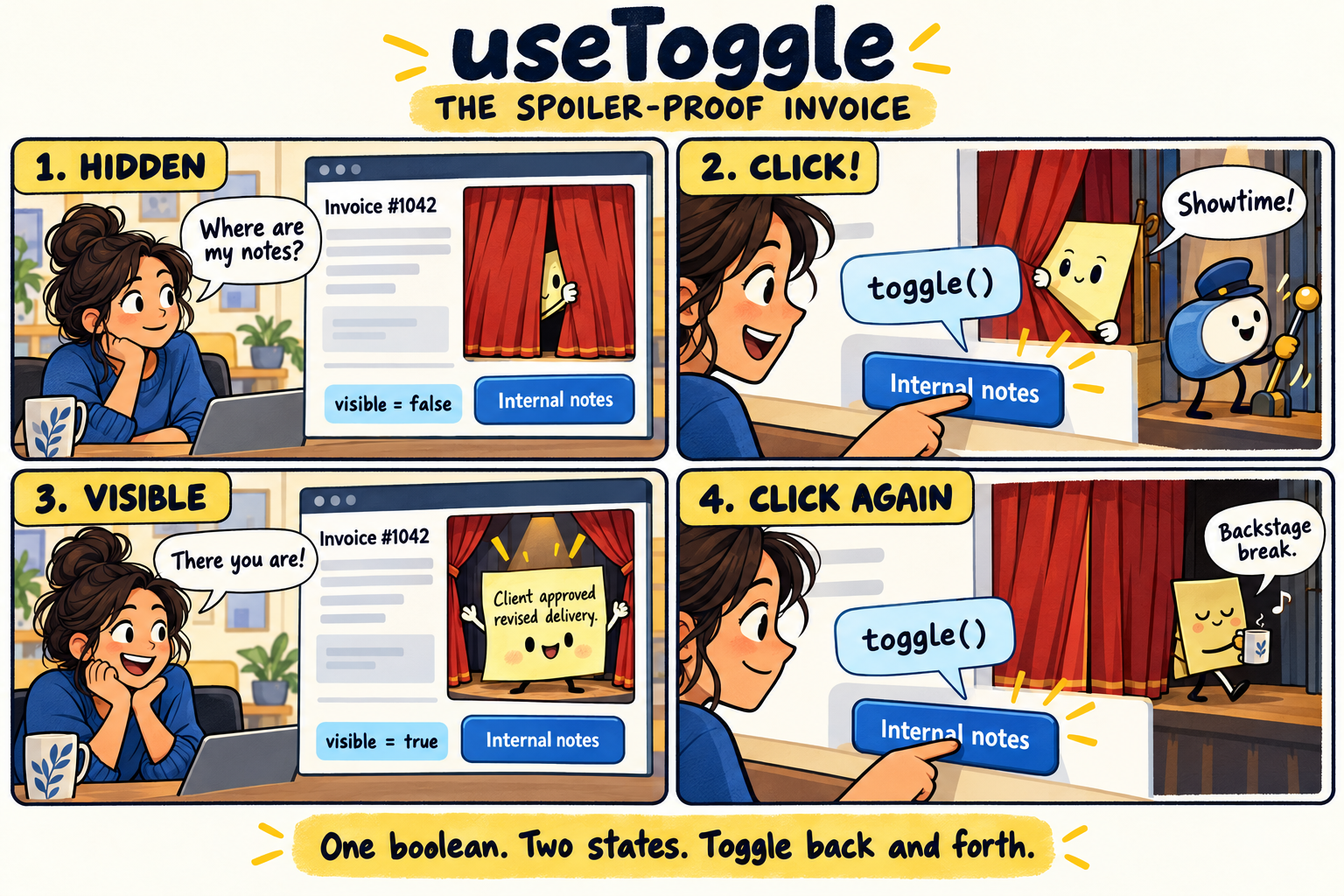
One boolean, two states: toggle() changes false to true, then back to false.
An invoice screen hides internal notes until a teammate asks to see them. No treasure map required.
Why this hook helps: A boolean and a stable toggle action keep the reveal/hide interaction small and readable.
Keep in mind: Use a full dialog primitive if the revealed content must trap focus; this example is an inline disclosure.
'use client';

import { useToggle } from 'use-a-hook';

export default function InvoiceNotes() {
  const [visible, toggle] = useToggle();
  return (
    <section>
      <button aria-expanded={visible} aria-controls="invoice-notes" onClick={toggle}>
        Internal notes
      </button>
      <p id="invoice-notes" hidden={!visible}>
        Client approved the revised delivery date.
      </p>
    </section>
  );
}
Boolean state with stable toggle and setter.
export declare function useToggle(
  // Whether the value starts on or off. Defaults to false.
  initialValue?: boolean
):
  // Returns: A fixed three-item array: the current value, a toggle action, and a setter.
  readonly [
    // The current true/false value.
    boolean,
    // Call with no arguments to flip true to false, or false to true.
    () => void,
    // React state setter: pass a boolean or a function that receives the previous boolean.
    import("react").Dispatch<import("react").SetStateAction<boolean>>
  ];
useCounter
Seats, not accidental seat mountains
A workspace administrator adds or removes paid seats before checkout. The minus button should not manufacture negative employees.
Why this hook helps: Counter actions compose when updates happen in the same batch, and reset clears the proposed change.
Keep in mind: The hook does not impose business limits. Enforce minimums and maximums in your UI and on the server.
'use client';

import { useCounter } from 'use-a-hook';

export default function SeatPicker() {
  const seats = useCounter(1);
  return (
    <section>
      <p>Seats: {seats.count}</p>
      <button disabled={seats.count <= 1} onClick={() => seats.decrement()}>
        Remove seat
      </button>
      <button onClick={() => seats.increment()}>Add seat</button>
      <button onClick={seats.reset}>Start over</button>
    </section>
  );
}
Counter state with stable functional actions and reset.
export declare function useCounter(
  // The starting number. Defaults to 0; reset uses the latest initialValue argument.
  initialValue?: number
):
  // Returns: The current count and actions for changing it.
  {
    // The number currently displayed.
    count: number;
    // Add step to the count. Leaving step out adds 1.
    increment: (step?: number) => void;
    // Subtract step from the count. Leaving step out subtracts 1; the hook does not enforce a minimum.
    decrement: (step?: number) => void;
    // Restore the latest initialValue argument.
    reset: () => void;
    // Set the count directly, or calculate it from the previous count.
    set: import("react").Dispatch<import("react").SetStateAction<number>>;
  };
usePrevious
Yesterday called; it brought a number
A sales dashboard shows whether the latest monthly total rose or fell from the last displayed total.
Why this hook helps: The hook remembers the previous committed value without scheduling another render just to keep history.
Keep in mind: This is render history, not a database of yesterday’s sales. Read historical business data from your API.
'use client';

import { useState } from 'react';
import { usePrevious } from 'use-a-hook';

export default function RevenueTrend() {
  const [revenue, setRevenue] = useState(1200);
  const previous = usePrevious(revenue);
  return (
    <section>
      <p>Revenue: ${revenue}</p>
      <p>
        {previous === undefined
          ? 'No previous reading yet.'
          : `Change since last render: ${revenue - previous}`}
      </p>
      <button onClick={() => setRevenue((value) => value + 100)}>
        Record another sale
      </button>
    </section>
  );
}
Read the value from the previous committed render.
export declare function usePrevious<
  // The type of value you pass in, such as a number or a customer object.
  T
>(
  // The value to remember after this render commits.
  value: T
):
  // Returns: The value from the previous committed render, or undefined on the first render.
  T | undefined;
useDebouncedValue
Search without the keyboard drum solo
A customer directory waits for a short typing pause before applying its search term.
Why this hook helps: The input stays immediate while the debounced value drives filtering or a query key.
Keep in mind: Debouncing limits update frequency; it does not cancel an older request. Pair remote search with a query library or cancellable fetch.
'use client';

import { useState } from 'react';
import { useDebouncedValue } from 'use-a-hook';

const customers = ['Ada Studio', 'Beacon Bakery', 'Cedar Design'];
export default function CustomerSearch() {
  const [query, setQuery] = useState('');
  const settled = useDebouncedValue(query, 300);
  const matches = customers.filter((name) =>
    name.toLowerCase().includes(settled.toLowerCase()),
  );
  return (
    <section>
      <input
        aria-label="Find customers"
        value={query}
        onChange={(event) => setQuery(event.target.value)}
      />
      <ul>
        {matches.map((name) => (
          <li key={name}>{name}</li>
        ))}
      </ul>
    </section>
  );
}
Delay publishing a value until changes settle.
import { type DebounceOptions } from './useDebouncedCallback.js';

export interface DebouncedValueOptions<T> extends DebounceOptions {
  // Compare the published and incoming values. Defaults to Object.is.
  equalityFn?: (previous: T, next: T) => boolean;
}

export declare function useDebouncedValue<
  // The type of your input and returned value; the hook keeps them the same.
  T
>(
  // The latest input value; the initial input is available immediately.
  value: T,
  // How long to wait after the last change, in milliseconds. Defaults to 300.
  delay?: number,
  // Optional scheduling edges, maxWait, and an equality function.
  options?: DebouncedValueOptions<T>
):
  // Returns: The most recent value whose waiting period has finished.
  T;
useDebouncedCallback
One preview, hold the confetti
A report builder regenerates a preview after the user pauses editing a heading.
Why this hook helps: The scheduled callback keeps the newest arguments. A Preview now button can flush pending work immediately.
Keep in mind: Use useAutosave for persistent writes that must be serialized; debouncing alone does not prevent overlapping saves.
'use client';

import { useState } from 'react';
import { useDebouncedCallback } from 'use-a-hook';

export default function ReportHeading() {
  const [heading, setHeading] = useState('Quarterly wins');
  const [preview, setPreview] = useState(heading);
  const update = useDebouncedCallback((text: string) => setPreview(text), 400, {
    maxWait: 1200
  });
  return (
    <section>
      <input
        aria-label="Report heading"
        value={heading}
        onChange={(event) => {
          setHeading(event.target.value);
          update(event.target.value);
        }}
      />
      <button onClick={() => update.flush()}>Preview now</button>
      <h2>{preview}</h2>
    </section>
  );
}
Configurable callback debounce with bounded waiting, pending inspection, cancel, and flush.
export interface ScheduledCallback<A extends unknown[], R> {
  (...args: A): void;
  // Cancel the pending call without running it.
  cancel(): void;
  // Run pending work now and return its result; return undefined if nothing is waiting.
  flush(): R | undefined;
}

export interface ControlledCallback<A extends unknown[], R> extends ScheduledCallback<A, R> {
  // Read whether a callback invocation is waiting; this does not trigger renders.
  isPending(): boolean;
}

export interface DebounceOptions {
  // Run at the start of a burst. Defaults to false.
  leading?: boolean;
  // Run the newest pending call after quiet time. Defaults to true.
  trailing?: boolean;
  // Maximum delay during continuous calls, clamped to at least delay.
  maxWait?: number;
}

export declare function useDebouncedCallback<
  // The list of argument types accepted by your callback.
  A extends unknown[],
  // The type of value your callback returns.
  R
>(
  // The function to run after calls stop arriving. The latest committed callback is used.
  callback: (...args: A) => R,
  // The quiet period in milliseconds. Defaults to 300.
  delay?: number,
  // Optional leading/trailing edges and maximum wait. Defaults to trailing-only behavior.
  options?: DebounceOptions
):
  // Returns: A callable scheduler with cancel(), flush(), and isPending(). Cleanup cancels work; it never flushes side effects automatically.
  ControlledCallback<A, R>;
useThrottledCallback
The slider with an inside voice
A dashboard slider emits many changes, but a secondary preview only needs an update every 100 milliseconds.
Why this hook helps: Time-based throttling delivers a leading update and the newest trailing value without rendering for every scheduled call.
Keep in mind: Use useRafCallback for paint-aligned visual movement. A millisecond throttle serves a different timing contract.
'use client';

import { useState } from 'react';
import { useThrottledCallback } from 'use-a-hook';

export default function PreviewQuality() {
  const [value, setValue] = useState(50);
  const [preview, setPreview] = useState(50);
  const publish = useThrottledCallback((quality: number) => setPreview(quality), 100);
  return (
    <section>
      <input
        aria-label="Preview quality"
        type="range"
        value={value}
        onChange={(event) => {
          const next = Number(event.target.value);
          setValue(next);
          publish(next);
        }}
      />
      <p>Preview quality: {preview}%</p>
    </section>
  );
}
Configurable leading/trailing callback throttle with pending inspection, cancel, and flush.
import type { ControlledCallback } from './useDebouncedCallback.js';

export interface ThrottleOptions {
  // Run immediately when a new time window starts. Defaults to true.
  leading?: boolean;
  // Run the newest pending arguments at the end of the window. Defaults to true.
  trailing?: boolean;
}

export declare function useThrottledCallback<
  // The callback argument types, kept in their original order.
  A extends unknown[],
  // The callback result type, returned by flush when it runs pending work.
  R
>(
  // The function to run at a limited rate. Later calls keep their newest arguments.
  callback: (...args: A) => R,
  // The minimum time between runs, in milliseconds. Defaults to 300.
  delay?: number,
  // Optional leading and trailing edges. Both default to true.
  options?: ThrottleOptions
):
  // Returns: A scheduler with cancel(), flush(), and isPending(). Calls are limited by elapsed time, independently of display frame rate.
  ControlledCallback<A, R>;
useInterval
The meeting clock takes a coffee break
A meeting timer counts seconds while running and pauses when the facilitator pauses the session.
Why this hook helps: A null delay pauses the interval, and changing the callback does not restart its cadence.
Keep in mind: For elapsed time that must survive background throttling, derive the display from timestamps rather than counting interval ticks.
'use client';

import { useState } from 'react';
import { useInterval } from 'use-a-hook';

export default function MeetingTimer() {
  const [running, setRunning] = useState(false);
  const [seconds, setSeconds] = useState(0);
  useInterval(() => setSeconds((value) => value + 1), running ? 1000 : null);
  return (
    <section>
      <p>Timer ticks: {seconds}</p>
      <button onClick={() => setRunning((value) => !value)}>
        {running ? 'Pause' : 'Start'}
      </button>
    </section>
  );
}
A cancellable interval that does not restart when callbacks change.
export declare function useInterval(
  // Work to repeat. Updating this function does not restart the timer.
  callback: () => void,
  // Time between runs in milliseconds; pass null to pause.
  delay: number | null
):
  // Returns: Nothing to store: the hook manages the interval and removes it on cleanup.
  void;
useTimeout
The toast knows when to leave
A settings screen briefly shows a local confirmation after updating a display preference.
Why this hook helps: A timeout clears the message and cancels when the component unmounts or its delay becomes null.
Keep in mind: A callback change does not restart the deadline. Use a distinct keyed notice component if every repeated notice needs a fresh timer.
'use client';

import { useState } from 'react';
import { useTimeout } from 'use-a-hook';

export default function PreferenceNotice() {
  const [notice, setNotice] = useState(false);
  useTimeout(() => setNotice(false), notice ? 2000 : null);
  return (
    <section>
      <button disabled={notice} onClick={() => setNotice(true)}>
        Apply display preference
      </button>
      {notice && <p role="status">Preference applied for this preview.</p>}
    </section>
  );
}
A cancellable timeout that uses the latest callback.
export declare function useTimeout(
  // Work to run once. The timer uses the latest committed function.
  callback: () => void,
  // Wait time in milliseconds; pass null to cancel. Changing the callback alone does not restart the wait.
  delay: number | null
):
  // Returns: Nothing to store: the hook schedules and cleans up the timeout.
  void;
useEventListener
Escape the help panel, not your job
A support panel closes when the user presses Escape.
Why this hook helps: The hook manages listener cleanup and keeps the handler current without reconnecting it on every render.
Keep in mind: For modifier shortcuts and editable-field filtering, use useHotkeys instead of rebuilding those rules yourself.
'use client';

import { useState } from 'react';
import { useEventListener } from 'use-a-hook';

export default function HelpPanel() {
  const [open, setOpen] = useState(true);
  useEventListener('keydown', (event) => {
    if (event.key === 'Escape') setOpen(false);
  });
  return (
    <section>
      <button onClick={() => setOpen(true)}>Open help</button>
      {open && <aside aria-label="Help">Press Escape to close this panel.</aside>}
    </section>
  );
}
Typed browser event listeners with stable callbacks and cleanup.
import { type RefObject } from 'react';

type Options = boolean | AddEventListenerOptions;

type Target<T extends EventTarget> = T | RefObject<T | null> | null;

export declare function useEventListener<
  // One supported browser event name; it determines the handler event type.
  K extends keyof WindowEventMap
>(
  // The event name, such as keydown, resize, or click.
  type: K,
  // The function that receives the event. Built-in event names get matching TypeScript event types.
  handler: (event: WindowEventMap[K]) => void,
  // An element, document, window, or object ref to one. Omit for window; null disables. Object-ref replacements are resolved after each commit.
  target?: Target<Window>,
  // Browser listener settings, or a boolean capture flag. Equivalent settings do not reconnect the listener.
  options?: Options
):
  // Returns: Nothing to store: the event listener is attached and removed for you.
  void;

export declare function useEventListener<
  // One supported browser event name; it determines the handler event type.
  K extends keyof DocumentEventMap
>(
  // The event name, such as keydown, resize, or click.
  type: K,
  // The function that receives the event. Built-in event names get matching TypeScript event types.
  handler: (event: DocumentEventMap[K]) => void,
  // An element, document, window, or object ref to one. Omit for window; null disables. Object-ref replacements are resolved after each commit.
  target: Target<Document>,
  // Browser listener settings, or a boolean capture flag. Equivalent settings do not reconnect the listener.
  options?: Options
):
  // Returns: Nothing to store: the event listener is attached and removed for you.
  void;

export declare function useEventListener<
  // One supported browser event name; it determines the handler event type.
  K extends keyof HTMLElementEventMap
>(
  // The event name, such as keydown, resize, or click.
  type: K,
  // The function that receives the event. Built-in event names get matching TypeScript event types.
  handler: (event: HTMLElementEventMap[K]) => void,
  // An element, document, window, or object ref to one. Omit for window; null disables. Object-ref replacements are resolved after each commit.
  target: Target<HTMLElement>,
  // Browser listener settings, or a boolean capture flag. Equivalent settings do not reconnect the listener.
  options?: Options
):
  // Returns: Nothing to store: the event listener is attached and removed for you.
  void;

export declare function useEventListener<
  // One supported browser event name; it determines the handler event type.
  K extends keyof SVGElementEventMap
>(
  // The event name, such as keydown, resize, or click.
  type: K,
  // The function that receives the event. Built-in event names get matching TypeScript event types.
  handler: (event: SVGElementEventMap[K]) => void,
  // An element, document, window, or object ref to one. Omit for window; null disables. Object-ref replacements are resolved after each commit.
  target: Target<SVGElement>,
  // Browser listener settings, or a boolean capture flag. Equivalent settings do not reconnect the listener.
  options?: Options
):
  // Returns: Nothing to store: the event listener is attached and removed for you.
  void;

export declare function useEventListener(
  // The event name, such as keydown, resize, or click.
  type: string,
  // The function that receives the event. Built-in event names get matching TypeScript event types.
  handler: (event: Event) => void,
  // An element, document, window, or object ref to one. Omit for window; null disables. Object-ref replacements are resolved after each commit.
  target: Target<EventTarget>,
  // Browser listener settings, or a boolean capture flag. Equivalent settings do not reconnect the listener.
  options?: Options
):
  // Returns: Nothing to store: the event listener is attached and removed for you.
  void;

export {};
useClickOutside
A menu that reads the room
An account menu dismisses when someone clicks elsewhere on the page.
Why this hook helps: The handler checks whether the pointer event came from outside the referenced subtree.
Keep in mind: This handles outside pointers, not complete menu accessibility. Add keyboard behavior or use an established menu primitive.
'use client';

import { useState, useRef } from 'react';
import { useClickOutside } from 'use-a-hook';

export default function AccountMenu() {
  const [open, setOpen] = useState(false);
  const ref = useRef<HTMLDivElement>(null);
  useClickOutside(ref, () => setOpen(false), open);
  return (
    <div ref={ref}>
      <button aria-expanded={open} onClick={() => setOpen((value) => !value)}>
        Account
      </button>
      {open && (
        <nav aria-label="Account">
          <a href="/settings">Settings</a>
        </nav>
      )}
    </div>
  );
}
Detect pointer events outside an element, including shadow DOM paths.
import { type RefObject } from 'react';

export interface ClickOutsideOptions {
  // Whether to listen; defaults to true.
  enabled?: boolean;
  // Refs whose event paths should be ignored.
  ignore?: readonly RefObject<HTMLElement | null>[];
  // Ignore pointer presses on the document scrollbars; defaults to false.
  excludeScrollbar?: boolean;
}

export declare function useClickOutside<
  // The HTML element type held by the ref, such as HTMLDivElement.
  T extends HTMLElement
>(
  // One ref or a fixed list of refs that all count as inside, including portaled content.
  ref: RefObject<T | null> | readonly RefObject<T | null>[],
  // The function to call when a pointer goes down outside that element.
  onOutside: (event: PointerEvent) => void,
  // Boolean enablement (default true), or options with enabled, ignored refs, and scrollbar exclusion.
  enabled?: boolean | ClickOutsideOptions
):
  // Returns: Nothing to store: the hook calls onOutside when appropriate.
  void;
useMediaQuery
The dashboard packs a smaller suitcase
A dashboard switches its preview between compact cards and a wider summary.
Why this hook helps: The hook subscribes to a CSS media query, with a deterministic fallback for server rendering.
Keep in mind: Prefer CSS alone for styling. Reach for this hook when JavaScript behavior or rendered content must change.
'use client';

import { useMediaQuery } from 'use-a-hook';

export default function ResponsiveSummary() {
  const wide = useMediaQuery('(min-width: 900px)');
  return (
    <section>
      <h2>Workspace activity</h2>
      <p>
        {wide
          ? 'Showing the detailed activity summary.'
          : 'Showing the compact summary.'}
      </p>
    </section>
  );
}
Subscribe to a media query with an explicit SSR fallback.
export declare function useMediaQuery(
  // A CSS media query, such as (min-width: 800px).
  query: string,
  // The value used during server rendering and initial hydration. Defaults to false.
  serverValue?: boolean
):
  // Returns: True when the browser matches the query; otherwise false.
  boolean;
useOnlineStatus
The Wi-Fi weather report
A workspace displays a connectivity hint near its editor.
Why this hook helps: All consumers share the browser online/offline listeners instead of each installing their own pair.
Keep in mind: Online means the browser thinks a network is available. It does not prove that your API can be reached.
'use client';

import { useOnlineStatus } from 'use-a-hook';

export default function ConnectionHint() {
  const online = useOnlineStatus();
  return (
    <p role="status">
      {online
        ? 'Network detected. Your API still gets the final say.'
        : 'Offline. Keep your draft handy.'}
    </p>
  );
}
Share browser online/offline subscriptions across consumers.
export declare function useOnlineStatus():
  // Returns: The browser connectivity hint: true for online, false for offline. Server rendering starts with true.
  boolean;
useLocalStorage
The dashboard remembers your favorite outfit
A user chooses a compact table layout and expects it to survive a page refresh.
Why this hook helps: JSON-backed state restores the preference and synchronizes other hook consumers of the same key.
Keep in mind: Keep values small and non-secret. Browser storage is synchronous, and stored JSON is not automatically schema-validated.
'use client';

import { useLocalStorage } from 'use-a-hook';

export default function TableDensity() {
  const [dense, setDense, reset] = useLocalStorage(
    'demo-table-density',
    false,
    { fallbackToMemory: true }
  );
  return (
    <section>
      <label>
        <input
          type="checkbox"
          checked={dense}
          onChange={(event) => setDense(event.target.checked)}
        />{' '}
        Compact rows
      </label>
      <button onClick={reset}>Forget this preference</button>
      <p>Rows are {dense ? 'compact' : 'comfortable'}.</p>
    </section>
  );
}
JSON state synchronized across hook instances and applicable browser tabs.
import { type StorageOptions } from './internal/useStorage.js';

export type { StorageOptions } from './internal/useStorage.js';

export declare function useLocalStorage<
  // The shape of your JSON value. This type does not validate data already in storage.
  T
>(
  // The browser storage key. Consumers using this key should agree on the value shape and default.
  key: string,
  // The fallback value, or a function that creates it once per mount.
  initialValue: T | (() => T),
  // Optional serializer, server fallback, cross-tab synchronization, memory fallback, and error reporting. Existing write failures still throw by default.
  options?: StorageOptions<T>
):
  // Returns: A fixed array with the stored value, its setter, and a remove action.
  readonly [
    // The current JSON value, or the captured default if storage cannot be read.
    T,
    // Set a new JSON value or calculate it from the latest stored value.
    import("react").Dispatch<import("react").SetStateAction<T>>,
    // Remove the storage key and return hook consumers to their defaults.
    () => void
  ];
useSessionStorage
A wizard with a short-term memory
An onboarding wizard remembers its current step during refreshes in the same tab.
Why this hook helps: Session storage keeps temporary flow state separate from long-lived preferences.
Keep in mind: Never persist passwords or one-time codes here. Verify sensitive flow state with the server.
'use client';

import { useSessionStorage } from 'use-a-hook';

export default function SetupWizard() {
  const [step, setStep, clear] = useSessionStorage('demo-setup-step', 1);
  return (
    <section>
      <p>Setup step {step} of 3</p>
      <button disabled={step <= 1} onClick={() => setStep((value) => value - 1)}>
        Back
      </button>
      <button disabled={step >= 3} onClick={() => setStep((value) => value + 1)}>
        Next
      </button>
      <button onClick={clear}>Restart</button>
    </section>
  );
}
JSON state scoped to a browser tab with synchronized hook instances.
import { type StorageOptions } from './internal/useStorage.js';

export declare function useSessionStorage<
  // The shape of your JSON value. This type does not validate data already in storage.
  T
>(
  // The browser storage key. Consumers using this key should agree on the value shape and default.
  key: string,
  // The fallback value, or a function that creates it once per mount.
  initialValue: T | (() => T),
  // Optional serializer, server fallback, cross-tab synchronization, memory fallback, and error reporting. Existing write failures still throw by default.
  options?: StorageOptions<T>
):
  // Returns: A fixed array with the stored value, its setter, and a remove action.
  readonly [
    // The current JSON value, or the captured default if storage cannot be read.
    T,
    // Set a new JSON value or calculate it from the latest stored value.
    import("react").Dispatch<import("react").SetStateAction<T>>,
    // Remove the storage key and return hook consumers to their defaults.
    () => void
  ];
useIntersectionObserver
The expensive chart waits backstage
A chart preview initializes only when its placeholder approaches the viewport.
Why this hook helps: Intersection observation reports visibility without a manual scroll-position calculation for every event.
Keep in mind: Visibility can change repeatedly. Keep expensive initialization cached or idempotent if it should happen only once.
'use client';

import { useIntersectionObserver } from 'use-a-hook';

export default function ChartPlaceholder() {
  const { ref, isIntersecting } = useIntersectionObserver<HTMLDivElement>({
    rootMargin: '100px',
  });
  return (
    <div ref={ref} style={{ minHeight: 180 }}>
      {isIntersecting ? (
        <p>Chart preview is in range: render the chart here.</p>
      ) : (
        <p>Chart is waiting nearby.</p>
      )}
    </div>
  );
}
Observe visibility through an element callback ref.
export declare function useIntersectionObserver<
  // The element type you will attach the ref to.
  T extends Element = HTMLElement
>(
  // Visibility settings: the scrolling root, extra root margin, and crossing thresholds.
  options?: IntersectionObserverInit
):
  // Returns: An element ref, the latest visibility record, and an easy-to-use boolean.
  {
    // Attach this callback as an element ref so the hook knows what to observe.
    ref: import("react").Dispatch<import("react").SetStateAction<T | null>>;
    // The latest browser observation, or null before one arrives.
    entry: IntersectionObserverEntry | null;
    // True when the latest observation says the element intersects the root.
    isIntersecting: boolean;
  };
useResizeObserver
The chart measures its actual apartment
A dashboard card needs the width of its own container rather than the width of the whole screen.
Why this hook helps: The observer tracks content-box dimensions and batches state updates by animation frame.
Keep in mind: Width and height start undefined. This hook measures size, not the element’s position on screen.
'use client';

import { useResizeObserver } from 'use-a-hook';

export default function ResizableCard() {
  const { ref, width, height } = useResizeObserver<HTMLDivElement>({
    round: Math.round
  });
  return (
    <div
      ref={ref}
      style={{
        resize: 'horizontal',
        overflow: 'auto',
        padding: 16,
        width: 280
      }}
    >
      <p>
        Card content: {Math.round(width ?? 0)} × {Math.round(height ?? 0)} CSS
        pixels
      </p>
      <p>Drag the resize handle to give the chart more room.</p>
    </div>
  );
}
Shared ResizeObserver subscriptions with latest-entry frame batching and configurable boxes.
import { type ResizeSubscriptionOptions } from './internal/resizeObserver.js';

export interface ElementSize {
  // Content-box width in CSS pixels; undefined until measured.
  width: number;
  // Content-box height in CSS pixels; undefined until measured.
  height: number;
}

export interface ResizeObserverOptions extends ResizeSubscriptionOptions {
  // Whether to subscribe. Defaults to true.
  enabled?: boolean;
  // Optional number rounding applied to measured dimensions. Defaults to preserving fractions.
  round?: (value: number) => number;
  // Receive each frame-batched size and its native observer entry.
  onResize?: (size: ElementSize, entry: ResizeObserverEntry) => void;
  // Set false for callback-only observation without size renders. Defaults to true.
  updateState?: boolean;
}

export declare function useResizeObserver<
  // The element type to measure, such as HTMLDivElement.
  T extends Element = HTMLElement
>(
  // Optional enablement, box selection, rounding, callback-only observation, and ResizeObserver constructor.
  options?: ResizeObserverOptions
):
  // Returns: An element ref and its latest content-box dimensions.
  {
    // Attach this callback to the element whose size you need.
    ref: import("react").Dispatch<import("react").SetStateAction<T | null>>;
    // Content-box width in CSS pixels; undefined until measured.
    width: number | undefined;
    // Content-box height in CSS pixels; undefined until measured.
    height: number | undefined;
  };
useFetch
A status card asks the server politely
A service-status card requests a small JSON response and lets the user refresh it.
Why this hook helps: The hook exposes loading and error state, aborts replaced requests, and ignores stale responses.
Keep in mind: Your app must implement /api/service-status. Use a query library when the same resource needs caching or request deduplication.
'use client';

import { useFetch } from 'use-a-hook';

type ServiceStatus = { message: string };
export default function ServiceStatusCard() {
  const request = useFetch<ServiceStatus>('/api/service-status');
  return (
    <section>
      <button disabled={request.loading} onClick={() => void request.refetch()}>
        Refresh status
      </button>
      {request.loading && <p role="status">Checking…</p>}
      {request.error && <p role="alert">{request.error.message}</p>}
      {request.data && <p>{request.data.message}</p>}
    </section>
  );
}
Minimal cancellable JSON reads with stale-response protection; no query cache.
export interface FetchState<T> {
  // The latest successful JSON result, or undefined before success/after an error. A 204 response also has no data.
  data: T | undefined;
  // The most recent request error, or undefined when there is none.
  error: Error | undefined;
  // True while the active request is pending; initially false until the effect starts.
  loading: boolean;
}

export interface FetchOptions extends Omit<RequestInit, 'signal'> {
  // Whether this URL may be fetched. Defaults to true. The hook owns its AbortSignal.
  enabled?: boolean;
}

export declare function useFetch<
  // The expected JSON response shape. Defaults to unknown; this is a type hint, not runtime validation.
  T = unknown
>(
  // The JSON endpoint to read; pass null to disable requests.
  url: string | null,
  // Fetch settings plus enabled. URL/enabled changes start a request; other option changes apply on the next request.
  options?: FetchOptions
):
  // Returns: Request state and a stable refetch action.
  {
    // Start another request using current options. Awaiting it waits for completion; errors are stored in error.
    refetch: () => Promise<void>;
    // The latest successful JSON result, or undefined before success/after an error. A 204 response also has no data.
    data: T | undefined;
    // The most recent request error, or undefined when there is none.
    error: Error | undefined;
    // True while the active request is pending; initially false until the effect starts.
    loading: boolean;
  };
useSetState
Change one filter, keep the rest of the band
A customer table updates its search text without accidentally discarding the active-only filter.
Why this hook helps: Partial patches merge into the object, and functional patches can depend on the current state.
Keep in mind: Merging is shallow. Replace a nested object deliberately instead of expecting a deep merge.
'use client';

import { useSetState } from 'use-a-hook';

export default function CustomerFilters() {
  const [filters, patch] = useSetState({ query: '', activeOnly: true });
  return (
    <section>
      <input
        aria-label="Search"
        value={filters.query}
        onChange={(event) => patch({ query: event.target.value })}
      />
      <label>
        <input
          type="checkbox"
          checked={filters.activeOnly}
          onChange={(event) => patch({ activeOnly: event.target.checked })}
        />{' '}
        Active customers only
      </label>
      <pre>{JSON.stringify(filters, null, 2)}</pre>
    </section>
  );
}
Shallow-merge object state, with functional patches and unchanged-value bailouts.
export declare function useSetState<
  // The object shape. Patches can change only keys that belong to this shape.
  T extends object
>(
  // The starting object, or a function that creates it once.
  initial: T | (() => T)
):
  // Returns: An object state value and a function that shallow-merges changes into it.
  readonly [
    // The current object. Treat it as immutable.
    T,
    // Pass changed fields, or a function returning changed fields. Nested objects are replaced, not deep-merged.
    (update: Partial<T> | ((previous: T) => Partial<T>)) => void
  ];
useConstant
One expensive notebook per desk
A report component builds a small reference index once for its mounted instance.
Why this hook helps: The initializer’s result keeps its identity across renders, even when its value is undefined.
Keep in mind: Keep initialization pure: Strict Mode and abandoned renders may initialize more than once. Do not open sockets or start timers here.
'use client';

import { useState } from 'react';
import { useConstant } from 'use-a-hook';

export default function RegionLookup() {
  const regions = useConstant(
    () =>
      new Map([
        ['apac', 'Asia Pacific'],
        ['emea', 'Europe, Middle East and Africa'],
      ]),
  );
  const [code, setCode] = useState('apac');
  return (
    <section>
      <select
        aria-label="Region"
        value={code}
        onChange={(event) => setCode(event.target.value)}
      >
        <option value="apac">APAC</option>
        <option value="emea">EMEA</option>
      </select>
      <p>{regions.get(code)}</p>
    </section>
  );
}
Initialize one pure value per mounted instance; useful for local stores.
export declare function useConstant<
  // The type of the initialized value, including undefined if that is what the function returns.
  T
>(
  // A pure function that creates the value. Do not start subscriptions or other side effects here.
  initialize: () => T
):
  // Returns: The same initialized value for the lifetime of this mounted instance.
  T;
useResetState
The reset button brings the original receipt
A profile form offers a way to discard local nickname edits.
Why this hook helps: The hook captures the original value once and exposes a stable action to restore it.
Keep in mind: A new initial argument does not replace the captured baseline. Remount the editor when switching records.
'use client';

import { useResetState } from 'use-a-hook';

export default function NicknameEditor() {
  const [nickname, setNickname, reset] = useResetState('Ada');
  return (
    <section>
      <input
        aria-label="Nickname"
        value={nickname}
        onChange={(event) => setNickname(event.target.value)}
      />
      <button onClick={reset}>Discard nickname edits</button>
    </section>
  );
}
State with a stable reset action that restores its original value.
export declare function useResetState<
  // The type of the state value.
  T
>(
  // The starting value or a function that creates it; captured once per mount.
  initial: T | (() => T)
):
  // Returns: A fixed array containing state, its setter, and a reset action.
  readonly [
    // The current state value.
    T,
    // Set the value directly or calculate it from the previous value.
    import("react").Dispatch<import("react").SetStateAction<T>>,
    // Restore the original captured value, not a later initial argument.
    () => void
  ];
useLatest
The callback checks today’s guest list
A delayed local preview should use the most recently committed recipient name, even if it was scheduled earlier.
Why this hook helps: A stable ref lets an imperative callback read fresh committed data without rebuilding that callback.
Keep in mind: Refs do not trigger renders. Use normal state for values that must update the visible UI.
'use client';

import { useState, useRef, useEffect } from 'react';
import { useLatest } from 'use-a-hook';

export default function GreetingPreview() {
  const [name, setName] = useState('Ada');
  const [message, setMessage] = useState('');
  const latestName = useLatest(name);
  const timer = useRef<ReturnType<typeof setTimeout> | undefined>(undefined);
  useEffect(() => () => clearTimeout(timer.current), []);
  function preview() {
    clearTimeout(timer.current);
    timer.current = setTimeout(() => setMessage(`Hello, ${latestName.current}!`), 1000);
  }
  return (
    <section>
      <input
        aria-label="Recipient"
        value={name}
        onChange={(event) => setName(event.target.value)}
      />
      <button onClick={preview}>Preview in one second</button>
      <p>{message}</p>
    </section>
  );
}
A stable ref containing the latest committed value, without causing renders.
export declare function useLatest<
  // The type stored in ref.current.
  T
>(
  // The value that should be available after the latest render commits.
  value: T
):
  // Returns: A stable ref object whose current property holds the latest committed value; updating it does not render the component.
  import("react").MutableRefObject<T>;
useEventCallback
A subscription without the revolving door
An integration emits a custom event, and the listener needs the current workspace name without being reattached on each edit.
Why this hook helps: The stable callback identity reads the latest committed closure when the event arrives.
Keep in mind: Call it from events or effects, not during render. This example uses a local CustomEvent instead of an external service.
'use client';

import { useState, useEffect } from 'react';
import { useEventCallback } from 'use-a-hook';

export default function WorkspaceEvent() {
  const [workspace, setWorkspace] = useState('Design team');
  const [message, setMessage] = useState('');
  const receive = useEventCallback(() => setMessage(`Event received for ${workspace}`));
  useEffect(() => {
    window.addEventListener('demo-workspace-ping', receive);
    return () => window.removeEventListener('demo-workspace-ping', receive);
  }, [receive]);
  return (
    <section>
      <input
        aria-label="Workspace"
        value={workspace}
        onChange={(event) => setWorkspace(event.target.value)}
      />
      <button onClick={() => window.dispatchEvent(new Event('demo-workspace-ping'))}>
        Send local ping
      </button>
      <p>{message}</p>
    </section>
  );
}
A stable event callback that reads the latest committed closure.
export declare function useEventCallback<
  // The callback argument types, in order.
  A extends unknown[],
  // The value returned when the callback runs.
  R
>(
  // Your event function; its latest committed version is used when called.
  callback: (...args: A) => R
):
  // Returns: A function with stable identity that accepts and returns the same types as callback. Call it from events or effects, not during render.
  (...args: A) => R;
useControllableState
The parent gets the remote control
A reusable details widget can manage itself or let a parent choose whether it is open.
Why this hook helps: The same component supports controlled value/onChange props and an internal default.
Keep in mind: Avoid switching between controlled and uncontrolled modes during the same mount.
'use client';

import { useState } from 'react';
import { useControllableState } from 'use-a-hook';

function Details({
  value,
  onChange,
}: {
  value?: boolean;
  onChange?: (next: boolean) => void;
}) {
  const [open, setOpen] = useControllableState({
    value,
    defaultValue: false,
    onChange,
  });
  return (
    <section>
      <button aria-expanded={open} onClick={() => setOpen((current) => !current)}>
        Details
      </button>
      {open && <p>Reusable components can share the remote.</p>}
    </section>
  );
}
export default function ControlledDetails() {
  const [open, setOpen] = useState(false);
  return (
    <>
      <button onClick={() => setOpen(true)}>Parent opens details</button>
      <Details value={open} onChange={setOpen} />
    </>
  );
}
Build components supporting either a controlled value or an internal default.
import { type SetStateAction } from 'react';

export interface ControllableStateOptions<T> {
  // The parent-controlled value. Undefined means use internal state.
  value?: T;
  // The initial internal value when no controlled value is supplied.
  defaultValue: T;
  // Called with the next requested value. In controlled mode the parent must pass that value back.
  onChange?: (value: T) => void;
}

export declare function useControllableState<
  // The type of the controlled or internal value.
  T
>(
  // Settings for controlled state or an internal default.
  { value, defaultValue, onChange }: ControllableStateOptions<T>
):
  // Returns: The effective value and a stable setter that can notify the owner.
  readonly [
    // The controlled value, or the internal value when uncontrolled.
    T,
    // Request a new value directly or from the previous value; controlled state still belongs to its parent.
    (action: SetStateAction<T>) => void
  ];
useHistory
Undo: the editor’s tiny time machine
A content editor lets users undo and redo title changes without turning every typo into a permanent life decision.
Why this hook helps: Immutable snapshots form a bounded past/present/future history. A new edit after undo creates a new branch.
Keep in mind: Avoid recording every large document on every keystroke. Group edits or store smaller snapshots for large editors.
'use client';

import { useHistory } from 'use-a-hook';

export default function TitleHistory() {
  const history = useHistory({ title: 'My portfolio' }, 30);
  return (
    <section>
      <input
        aria-label="Portfolio title"
        value={history.value.title}
        onChange={(event) => history.set({ title: event.target.value })}
      />
      <button disabled={!history.canUndo} onClick={history.undo}>
        Undo
      </button>
      <button disabled={!history.canRedo} onClick={history.redo}>
        Redo
      </button>
    </section>
  );
}
Bounded undo/redo history for immutable editor snapshots.
export declare function useHistory<
  // The type of every stored snapshot; do not mutate snapshots after storing them.
  T
>(
  // The first immutable snapshot.
  initial: T,
  // Maximum number of past snapshots to keep. Defaults to 100 and is clamped to at least 1.
  limit?: number
):
  // Returns: The present snapshot and bounded undo/redo controls.
  {
    // The current snapshot.
    value: T;
    // Whether a past snapshot exists.
    canUndo: boolean;
    // Whether a future snapshot exists after an undo.
    canRedo: boolean;
    // Add a new snapshot directly or from the current value; this clears redo history.
    set: (action: T | ((previous: T) => T)) => void;
    // Move back one snapshot if possible.
    undo: () => void;
    // Move forward one snapshot if possible.
    redo: () => void;
    // Replace the present value and clear both history stacks.
    reset: (value: T) => void;
  };
useList
The task list grows legs
A project board adds, updates, and removes local tasks before they are submitted.
Why this hook helps: List actions create new arrays, so React can detect changes without mutating an earlier snapshot.
Keep in mind: Use stable record IDs as React keys. Array positions are useful for operations, not durable identity.
'use client';

import { useList } from 'use-a-hook';

export default function TaskList() {
  const tasks = useList<{ id: string; title: string }>([]);
  return (
    <section>
      <button
        onClick={() =>
          tasks.append({ id: crypto.randomUUID(), title: 'Review invoice' })
        }
      >
        Add task
      </button>
      <ul>
        {tasks.items.map((task, index) => (
          <li key={task.id}>
            {task.title} <button onClick={() => tasks.removeAt(index)}>Remove</button>
          </li>
        ))}
      </ul>
      <button onClick={tasks.clear}>Clear local tasks</button>
    </section>
  );
}
Immutable list operations with stable actions and functional updates.
export declare function useList<
  // The type of one list item, such as a task object.
  T
>(
  // The starting items. Defaults to an empty list; copied once when the hook mounts.
  initial?: readonly T[]
):
  // Returns: A read-only item snapshot and actions that create new arrays.
  {
    // The current list. Do not change this array directly.
    items: readonly T[];
    // Replace the whole list, or calculate a new array from the previous list.
    set: import("react").Dispatch<import("react").SetStateAction<T[]>>;
    // Add one or more items at the end.
    append: (...values: T[]) => void;
    // Add one or more items at the beginning.
    prepend: (...values: T[]) => void;
    // Remove the item at this zero-based index; invalid indexes do nothing.
    removeAt: (index: number) => void;
    // Replace the item at this zero-based index; invalid indexes do nothing.
    updateAt: (index: number, value: T) => void;
    // Remove every item.
    clear: () => void;
  };
useMap
Every invoice gets its own sticky note
A billing review screen tracks local review notes by invoice ID.
Why this hook helps: A map provides keyed lookups while immutable actions keep snapshots safe for React rendering.
Keep in mind: The exposed snapshot is read-only in TypeScript. Use hook actions instead of mutating it with Map.set.
'use client';

import { useMap } from 'use-a-hook';

export default function InvoiceReviewNotes() {
  const notes = useMap<string, string>();
  return (
    <section>
      <label>
        Invoice INV-42{' '}
        <input
          value={notes.value.get('INV-42') ?? ''}
          onChange={(event) => notes.set('INV-42', event.target.value)}
        />
      </label>
      <button onClick={() => notes.remove('INV-42')}>Remove note</button>
      <p>{notes.value.size} invoices have local notes.</p>
    </section>
  );
}
Immutable map updates that skip unchanged keys and values.
export declare function useMap<
  // The type of map keys, such as a customer ID string.
  K,
  // The type of values stored under those keys.
  V
>(
  // Optional starting key/value pairs. Copied once when the hook mounts.
  initial?: Iterable<readonly [K, V]>
):
  // Returns: A read-only map snapshot and actions for changing entries.
  {
    // The current key/value map.