
use-smooth-text
v0.1.1
Published
Smoothly reveal streamed (LLM) text in React — backend-agnostic, zero-dependency.
Downloads
133

Maintainers
 sleepyzzz
Readme
use-smooth-text
Stream LLM responses into React without the jitter.
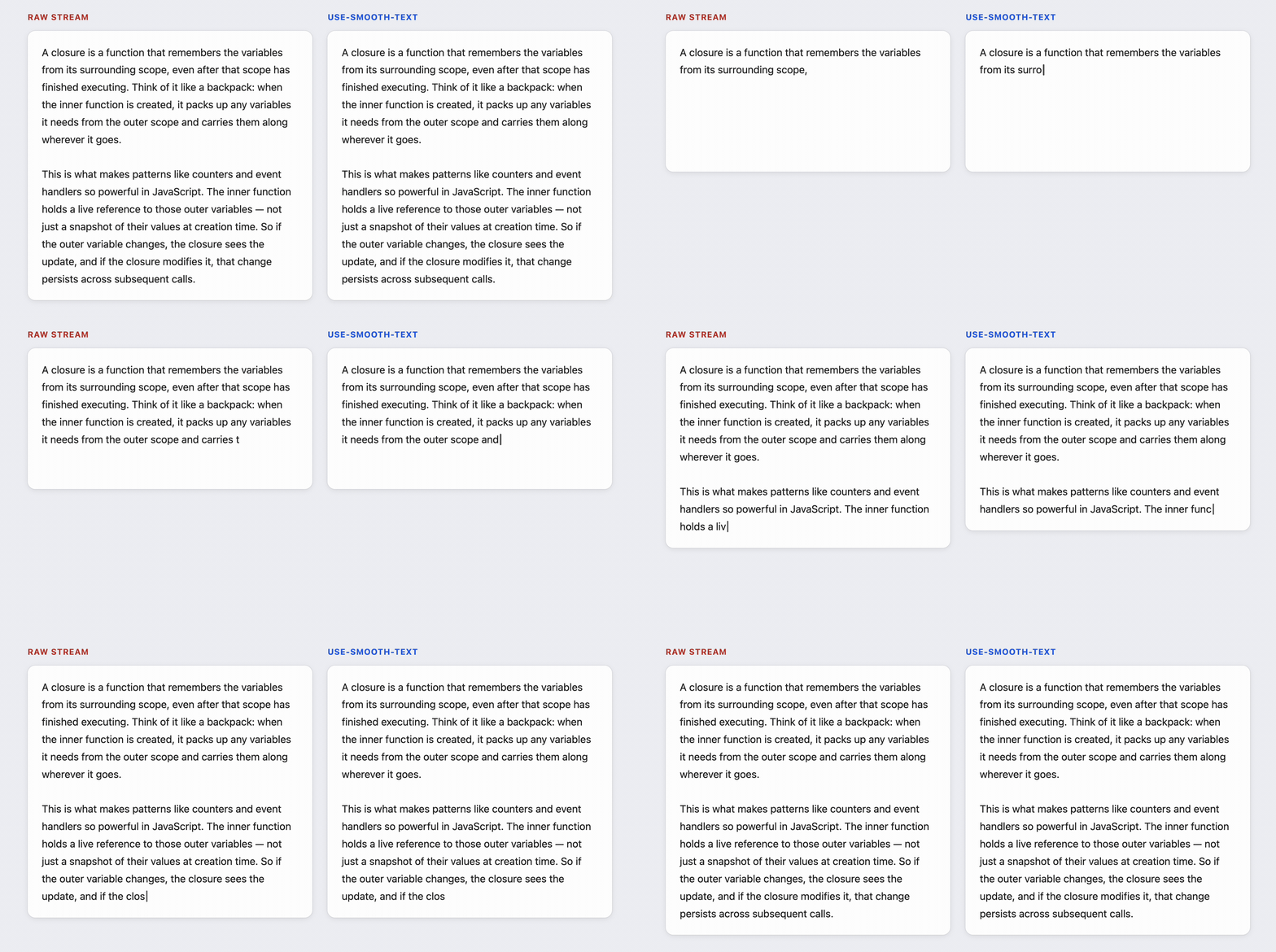
When a model streams a reply, the text doesn't trickle in one character at a time. It arrives in clumps: a few words, then a pause, then a whole sentence at once. Render that straight to the screen and it stutters. The chat apps you actually like to use hide this — the words glide in at a steady, readable pace. That smoothness is faked on top of bursty data, and this hook does the faking for you.
The popular way to get it, the Vercel AI SDK's smoothStream, runs on the server, and only if that server is JavaScript. If your backend is Python, Go, Rust, or just something you wrote yourself, you're out of luck. use-smooth-text runs in the browser on plain strings, so it doesn't care where the text came from or how it got there. No dependencies, one hook.
Install
npm install use-smooth-textYou'll need React 18 or newer — it's a peer dependency.
Quick start
Give the hook the text you've collected so far, and render what it hands back:
import { useEffect, useState } from 'react'
import { useSmoothText } from 'use-smooth-text'

function Reply({ stream }: { stream: AsyncIterable<string> }) {
  const [full, setFull] = useState('')
  const [done, setDone] = useState(false)

  // Collect chunks however you got them — fetch, SSE, a WebSocket, whatever.
  useEffect(() => {
    let cancelled = false
    ;(async () => {
      for await (const chunk of stream) {
        if (cancelled) return
        setFull((prev) => prev + chunk)
      }
      setDone(true)
    })()
    return () => { cancelled = true }
  }, [stream])

  const { text, isComplete } = useSmoothText(full, { done })
  return <p aria-live={isComplete ? 'off' : 'polite'}>{text}</p>
}
That's the whole idea: you keep appending to a string, the hook gives you back a smoothly-growing slice of it.
One thing to watch: if you reuse the same component across conversations, clear full and done when the stream changes. The simplest fix is to give the component a key={messageId} so React remounts it for each new reply.
What it returns
useSmoothText(fullText, options?) takes the text you've accumulated so far and returns a smoothly-revealed slice of it, plus a little state to drive your UI.
Options
| Option | Type | Default | What it does |
|---|---|---|---|
| granularity | 'char' \| 'word' | 'char' | Reveal a grapheme at a time (smoothest) or a word at a time (reads more naturally and splits markdown less often). |
| charsPerSecond | number | 60 | How fast it reveals. It'll speed up on its own to catch up after a big burst. |
| done | boolean | false | Flip this when the stream ends so the hook drains the rest and reports completion. |
Returns
| Field | Type | What it's for |
|---|---|---|
| text | string | The slice of fullText revealed so far — render this. |
| isAnimating | boolean | true while there's still text left to reveal. |
| isComplete | boolean | true once done is set and everything has been shown. |
| flush | () => void | Skip the rest of the animation and show everything now. |
A few things worth knowing
It works with any backend because it only ever sees plain strings — it never talks to your model, your server, or your transport. Whatever puts text in the browser is your business.
It won't mangle your text. Reveal happens on real character boundaries via Intl.Segmenter, so it never splits an emoji, a ZWJ sequence, or a surrogate pair, and it handles CJK and right-to-left scripts like Arabic and Hebrew correctly. "One character at a time" is a lie in most of the world's writing systems, and this hook knows it.
It paces itself. When it falls behind a burst it speeds up, then eases off as it catches up, so it lands roughly when the stream does instead of lagging forever.
It respects prefers-reduced-motion. If the user has asked for less motion, the text just appears, no animation.
It's safe to server-render. On the server it renders nothing and never touches window, so there's no hydration mismatch in Next.js, Remix, or anything else doing SSR.
What it doesn't do (yet)
I'd rather be upfront about the edges than have you discover them:
- It smooths the visual reveal. It doesn't change how many packets your server sends or how fast they arrive — that's the price of doing this in the browser, and it's also what makes it work everywhere.
- Feed it human-readable text, not tool calls or JSON. You don't want to type out a function-call payload one character at a time.
- The input is append-only. It expects the string to keep growing; a non-prefix change is treated as a brand-new message and starts over (no support for editing text that's already streamed in).
- v0 is controlled-input only. You hold the string and pass it in. Imperative
push()and stream-consuming adapters are on the list. - It doesn't parse markdown. For streaming markdown, pair it with a renderer that completes partial syntax (like
streamdown);granularity: 'word'also cuts down on mid-token flicker.
How it compares
| | use-smooth-text | smoothStream (AI SDK) | @llm-ui/react |
|---|:-:|:-:|:-:|
| Runs in | browser | JS server only | browser |
| Works with any backend | yes | no (needs a JS server) | yes |
| Zero dependencies | yes | n/a | no |
| Actively maintained | yes | yes | no (quiet since 2024) |
If you're already all-in on the Vercel AI SDK with a Node backend, smoothStream is right there and you don't need this. This is for everyone else.