npm package discovery and stats viewer.

Discover Tips

  • General search

    [free text search, go nuts!]

  • Package details

    pkg:[package-name]

  • User packages

    @[username]

Sponsor

Optimize Toolset

I’ve always been into building performant and accessible sites, but lately I’ve been taking it extremely seriously. So much so that I’ve been building a tool to help me optimize and monitor the sites that I build to make sure that I’m making an attempt to offer the best experience to those who visit them. If you’re into performant, accessible and SEO friendly sites, you might like it too! You can check it out at Optimize Toolset.

About

Hi, 👋, I’m Ryan Hefner  and I built this site for me, and you! The goal of this site was to provide an easy way for me to check the stats on my npm packages, both for prioritizing issues and updates, and to give me a little kick in the pants to keep up on stuff.

As I was building it, I realized that I was actually using the tool to build the tool, and figured I might as well put this out there and hopefully others will find it to be a fast and useful way to search and browse npm packages as I have.

If you’re interested in other things I’m working on, follow me on Twitter or check out the open source projects I’ve been publishing on GitHub.

I am also working on a Twitter bot for this site to tweet the most popular, newest, random packages from npm. Please follow that account now and it will start sending out packages soon–ish.

Open Software & Tools

This site wouldn’t be possible without the immense generosity and tireless efforts from the people who make contributions to the world and share their work via open source initiatives. Thank you 🙏

© 2026 – Pkg Stats / Ryan Hefner

uxml-preview

v0.4.0

Published

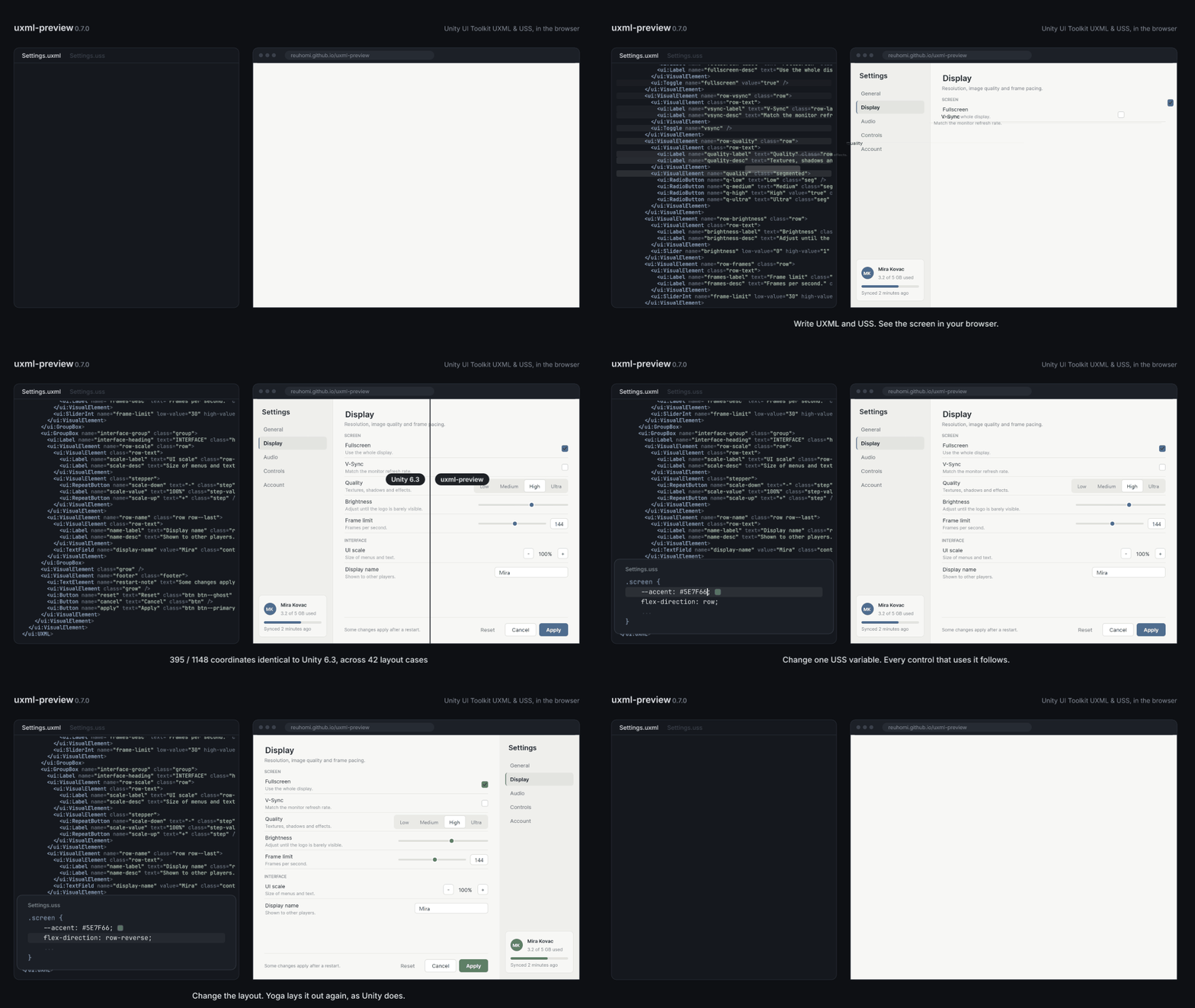
Preview Unity UI Toolkit UXML/USS in a browser without the Unity Editor. Uses Yoga (WebAssembly), the same layout engine UI Toolkit uses: 660 of 676 element coordinates identical to Unity 6. Parses and writes files back byte-for-byte.

Readme

uxml-preview

Render and edit Unity UI Toolkit UXML/USS in the browser — no Unity Editor required.

유니티 에디터 없이, 브라우저에서 UXML/USS를 렌더링하고 편집합니다.

Try it in your browser · 한국어

Paste your own .uxml and .uss, or open one of the examples. Nothing is uploaded — it all runs locally in the page.

Deleting flex-direction: row makes the buttons stack, because column is the USS default

Deleting one line rotates the layout ninety degrees — flex-direction defaults to column in USS and row in CSS. It is the most common way a ported stylesheet comes out wrong.

CI Pages License

English · 한국어

npm install uxml-preview

v0.2.0 — early release. Five controls (VisualElement, Label, Button, Image, ScrollView), everything else drawn as a plain box with a warning, and a support matrix that says plainly what has not been measured. Read what is not verified yet before relying on it.

v0.2.0 — 초기 릴리스입니다. 컨트롤 5종(VisualElement, Label, Button, Image, ScrollView)이고, 나머지는 경고와 함께 일반 박스로 그립니다. 검증되지 않은 부분은 지원 범위표에 그대로 적어뒀습니다. 쓰시기 전에 아직 검증되지 않은 것을 먼저 봐주세요.


English

What it does

uxml-preview parses Unity UI Toolkit .uxml and .uss files and renders them directly in a web browser. It uses Yoga — the same layout engine Unity UI Toolkit itself uses — compiled to WebAssembly, so results match the Unity Editor rather than approximating it.

Measured against Unity 6000.0.40f1: 660 of 676 element coordinates identical across 40 layout cases, including a full working screen. Ten of the sixteen differences are font metrics rather than layout — a browser cannot measure Unity's font asset. All sixteen are named in docs/accuracy.en.md.

.uxml + .uss  →  parse  →  style resolve  →  Yoga layout  →  DOM paint
                                                                  ↓
                                                          edit in browser
                                                                  ↓
                                                       serialize back to .uxml/.uss

Why

Designing Unity UI Toolkit interfaces today means a slow round trip: mock it up somewhere, hand-translate to UXML, open the Unity Editor, check, repeat. Web-based design tools and AI coding agents can write UXML, but neither can see the result. That broken feedback loop is what this library fixes.

Use cases

  • Preview UXML layouts without launching Unity
  • Give AI agents a visual feedback loop when authoring UI Toolkit interfaces
  • Embed a UXML preview in your own tooling (editor extensions, internal tools)
  • Share UI mockups with people who don't have Unity installed

Design principles

  1. Never reimplement layout. Unity UI Toolkit delegates layout to Yoga. So do we. Reimplementing it guarantees drift.
  2. Round-trip fidelity is non-negotiable. Parse → serialize must preserve comments, attribute order, and formatting. If opening and saving a file produces a noisy git diff, it's unusable in practice.
  3. USS is not CSS. Different box model, different defaults, no z-index, no @keyframes. USS is not CSS walks through the differences with a live example for each.
  4. Honest support matrix. Unsupported properties produce warnings, not silent wrong output. See docs/supported.en.md.

Status & roadmap

| Phase | Scope | Status | |---|---|---| | 0 | Repo scaffold + playground | ✅ | | 1 | Data model | ✅ | | 2 | Parser + serializer (round-trip) | ✅ | | 3 | USS style resolver | ✅ | | 4 | Yoga layout + DOM painting | ✅ | | 5 | Golden tests against Unity | ✅ | | 6 | v0.1 release | ✅ | | 7 | v0.2 — ScrollView, Image, states, a measured screen | ✅ | | 8+ | Editing layer, tool integration | ⬜ |

Full plan: docs/ROADMAP.md

What is not verified yet

The support matrix is deliberately conservative — see docs/supported.en.md for the full table.

  • Only geometry is compared automatically, and only as far as Yoga. The figure above is measured at the coordinates the layout engine produces. Whether the painted DOM reproduces them is checked by an invariant of our own rather than against Unity.
  • Colour, borders and corners rest on a single eye comparison. One screen was put side by side with Unity and checked item by item (docs/visual-check.md); it found two real defects, so it was worth doing, but it is one screen and not an automated diff. Everything it did not contain is still unmeasured.
  • Text measurement was not compared. Unity renders text with its own font asset, so any box sized by its text differs — this accounts for ten of the sixteen coordinate divergences. The line-height factor is still an estimate.
  • A wrapped ScrollView's content height diverges. Unity clamps it to the viewport; Yoga grows it to the content. Unity's rule is not yet identified.
  • Nested disabled elements dim twice. enabled="false" disables a subtree and each level takes the half opacity, so a disabled control inside a disabled panel comes out at a quarter. Unity almost certainly dims once; this is not measured yet.
  • Scrollbars reserve their width but are not drawn, and nothing scrolls.
  • -unity-slice-*, -unity-background-image-tint-color and transition are parsed and preserved, but not drawn.

API

import { loadLayoutEngine, parse, render, serialize } from 'uxml-preview';

// Yoga is WebAssembly, so it loads once, up front. `render` stays synchronous.
await loadLayoutEngine();

// text → model
const doc = parse(uxmlText, ussText);

// model → screen
const view = render(doc, document.getElementById('preview'), {
  resolveAsset: (path) => myAssetUrlFor(path),

  // Pseudo-class states are explicit input, keyed by USS selector, so the same
  // call always draws the same picture. Per element, because real screens mix.
  states: { '#UseButton': ['hover'], '#DropButton': ['disabled'] },
});
console.log(view.warnings);

// Yoga nodes are WASM handles and are not garbage collected.
view.dispose();

// model → text
const { uxml, uss } = serialize(doc);

Playground

reuhomi.github.io/uxml-preview — or run it locally:

pnpm install
pnpm dev

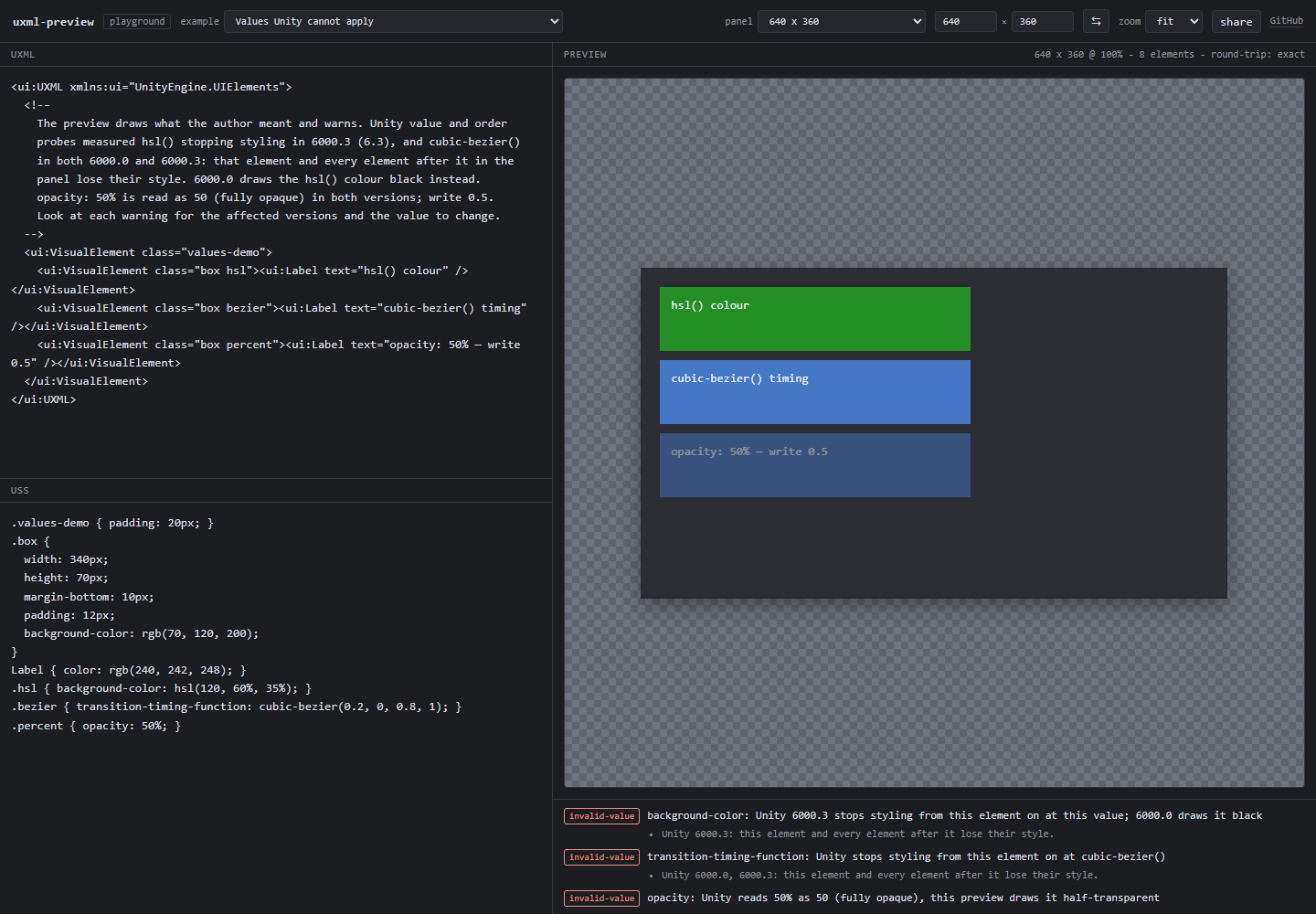
Edit UXML and USS on the left, see the result on the right. The panel size is set explicitly rather than following the window, because USS percentages and stretching resolve against the panel — a preview that resizes with the browser cannot answer "how does this look at 1920×1080".

The corner reads round-trip: exact whenever serializing the document back out reproduces what you typed, byte for byte. It is the round-trip guarantee checked live, on your own file — and it holds for text that does not parse, too, since untouched input is copied out of the original rather than regenerated. Half a tag, no root element, an empty file: still exact. DIFFERS would mean a bug here, not in your document.

Unsupported controls are reported but still round-trip exactly

The panel size is chosen rather than inherited from the window, so a layout can be checked at the resolution it will actually ship at.

Switching the panel between 1920x1080, portrait and a phone size

The examples are chosen to show the traps: flex-direction defaulting to column, overlap ordered by markup rather than z-index, and unsupported controls surviving a round trip while being reported rather than drawn.

Development

pnpm test           # everything
pnpm test:roundtrip # parse -> serialize is byte-identical
pnpm test:golden    # regression snapshots + comparison against Unity
pnpm golden:emit    # write the golden cases out for loading into Unity
pnpm build

Reproducing the accuracy numbers needs a Unity install; the procedure is in docs/accuracy.en.md.

Accuracy

Checked by comparing element geometry against the Unity Editor, case by case. Geometry rather than pixels: Unity draws text with its own font asset and a browser does not, so a pixel diff would measure the font more than the layout.

Measured against Unity on 2026-08-12, over 40 cases and 169 elements:

| | | |---|---| | Cases matching exactly | 38 / 40 | | Values within 0.5px | 660 / 676 (97.6%) |

The sixteen divergences are four different things, and the distinction matters more than the ratio: ten are text metrics, three are 1px, two are a yoga-layout version difference, and one is unresolved. The ten are not a layout defect — both engines shrink the same box for the same reason and only the ruler differs, which is the same fact that makes pixel diffing useless. Every one is named in docs/accuracy.en.md, along with the failed attempts to configure around the version difference and how to reproduce the measurement.

Questions this answers

Can I preview a UXML file without opening the Unity Editor? Yes. Paste .uxml and .uss into the playground, or call parse() and render() from the library. Nothing is uploaded and Unity is never launched.

Why does my CSS layout come out wrong in UI Toolkit? Most often because flex-direction defaults to column in USS and row in CSS, so every container without an explicit direction is rotated ninety degrees. The other four common causes — no z-index, forced border-box, no bare text nodes, no margin collapsing — are in USS is not CSS, each with a live example.

Does USS support z-index, CSS Grid, or calc()? No, none of the three. Overlap follows markup order, grid layouts must be rebuilt as nested flex, and computed values have to be resolved to fixed numbers or calculated in C#.

How close is the output to Unity? 660 of 676 element coordinates identical against Unity 6000.0.40f1, across 40 layout cases including a complete inventory screen. Geometry is compared rather than screenshots, because Unity draws text with its own font asset — which is also why ten of the sixteen differences are font metrics rather than layout. Every divergence is named in docs/accuracy.en.md.

Will it damage my files if I edit them? Editing goes through a model that keeps the original text. An unedited document serializes back byte-for-byte — comments, attribute order, entity encodings and CRLF endings included — and an edit rewrites only the region it touched. The playground shows this live as round-trip: exact.

What happens to controls it does not support? They are drawn as a plain VisualElement, reported as a warning, and written back out unchanged. Their own styles and their children come out normally; only what makes that control look like itself is missing. One unfamiliar tag never takes down the rest of the screen, and nothing is silently dropped.

License

Apache-2.0


한국어

무엇을 하는가

uxml-preview는 Unity UI Toolkit의 .uxml, .uss 파일을 파싱해서 웹 브라우저에 직접 렌더링하는 라이브러리입니다. Unity UI Toolkit이 실제로 사용하는 레이아웃 엔진인 Yoga를 WebAssembly로 그대로 사용하기 때문에, 결과를 "비슷하게 흉내내는" 것이 아니라 유니티 에디터와 일치시킵니다.

Unity 6000.0.40f1과 대조한 결과, 실무형 화면을 포함한 레이아웃 케이스 40개에서 요소 좌표 676개 중 660개가 일치합니다. 어긋난 16개 중 10개는 레이아웃이 아니라 폰트 메트릭 차이입니다 — 브라우저는 유니티 폰트 에셋을 잴 수 없습니다. 16개 전부 docs/accuracy.md에 이름과 사유를 적어뒀습니다.

.uxml + .uss  →  파싱  →  스타일 계산  →  Yoga 레이아웃  →  DOM 페인팅
                                                                  ↓
                                                          브라우저에서 편집
                                                                  ↓
                                                    .uxml/.uss로 다시 저장

왜 만드는가

지금 UI Toolkit으로 UI를 만들려면 왕복이 깁니다. 어딘가에 시안을 만들고 → 손으로 UXML로 옮기고 → 유니티를 켜서 확인하고 → 안 맞으면 되돌아갑니다. 웹 기반 디자인 도구나 AI 코딩 에이전트가 UXML을 쓸 수는 있지만, 둘 다 그 결과를 볼 수 없습니다. 이 끊긴 피드백 루프를 잇는 것이 이 라이브러리의 목적입니다.

활용

  • 유니티를 켜지 않고 UXML 레이아웃 확인
  • AI 에이전트가 UI Toolkit UI를 만들 때 시각적 피드백 루프 제공
  • 자체 도구(에디터 확장, 사내 툴)에 UXML 프리뷰 내장
  • 유니티가 없는 사람과 UI 시안 공유

설계 원칙

  1. 레이아웃을 직접 구현하지 않는다. UI Toolkit은 레이아웃을 Yoga에 위임합니다. 우리도 그렇게 합니다. 직접 구현하면 반드시 어긋납니다.
  2. 왕복 보존은 타협 대상이 아니다. 파싱 → 직렬화 시 주석, 속성 순서, 서식이 유지되어야 합니다. 열었다 저장했을 때 git diff가 지저분해지면 실무에서 못 씁니다.
  3. USS는 CSS가 아니다. 박스 모델이 다르고, 기본값이 다르고, z-index가 없고, @keyframes가 없습니다. USS는 CSS가 아니다에 차이점마다 직접 해볼 수 있는 예제 링크와 함께 정리해뒀습니다.
  4. 지원 범위를 정직하게 밝힌다. 미지원 속성은 조용히 틀린 결과를 내는 대신 경고를 남깁니다. docs/supported.md 참조.

진행 상황

| 단계 | 범위 | 상태 | |---|---|---| | 0 | 저장소 뼈대 + 놀이터 | ✅ | | 1 | 데이터 모델 | ✅ | | 2 | 파서 + 직렬화 (왕복 검증) | ✅ | | 3 | USS 스타일 리졸버 | ✅ | | 4 | Yoga 레이아웃 + DOM 페인팅 | ✅ | | 5 | 유니티 대조 골든 테스트 | ✅ | | 6 | v0.1 공개 | ✅ | | 7 | v0.2 — ScrollView·Image·상태, 대표 화면 대조 | ✅ | | 8+ | 편집 레이어, 도구 통합 | ⬜ |

전체 계획: docs/ROADMAP.md

아직 검증되지 않은 것

지원 범위는 일부러 보수적으로 적었습니다. 전체 표는 docs/supported.md에 있습니다.

  • 자동 대조는 좌표만, 그것도 Yoga 층까지입니다. 위 수치는 레이아웃 엔진이 낸 좌표를 잰 것입니다. 그려진 DOM이 그 좌표를 재현하는지는 유니티가 아니라 자체 불변식 검사로 봅니다
  • 색·테두리·모서리는 육안 대조 1회에 기대고 있습니다. 화면 하나를 유니티와 나란히 놓고 항목별로 확인했고(docs/visual-check.md), 거기서 실제 결함 두 개가 나왔으니 할 값어치는 있었습니다. 다만 화면 하나이고 자동 diff가 아닙니다. 그 화면에 없던 것은 여전히 미측정입니다
  • 텍스트 측정은 대조하지 않았습니다. 유니티는 자기 폰트 에셋으로 글자를 그리므로 텍스트가 크기를 좌우하는 박스는 어긋납니다 — 좌표 불일치 16건 중 10건이 이것입니다. 행 높이 계수도 아직 추정치입니다
  • wrap된 ScrollView의 콘텐츠 높이가 어긋납니다. 유니티는 뷰포트에 묶고 Yoga는 콘텐츠로 키웁니다. 유니티의 규칙을 아직 특정하지 못했습니다
  • 중첩된 비활성 요소가 두 번 흐려집니다. enabled="false"가 하위 트리를 비활성으로 만들고 각 층이 0.5 불투명도를 받아 1/4이 됩니다. 유니티는 한 번만 흐리게 할 것이 거의 확실하지만 아직 측정하지 않았습니다
  • 스크롤바는 폭만 예약하고 그리지 않으며, 스크롤되지 않습니다
  • -unity-slice-*, -unity-background-image-tint-color, transition은 파싱·보존은 되지만 그려지지 않습니다

놀이터

reuhomi.github.io/uxml-preview — 또는 로컬에서:

pnpm install
pnpm dev

왼쪽에서 UXML과 USS를 고치면 오른쪽에 바로 반영됩니다. 패널 크기는 창을 따라가지 않고 직접 지정합니다 — USS의 %와 stretch가 전부 패널 크기에 걸려 있어서, 창 크기를 따라가는 프리뷰로는 "1920×1080에서 어떻게 보이나"에 답할 수 없기 때문입니다.

우상단의 round-trip: exact지금 입력한 내용을 다시 저장했을 때 바이트 단위로 같다는 뜻입니다. 왕복 보존이라는 약속을 사용자 파일로 실시간 검사하는 것이고, 파싱되지 않는 텍스트에도 성립합니다 — 건드리지 않은 입력은 재생성하지 않고 원본에서 그대로 복사하기 때문입니다. 태그를 반쯤 지우든, 루트가 없든, 파일을 비우든 exact입니다. DIFFERS가 뜬다면 그건 문서가 아니라 이 라이브러리의 버그라는 뜻입니다.

예제는 예쁜 것보다 함정을 보여주는 것으로 골랐습니다 — flex-direction의 기본값이 column이라는 것, 겹침 순서가 z-index가 아니라 마크업 순서로 정해진다는 것, 전용 렌더러가 없는 컨트롤도 일반 박스로 그려지고 경고와 함께 왕복에서 살아남는다는 것.

개발

pnpm test           # 전체
pnpm test:roundtrip # 파싱 -> 직렬화 바이트 일치
pnpm test:golden    # 회귀 스냅샷 + 유니티 대조
pnpm golden:emit    # 골든 케이스를 유니티용 파일로 출력
pnpm build

정확도 수치를 재현하려면 유니티가 필요합니다. 절차는 docs/accuracy.md에 있습니다.

이런 질문에 답합니다

유니티를 켜지 않고 UXML을 미리 볼 수 있나요? 됩니다. 놀이터.uxml.uss를 붙여넣거나, 라이브러리의 parse()·render()를 호출하면 됩니다. 아무것도 업로드되지 않고 유니티도 실행되지 않습니다.

CSS 레이아웃을 옮겼는데 UI Toolkit에서 왜 어긋나나요? 대개 flex-direction 기본값 때문입니다. USS는 column, CSS는 row라서 방향을 명시하지 않은 모든 컨테이너가 90도 틀어집니다. 나머지 네 가지 흔한 원인(z-index 없음, border-box 강제, 맨몸 텍스트 노드 없음, margin 상쇄 없음)은 USS는 CSS가 아니다에 직접 해볼 수 있는 예제와 함께 있습니다.

USS에 z-index나 CSS Grid, calc()가 있나요? 셋 다 없습니다. 겹침은 마크업 순서로 정해지고, 그리드는 중첩 flex로 다시 짜야 하며, 계산이 필요한 값은 고정값으로 풀거나 C#에서 계산해야 합니다.

유니티와 얼마나 같나요? Unity 6000.0.40f1 기준, 인벤토리 화면 전체를 포함한 레이아웃 케이스 40개에서 요소 좌표 676개 중 660개 일치입니다. 스크린샷이 아니라 좌표를 비교하는데, 유니티가 자기 폰트 에셋으로 글자를 그리기 때문입니다 — 그리고 그 사실 때문에 불일치 16개 중 10개가 레이아웃이 아니라 폰트 메트릭입니다. 전부 docs/accuracy.md에 이름이 적혀 있습니다.

편집하면 파일이 망가지지 않나요? 편집은 원본 텍스트를 그대로 들고 있는 모델을 거칩니다. 고치지 않은 문서는 주석·속성 순서·엔티티 표기·CRLF까지 바이트 단위로 같게 저장되고, 고친 경우에도 건드린 영역만 바뀝니다. 놀이터의 round-trip: exact 표시가 이걸 실시간으로 보여줍니다.

지원하지 않는 컨트롤은 어떻게 되나요? 일반 VisualElement처럼 그려지고, 경고로 보고되고, 저장하면 그대로 다시 나옵니다. 자기 스타일과 자식은 정상적으로 나오며 그 컨트롤 고유의 모양만 빠집니다. 모르는 태그 하나 때문에 화면 전체가 죽지 않고, 조용히 사라지는 것도 없습니다.

라이선스

Apache-2.0


Keywords

Unity, Unity3D, UI Toolkit, UITK, UXML, USS, renderer, preview, browser, Yoga layout, WebAssembly, TypeScript, game UI, editor tooling