
v-picker
v2.0.1
Published
a better vue picker


Readme
原来的vuepicker比较差,没有默认数据,所以特意修改了一下
vue-picker
a picker componemt for vue2.0
走了一圈 github 都没有找到自己想要的移动端的 vue-picker的组件,于是自己就下手,撸了一个出来,感受下效果图。
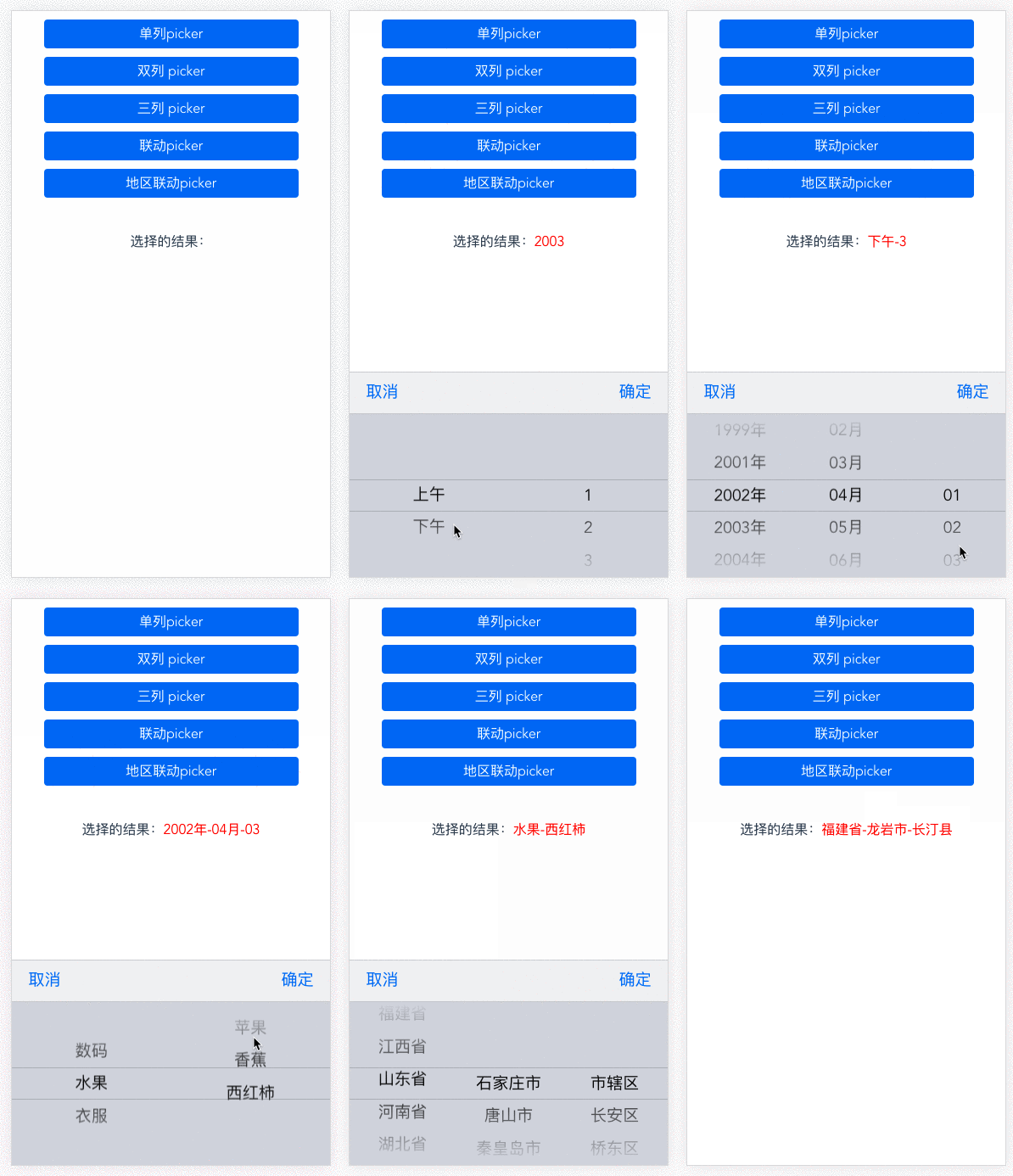
demo
exampleCode:https://github.com/naihe138/vue-picker/blob/master/arearSelect/demo.vue
demo 地址:http://gitblog.naice.me/vue-picker/arearSelect/index.html
install
npm install vue-pickers --save
使用
import VuePickers from 'vue-pickers'

// components
components: {
  VuePickers
}

// template
<vue-pickers :show="show1"
    :selectData="pickData1"
    v-on:cancel="close"
    v-on:confirm="confirmFn"></vue-pickers>
配置
数据结构说明
例1普通的数据结构
pickData1: {
  columns: 1, // picker的列数
  // 第一列的数据结构
  pData1: [
    {
      text: 1999,
      value: 1999
    },
    {
      text: 2001,
      value: 2001
    },
    {
      text: 2002,
      value: 2002
    },
    {
      text: 2003,
      value: 2003
    },
    {
      text: 2004,
      value: 2004
    },
    {
      text: 2005,
      value: 2005
    },
  ]
}
例2联级数据结构
pickData2: {
  columns: 2, // 两列
  link: true, // 联级必须需要link 参数
   // 第一列数据结构
  pData1: [
    {
      text: '数码',
      value: 1999
    },
    {
      text: '水果',
      value: 2001
    },
    {
      text: '衣服',
      value: 2002
    }
  ],
 // 第二列数据结构
  pData2: {
    '1999': [
      {
        text: '相机',
        value: 101
      },
      {
        text: '手机',
        value: 102
      },
      {
        text: '音箱',
        value: 103
      }
    ],
    '2001': [
      {
        text: '苹果',
        value: 104
      },
      {
        text: '香蕉',
        value: 105
      },
      {
        text: '西红柿',
        value: 106
      }
    ],
    '2002': [
      {
        text: '衬衫',
        value: 107
      },
      {
        text: '短裤',
        value: 108
      },
      {
        text: '上衣',
        value: 109
      }
    ]
  }
},
例3中国地区联级数据结构
import {provs_data, citys_data, dists_data} from 'vue-pickers/lib/areaData'

pickData3: {
  columns: 3,
  link: true,
  pData1: provs_data,
  pData2: citys_data,
  pData3: dists_data,
},