
v-topo-draw
v1.0.4
Published
基于ant-x6的封装,进行topo图的绘制


Readme
v-topo-draw
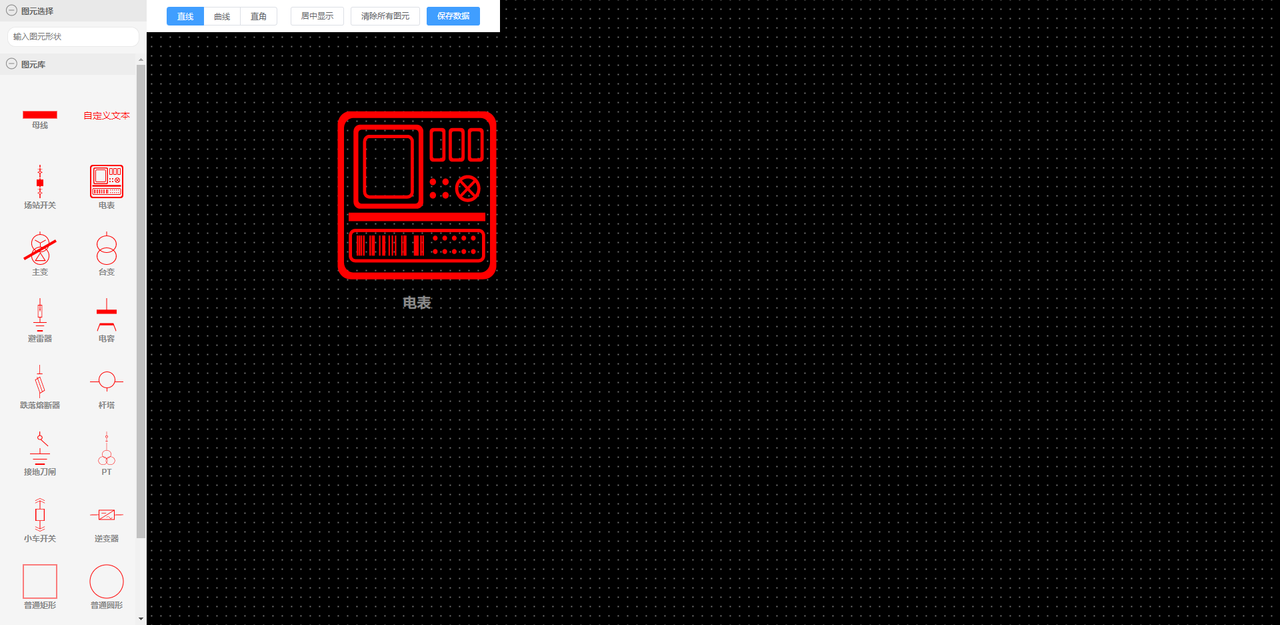
功能描述
基于antv-x6工具进行封装,用于接线图的拖拽绘制
使用
import VTopoDraw from 'v-topo-draw'

Vue.use(VTopoDraw)
参数
<VTopoDraw :graphData="[]" :shapeList="[]"></VTopoDraw>graphData(可选,Array):后台接口查询出的绘制图元数据,数据格式和antv-x6中API,graph.toJSON()保持一致,传入后渲染图元到绘制区域
shapeList(可选,Array):绘制区域左侧的图元数据,不传入有默认自带的一些图元数据
shapeList数据格式:
| 属性 | 数据类型 | 说明 |
| ---- | ---- | ---- |
| shape | String | 支持Rect、Circle、Text-Block、Image、Path,和antv-x6中的Shape类型对应,其中Path应该满足所有的应用场景,需要UI设计好svg并且合并图层的方式最佳 |
| options | Object | 用于antv-x6在创建图元节点对象所需的配置参数 |
options数据格式
| 属性 | 数据类型 | 说明 |
| ---- | ---- | ---- |
| width | Number | 图元在左侧图元库中的显示宽度 |
| height | Number | 图元在左侧图元库中的显示高度 |
| imageUrl | String | 如果shape为Image,则需要传入图片路径,一般采用svg格式 |
| data | Object | 额外的图元数据,等同于官方格式和用途 |
| ports | Object | 图元连接锚点,等同于官方格式和用途 |
| attrs | Object | 用于antv-x6在创建图元节点对象所需的属性配置,可参考官网传入,示例如下 |
attrs: {
    label: {
        text: '母线',
        fill: '#888',
        fontSize: 12,
        fontWeight: 600,
        refY: '150%',
        textVerticalAnchor: 'top'
    },
    body: {
        stroke: '#ff0000',
        strokeWidth: 1,
        fill: '#ff0000',
    },
}
完整的数据格式示例
{
        shape: 'Path',
        options: {
            width: 50,
            height: 15,
            attrs: {
                body: {
                    fill: '#ff0000',
                    stroke: 'none',
                    refD: `M37,14 L37,31 L13,31 L13,14 L37,14 Z M36,15.521 L15.325,30 L36,30 L36,15.521 Z M35.183,15 L14,15 L14,29.835 L35.183,15 Z M27.898547,24.9121622 L27.8981354,24.9351622 L30.6151354,28.2221622 L31.8291354,28.2221622 L33.197209,26.5673346 L33.6001354,27.0549897 L32.0689468,28.9080932 L32.0689468,28.9121622 L30.3418126,28.9121622 L30.3411354,28.8591622 L30.3383178,28.8634035 L27.5291354,25.4631622 L26.4811354,25.4631622 L25.0030618,27.2529208 L24.6001354,26.7652656 L26.1271354,24.9171622 L26.1278083,24.9121622 L27.898547,24.9121622 Z M12.997051,22 L13,22.9085237 L0.0027305188,23 L0,22.0914763 L12.997051,22 Z M49.997051,22 L50,22.9085237 L37.0027305,23 L37,22.0914763 L49.997051,22 Z M24.2682129,19.2837838 L24.2682129,20.2837838 L17.2682129,20.2837838 L17.2682129,19.2837838 L24.2682129,19.2837838 Z`
                },
                label: {
                    text: '逆变器',
                    fill: '#888',
                    fontSize: 12,
                    fontWeight: 600,
                    refY: '250%',
                    textVerticalAnchor: 'top'
                },
            },
            ports: {
                groups: {
                    top: {
                        position: {
                            name: 'absolute',
                            args: {
                                x: '50%',
                                y: 0
                            }
                        },
                        attrs: portAttrs,
                    },
                    bottom: {
                        position: {
                            name: 'absolute',
                            args: {
                                x: '50%',
                                y: '100%'
                            }
                        },
                        attrs: portAttrs,
                    },
                    left: {
                        position: {
                            name: 'absolute',
                            args: {
                                x: 0,
                                y: '49.9%'
                            }
                        },
                        attrs: portAttrs,
                    },
                    right: {
                        position: {
                            name: 'absolute',
                            args: {
                                x: '100%',
                                y: '49%'
                            }
                        },
                        attrs: portAttrs,
                    },
                },
                items: portItems,
            },
            data: {}
        },
        type: 'comm'
    }
需要注意的是:refD的值是一个复杂的svg图元,但是在设计的时候可以合并图层,整个svg文件得到一个path路径赋值到这里,好处是可以动态的改变这个图元的颜色,不像图片那么单调,或者你的图元本身就有动态变色的需求,如果没有动态变色的需求,也可以设置shape为Image,按照官网文档引入相应的svg图片
事件
<VTopoDraw :graphData="[]" @saveGraphData="saveGraphData"></VTopoDraw>保存数据按钮,向外抛出saveGraphData事件,数据格式来源antv-x6的API,graph.toJSON()