
valtec-tts
v0.1.6
Published
Offline Vietnamese TTS engine for React Native & Expo (Ported from Valtec TTS)

Maintainers
 haidv2806
Readme
Valtec TTS
High-quality, Offline Vietnamese & English Text-to-Speech (TTS) engine for React Native.
Demo Video
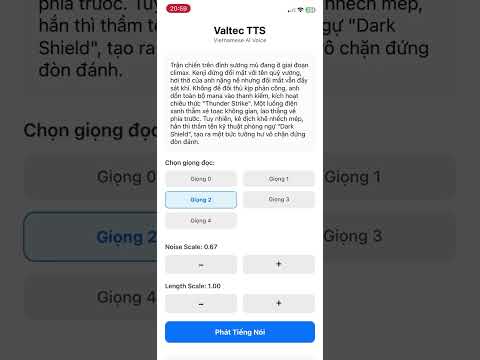
valtec-tts leverages ONNX Runtime to run VITS-based neural network models directly on your mobile device. It supports multiple speakers, adjustable speed/noise, and intelligent text chunking for natural prosody.
Features
- 100% Offline: No internet connection required after installation.
- Vietnamese & English Supported: Optimized for both Vietnamese and English phonemes.
- Multi-Speaker: Support for switching between different voice identities.
- Customizable: Adjust speech speed (length scale) and variability (noise scale).
- Smart Chunking: Includes utilities to normalize text and split long paragraphs with natural pauses.
Installation
1. Install the package and dependencies
npm install valtec-tts
# or
yarn add valtec-tts
You also need to install the peer dependencies required for model loading and processing:
npm install onnxruntime-react-native expo-asset react-native-fs vinorm buffer
2. Configure
Metro Bundler
To load .onnx model files you must update your metro.config.js.
For Expo users:
const { getDefaultConfig } = require('expo/metro-config');

const config = getDefaultConfig(__dirname);

// Thêm đuôi file .onnx vào danh sách các asset được phép nhận diện
config.resolver.assetExts.push('onnx');

module.exports = config;
For Bare React Native:
You may need to edit metro.config.js similarly to allow onnx extensions.
OnnxruntimePackage on android.
To load OnnxruntimePackage in android you must update your react-native.config.js.
module.exports = {
  dependencies: {
    'onnxruntime-react-native': {
      root: './node_modules/onnxruntime-react-native',
      platforms: {
        android: {
          sourceDir: './android',
          packageImportPath: 'import ai.onnxruntime.reactnative.OnnxruntimePackage;',
          packageInstance: 'new OnnxruntimePackage()'
        }
      }
    }
  }
}
Usage
Basic Synthesis
import React, { useEffect } from 'react';
import ValtecTTSEngine from 'valtec-tts';
import { PlaybackHelper } from './utils'; // See "Playing Audio" section below

const App = () => {
  useEffect(() => {
    const runTTS = async () => {
      try {
        // 1. Initialize the Engine instance
        const engine = new ValtecTTSEngine();

        // 2. Download the Models (Only needed once, it skips if already downloaded)
        // You can also pass an onProgress callback here:
        // await engine.downloadModels((prog, file) => console.log(prog));
        await engine.downloadModels();

        // 3. Load Models into Memory
        await engine.initialize();

        // 4. Synthesize Text
        // Returns a Float32Array (PCM Data)
        const pcmData = await engine.synthesize(
          "Xin chào, đây là giọng đọc tiếng Việt.",
          1 // Speaker ID
        );

        // 3. Play audio (requires conversion to WAV)
        await PlaybackHelper.playPCM(pcmData);

      } catch (error) {
        console.error("TTS Error:", error);
      }
    };

    runTTS();
  }, []);

  return null;
};
Advanced: Handling Long Text & Pauses
For long paragraphs, it is recommended to split text into chunks to avoid memory issues and create natural pauses (breathing space).
note: Synthesizing very long text strings may result in audio artifacts (high-pitched noise)
import ValtecTTSEngine, { splitTextIntoChunks } from 'valtec-tts';

const speakLongText = async (engine, longText) => {
  // Split text based on punctuation and length
  // 10 words max per chunk if no punctuation found
  const chunks = splitTextIntoChunks(longText, 10);

  const audioBuffers = [];

  for (const chunk of chunks) {
    // Synthesize the text part
    if (chunk.text) {
      const audio = await engine.synthesize(chunk.text, 1);
      audioBuffers.push(audio);
    }

    // Add silence (padding) if required
    if (chunk.addSilenceAfter > 0) {
      // 24000 is the sample rate
      const silenceFrames = Math.floor(24000 * chunk.addSilenceAfter);
      audioBuffers.push(new Float32Array(silenceFrames));
    }
  }

  // Concatenate all buffers and play
  const totalLength = audioBuffers.reduce((acc, buf) => acc + buf.length, 0);
  const fullAudio = new Float32Array(totalLength);

  let offset = 0;
  for (const buf of audioBuffers) {
    fullAudio.set(buf, offset);
    offset += buf.length;
  }

  await PlaybackHelper.playPCM(fullAudio);
};
API Reference
ValtecTTSEngine
downloadModels(onProgress?: (progress: number, fileName: string) => void)
Downloads the required ONNX models and configuration into the device's local storage. This must be called before initialize() if the models haven't been downloaded yet. It skips downloading if the files already exist.
- Returns:
Promise<void>
deleteModels()
Deletes the downloaded ONNX models from the device's local storage to free up space.
- Returns:
Promise<void>
initialize()
Loads the downloaded ONNX models and configuration into memory. Must be called after downloadModels and before synthesize.
- Returns:
Promise<void>
synthesize(text, speakerId, noiseScale, lengthScale)
Converts text to raw audio data.
text(string): The input text (Vietnamese or English).speakerId(number): ID of the speaker voice (Default:0).noiseScale(number): Controls audio variability/emotion (Default:0.667).lengthScale(number): Controls speed. Lower is faster, Higher is slower (Default:1.0).Returns:
Promise<Float32Array>containing raw PCM audio data.
close()
Releases ONNX sessions and frees memory.
Utilities
splitTextIntoChunks(fullText, maxWordsPerChunk, shortSilence, longSilence)
Normalizes text and splits it into processable chunks with defined pause durations.
fullText: String to process.maxWordsPerChunk: Max words before forcing a break (default: 0).shortSilence: Pause after commas/clauses (default: 0.2s).longSilence: Pause after sentences/paragraphs (default: 0.5s).
Appendix: Playing Audio (PCM to WAV)
The engine returns raw PCM data (Float32Array). To play this in React Native (e.g., using expo-av), you need to wrap it with a WAV header.
Here is a helper function you can use in your app:
// utils/wavHelper.ts
import { Audio } from 'expo-av';
import { Buffer } from 'buffer';

const SAMPLE_RATE = 24000;

export const createWavUrl = (audioData) => {
  const numChannels = 1;
  const bytesPerSample = 2; // 16-bit
  const blockAlign = numChannels * bytesPerSample;
  const byteRate = SAMPLE_RATE * blockAlign;
  const dataSize = audioData.length * bytesPerSample;
  const fileSize = 36 + dataSize;

  const buffer = new ArrayBuffer(fileSize + 8);
  const view = new DataView(buffer);

  // RIFF Chunk
  writeString(view, 0, 'RIFF');
  view.setUint32(4, fileSize, true);
  writeString(view, 8, 'WAVE');
  writeString(view, 12, 'fmt ');
  view.setUint32(16, 16, true); // PCM format
  view.setUint16(20, 1, true); // Linear PCM
  view.setUint16(22, numChannels, true);
  view.setUint32(24, SAMPLE_RATE, true);
  view.setUint32(28, byteRate, true);
  view.setUint16(32, blockAlign, true);
  view.setUint16(34, 16, true); // Bits per sample
  writeString(view, 36, 'data');
  view.setUint32(40, dataSize, true);

  // PCM Data
  let offset = 44;
  for (let i = 0; i < audioData.length; i++, offset += 2) {
    let s = Math.max(-1, Math.min(1, audioData[i]));
    s = s < 0 ? s * 0x8000 : s * 0x7FFF;
    view.setInt16(offset, s, true);
  }

  const base64 = Buffer.from(buffer).toString('base64');
  return `data:audio/wav;base64,${base64}`;
};

function writeString(view, offset, string) {
  for (let i = 0; i < string.length; i++) {
    view.setUint8(offset + i, string.charCodeAt(i));
  }
}

// Usage
export const playPCM = async (pcmData) => {
    const uri = createWavUrl(pcmData);
    const { sound } = await Audio.Sound.createAsync({ uri }, { shouldPlay: true });
    return sound;
}