
vant4-sku
v1.0.5
Published
基于 Vant4 二次开发的 SKU 选择器组件

Maintainers
 hausholin
Readme
Vant4 SKU 百宝箱使用文档
⚙️ 前置技术要求
- Vue 版本:Vue 3.x
- Vant 版本:Vant 4.x(已安装)
- Node 版本:最低要求 18.20.2 或 20.19.3 及以上
- PostCSS 插件:项目已安装
postcss-px-to-viewport或类似自适应插件 - 设计稿支持: 默认适配 750px 设计稿,自动兼容小屏(375px)与中大屏设备
📦 组件介绍
Vant4 SKU 百宝箱是一个基于 Vant4 组件库二次开发的商品规格选择器,遵循 MIT 协议,适用于移动端电商项目。
支持:
- 多规格动态选择
- 指定选中 sku 组合
- 库存检测与禁用
- 图片预览
- 数量选择器
- 分期付款
- 自定义插槽
- 表单输入(手机号、邮箱、日历、选择器、备注等)
规格名称和数量是不限制的,例如颜色、尺寸、版本,也可以是型号、内存,这都是你传入字段时定义的,非常自由的一款 Sku 组件,具体如何处理数据在下方"数据结构"会讲到。
为何开发这款 sku 组件呢,因为 vant4 组件库没有,询问过官方是否会开发,答复是不会。但我用 vue3 + vant4 开发移动端经常用到 sku 规格选项,所以自己整合一下后开发出来了,方便自己使用,同时也开源给兄弟们。
在线预览
NPM:https://www.npmjs.com/package/vant4-sku?activeTab=readme
Github:https://github.com/HSg666/vant4sku
Gitee:https://gitee.com/HaushoLin/vant4sku
本组件完整版效果图
🚀 安装方式
# 使用 npm
npm install vant4-sku

# 或使用 yarn
yarn add vant4-sku

# 或使用 pnpm
pnpm add vant4-sku
⚠️ 依赖说明
本组件依赖 Vant4 ,使用前请确保项目中已安装并正确引入 Vant。
// vant4安装命令,项目已安装的跳过这一步,直接看下面的代码演示。
npm i vant  # 通过 npm 安装

yarn add vant  # 通过 yarn 安装

pnpm add vant  # 通过 pnpm 安装

bun add vant # 通过 Bun 安装
注意事项
由于本组件内部使用了多个 Vant 组件(如 van-popup、van-tag、van-stepper 等),因此用户必须确保项目中已正确安装并注册 Vant。
1. 全局引入 Vant(推荐)
// main.ts
import { createApp } from "vue";
import App from "./App.vue";
import Vant from "vant";
import "vant/lib/index.css";

const app = createApp(App);
app.use(Vant);
app.mount("#app");
2. 按需引入 Vant
如果项目中使用了按需引入,请确保注册了以下 Vant 组件:
import {
  Popup,
  Tag,
  Stepper,
  CellGroup,
  Cell,
  Field,
  Calendar,
  Picker,
  ActionBar,
  ActionBarIcon,
  ActionBarButton,
  RadioGroup,
  Radio,
  ImagePreview,
  Icon,
  showToast,
} from "vant";
否则组件将无法正常显示或报错。
🎯 代码演示
1. 基础用法
<template>
  <van-button type="primary" @click="showSkuPopup = true">显示Sku商品规格</van-button>

  <Vant4Sku v-model="showSkuPopup" :product="productWithSpecs" @addToCart="handleAddToCart" @buyNow="handleBuyNow" />
</template>
<script setup>
import Vant4Sku from "vant4-sku";
import { ref, computed } from "vue";
// 源码位置:这个在下面的数据结构 ——> 工具函数中
import { generateSpecs } from "./utils/generateSpecs";
const showSkuPopup = ref(false);
const selectedSku = ref({}); // 组件提交的sku总数据
// 商品数据结构
const product = ref({
id: 1,
name: "XX商品",
mainImage: "https://i-blog.csdnimg.cn/direct/78acd709017b4ddd857ce1a89079ab60.jpeg",
skulist: [
{
id: 1,
price: 199,
originPrice: 299,
stock: 100,
img: "https://i-blog.csdnimg.cn/direct/78acd709017b4ddd857ce1a89079ab60.jpeg",
color: "深灰绿色",
size: "床单款1.8M床",
},
{
id: 2,
price: 199,
originPrice: 299,
stock: 50,
img: "https://i-blog.csdnimg.cn/direct/6f4997df324b465da2b57d0f45944bb9.jpeg",
color: "烟灰卡其",
size: "床单款1.5M床",
},
],
});
// 映射字段
const fieldMap = {
color: "颜色",
size: "尺寸",
};
// 自动生成规格结构
const productWithSpecs = computed(() => {
return {
...product,
specs: generateSpecs(product.skulist, fieldMap),
};
});
console.log(productWithSpecs.value, "productWithSpecs");
const handleAddToCart = (skuobj) => {
selectedSku.value = skuobj.sku;
console.log("加入购物车:", skuobj);
};
const handleBuyNow = (skuobj) => {
selectedSku.value = skuobj.sku;
console.log("立即购买:", skuobj);
};
</script>2.自定义步进器(购买数量)
<Vant4Sku
  v-model="showSkuPopup"
  :product="productWithSpecs"
  @addToCart="handleAddToCart"
  @buyNow="handleBuyNow"
  :showQuotaText="showQuotaText"
  :quantity-text="showQuantityText"
  :stepper-min="2"
  :stepper-max="10"
  @change-stepper="changeStepper"
/>
const showQuotaText = ref(true); // 默认隐藏,可传值显示限购提示
const showQuantityText = ref("我要买"); // 更改购买数量标题
// 监听数量
const changeStepper = (count) => {
console.log("购买数量", count);
};3、插槽使用
①、单选分期
<Vant4Sku
  v-model="showSkuPopup"
  :product="productWithSpecs"
  @addToCart="handleAddToCart"
  @buyNow="handleBuyNow"
  :installment-options="['0', '3', '6', '12']"
  installment-tips="(*仅支持信用卡支付)"
  installmentTitle="选择分期"
  :show-installment-tips="showInstallmentTips"
>
  <!-- 单选分期 -->
  <template #select-installment></template>
</Vant4Sku>
/* :installment-options是分期数组,0会自动转化为"不分期"。
:installment-tips 可自定义分期提示文案
installmentTitle 可自定义修改分期标题
*/
const showInstallmentTips = ref(true); // 是否显示分期提示②、自定义划线价
<Vant4Sku v-model="showSkuPopup" :product="productWithSpecs" @addToCart="handleAddToCart" @buyNow="handleBuyNow">
  <!--  用户自定义划线价 -->
  <template #origin-price="{ sku }">
    <span class="origin-price">特价 ¥{{ sku?.originPrice?.toFixed(2) }}</span>
  </template>
</Vant4Sku>
注意:originPrice 是 sku 组合对象的原价,sku 组合对象如下,一般都是处理好数据结构之后传入的。 { id:1, price:666, originPrice:999 } price 是优惠价,即红色价格。
.origin-price {
  font-size: 22px;
  color: #999;
  text-decoration: line-through;
}
③、底部备用自定义插槽(为您准备的)
位置:在整个 sku 弹窗底部,按钮的上面。
例如:有些同学可能要在 sku 弹窗里面做选择配送地址,可以在这使用 vant 地址组件编写标签代码。
<Vant4Sku v-model="showSkuPopup" :product="productWithSpecs" @addToCart="handleAddToCart" @buyNow="handleBuyNow">
  <!-- 备用底部插槽 -->
  <template #footer>测试一下备用插槽</template>
</Vant4Sku>
4、表单相关
<Vant4Sku
  v-model="showSkuPopup"
  :product="productWithSpecs"
  @addToCart="handleAddToCart"
  @buyNow="handleBuyNow"
  :showTel="showTel"
  :showEmail="showEmail"
  :showMessages="showMessages"
  :showDate="showDate"
  :showPicker="showPicker"
  :columns="columns"
  select-title="城市"
  :showRemark="showRemark"
/>
/* 这些默认都是隐藏的,因为你不一定都会用到,需要再打开就行。
手机号、邮箱、日历、选择器 这四个都有加校验的。只要有显示,一点击购买就会校验。
*/
const showTel = ref(true); // 显示手机号输入框
const showEmail = ref(true); // 显示邮箱输入框
const showMessages = ref(true); // 显示留言输入框
const showDate = ref(true); // 显示日期输入框
const showPicker = ref(true); // 显示选择器
const showRemark = ref(true); // 显示备注输入框
// select-title 选择器标题,可自定义,默认为选择器
// 选择器传入这样的数据结构,组件用的van-picker
const columns = [
{ text: "杭州", value: "Hangzhou" },
{ text: "宁波", value: "Ningbo" },
{ text: "温州", value: "Wenzhou" },
{ text: "绍兴", value: "Shaoxing" },
{ text: "湖州", value: "Huzhou" },
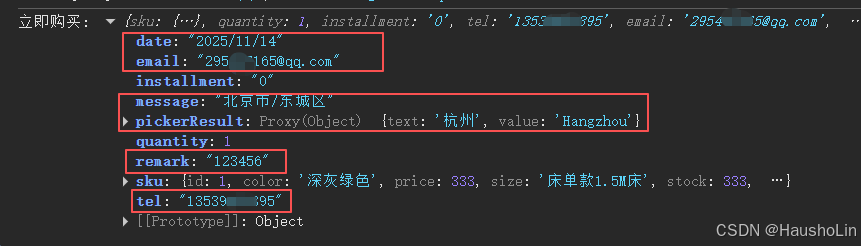
];点击"立即购买"后整个 sku 组件打印的数据如下:
5、可传入指定 skuId
使用场景:
①、例如:在购物车里修改某个商品的 sku 组合,传入指定的 sku 组合 id,sku 弹窗时就自动匹配选中。
②、再例如:外部某个商品跳转到商品详情时,url 中携带 skuId 参数,进来就默认选中传入的 skuId 组合。
如果传入的 skuId 不存在,那么会自动选中其他有库存并存在的 sku 组合。
参数说明:defaultSkuId 接收 string 类型的值
<Vant4Sku
  v-model="showSkuPopup"
  :product="productWithSpecs"
  @addToCart="handleAddToCart"
  @buyNow="handleBuyNow"
  :defaultSkuId="5"
/>
数据结构
sku 数据结构
1、工具函数
我给你准备了自动生成规格结构的工具函数,在你项目的 utils 文件夹中创建一个工具函数 ts 文件,然后在组件中引入。(如果没有 utils 文件就新建一个)
//  utils/generateSpecs.ts

/**
 * 从 skulist 自动生成 specs 结构,并映射字段名为中文
 * @param skulist - SKU 列表
 * @param fieldMap - 字段名映射表,如 { color: '颜色' }
 * @returns specs - 规格结构
 */
export function generateSpecs(
  skulist: Array<Record<string, any>>,
  fieldMap: Record<string, string> = {}
): Array<{ name: string, key: string, options: Array<any> }> {
  if (!skulist || skulist.length === 0) return [];

  // 自动从 fieldMap 的 key 中提取 includeFields
  const includeFields = Object.keys(fieldMap);

  // 只从 skulist 中提取指定字段作为规格维度
  const allKeys = [...new Set(skulist.flatMap((sku) => Object.keys(sku)))].filter((key) => includeFields.includes(key));

  // 为每个 key 生成 options,并映射中文名
  const specs = allKeys.map((key) => {
    const options = [...new Set(skulist.map((sku) => sku[key]))].filter(Boolean);
    return {
      name: fieldMap[key] || key, // 显示用的中文名
      key, // 用于匹配的原始字段名
      options,
    };
  });

  return specs;
}
在你组件中引入工具函数文件。你如果没配路径别名 alias 就写你项目的相对路径 ../,已配可这样写@/utils。
import { generateSpecs } from "./utils/generateSpecs";2、准备好商品数据结构
skulist 数组下的组合对象指定字段:
这几个必须保持一致,因为组件内部使用到这些字段。 其他字段随便你传,到时我都会返回给你。
| 字段名 | | 说明 | 类型 | | --------- | ----------- | ---------- | ------ | | id | | 主商品 id | Number | | name | | 主商品名称 | String | | mainImage | | 主图 | String | | | img | sku 组合图 | String | | | originPrice | 原价 | Number | | | price | 优惠价 | Number | | | productCode | 商品编号 | String | | | stock | 库存 | Number |
// 商品数据结构
const product = {
  id: 1,
  name: "XX商品",
  mainImage: "",
  // ... 其他你传入的组件未用到的字段,到时选完sku规格我都会原路返回给你。
  skulist: [
    {
      id: 1,
      price: 199,
      originPrice: 299,
      stock: 100,
      img: "https://i-blog.csdnimg.cn/direct/78acd709017b4ddd857ce1a89079ab60.jpeg",
      color: "深灰绿色",
      size: "床单款1.8M床",
    },
    {
      id: 2,
      price: 199,
      originPrice: 299,
      stock: 50,
      img: "https://i-blog.csdnimg.cn/direct/6f4997df324b465da2b57d0f45944bb9.jpeg",
      color: "烟灰卡其",
      size: "床单款1.5M床",
    },
  ],
};
3、指定规格字段,自动生成规格结构
要用什么字段做规格就写上,工具函数会自动转化为符合 sku 组件的规格结构。写几个就展示几个,所以文章开头我才说这个组件非常自由,对开发者非常友好。
// 映射字段
const fieldMap = {
  color: "颜色",
  size: "尺寸",
};

// 自动生成规格结构
const productWithSpecs = computed(() => {
  return {
    ...product,
    specs: generateSpecs(product.skulist, fieldMap),
  };
});
console.log(productWithSpecs.value, "productWithSpecs");
自动化处理后的数据结构如下:
tips:要处理成下面的数据结构,传入组件就能完美显示了。
{
  id:1,
  name: 'XX商品', // 主商品名称
  mainImage: '', // 主图
  // ... 你传入的其他商品信息字段
  skulist:[
    {
      id: 1,
      price: 199,
      originPrice: 299,
      stock: 100,
      img: 'https://i-blog.csdnimg.cn/direct/78acd709017b4ddd857ce1a89079ab60.jpeg',
      color: '深灰绿色',
      size: '床单款1.8M床',
    },
     {
      id: 2,
      price: 199,
      originPrice: 299,
      stock: 50,
      img: 'https://i-blog.csdnimg.cn/direct/6f4997df324b465da2b57d0f45944bb9.jpeg',
      color: '烟灰卡其',
      size: '床单款1.5M床',
    }

  ]
 specs: [
    {
      name: '颜色',
      key: 'color',
      options: ['深灰绿色','烟灰卡其']
    },
    {
      name: '尺寸',
      key: 'size',
      options: ['床单款1.8M床', '床单款1.5M床']
    }

	]
}
选择器的数组结构
const columns = [
  { text: "杭州", value: "Hangzhou" },
  { text: "宁波", value: "Ningbo" },
  { text: "温州", value: "Wenzhou" },
  { text: "绍兴", value: "Shaoxing" },
  { text: "湖州", value: "Huzhou" },
];
点击购买或添加购物车回调函数接收的 skuData 对象结构
skuData = {
  id: 1, // 商品id,
  name: "XX商品", // 主商品名称
  mainImage: "", // 主图
  // ... 其他商品字段也都会返回给你
  // sku组合对象
  sku: {
    id: 1, // sku的id
    img: "xxx.jpg",
    originPrice: 1333, // 原价
    price: 333, // 优惠价
    productCode: "ABC123456789", // 商品编号
    stock: 333, // 库存

    // ... 上面的字段都是指定的,不能写错。其他多余的字段我照样返回给你,例如下面这些。
    color: "深灰绿色", // 颜色
    size: "床单款1.5M床", // 尺寸
    version: "2010款",
    info: "被套103*103cm; 床单103*103cm; 枕套48*74cm",
  },
  quantity: 1, // 购买数量
  tel: "123456789101", // 手机号
  installment: "3", // 分期付款
  email: "[email protected]", // 邮箱
  message: "123", // 留言
  date: "2025/11/14", // 日期
  pickerResult: { text: "杭州", value: "HangZhou" }, // 选择器
  remark: "456", // 备注
};
完整功能预览图
<template>
  <van-button type="primary" @click="showSkuPopup = true">显示Sku商品规格</van-button>

  <Vant4Sku
    v-model="showSkuPopup"
    :defaultSkuId="5"
    :product="productWithSpecs"
    :showTel="showTel"
    :showEmail="showEmail"
    :showMessages="showMessages"
    :showDate="showDate"
    :showPicker="showPicker"
    :showRemark="showRemark"
    :columns="columns"
    :installment-options="['0', '3', '6', '12']"
    :installment-title="'选择分期方式'"
    :installment-tips="'(*仅支持信用卡支付)'"
    :show-installment-tips="showInstallmentTips"
    :showQuotaText="showQuotaText"
    :stepper-min="2"
    :stepper-max="10"
    @addToCart="handleAddToCart"
    @buyNow="handleBuyNow"
    @change-stepper="changeStepper"
  >
    <!--  用户自定义划线价 -->
    <template #origin-price="{ sku }">
      <span style="font-size: 12px; color: #999; text-decoration: line-through"
        >特价 ¥{{ sku?.originPrice?.toFixed(2) }}</span
      >
    </template>
    <!-- 单选分期 -->
    <template #select-installment></template>
    <!-- 备用底部插槽 -->
    <slot name="footer"></slot>
  </Vant4Sku>
</template>
<script>
import { ref, computed } from "vue";
import Vant4Sku from "vant4-sku";
import { generateSpecs } from "./utils/generateSpecs";
const showSkuPopup = ref(false); // 是否显示sku弹窗
const selectedSku = ref({}); // 选中的sku总数据
const showTel = ref(true); // 是否显示手机号输入框
const showEmail = ref(true); // 是否显示邮箱输入框
const showDate = ref(true); // 是否显示日期输入框
const showPicker = ref(true); // 是否显示选择器
const showRemark = ref(true); // 是否显示备注输入框
const showMessages = ref(true); // 是否显示消息输入框
const showQuotaText = ref(true); // 是否显示限购提示
const showQuantityText = ref("我要买"); // 更改购买数量标题
const showInstallmentTips = ref(true); // 是否显示分期提示
const showImage = ref(false); // 是否显示图片
// 商品数据结构
const product = ref({
id: 1,
name: "XX商品",
mainImage: "https://i-blog.csdnimg.cn/direct/78acd709017b4ddd857ce1a89079ab60.jpeg",
skulist: [
{
id: 1,
price: 199,
originPrice: 299,
stock: 100,
img: "https://i-blog.csdnimg.cn/direct/78acd709017b4ddd857ce1a89079ab60.jpeg",
color: "深灰绿色",
size: "床单款1.8M床",
},
{
id: 2,
price: 199,
originPrice: 299,
stock: 50,
img: "https://i-blog.csdnimg.cn/direct/6f4997df324b465da2b57d0f45944bb9.jpeg",
color: "烟灰卡其",
size: "床单款1.5M床",
},
],
});
// 选择器
const columns = [
{ text: "杭州", value: "Hangzhou" },
{ text: "宁波", value: "Ningbo" },
{ text: "温州", value: "Wenzhou" },
{ text: "绍兴", value: "Shaoxing" },
{ text: "湖州", value: "Huzhou" },
];
// 映射字段
const fieldMap = {
color: "颜色",
size: "尺寸",
};
// 自动生成规格结构
const productWithSpecs = computed(() => {
return {
...product,
specs: generateSpecs(product.skulist, fieldMap),
};
});
const handleAddToCart = (skuobj) => {
selectedSku.value = skuobj.sku;
console.log("加入购物车:", skuobj);
};
const handleBuyNow = (skuobj) => {
selectedSku.value = skuobj.sku;
console.log("立即购买:", skuobj);
};
const changeStepper = (count) => {
console.log("购买数量", count);
};
</script>📚 API 说明
Props | 参数 | 说明 | 类型 | 默认值 | |------|------|------|--------| | v-model | 是否显示弹窗 | Boolean | false | | product | 商品数据 | Object | sku 数据结构见下方文档 | | default-sku-id | 默认选中的 SKU ID | Number | null | | show-add-cart-btn | 是否显示加入购物车按钮 | Boolean | true | | show-image | 是否显示图片 | Boolean | true | | show-tel | 是否显示手机号输入框 | Boolean | false | | show-email | 是否显示邮箱输入框 | Boolean | false | | show-messages | 是否显示留言框 | Boolean | false | | show-remark | 是否显示备注输入框 | Boolean | false | | show-date | 是否显示日历选择器 | Boolean | false | | show-picker | 是否显示选择器 | Boolean | false | | columns | 选择器列数据 | Array | [] | | select-title | 选择器标题 | String | 选择器 | | select-tips | 选择器提示文字 | String | 点击选择城市 | | show-origin-price | 是否显示原价 | Boolean | true | | show-stock | 是否显示库存 | Boolean | true | | show-product-code | 是否显示商品编码 | Boolean | true | | cart-button-text | 购物车按钮文字 | String | 加入购物车 | | buy-button-text | 购买按钮文字 | String | 立即购买 | | quantityText | 购买数量标题 | String | 购买数量 | | stepper-min | 数量选择器最小值 | Number | 1 | | stepper-max | 数量选择器最大值 | Number | null | | show-quota-text | 是否显示限购提示 | Boolean | false | | installment-options | 分期选项 | Array | [] | | installment-title | 分期标题 | String | 选择分期 | | installment-tips | 分期提示语 | String | (*分期限龙卡信用卡支付) | | show-installment-tips | 是否显示分期提示语 | Boolean | true |
Events | 事件名 | 说明 | 回调参数 | |--------|------|----------| | add-to-cart | 点击加入购物车时触发 | Object | | buy-now | 点击立即购买时触发 | Object | | change-stepper | 数量改变时触发 | Number |
Slots | 插槽名 | 说明 | |------|------| | origin-price | 自定义原价显示 | | select-installment | 自定义分期选择 | | footer | 底部插槽 |
🎨 样式定制
组件使用 CSS 变量进行样式定制,可通过覆盖变量来修改样式:
:root {
  --popup-header-height: 180px;
  --popup-header-gap: 32px;
  --popup-img-size: 180px;
  --popup-price-font-size: 40px;
  --spec-title-font-size: 30px;
}
组件已内置移动端适配,支持安全区域和触摸优化。
拓展:
PostCSS 安装教程: https://blog.csdn.net/Steven_Son/article/details/135554296
NVM 安装教程:一台电脑如何安装多个不同版本的 Node 并能自由切换
Vue3+TS+移动端开发脚手架:基于 Vue3.3 + TS + Vant4 + Vite5 + Pinia + Tailwindcss 搭建的 H5 移动端开发模板
个人博客:https://blog.csdn.net/Steven_Son
⚠️ 免责声明
本组件按“现状”提供,不提供任何形式的担保。作者不对因使用本组件而导致的任何直接或间接损失承担责任。
如何更新到最新版本
// 自动
npm install vant4-sku@latest
yarn add vant4-sku@latest

// 手动    前提是你知道版本号
npm install [email protected]
yarn add [email protected]
更新日志
v1.0.2
- 修复默认 SKU 无法自动选中的问题
- 优化图片展示逻辑
- 修复部分 TypeScript 类型错误
v1.0.3
- 解决 img 图片因防盗链问题无法正常加载的问题
v1.0.4
- 使用文档新增线上预览地址,方便用户直观的体验组件。