
vastgrid
v0.3.0
Published
A canvas data grid for React that opens tables of any size like a spreadsheet: sort, filter, group, pivot, edit, undo and export, driven by a typed document, session and commands.

Maintainers
 haya-inc
Readme
vastgrid
A canvas data grid for React that opens tables of any size like a spreadsheet: huge CSV, TSV, Parquet, JSON Lines and Excel files, read a block of rows at a time as you scroll. People sort, filter, group, pivot, find, format, edit, undo and export; engines in the browser or on Node.js do the work, and save edited CSV and TSV files with every byte that was not edited kept as it is.
Demo · Open a file · Documentation · GitHub
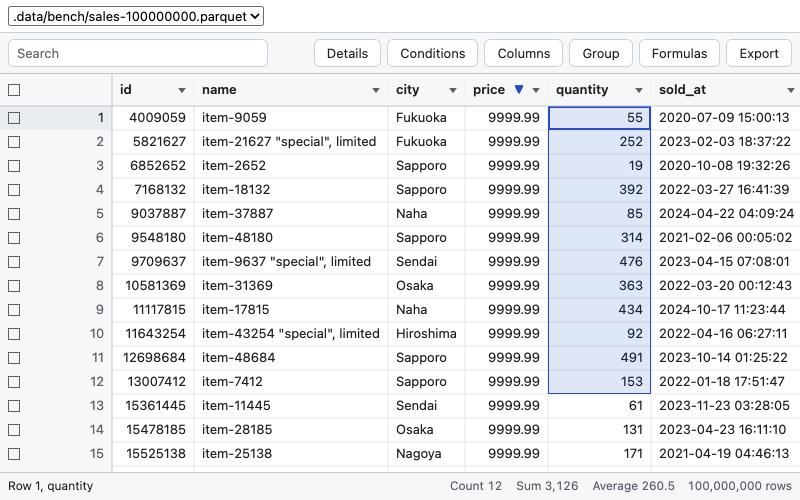
Install
npm install vastgrid vastgrid-jsvastgrid needs React 19.3 or later and a browser with CSS light-dark() (Chrome and Edge 123, Firefox 120,
Safari 17.5 or later). React is an optional peer dependency: vastgrid/core runs on servers and in workers without
it.
Quick start
import { DataGrid, localTransport } from "vastgrid";
import "vastgrid/styles.css";
import { memoryEngine } from "vastgrid-js";

const transport = localTransport(
  memoryEngine({
    tables: {
      orders: {
        columns: [
          { name: "id", type: "integer" },
          { name: "customer", type: "string" },
          { name: "price", type: "decimal", precision: 10, scale: 2 },
        ],
        rows: [
          [1, "Acme", "12.50"],
          [2, "Globex", "8.00"],
        ],
        editable: true,
      },
    },
  }),
);

export function Orders() {
  return <DataGrid transport={transport} table="orders" style={{ height: 480 }} />;
}
The grid fills the height you give it. Rows are typed JSON (decimals as strings with their exact digits, dates as
YYYY-MM-DD); the memory engine also opens Arrow, CSV, TSV, JSON Lines, Excel and Parquet files
(vastgrid-js).
Entry points
| Entry | Holds | Imports React |
| --- | --- | --- |
| vastgrid | DataGrid, GridProvider, the hooks, and everything of vastgrid/core | yes ("use client") |
| vastgrid/core | createGridStore and GridStore, and the transports | no |
| vastgrid/server | readInitialView: the first rows, read on a server for initial | no |
| vastgrid/locales/<tag> | the texts of one language for messages: ja, zh-Hans, zh-Hant, ko, es, pt-BR, fr, de, en | no |
| vastgrid/locales | every language, and messagesFor(locale) | no |
| vastgrid/styles.css | the styles, themed by CSS custom properties on .vg-root | — |
Engines and transports
A transport carries the grid's messages to an engine; a new transport or table makes a new store.
| Transport | Engine |
| --- | --- |
| localTransport(engine) | in the same thread, such as memoryEngine of vastgrid-js |
| workerTransport(worker) | in a Web Worker that calls serveEngine(engine, self), or behind anything that carries messages as a worker does (a MessagePort, a webview) |
| httpTransport(url, { events }) | on a server, such as createHttpHandler of vastgrid-duckdb |
| serverFunctionTransport(action) | behind a React Server Function |
import { DataGrid, httpTransport, workerTransport } from "vastgrid";

// The memory engine in a Web Worker: the page never stops while it sorts a million rows.
const worker = new Worker(new URL("./engine.worker.ts", import.meta.url), { type: "module" });
const inWorker = workerTransport(worker);

// The DuckDB engine on a Node.js server, with its events.
const onServer = httpTransport("/api", { events: "/api/events" });

export function Sales() {
  return <DataGrid transport={onServer} table="sales.parquet" style={{ height: 600 }} />;
}
// engine.worker.ts
import { serveEngine, type WorkerLike } from "vastgrid/core";
import { memoryEngine } from "vastgrid-js";
const engine = memoryEngine({ tables: { trips: { parquet: "https://example.com/trips.parquet" } } });
serveEngine(engine, self as unknown as WorkerLike);DataGrid
| Prop | Meaning |
| --- | --- |
| transport, table, open | where the rows come from: a transport, the table to open, and how to read it (a workbook's sheet) |
| store | a store made outside (useCreateGridStore), instead of transport and table |
| document, defaultDocument, onDocumentChange | the view and its columns: plan, widths, pins, formats, totals; controlled or not |
| session, defaultSession, onSessionChange | where the person is: selection, scroll, checked rows, the undo history |
| initial | rows read on a server (readInitialView), or a promise of them, shown before the first read |
| toolbar, statusBar | the built-in toolbar (search, Conditions, Group, Columns, Formulas, Export, Save) and status bar |
| checkboxes | a check box for each row, kept on the same records through sorts and filters |
| columnGroups, groupHeaderHeight | header rows of groups of columns |
| wrapLines | the lines of a row while a column wraps its text |
| cellText, cellStyle, drawCell, cellAction, onCellAction | the text, colors, drawing and actions (links, buttons) of cells |
| detailPanel | your own content of the detail panel of the active row |
| rowHeight, headerHeight | sizes in CSS pixels |
| locale | the locale of numbers and dates (the browser's by default) |
| messages | the UI's texts over the English ones: a set from vastgrid/locales/<tag> (ja, zh-Hans, zh-Hant, ko, es, pt-BR, fr, de), or texts of your own |
| onError | failures that belong to no command |
| ref | { store, dispatch, focus } |
| className, style, aria-label | on the root element |
Hooks and commands
Every change is a typed command (GridCommand), which the grid's keys and menus dispatch as your code does.
| Hook | Gives |
| --- | --- |
| useGridSelector(selector, isEqual?) | a part of the store's immutable snapshot; renders again only when it changes |
| useGridDispatch() | dispatch, for commands such as { command: "sort.set", keys: [{ column: "price", direction: "desc" }] } |
| useGridRows({ start, end, columns }) | values of rows of the view, for cells that React renders |
| useCreateGridStore(options), GridProvider | a store of your own, shared by the grid and your controls |
| useGridStore() | the store of the nearest grid or provider |
import { DataGrid, GridProvider, useCreateGridStore, useGridDispatch, useGridSelector } from "vastgrid";

function Workbench() {
  const store = useCreateGridStore({ transport, table: "orders" });
  return (
    <GridProvider store={store}>
      <ClearSort />
      <DataGrid store={store} style={{ height: 480 }} />
    </GridProvider>
  );
}

function ClearSort() {
  const sort = useGridSelector((snapshot) => snapshot.document.plan?.sort);
  const dispatch = useGridDispatch();
  return (
    <button type="button" disabled={!sort} onClick={() => dispatch({ command: "sort.clear" })}>
      Clear sort
    </button>
  );
}
How it renders
Scrolling, drawing and dragging a selection run in the store and the canvas and render no React; moving the active
cell commits once and renders only what reads the session. The rows on screen are also accessible rows of the ARIA
grid pattern under the canvas. Every component and hook compiles with React Compiler 1.0, and the package ships
compiled. On a server, DataGrid renders the first rows of initial as an HTML table, streamed when it is a
promise, and the canvas takes over in the browser.
When the engine shows a sort's first rows while the rest builds (the DuckDB engine on a million rows or more), the status bar says it is reading and the row count stays exact; changing the plan or disconnecting cancels old reads, so that late answers never replace the current view.
Documentation
- docs/react.md: the store, the transports,
DataGrid, the hooks, rendering, theming and server rendering. - docs/spec.md: the document and session (§5), the commands (§6), editing and saving (§7) and the messages (§8).
- Where vastgrid opens files: the same grid in the command line, VS Code, an MCP App and a notebook.
- docs/migrating-from-0.1.md: from vastgrid 0.1.x.
The tests run on the sources (npm test); the end-to-end tests run the bench of
examples/bench in Chromium against the build
(npm run build && npm run e2e).
License
MIT