
vector-memory-pg
v1.10.7
Published
Institutional technical memory for AI coding agents using PostgreSQL, pgvector, hybrid search, MCP, Reflect, CLI, and local UI.

Maintainers
 cabupy
Readme
vector-memory-pg
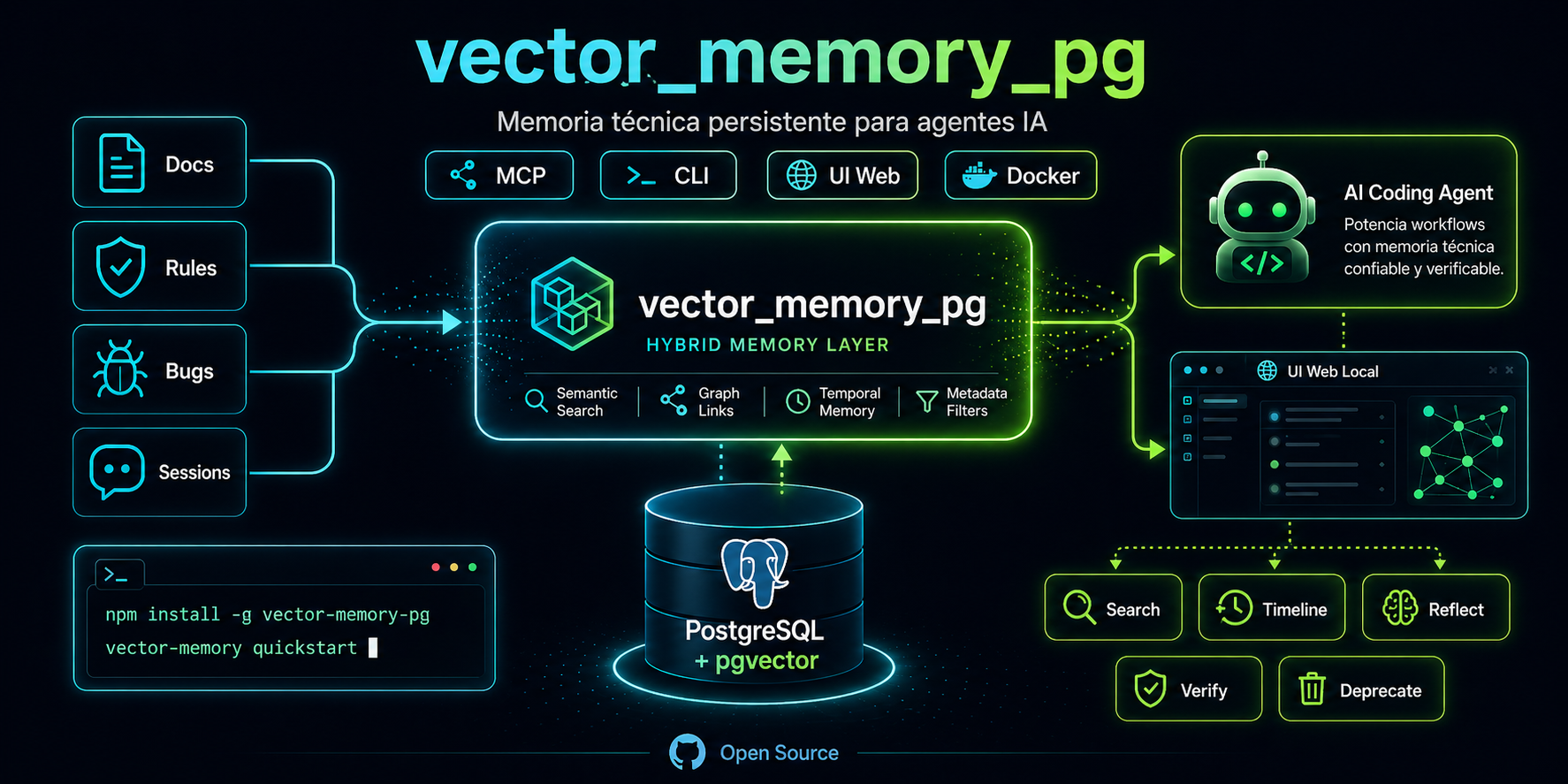
Institutional technical memory for AI agents — PostgreSQL + pgvector + OpenAI embeddings + HTTP API + MCP + web UI.
Installation • CLI • HTTP API • MCP • Security • Architecture • Contributing
Versión en español: README.md
Your agent forgets everything when the session ends. vector-memory-pg gives it memory.
A queryable technical knowledge base: architecture decisions, known bugs, conventions, constraints and work sessions. Separated by organization, project and repository. With lifecycle control, criticality levels and hybrid semantic + full-text search.
Works from any directory without interfering with other projects' environment variables.
Installation
npm install -g vector-memory-pg
vector-memory up              # PostgreSQL 17 + pgvector via Docker (:5433)
vector-memory quickstart      # configures ~/.vector-memory.env and applies schema
vector-memory worker --open   # starts the server and opens the UI in the browser
Bring Your Own Coding Agent
Works with any AI agent that supports MCP. One command configures everything:
vector-memory init --tools claude-code # or cursor, codex, opencode, openclawThat runs in a single step: creates .vector-memory.json, installs usage instructions
in the agent's config file, installs slash commands (where supported),
and displays the MCP config snippet.
| Agent | Instructions | Slash commands | MCP config |
|---|---|---|---|
| Claude Code | CLAUDE.md | .claude/commands/vm-*.md | ~/.claude/mcp.json |
| OpenCode | AGENTS.md | .opencode/commands/vm-*.md | .opencode/config.json |
| Cursor | .cursor/rules/vector-memory.mdc | — | Settings → MCP |
| Codex | AGENTS.md | — | ~/.codex/config.yaml |
| OpenClaw | AGENTS.md | .opencode/commands/vm-*.md | per config |
Available slash commands: /vm-context, /vm-search, /vm-save, /vm-reflect, /vm-iterate
# Install only usage instructions
vector-memory skills install --target opencode

# Install only slash commands
vector-memory commands install --target claude-code

# Combine multiple agents
vector-memory init --tools claude-code,cursor
See detailed guides in docs/integrations/.
Full Cycle
1. Save         save_memory / POST /memories
                → decisions, bugs, patterns, constraints

2. Search       search_memories / vector-memory search
                → hybrid: semantic (70%) + full-text (20%)

3. Timeline     memory_timeline / GET /timeline / UI Timeline
                → chronological history grouped by day

4. Reflect      reflect_memories / POST /reflect / UI Reflect
                → detects contradictions, duplicates and gaps with AI
                → returns suggestions without modifying anything

5. Deprecate    deprecate_memory / POST /memories/:id/deprecate
                → Deprecate button in UI Reflect applies suggestions

6. Conclude     save_session_summary / POST /events/session-end
                → persists the session summary at the end
Web UI
Local web interface accessible at http://localhost:3010/ui:
- Search — semantic search with status, type and limit filters
- Recent — last N memories ordered by date
- Timeline — history grouped by day with configurable range
- Stats — totals, DB size and distribution by type
- Reflect — analyzes memories with AI; detects contradictions and gaps; buttons to deprecate or save suggestions directly
vector-memory worker --open # starts server and opens browser automaticallyArchitecture
Agent (Claude Code / OpenCode / Cursor)
        |
        |-- MCP (stdio)          save_memory, search_memories, reflect_memories ...
        |-- HTTP API (:3010)     GET /query, POST /reflect, /events/session-*
        `-- CLI                  vector-memory search, ingest, doctor ...
                |
                v
        PostgreSQL + pgvector
                |-- vector(1536) + HNSW   (semantic search)
                |-- tsvector + GIN        (full-text)
                `-- metadata + lifecycle + criticality
                        |
                        v
                OpenAI text-embedding-3-small
Features
Search
- Hybrid: vector similarity (70%) + PostgreSQL Full-Text Search (20%)
- Boosts for criticality, status and verification date
search_memories_compact— reduced output to minimize context windowget_memories— retrieves full memories by list of IDsmemory_timeline— chronological history grouped by date
Writing from MCP
save_memory— saves decisions, bugs, patterns, constraints; acceptsauto_classify: trueto infer type, criticality and tags with AIsave_session_summary— session summary when finishingupdate_memory,deprecate_memory,verify_memory
AI Analysis (Reflect)
reflect_memories— analyzes recent memories with gpt-4o-mini- Detects contradictions, duplicates and gaps in accumulated knowledge
- Returns findings, suggested memories and suggested deprecations
- Suggests only; never modifies anything
- UI Reflect allows applying each suggestion with a single click
Session lifecycle
POST /events/session-start— injects relevant context on startPOST /events/post-tool-use— saves observations automaticallyPOST /events/session-end— persists the session summary
Metadata and lifecycle
- Separation by
organization,project,repo_name,memory_type - Statuses:
active,deprecated,superseded,archived - Criticality:
low,normal,high,critical public_idreadable:VM-000001,VM-000042...
Security and ingestion
- Path denylist + detector of 8 secret patterns
block(default) andredactmodes- Dry-run and auditable sanitization log
- Incremental ingestion of Markdown and JSONL with
mtimedetection
Isolated configuration
VECTOR_MEMORY_DATABASE_URL— dedicated variable that doesn't collide with other projects~/.vector-memory.env— global user config, applies from any directory- Content policy:
@no-memoryomits a memory,<private>...</private>redacts sensitive blocks
Quick Setup
# ~/.vector-memory.env  (global config, done once)
VECTOR_MEMORY_DATABASE_URL=postgres://vector:vector@localhost:5433/vector_memory
OPENAI_API_KEY=sk-...
# MCP config for your agent
vector-memory mcp-config --target claude-codeFor safety, mcp-config omits real secrets by default. Use --show-secrets
only if you need to print them in the terminal.
{
  "mcpServers": {
    "vector-memory-pg": {
      "command": "vector-memory",
      "args": ["mcp"],
      "env": {
        "VECTOR_MEMORY_DATABASE_URL": "YOUR_VECTOR_MEMORY_DATABASE_URL",
        "OPENAI_API_KEY": "YOUR_OPENAI_API_KEY"
      }
    }
  }
}
MCP Tools
| Tool | Description |
|---|---|
| search_memories | Hybrid semantic search with filters |
| search_memories_compact | Same but with short snippet to save context window |
| get_memories | Retrieves full memories by IDs or public_ids |
| recent_memories | Lists recent memories |
| memory_timeline | Chronological history grouped by date |
| memory_stats | Knowledge base statistics |
| save_memory | Saves a new memory; accepts auto_classify: true |
| save_session_summary | Saves the summary at the end of each session |
| update_memory | Corrects or updates an existing memory |
| deprecate_memory | Marks a memory as obsolete |
| verify_memory | Confirms a memory is still valid |
| reflect_memories | Detects contradictions and gaps; suggests actions without modifying anything |
Documentation
| Doc | Description | |---|---| | Installation | Requirements, Docker, environment variables | | CLI | All commands and flags | | HTTP API | Endpoints, parameters, examples | | MCP | Per-agent configuration, available tools | | Security | Denylist, secret detector, dry-run, log | | Architecture | Data model, ranking, indexes, structure | | Roadmap | Next steps and exploration tracks | | AGENTS.md | Reference system prompt for integrating agents | | Integrations | Claude Code, Cursor, Codex, OpenCode, OpenClaw | | Concepts | Memory banks, reflect, verification, deprecation | | Cookbook | Architecture decisions, bugs, security, sessions |
Contributing
Bugs, improvements, documentation and architecture ideas are welcome. Check CONTRIBUTING.md before opening a PR.
Credits
Inspired by the tutorial from Carlos Azaustre, evolved into institutional technical memory for AI agents.
Author: Carlos Vallejos (cabupy)
License
MIT. See LICENSE.