
vector-score
v1.0.3
Published


Maintainers
 drakeb1234
Readme

Vector Score


A lightweight, SVG-based TypeScript library for rendering musical staves, notes, and rhythm patterns in the browser.
Features
- Multiple Staff Types: Supports Treble, Bass, Alto, and Grand staves (MusicStaff and ScrollingStaff).
- Music Staff:Standard music staff for notation.
- Rhythm Staff: Dedicated staff for rhythm exercises with customizable time signatures and bar handling.
- Scrolling Staff Staff made to allow for 'endless' style of notes.
- SVG Rendering: Scalable Vector graphics suitable for any screen size.
- Flexible Note Input: Simple string-based syntax for defining notes.
Installation
npm i vector-scoreDevelopment
To start the development server with a playground:
npm run devTo build the library for production:
npm run buildUsage
1. Setup HTML
Create a container element in your HTML where the staff will be rendered.
<div id="staff-container"></div>2. Import and Initialize
Standard Music Staff
import { MusicStaff } from 'vector-score';

const container = document.getElementById('staff-container');

const staff = new MusicStaff(container, {
  staffType: 'treble', // 'treble', 'bass', 'alto', or 'grand'
  width: 400,
  scale: 1.2,
  spaceBelow: 1
});

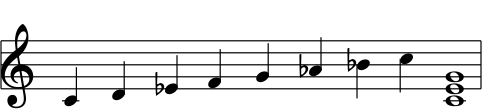
// Draw a C Minor scale (quarter notes)
// Format: NoteName + Accidental(optional) + Octave + Duration
staff.drawNote(['C4q', 'D4q', 'Eb4q', 'F4q', 'G4q', 'Ab4q', 'Bb4q', 'C5q']);

// Draw a C Chord
staff.drawChord(['C4w', 'E4w', 'G4w']);

// Evenly space all notes on the staff
staff.justifyNotes();
Resulting Staff
Grand Staff
import { MusicStaff } from 'vector-score';

const grandStaff = new MusicStaff(container, {
  staffType: 'grand',
  width: 400,
  spaceBelow: 2,
  spaceAbove: 2
});

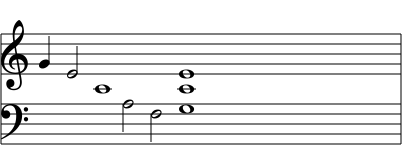
// Notes are automatically positioned on the correct stave based on pitch
grandStaff.drawNote(['G4q', 'E4h', 'C4w', "A3h", "F3h"]);

grandStaff.drawChord(["G3w", "C4w", "E4w"]);
Resulting Staff
Rhythm Staff
import { RhythmStaff } from 'vector-score';

const rhythmContainer = document.getElementById('rhythm-container');

const rhythm = new RhythmStaff(rhythmContainer, {
  width: 400,
  topNumber: 4, // Time signature numerator (e.g., 4/4 time)
  barsCount: 2
});

// Draw notes and rests
rhythm.drawNote(['q', 'q']); // Duration only
rhythm.drawRest(['h']);

// Draw beamed note
rhythm.drawBeamedNotes("e", 4); // Draws a beamed note of 4 eighth notes

// Finish the bar
rhythm.drawNote(['q', 'q']);

// Increment the UI to show the first beat in the bar
rhythm.incrementCurrentBeatUI();
Resulting Staff

Scrolling Staff
import { ScrollingStaff } from 'vector-score';

const scrollingContainer = document.getElementById('scrolling-container');

const scrollingStaff = new ScrollingStaff(scrollingContainer, {
  width: 400,
  spaceBelow: 2,
  spaceAbove: 2,
  onNotesOut: handleNotesOut, // Connect a handler when notes run out (optional)
});

// Handler for when notes run out
function handleNotesOut() {
  isNotesOut = true;
}

// ****
// NOTE CSS SELECTOR FOR NOTES FOR ANIMATION IS
// .vs-scrolling-notes-layer > g.vs-note-wrapper { transition: transform 0.2s ease-in }
// ****


// Add notes to the queue
// 5 single notes, a C chord, 2 more notes, finally a D chord
scrollingStaff.queueNotes([
  "C4w",
  "F4w",
  "C4w",
  "B4w",
  "D4w",
  ["C4w", "E4w", "G4w"],
  "B4w",
  "D4w",
  ["D4w", "F#4w", "A4w"],
]);

// The button event listener calls 'advanceNotes()' to move the notes over, one step at a time.
Resulting Staff
Note String Syntax
Notes are defined using a specific string format parsed by the library:
[Name][Accidental?][Octave][Duration]
- Name:
A-G(Case insensitive) - Accidental:
#(Sharp) orb(Flat). Optional. - Octave:
0-9 - Duration:
w: Wholeh: Halfq: Quartere: Eighth
Examples:
C4w: C, Octave 4, Whole noteF#5q: F Sharp, Octave 5, Quarter noteBb3e: B Flat, Octave 3, Eighth note
API Reference
MusicStaff Class
| Method | Description |
| :--- | :--- |
| drawNote(notes: string \| string[]) | Draws one or multiple notes sequentially. |
| drawChord(notes: string \| string[]) | Draws multiple notes stacked as a chord at the current cursor position. |
| justifyNotes() | Evenly spaces all currently drawn notes across the staff width. |
| clearAllNotes() | Removes all notes from the staff and resets the cursor. |
| changeNoteByIndex(note: string, index: number) | Replaces a note at a specific index with a new note. |
| changeChordByIndex(notes: string[], index: number) | Replaces a chord at a specific index with a new chord. |
| destroy() | Destroys internal arrays and elements |
RhythmStaff Class
| Method | Description |
| :--- | :--- |
| drawNote(notes: string \| string[]) | Draws rhythm notes. |
| drawRest(rests: string \| string[]) | Draws rests. |
| drawBeamedNotes(type: 'e'\|'s', count: number) | Draws a group of beamed eighth or sixteenth notes. |
| clearAllNotes() | Removes all items from the staff. |
| incrementCurrentBeatUI() | Starts the UI for showing the current beat. Connect to a external interval for accurate showing of current beat. |
| resetCurrentBeatUI() | Must be called if current beat goes over the total beats in the bar to reset its state |
| destroy() | Destroys internal arrays and elements |
ScrollingStaff Class
| Method | Description |
| :--- | :--- |
| queueNotes(notes: (string \| string[])[]) | Queues notes on the staff. ["C4", ["C4", "E4", "G4"], "B4"] |
| advanceNotes() | Advances notes to the next position |
| clearAllNote() | Clears all notes on the staff |
| destroy() | Destroys internal arrays and elements |
Configuration Options
MusicStaffOptions
width: Total width of the SVG in pixels.scale: Zoom factor (default: 1).noteStartX: Position where notes start to draw.staffType:'treble' | 'bass' | 'alto' | 'grand'.spaceAbove: Padding units above the staff (in staff line spaces).spaceBelow: Padding units below the staff (in staff line spaces).staffColor: CSS color string for lines and notes.staffBackgroundColor: CSS color string for background.
RhythmStaffOptions
topNumber: The top number of the time signature (e.g., 4 for 4/4 time).barsCount: Number of measures to draw.currentBeatUIColor: CSS color string for current beat UI.- Inherits sizing and color options from MusicStaffOptions.
width: Total width of the SVG in pixels.scale: Zoom factor (default: 1).topNumber: The top number of the time signature (e.g., 4 for 4/4 time).barsCount: Number of measures to draw.spaceAbove: Padding units above the staff (in staff line spaces).spaceBelow: Padding units below the staff (in staff line spaces).staffColor: CSS color string for lines and notes.staffBackgroundColor: CSS color string for background.currentBeatUIColor: CSS color string for current beat UI indicator.
ScrollingStaffOptions
width: Total width of the SVG in pixels.scale: Zoom factor (default: 1).noteStartX: Position where notes start to draw.staffType:'treble' | 'bass' | 'alto' | 'grand'.spaceAbove: Padding units above the staff (in staff line spaces).spaceBelow: Padding units below the staff (in staff line spaces).staffColor: CSS color string for lines and notes.staffBackgroundColor: CSS color string for background.onNotesOut: Callback function for when there are no more notes on the staff to advance.