
vellora
v0.5.0
Published
HTML to PDF for Node.js without Chromium or Puppeteer: a native, in-process renderer for invoices, receipts and reports, with templating and clear errors.

Maintainers
 diomalta
Readme
vellora
Turn HTML into PDF inside your Node.js process. No Chromium, no Puppeteer, no browser to babysit.


You write the document as HTML and CSS, the way you already would for Puppeteer. vellora lays it out inside your Node process and gives you the PDF bytes back. There is nothing to download at runtime, no browser process to launch or keep warm, and on the same platform the same input produces the same PDF, byte for byte.
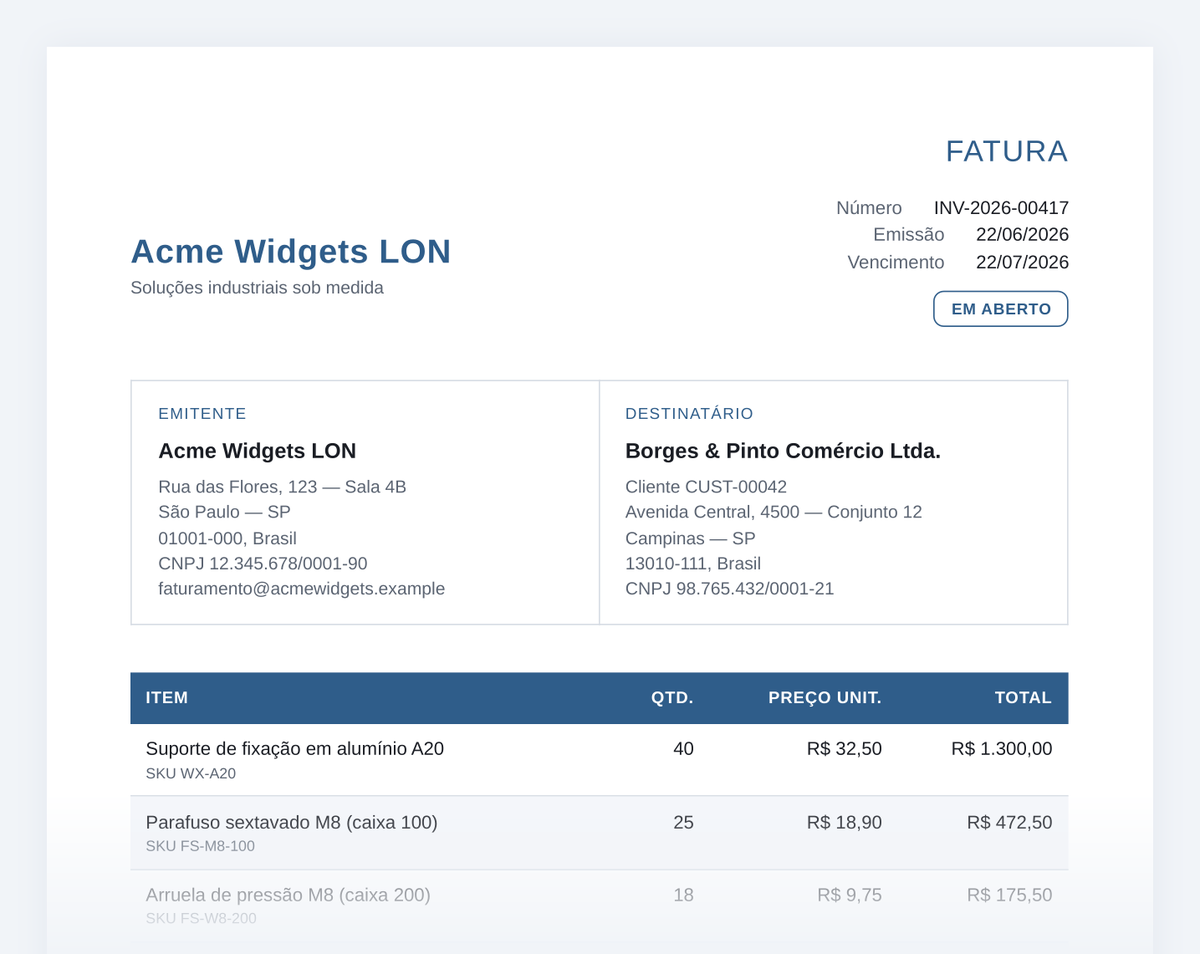
Page 1 of the invoice fixture in the repository, rendered by [email protected] with no browser installed.
Is it a good fit?
vellora is built for documents you generate from your own templates: invoices, receipts, statements, reports, bank slips, notifications, contracts.
| Use vellora when | Keep a browser when | |---|---| | You control the HTML template | You render arbitrary pages from the web | | You want a small, fast container without Chromium | The page needs JavaScript to build its content | | You have tight memory limits: about 118 MB peak for the whole Node process with 8 renders at once in our benchmark | You depend on CSS grid, transforms or animations | | You need the same PDF bytes for the same input | You need Chrome's exact print output |
When one template does need Chrome, you can route only that template to the optional
@vellora/engine-chromium and keep
everything else native.
Install
npm install velloraThat's it. npm picks the prebuilt binary for your machine (macOS arm64/x64, Linux x64/arm64 with glibc). You do not need Rust, Python, Chromium or system fonts.
Works with ESM and with CommonJS require("vellora") on Node 20.19+ / 22.12+.
Your first PDF
import { writeFileSync } from "node:fs";
import { renderPdf } from "vellora";

const html = `<!DOCTYPE html>
<html>
  <head>
    <style>
      @page { size: A4; margin: 20mm; }
      body { font-family: sans-serif; }
      td.amount { text-align: right; }
    </style>
  </head>
  <body>
    <h1>Invoice {{ number }}</h1>
    <p>Issued {{ issued | date("DD/MM/YYYY") }} to {{ customer.name }}</p>
    <table>
      {% for item in items %}
      <tr><td>{{ item.name }}</td><td class="amount">{{ item.price | currency("USD") }}</td></tr>
      {% endfor %}
    </table>
    {% if paid %}<p>Paid, thank you!</p>{% endif %}
  </body>
</html>`;

const pdf = await renderPdf(html, {
  number: "INV-0042",
  issued: "2026-10-28",
  customer: { name: "Ada Lovelace" },
  items: [
    { name: "Consulting", price: 1200 },
    { name: "Support plan", price: 300 },
  ],
  paid: true,
});

writeFileSync("invoice.pdf", pdf); // pdf is a Uint8Array
The page size and margins come from your CSS (@page). Templating is built in:
{{ value }} with dotted paths, {% for %}, {% if %}, and the currency, number and
date helpers. Every value is HTML-escaped. For HTML already rendered by another engine,
pass { template: false } so a literal {{ or {% stays as text, or wrap that part in
{% raw %}…{% endraw %}.
Put your CSS in a <style> tag or style="". vellora loads nothing from the network:
<link rel="stylesheet"> and @import are rejected with the line and column (css:external-stylesheet),
and images and fonts are passed in as bytes
(see images and fonts below).
What you get
Real document layout. Tables that span pages with the header repeated on each page, page numbers (
counter(page)/counter(pages)), page breaks (break-before,break-inside: avoid), floats, multi-column text, inline SVG drawn as vectors, images and your own fonts.Fast and light. A warm render of a 3-page invoice takes about 19 ms, and the whole Node process peaks at about 118 MB with 8 renders in parallel (numbers below).
Close to Chrome. In 8 of the 9 documents we test, every word lands within 1 mm of where Chrome prints it. We measured this ourselves on a Mac against Chrome for Testing 155 (how it's measured).
Same input, same bytes. No clock, no randomness, no fonts borrowed from the host: the same bundled fonts on every machine. On one platform, snapshot tests and caching work without special handling. Across machines, macOS arm64 and Linux arm64 produced identical bytes in our check on a pre-release tree; x86_64 was not measured.
Errors instead of silent surprises. If a template uses something vellora can't render faithfully, it fails before writing a PDF and tells you where:
import { renderPdf, VelloraUnsupportedError } from "vellora";

try {
  await renderPdf(`<div style="transform: rotate(5deg)">x</div>`);
} catch (err) {
  if (err instanceof VelloraUnsupportedError) {
    console.log(err.feature, err.line, err.col); // "css:transform" 1 13
    console.log(err.hint); // "this CSS feature is outside vellora's document subset; run `vellora fix`"
  }
}
Pass
strict: falseto have vellora apply its automatic fixes (from@vellora/lint) first. These cover grid or flex on a table cell, images without a size, inline SVG and broken markup. Other constructs, liketransform, are still rejected.
How close to Chrome?
Each image below shows the same page three times: Chrome's print-to-PDF (the reference), the previous vellora release, and the current one.
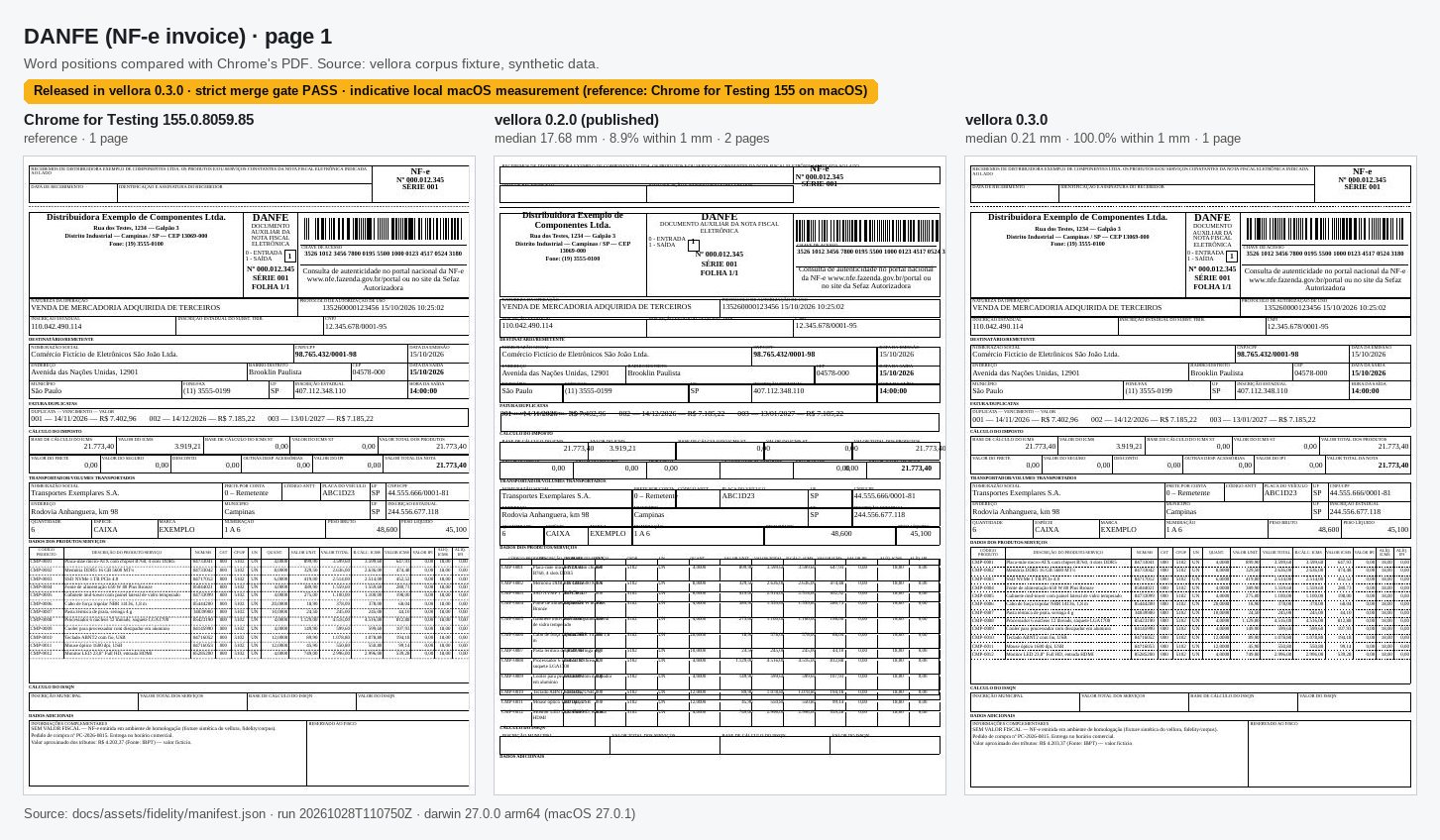
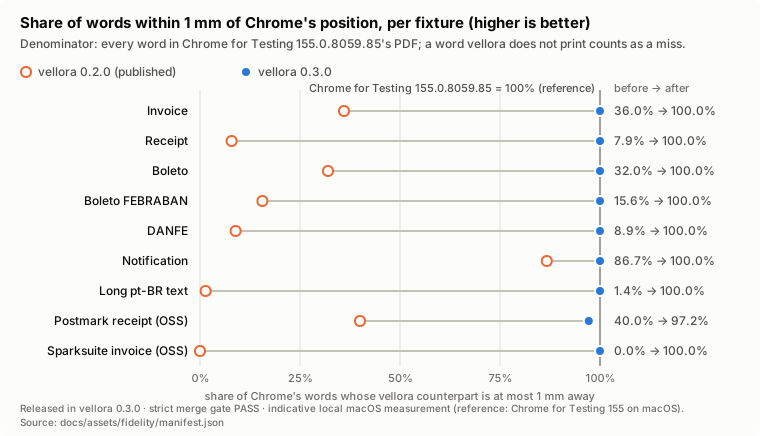
The full method, every document and the cases where vellora still loses are in the fidelity report.
API at a glance
import { renderPdf, renderPdfBatch, renderPdfToStream, renderTemplate } from "vellora";

// One document -> Uint8Array
const pdf = await renderPdf(html, data, options);

// Many documents, at most 4 at a time, results in input order
const pdfs = await renderPdfBatch(
  customers.map((c) => ({ html, data: c })),
  { concurrency: 4 },
);

// Write straight to an HTTP response or file stream
await renderPdfToStream(html, res, data);

// Only the templating step, no PDF
const filledHtml = renderTemplate(html, data);
html is always the document itself (a string, Uint8Array or readable stream), never a file
path. Useful options:
| Option | What it does |
|---|---|
| images | { "logo.png": bytes }: images your <img src> refers to. vellora never fetches from the network. |
| baseUrl | Resolves relative src values before looking them up in images. |
| fonts | [bytes, ...]: your own TTF/OTF fonts, used by their family name. |
| metadata | { title, creationDate } for the PDF info. Without a date, a fixed one is used so output stays reproducible. |
| pdfa | "PDF/A-2b" for archival PDFs. |
| strict | true by default. false applies the automatic fixes before rendering. |
| engine | "native" (default), "chromium", or "auto" to choose per template from a reviewed policy file. |
Performance
A warm 3-page invoice renders in about 19 ms, with no browser to download. Measured on a 4-core GitHub Actions Linux runner with vellora 0.3.0 (run 40687532121).
AMD EPYC 7763, 4 cores, Node v22.23.4, built from the v0.3.0 commit. Memory is the peak with 8 renders at once; warm timings are over 50 renders. The Chromium row is vellora's optional Chromium engine, which launches Chromium for each render. The two memory figures are sampled differently, and summing memory across browser processes counts shared memory more than once.
| Path | Install size | Extra runtime | Peak memory @8 | Cold start | Warm median / slowest 1 in 20 |
|---|---:|---:|---:|---:|---:|
| vellora (native) | 39.7 MB | none | 117.6 MB (inside Node) | 47 ms | 19.1 / 23.3 ms |
| vellora + optional Chromium engine (launched per render) | 39.7 MB | 412.3 MB browser | 6,834 MB (summed across browser processes) | 735 ms | 635.5 / 681.0 ms |
Method and raw artifacts: benchmarks/.
Limits worth knowing
vellora is not a browser. It does not run JavaScript, does not fetch URLs, and covers a documented
subset of HTML and CSS. Flexbox is partial (tables are the reliable choice for layout); CSS
grid, transform, filter, animations, forms and <canvas> are rejected. The complete list is
in COMPATIBILITY.md.
vellora is pre-1.0: the API works and is tested, but a minor version can still bring a breaking change. Read the release notes before upgrading.
The vellora packages
| Package | What it's for |
|---|---|
| vellora | This package. The API you use. |
| @vellora/native | The native renderer. Installed for you. |
| @vellora/lint | Check and fix templates in your editor or CI. |
| @vellora/cli | vellora render, lint, fix and doctor from the terminal. |
| @vellora/engine-chromium | Optional Chrome rendering for the templates that need it. |
Learn more
- Getting started and rendering invoices
- Images, fonts, streaming, PDF/A
- Switching from Puppeteer
- HTML to PDF in Node.js without Puppeteer
Found a template that renders wrong? Open an issue with the HTML. A failing template is the most useful bug report there is.
License
MIT. See LICENSE.