npm package discovery and stats viewer.

Discover Tips

  • General search

    [free text search, go nuts!]

  • Package details

    pkg:[package-name]

  • User packages

    @[username]

Sponsor

Optimize Toolset

I’ve always been into building performant and accessible sites, but lately I’ve been taking it extremely seriously. So much so that I’ve been building a tool to help me optimize and monitor the sites that I build to make sure that I’m making an attempt to offer the best experience to those who visit them. If you’re into performant, accessible and SEO friendly sites, you might like it too! You can check it out at Optimize Toolset.

About

Hi, 👋, I’m Ryan Hefner  and I built this site for me, and you! The goal of this site was to provide an easy way for me to check the stats on my npm packages, both for prioritizing issues and updates, and to give me a little kick in the pants to keep up on stuff.

As I was building it, I realized that I was actually using the tool to build the tool, and figured I might as well put this out there and hopefully others will find it to be a fast and useful way to search and browse npm packages as I have.

If you’re interested in other things I’m working on, follow me on Twitter or check out the open source projects I’ve been publishing on GitHub.

I am also working on a Twitter bot for this site to tweet the most popular, newest, random packages from npm. Please follow that account now and it will start sending out packages soon–ish.

Open Software & Tools

This site wouldn’t be possible without the immense generosity and tireless efforts from the people who make contributions to the world and share their work via open source initiatives. Thank you 🙏

© 2025 – Pkg Stats / Ryan Hefner

vercel-deploy-source-downloader

v1.0.1

Published

Download source code from Vercel deployments with support for latest or specific deployment IDs

Downloads

85

Readme

Download Vercel Source

A powerful CLI tool to download source code from Vercel deployments. Supports fetching the latest deployment or a specific deployment by ID, with automatic file tree traversal and verification.

🚀 Quick Start (npx - No Installation Required)

npx vercel-deploy-source-downloader <your-vercel-token>

That's it! No installation needed. The tool will download the source code from your latest Vercel deployment.

More Examples

# Download from a specific deployment
npx vercel-deploy-source-downloader <token> --deployment dpl_ABC123

# Download from a specific project
npx vercel-deploy-source-downloader <token> --project my-project

# Enable verbose logging
npx vercel-deploy-source-downloader <token> --verbose

# Combine options
npx vercel-deploy-source-downloader <token> --project my-app --team team_xyz --verbose

Get your Vercel token: https://vercel.com/account/tokens

Features

  • Dynamic Deployment Selection - Download from latest or specific deployment
  • Smart Caching - Skip already downloaded files for faster re-runs
  • Tree View - Beautiful tree structure of downloaded files
  • Flexible Configuration - CLI args, environment variables, or .env file
  • Progress Tracking - Verbose mode for detailed progress
  • Auto-detection - Automatically detects project and team
  • Verification - Built-in file verification and statistics

Installation (Alternative Methods)

Global Installation

npm install -g vercel-deploy-source-downloader

Then use it directly:

vercel-deploy-source-downloader <your-vercel-token>

Local Installation

# Clone this repository
git clone https://github.com/numanaral/vercel-deploy-source-downloader.git
cd vercel-deploy-source-downloader

# Install dependencies
npm install

Usage

Option 1: Using .env file (Recommended for Local Development)

  1. Copy the example environment file:
cp .env.example .env
  1. Edit .env and add your Vercel token:
VERCEL_TOKEN=your_token_here
VERCEL_PROJECT=your-project-name  # optional
  1. Run the script:
npx tsx src/vercel-deploy-source-downloader.ts

Option 2: Using Command Line

npx tsx src/vercel-deploy-source-downloader.ts <your-vercel-token>

Option 3: Using Environment Variables

VERCEL_TOKEN=<token> npx tsx src/vercel-deploy-source-downloader.ts

Configuration

Command Line Options

npx tsx src/vercel-deploy-source-downloader.ts [token] [options]

Options:

  • --deployment <id|latest> - Deployment ID or "latest" (default: latest)
  • --project <name> - Project name (default: auto-detect)
  • --team <id> - Team ID (default: auto-detect)
  • --verbose - Show detailed progress for each file

Environment Variables

Create a .env file or set these in your environment:

  • VERCEL_TOKEN - Your Vercel API token (required)
  • VERCEL_DEPLOYMENT - Deployment ID or "latest" (default: latest)
  • VERCEL_PROJECT - Project name (optional)
  • VERCEL_TEAM - Team ID (optional)

Configuration Priority:

  1. CLI arguments (highest)
  2. Environment variables
  3. .env file
  4. Defaults (lowest)

Usage Examples

Download from Latest Deployment

# Auto-detect everything
npx tsx src/vercel-deploy-source-downloader.ts <token>

# Or with .env file
npx tsx src/vercel-deploy-source-downloader.ts

Download from Specific Deployment

npx tsx src/vercel-deploy-source-downloader.ts <token> --deployment dpl_ABC123xyz

Download from Specific Project

npx tsx src/vercel-deploy-source-downloader.ts <token> --project my-project

# With verbose output
npx tsx src/vercel-deploy-source-downloader.ts <token> --project my-project --verbose

Download for Team Project

npx tsx src/vercel-deploy-source-downloader.ts <token> \
  --project my-project \
  --team team_ABC123

Output

The script will:

  1. Create an out/ directory with all downloaded source files
  2. Generate a download-log.txt with full operation log
  3. Display summary with:
    • File count (downloaded vs skipped)
    • Total size
    • File type breakdown
    • Verification of important files
    • Tree structure view

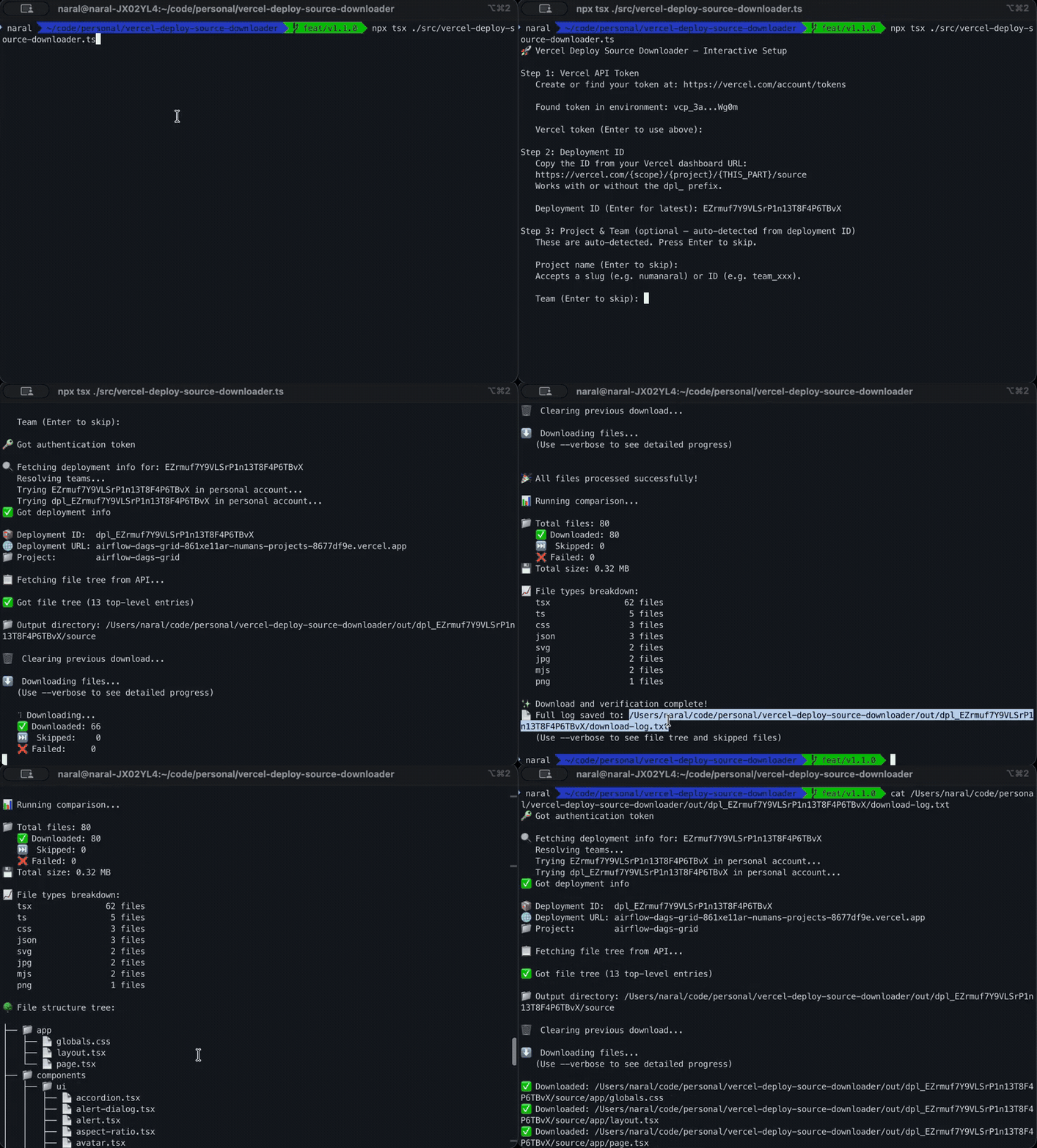
Example Output

📦 Using Deployment ID: dpl_ABC123xyz
🌐 Deployment URL: my-app-xyz.vercel.app
📁 Project:        my-project
👥 Team:           my-team

✅ Got file tree

⬇️  Downloading files...
   (Use --verbose to see detailed progress)

📁 Output directory: /path/to/out

🎉 All files processed successfully!

📊 Running comparison...

📁 Total files: 318
   ✅ Downloaded: 42
   ⏭️  Skipped: 276
💾 Total size: 5.79 MB

📈 File types breakdown:
   ts               122 files
   tsx              106 files
   md                38 files
   ...

🔍 Verifying important files:
   ✅ package.json                                  4.6 KB
   ✅ next.config.ts                                0.3 KB
   ...

🌳 File structure tree:
   [Tree view of all files]

✨ Download and verification complete!
📄 Full log saved to: download-log.txt

Getting Your Vercel Token

  1. Go to Vercel Account Tokens
  2. Click "Create Token"
  3. Give it a name and appropriate scope
  4. Copy the token and use it in your configuration

Security Note: Never commit your .env file or share your token publicly.

Files Downloaded

The script downloads the source code from your Vercel deployment, including:

  • All source files (.ts, .tsx, .js, .jsx, etc.)
  • Configuration files (package.json, tsconfig.json, etc.)
  • Static assets
  • Database schemas
  • Scripts and utilities

Note: It does NOT download build outputs or lambda functions (these are skipped automatically).

Troubleshooting

"No deployments found"

  • Make sure your token has access to the project
  • Verify the project name is correct
  • Check if there are any READY deployments

"Deployment not found"

  • Verify the deployment ID is correct
  • Make sure you have access to that deployment
  • Check if the deployment belongs to a team (use --team flag)

Files are empty or contain error JSON

  • The API endpoint changed - this script uses the correct v7 endpoints
  • Your token might not have sufficient permissions

Rate limiting

If you hit rate limits, the script will fail. Wait a few minutes before retrying.

Advanced Usage

Download Only New Files

The script automatically skips files that already exist with content. This makes re-runs very fast:

# First run - downloads everything
npx tsx src/vercel-deploy-source-downloader.ts

# Second run - only downloads new/changed files
npx tsx src/vercel-deploy-source-downloader.ts

Verbose Mode for Debugging

npx tsx src/vercel-deploy-source-downloader.ts --verbose

This shows every file being processed in real-time.

Mix Configuration Methods

# Token from .env, deployment from CLI
npx tsx src/vercel-deploy-source-downloader.ts --deployment dpl_ABC123

# Token from CLI, project from env
VERCEL_PROJECT=my-project npx tsx src/vercel-deploy-source-downloader.ts <token>

Requirements

  • Node.js >= 18.0.0
  • tsx (installed as dev dependency)

License

MIT

Contributing

Feel free to submit issues and pull requests!

Author

Numan [email protected]