
view-json-react
v3.0.0
Published
Accessible, dependency-free React JSON tree viewer with search, safe inspection, and virtualized large-data support.

Maintainers
 nycruslan1992
Readme
view-json-react





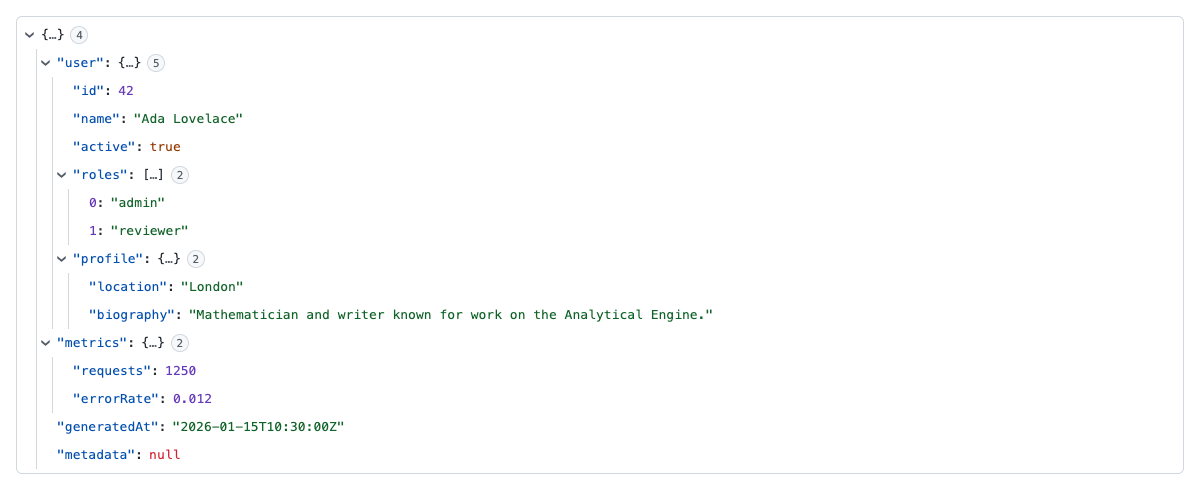
A small, accessible, read-only React JSON tree viewer for inspecting JSON and JavaScript values.
- Genuine WAI-ARIA tree navigation
- Safe handling of cycles, accessors, sparse arrays, and non-JSON values
- Accurate asynchronous clipboard results and optional redaction
- Controlled or uncontrolled expansion
- Bounded search and rendering
- Optional dependency-free windowing for large values
- Static, CSP-friendly CSS with light, dark, and system themes
- ESM, CommonJS, SSR, and React Server Component boundaries
- Zero runtime dependencies; React 18 and 19 supported
Unlike editor-oriented JSON components, view-json-react deliberately omits mutation, schema, fetching, persistence, and runtime style injection. The standard entry stays compact, while large expanded datasets can opt into a separate virtualized entry.
Explore the live examples and API documentation
Install
npm install view-json-react
# pnpm add view-json-react
# yarn add view-json-react
Requires React 18 or 19. Node.js 18 or newer is supported for SSR; repository development uses Node.js 24.
Quick start
The stylesheet is explicit in v3. Import it once in your application entry point.
import { JsonViewer } from 'view-json-react';
import 'view-json-react/styles.css';

const data = {
  user: { name: 'Ada', roles: ['admin', 'reviewer'] },
  active: true,
};

export function Inspector() {
  return <JsonViewer data={data} rootName="response" theme="auto" />;
}
data is unknown: valid JSON works as expected, while values such as undefined, bigint, Date, RegExp, Map, Set, functions, symbols, NaN, infinity, -0, sparse arrays, repeated references, and cycles have explicit display behavior.
AI coding agents
The published package includes its complete README, migration guide, TypeScript declarations, llms.txt, and a portable Agent Skill. Agents can already inspect the installed package for version-matched guidance; the skill is optional and adds a concise integration workflow for Copilot, Claude Code, Codex, OpenCode, Pi, and other Agent Skills-compatible tools.
Install the skill from the dependency already pinned by your application rather than relying on unversioned model knowledge:
npx skills add ./node_modules/view-json-reactPi users can instead load the bundled skill through the package manifest:
pi install ./node_modules/view-json-react -lThe documentation site serves /llms.txt for retrieval tools and documentation indexes, and the repository includes context7.json for focused, version-aware Context7 indexing. No MCP server is required: this library exposes static documentation and typed APIs, not a remote service or action interface.
Accessibility and keyboard controls
The viewer implements the WAI-ARIA Tree View pattern with tree, treeitem, managed focus, structural metadata, and polite status announcements.
| Key | Action |
|---|---|
| Arrow Down / Arrow Up | Move to the next or previous visible node |
| Arrow Right | Expand a branch, then move to its first child |
| Arrow Left | Collapse a branch, then move to its parent |
| Home / End | Move to the first or last visible node |
| Page Up / Page Down | Move by approximately one viewport |
| Enter / Space | Toggle the active branch |
| * | Expand sibling branches |
| Type characters | Move by node-name type-ahead |
| Ctrl/Cmd+C | Copy the active value when value copying is enabled |
| Ctrl/Cmd+Shift+C | Copy the active path when path copying is enabled |
| F3 / Shift+F3 | Move between current search matches |
Expansion
Uncontrolled expansion is the default:
<JsonViewer data={data} defaultExpandDepth={2} />

// Or choose exact initially expanded branches.
<JsonViewer data={data} defaultExpandedPaths={['', '/user']} />
Paths used for expansion are RFC 6901 JSON Pointers. For full control:
const [expanded, setExpanded] = useState<ReadonlySet<string>>(new Set(['']));

<JsonViewer
  data={data}
  expandedPaths={expanded}
  onExpandedPathsChange={setExpanded}
/>
An imperative ref is also available:
const viewerRef = useRef<JsonViewerHandle>(null);

viewerRef.current?.focusPath('/user/name');
viewerRef.current?.expand('/user');
viewerRef.current?.collapseAll();
viewerRef.current?.nextMatch();

<JsonViewer ref={viewerRef} data={data} />
Search and sorting
Search is controlled so applications can use their own input, command palette, or debouncing policy. Matching descendants are found even when their branches were collapsed; only matches and their ancestors are shown.
const [query, setQuery] = useState('');

<input
  aria-label="Search JSON"
  value={query}
  onChange={event => setQuery(event.target.value)}
/>
<JsonViewer
  data={data}
  searchQuery={query}
  maxSearchNodes={100_000}
  maxSearchResults={1_000}
  sortKeys
/>
sortKeys accepts true for deterministic code-point ordering or a comparator such as (a, b) => a.localeCompare(b).
Clipboard and redaction
By default, values can be copied and paths cannot. Clipboard writes are awaited; onCopy runs afterward with the real result.
<JsonViewer
  data={data}
  copy={{ value: true, path: true, indent: 2 }}
  redact={(path) => path.at(-1) === 'token'}
  onCopy={({ success, kind, path, text, error }) => {
    if (!success) console.error('Copy failed', error);
    else console.log(`Copied ${kind}`, path, text);
  }}
/>
redact applies to copied values, not the visible tree. It can return true for [Redacted], return a replacement string, or return a falsey value to retain the value. Supply copy.stringify for complete control of value serialization.
The Clipboard API normally requires HTTPS or localhost and user activation. Unsupported or denied writes are reported as failures rather than as false successes.
Large values
The standard viewer lazily creates descendants only for expanded branches. Safety limits prevent accidental unbounded traversal:
<JsonViewer
  data={data}
  maxDepth={50}
  maxVisibleNodes={10_000}
  collapseStringsAfterLength={120}
/>
For large expanded collections, use the optional windowed entry point. It renders only the current viewport while retaining tree keyboard behavior.
import { VirtualJsonViewer } from 'view-json-react/virtual';
import 'view-json-react/styles.css';

<VirtualJsonViewer
  data={largeData}
  height={480}
  rowHeight={28}
  overscan={8}
/>
Windowing uses dynamic inline positioning styles. The standard viewer itself does not inject styles and works with a strict CSP when its static stylesheet is allowed.
Custom values and localization
<JsonViewer
  data={data}
  renderValue={({ value, type, formatted, path }) =>
    type === 'date' ? <time>{formatted}</time> : undefined
  }
  labels={{
    tree: 'API response',
    copied: 'Value copied',
  }}
/>
Return undefined from renderValue to use the built-in rendering. Control and status labels can be replaced through labels; layout uses logical CSS properties and supports dir="rtl".
Themes
<JsonViewer data={data} theme="light" />
<JsonViewer data={data} theme="dark" />
<JsonViewer data={data} theme="auto" />
Customize tokens through a class or the typed style prop:
<JsonViewer
  data={data}
  style={{
    '--vjr-background': '#101418',
    '--vjr-text': '#f0f3f6',
    '--vjr-key': '#80bfff',
    '--vjr-string': '#8ddb8c',
    '--vjr-indent': '20px',
  }}
/>
Main tokens include --vjr-background, --vjr-text, --vjr-key, --vjr-index, --vjr-string, --vjr-number, --vjr-boolean, --vjr-null, --vjr-special, --vjr-border, --vjr-hover, --vjr-active, --vjr-focus, --vjr-match, --vjr-font-family, --vjr-font-size, --vjr-line-height, and --vjr-indent.
The stylesheet includes reduced-motion, forced-colors, coarse-pointer, and automatic dark-mode rules.
Headless utilities
The data model is available without React:
import {
  buildVisibleTree,
  classifyValue,
  formatJsonPath,
  formatValue,
  searchTree,
  stringifyValue,
  toJsonPointer,
} from 'view-json-react/headless';
Use these functions to build custom renderers or share the viewer's path, search, formatting, and safe-serialization semantics elsewhere. stringifyValue accepts maxDepth, maxBreadth, and maxNodes limits; their safe defaults are 100, 10,000, and 100,000.
Core props
| Prop | Type | Default |
|---|---|---|
| data | unknown | required |
| rootName | string | hidden; accessible name is "root" |
| theme | 'light' \| 'dark' \| 'auto' | 'light' |
| defaultExpandDepth | number | 1 |
| defaultExpandedPaths | Iterable<string> | derived from depth |
| expandedPaths | ReadonlySet<string> | uncontrolled |
| onExpandedPathsChange | (paths, change) => void | — |
| onExpand | (change) => void | — |
| showObjectSize | boolean | true |
| copy | boolean \| CopyOptions | true |
| onCopy | (result: CopyResult) => void | — |
| redact | (path, value) => boolean \| string \| null \| undefined | — |
| searchQuery | string | '' |
| onSearchMatchCount | (count) => void | — |
| sortKeys | boolean \| KeyComparator | false |
| collapseStringsAfterLength | number | 120 |
| maxDepth | number | 100 |
| maxVisibleNodes | number | 10_000 |
| maxSearchNodes | number | 100_000 |
| maxSearchResults | number | 1_000 |
| renderValue | (context) => ReactNode | — |
| labels | Partial<JsonViewerLabels> | English labels |
Standard div attributes such as className, style, dir, aria-label, and event handlers are forwarded to the tree.
Security and resilience
- Values are rendered as React text; the package does not use
dangerouslySetInnerHTML. - Enumerable getters and setters are described without invocation.
- Cycles are represented as references instead of recursing forever.
- Traversal and search are bounded; serialization also limits depth, breadth, and total nodes.
- Revoked or throwing proxies are represented as unavailable where possible. Proxy reflection traps can execute by JavaScript design, so do not treat arbitrary executable proxy objects as inert data.
- Copy redaction happens before serialization.
- The package has no runtime dependencies and publishes static CSS instead of injecting a
<style>element. - A custom
renderValueis application code and remains responsible for its own output safety.
SSR and frameworks
Both UI entries carry a "use client" boundary and can be server-rendered without accessing window, document, or navigator during render. Import the stylesheet through your framework's supported global-CSS entry point. The headless entry has no React dependency.
In a Next.js App Router project, import the stylesheet from the root layout and render the viewer from a Server Component with serializable data:
// app/layout.tsx
import 'view-json-react/styles.css';

// app/page.tsx
import { JsonViewer } from 'view-json-react';

export default function Page() {
  return <JsonViewer data={{ status: 'ok' }} />;
}
State, callbacks, functions, proxies, and other non-serializable values must originate inside a Client Component because they cannot cross the React Server Component boundary. Headless utilities can be imported directly in Server Components and route handlers.
Package entries and size budgets
| Entry | Purpose | Current budget |
|---|---|---|
| view-json-react | Standard viewer | 6.5 KB Brotli |
| view-json-react/virtual | Windowed viewer | 7 KB Brotli |
| view-json-react/headless | Data utilities | 3 KB Brotli |
| view-json-react/styles.css | Static styles | 2 KB Brotli |
Packed ESM, CommonJS, TypeScript, SSR, CSS, and subpath exports are tested in CI. publint and Are the Types Wrong validate both ESM and CommonJS declaration graphs.
Project resources
MIT © Ruslan Shulga.