
vimtronner
v0.0.9
Published
A multi-player Vim trainer.


Readme

#vimtronner
A multiplayer, realtime, command-line game that teaches you the core vim keys. Be the last player alive by either controlling your bike safely around obstacles or insert your own walls so that others crash into them. Just remember, you can't do both at the same time!
Inspired by Patrick Moody's vimsnake and, of course, TRON.
Quickstart Guide
Greetings, programs! Before we can enter the grid, we need to have
node (http://nodejs.org) installed. There are
many paths to do so; we like to install it through brew
(http://brew.sh/).
$ brew install nodeInstall the vimtronner module via npm:
$ npm install -g vimtronnerStart a practice game:
$ vimtronnerPress i to start the game. After a countdown, the game
starts. Your bike moves continuously. You can control its
direction:
- go left by pressing
h - go down by pressing
j - go up by pressing
k - go right by pressing
l
To start creating insert walls, enter INSERT mode by pressing
i. BUT remember; you can change your direction while in
INSERT mode. To return to normal press ESC or CTRL-[. Press
q to quit anytime.
When you're ready to face other players, connect
as a client to the public vimtronner server,
stating the number of players you want.
$ vimtronner -C -N 4Look in the lower left-hand corner for your game name.
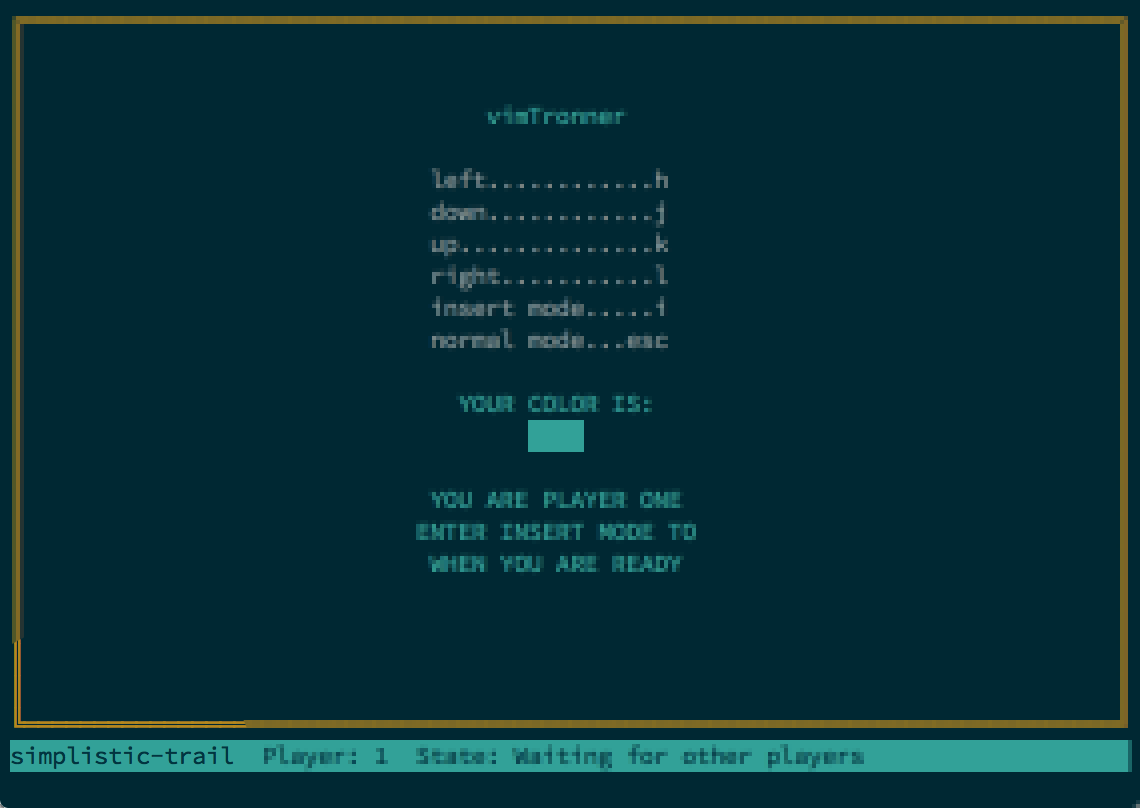
Then have the other players join that game as a client:
$ vimtronner -G simplistic-trailThe game will start once all players have declared they are ready by
pressing i.
Good luck. It's in your hands to see if you're a User ... or a loser!
Controls
Your bike will continually move on its own; you only have control over which direction it is heading in or whether you can build walls. Just remember, you can't do both at the same time!
left...................h
down...................j
up.....................k
right..................l
insert mode............i
normal mode...esc/ctrl-[
Launching
Practice
Launching vimtronner with no options kicks it off in a single-player
practice mode:
$ vimtronnerUse this mode to become familar with the vim keys and how to rapidly
switch between INSERT mode to build walls and normal mode to control
your direction.
Public Multiplayer
To play a multiplayer game, you connect as a client (with the -C or
--client flag) to our public multiplayer server, passing in the
number of players who want to play with the -N or --number option.
$ vimtronner -C -N 6A game is created with a random name you can find in the lower left-hand corner.
You can also explicitly give a name to a game when you create it through
the -G or --game option.
$ vimtronner -C -N 6 -G mygameOther players can then join your game by starting vimtronner in
client-only mode (-C or --client) and passing in the name of the
game (-G or --game).
$ vimtronner -C -G simplistic-trailThe game will only start one all players have connected and declared
they are ready by entering INSERT mode (pressing i). You can quit at
anytime (press q) with the last bike remaining being considered the
winner.
At the end of the match, you can all play again by everyone
declaring they are ready by pressing i.
NOTE: Games on the public server have a time to live of 3 minutes. This is to ensure system resources are not overwhelmed with dead games. Blame the MCP.
Local Multiplayer
You can start yor own multiplayer on your local network for others to
join. Simply launch vimtronner with the number of players
you want before starting a game with the -N or --number option and
WITHOUT the client flag (-C or --client)
$ vimtronner -N 3This starts your own vimtronner on your machine, which you are
immediately connected to. Like on the public server a random name is
given to your game (displayed in the lower left-hand corner)
You can explicitly give a name to a game when you create it through
the -G or --game option.
$ vimtronner -N 3 -G mygameOther players can then join your game by starting vimtronner in
client-only mode (-C or --client) and passing in the name of the
game (-G or --game) and the address of your machine (-A or
--address).
$ vimtronner -C -G simplistic-trail -A 10.0.1.144By default, vimtronner launches and connects to port 8766. You can
override this through the -P or --port flag. So when launching a
local multiplayer game:
$ vimtronner -N 3 -P 8000And when others want to join:
$ vimtronner -C -G simplistic-trail -A 10.0.1.144 -P 8000Note: that if the game host quits, the game ends immediately and everyone is disconnected.
"Headless" Server Mode
You can launch a vimtronner server to host multiple games without also
starting a game. Simply pass in the -S or --server flag.
$ vimtronner -SNow anyone can create a game on the server by connecting as a client
(-C or --client flag) to the server's address (-A or --address)
to create games:
$ vimtronner -C -A 10.0.1.144 -N 5And join them:
$ vimtronner -C -A 10.0.1.144 -N 5 -G simplistic-trailAs always they can give games a specific name (-G or --game
option) when creating them. You can also set a port number for your
server to listen to with the -P or --port option (it defaults to
8766). Players use the same option when connecting.
Listing Games
To see a list of all games running on a server, simply connect as a
client and pass the -L or --list flag.
$ vimtronner -C -LThis works in tandem with the -A/--address and -P/--port options
to specify the server we are connecting to.
All Options
  Usage: vimtronner [options]

  Options:

    -h, --help                        output usage information
    -V, --version                     output the version number
    -S, --server                      launches in server only mode
    -C, --client                      launches in client only mode
    -A, --address <address>           the address to connect the client
    -P, --port <port>                 the port to launch the server or connect the client
    -G, --game <game>                 the name of the game the client wants to join
    -N, --number <number of players>  the number of players required to play (applies to new game only)
    -W, --width <size>                the grid width
    -H, --height <size>               the grid height
    -L, --list                        list active games on the server
Development
Want to contribute to vimtronner? There are many ways to do. File bugs
and features through
Github.
Or fork the repo to add your own
changes and create a pull-request so we can bring them in! Any help is
welcome!