
virtual-keyboard-noahko
v1.1.0
Published
키오스크·태블릿용 React 한글 가상 키보드. 자모 조합, 한/영 전환, 커서 위치 입력을 지원합니다. (React virtual keyboard with Korean Hangul composition)

Maintainers
 jygo
Readme
virtual-keyboard-noahko


키오스크·태블릿처럼 물리 키보드가 없는 화면을 위한 React 한글 가상 키보드입니다. 자모를 누르면 한글로 조합되고, 입력창 중간에 커서를 둔 상태로 입력·삭제할 수 있습니다.
React virtual keyboard with Korean Hangul composition, for kiosks and touch screens.
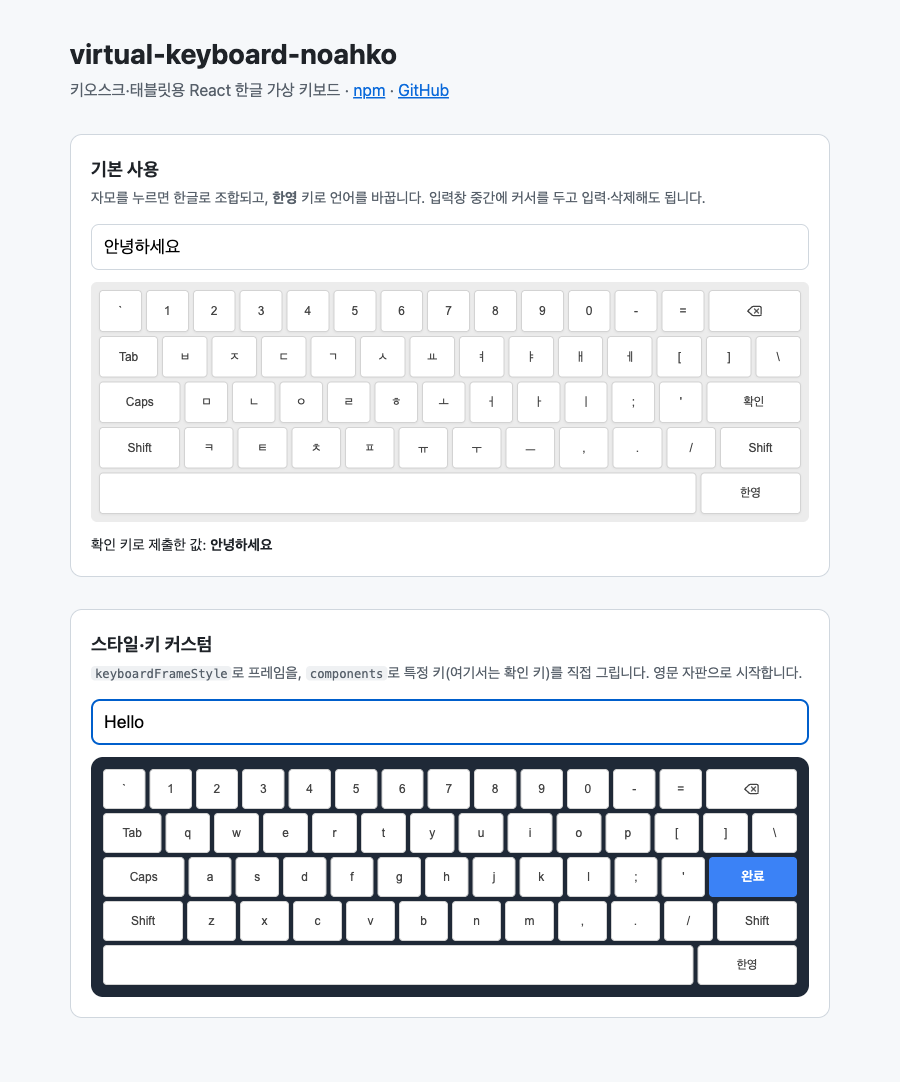
특징
- 한글 자모 조합:
ㅎ ㅏ ㄴ ㄱ ㅡ ㄹ을 누르면한글이 됩니다. 조합은 hangul-js로 처리합니다. - 커서 위치 입력: 입력창 끝이 아니라 커서가 있는 자리에 글자를 넣고, 선택한 범위는 한 번에 지웁니다.
- 자모 단위 지우기: 글 끝에서 지우기를 누르면
한→하→ㅎ처럼 자모 단위로 지웁니다. - 한/영 전환과 Shift: 한영 키로 자판을 바꾸고, Shift는 한 글자를 입력하면 자동으로 풀립니다.
- 커스텀: 프레임 스타일, 자판 배열, 특정 키의 렌더링을 바꿀 수 있습니다.
- 터치 대응:
pointerdown으로 입력해 터치 화면에서 반응이 빠르고, 더블 탭 확대를 막습니다.
설치
npm install virtual-keyboard-noahko hangul-js lucide-reactreact·react-dom 19, hangul-js, lucide-react는 peer dependency입니다.
사용법
import { useRef, type RefObject } from "react";
import { VirtualKeyboard } from "virtual-keyboard-noahko";

export function SearchKiosk() {
  const inputRef = useRef<HTMLInputElement>(null);

  return (
    <>
      <input ref={inputRef} />
      <div style={{ height: 240 }}>
        <VirtualKeyboard
          inputRef={inputRef as RefObject<HTMLInputElement>}
          onClickEnter={() => console.log(inputRef.current?.value)}
        />
      </div>
    </>
  );
}
키보드는 부모 요소의 너비와 높이를 채웁니다. 부모에 높이를 지정해 주세요.
비제어 input과 함께 쓰세요. 키보드는
inputRef.current.value를 직접 바꿉니다.value·onChange로 상태를 관리하는 제어 컴포넌트에서는 React 상태가 갱신되지 않으니, 값은inputRef.current.value로 읽어 주세요.
Props
| Prop | 타입 | 기본값 | 설명 |
| --- | --- | --- | --- |
| inputRef | RefObject<HTMLInputElement> | (필수) | 입력을 받을 input의 ref |
| onClickEnter | () => void | - | 확인(Enter) 키를 눌렀을 때 호출 |
| initialLanguage | "ko" \| "en" | "ko" | 처음 표시할 자판 |
| keyboardFrameStyle | Partial<KeyboardFrameStyleType> | - | 프레임의 width, height, backgroundColor, padding, borderRadius, rowGap |
| layout | Record<"ko" \| "en", KeyboardKeyRawLayoutType> | 기본 자판 | 자판 배열 전체를 바꿀 때 사용 |
| components | ({ key, onClick }) => ReactNode | - | 특정 키를 직접 그릴 때 사용. undefined를 반환한 키는 기본 키로 그림 |
onClikEnter(1.0.0의 오타 이름)도 계속 동작하지만, 새 코드에서는 onClickEnter를 써 주세요.
커스텀
특정 키 바꾸기
import { VirtualKeyboard, ENTER_KEY } from "virtual-keyboard-noahko";

<VirtualKeyboard
  inputRef={inputRef}
  keyboardFrameStyle={{ backgroundColor: "#1f2937", borderRadius: "0.75rem" }}
  components={({ key, onClick }) =>
    key === ENTER_KEY ? (
      <button key={key} style={{ flex: 3 }} onPointerDown={onClick}>
        완료
      </button>
    ) : undefined
  }
/>;
자판 배열 바꾸기
기본 자판(KoreanDefaultLayout, EnglishDefaultLayout)을 복사해서 고친 뒤 layout으로 넘깁니다. 각 자판은 default와 shift 두 배열로 되어 있습니다.
import {
  VirtualKeyboard,
  KoreanDefaultLayout,
  EnglishDefaultLayout,
} from "virtual-keyboard-noahko";

const layout = {
  ko: KoreanDefaultLayout,
  en: {
    ...EnglishDefaultLayout,
    default: EnglishDefaultLayout.default.slice(1), // 숫자 줄 제거
  },
};

<VirtualKeyboard inputRef={inputRef} layout={layout} />;
특수 키
| 상수 | 값 | 동작 |
| --- | --- | --- |
| BKSB_KEY | {bksp} | 지우기 |
| ENTER_KEY | {enter} | onClickEnter 호출 |
| SPACE_KEY | {space} | 띄어쓰기 |
| LANG_KEY | {lang} | 한/영 전환 |
| SHIFT_KEY | {shift} | 다음 한 글자만 Shift 자판으로 입력 |
| CAPSLOCK_KEY | {capslock} | 지금은 Shift와 같게 동작 |
| TAB_KEY | {tab} | 입력하지 않음(자리 표시용) |
라이선스
MIT