
vite-plugin-auto-route
v2.1.0
Published
plugin of Vite

Maintainers
 summery_laker
Readme
vite-plugin-auto-route
A vite plugin for automatic routing in Vue 3 based on your file structure.
Why?
You hate repetition and want automatic routing from a file structure, as you'd get in Nuxt UmiJS and Next. Specifically, you want to turn this file tree:
views/
--| Home.vue
--| Counter
-----| index.vue
-----| counter.vue
-----| Hello.vue
--| About.vue
into this:
routes: [
  {
    path: "/",
    name: "Home",
    component: () => import("@/views/HomeView.vue"),
  },
  {
    path: "/counter",
    name: "CounterHome",
    component: () => import("@/views/Counter/IndexView.vue"),
    children: [
      {
        path: "",
        name: "Counter",
        component: () => import("@/views/Counter/CounterView.vue"),
      },
      {
        path: "hello",
        name: "Hello",
        component: () => import("@/views/Counter/HelloView.vue"),
      },
    ],
  },
  {
    path: "/about",
    name: "About",
    component: () => import("@/views/AboutView.vue"),
  },
];
Usage
Installation
With npm:
npm i --save-dev vite-plugin-auto-routeWith pnpm:
pnpm add -D vite-plugin-auto-routesThen in your vite.config.js file add:
REM: It is recommended to use the ESM specification, although CJS is also supported
import VitePluginAutoRoute from "vite-plugin-auto-route";

defineConfig({
  plugins: [
    VitePluginAutoRoute({
      pagesDir: "./src/views", // Route page folder path
      routesFile: "./src/router/autoRoutes.ts", // Name and location of the file automatically routed for writing
    }),
  ],
});
Then open dev-server in your Vue3 project, and based on the directory structure of the views folder, you will find the routes in the location you specified.
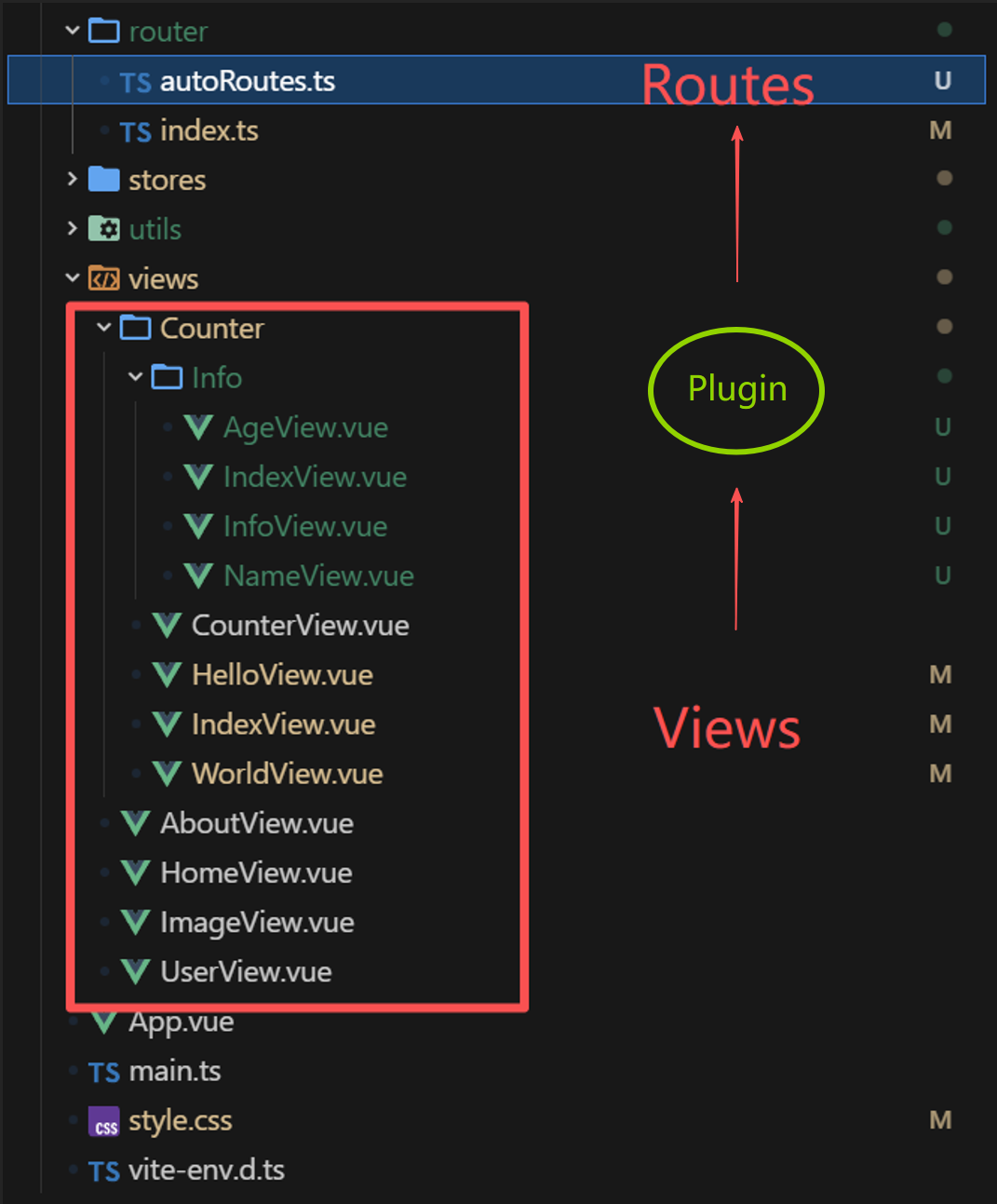
In router/autoRoutes.ts
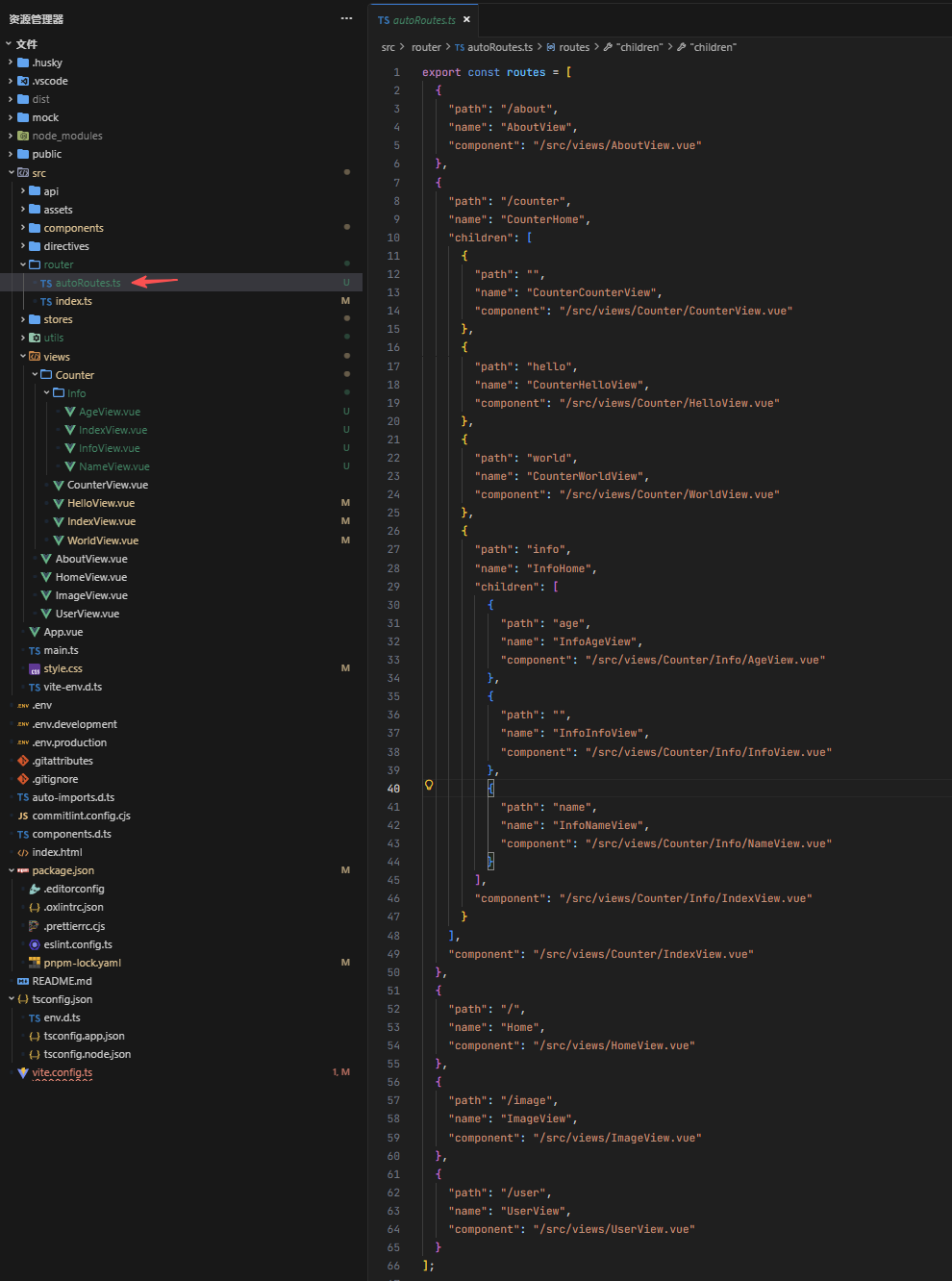
Next, the routes are imported from router/autoRoutes.ts to router/index.ts. Based on the route mapping table obtained by import.meta.glob('/src/views/**/*.vue'), the available route table is parsed and injected into vue-router.
// In router/index.ts
import { createRouter, createWebHistory } from 'vue-router';
import type { RouteRecordRaw } from 'vue-router';
import { routes as generatedRoutes } from './autoRoutes';

type GeneratedRoute = {
  path: string;
  name: string;
  component?: unknown;
  children?: GeneratedRoute[];
};

const viewModulesMap = import.meta.glob('/src/views/**/*.vue');

function resolveRoutes(routes: GeneratedRoute[]): GeneratedRoute[] {
  return routes.map((item) => {
    const { component, children, ...rest } = item;
    return {
      ...rest,
      ...(component && typeof component === 'string'
        ? { component: viewModulesMap[component] }
        : {}),
      ...(children ? { children: resolveRoutes(children) } : {})
    };
  });
}

const routes = resolveRoutes(generatedRoutes) as RouteRecordRaw[];

const router = createRouter({
  history: createWebHistory(),
  routes
});

export default router;
Finally, open your browser, done!
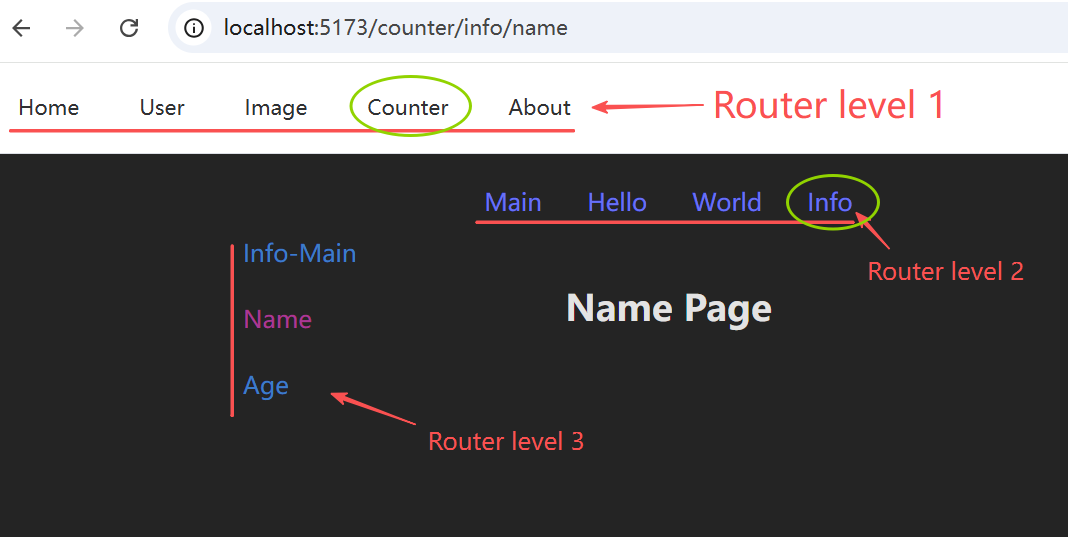
Limitations
Hot module reloading
If you create new pages that will generate new routes, they currently will not be available until you refresh the page. Editing existing pages will hot reload as normal.
To do
- [x] Support single flat directory
- [x] Support child components through nested directories
- [x] Custom pages directory
- [ ] Support route parameters
- [ ] Support routing metadata
Source Code
Github Repository: https://github.com/yanchengfang/vite-plugin-auto-route