
vite-plugin-domain
v2.0.6
Published
Vite plugin that wires a local domain via Caddy for your dev server.

Maintainers
 mustafaj
Readme
vite-plugin-domain
Juggling multiple Vite apps and can't remember which port is which?
Stop playing the localhost lottery. This plugin automatically assigns memorable domains to each of your projects — derived from the folder name or package.json — so localhost:5173, localhost:5174, and localhost:5175 become frontend.local, admin.local, and api.local.
What it does
The plugin automatically:
- Configures a Caddy reverse proxy with HTTPS (via the internal issuer)
- Routes your domain to whatever port Vite picks
- Generates domain names from your folder or package.json
- Adds the domain to Vite's
server.allowedHostsduring dev - Shares one Caddy instance across all your projects
- Automatically stays disabled in CI
Installation
pnpm add -D vite-plugin-domainPrerequisites
Install and start Caddy
- Install Caddy for your platform
- Trust Caddy's local CA (one-time setup):
sudo caddy trust - Start Caddy with the admin API enabled:
The admin API runs oncaddy runhttp://127.0.0.1:2019by default. The plugin uses this API to configure domains dynamically.
Quick start
Add the plugin to your vite.config.ts:
import domain from 'vite-plugin-domain'

export default defineConfig({
  plugins: [
    domain()
  ]
})
Configuration
import { defineConfig } from 'vite'
import domain from 'vite-plugin-domain'

export default defineConfig({
  plugins: [
    domain({
      // All options are optional with sensible defaults:
      adminUrl: 'http://127.0.0.1:2019',   // Caddy admin API endpoint
      serverId: 'vite-dev',                // Caddy server identifier
      listen: [':443', ':80'],             // Ports Caddy should listen on
      nameSource: 'folder',                // Use folder name for domain ('folder' | 'pkg')
      tld: 'localhost',                    // Top-level domain suffix
      // domain: 'myapp.localhost',        // Explicit domain (overrides nameSource+tld)
      failOnActiveDomain: true,            // Fail if domain already has an active route
      insertFirst: true,                   // Insert new route at top of route list
      allowInCi: false,                    // Disabled automatically when CI is set
      verbose: false,                      // Enable detailed logging
    })
  ],
})
CI safety
The plugin does nothing when the standard CI environment variable indicates CI (0 and false are ignored). No per-project configuration is required. To deliberately run it in CI, set allowInCi: true.
How it works
When you start your Vite dev server:
- The plugin connects to Caddy's admin API
- Creates or updates a Caddy server configuration
- Adds a route from your domain to Vite's dev server port
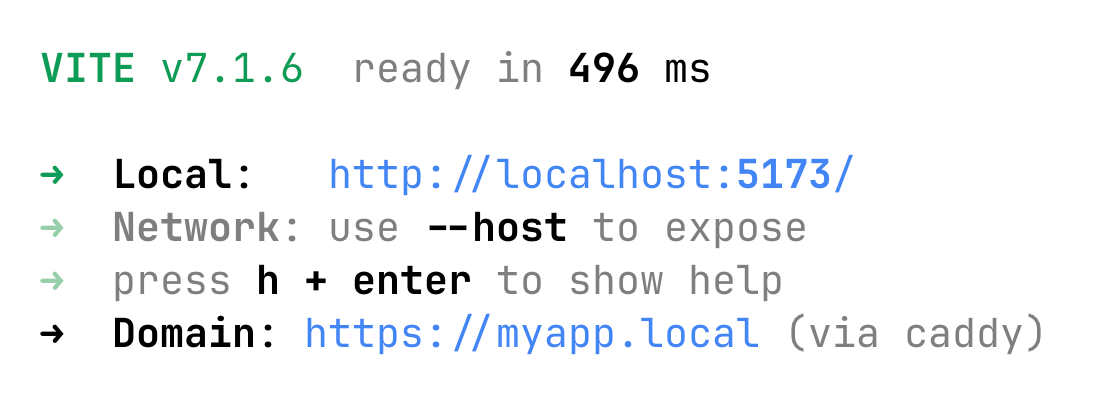
- Prints the URL where you can access your app
Domain configuration
Automatic naming
By default, the plugin generates a domain based on:
- Folder name (
nameSource: 'folder') — Uses the current directory name - Package name (
nameSource: 'pkg') — Uses thenamefield frompackage.json
The generated domain follows the pattern: {name}.{tld}
Manual naming
Override automatic naming by specifying an explicit domain:
domain({ domain: 'my-custom-app.localhost' })Or set the VITE_PLUGIN_DOMAIN_VALUE env variable.
Choosing a TLD: .localhost vs .local
Using .localhost (default)
Works without additional setup in most browsers:
domain({ tld: 'localhost' })Browsers typically resolve *.localhost to 127.0.0.1 automatically.
Using .local
Shorter and cleaner, with a small one-time step:
- Add an entry to
/etc/hosts:
Note: Some networks usesudo bash -c "echo '127.0.0.1 myapp.local' >> /etc/hosts".localfor mDNS. The explicit hosts entry ensures local resolution.
Advanced usage
Custom Caddy server configuration
If you need different Caddy server settings per project:
domain({
  serverId: 'my-project-server',
  listen: [':8443', ':8080'],  // Custom ports
  adminUrl: 'http://127.0.0.1:2019'
})
Debugging
Enable verbose logging to troubleshoot issues:
domain({ verbose: true })Troubleshooting
Browser shows "connection refused"
- Ensure Caddy is running:
caddy run - Check the domain resolves:
ping myapp.localhost - Verify
/etc/hostsentry exists for.localdomains
Certificate warnings
- Run
sudo caddy trustto install Caddy's local CA - Restart your browser after trusting the certificate
"Domain already has an active route" error
- Another project is using this domain
- Either stop the other project or use a different domain
- Or set
failOnActiveDomain: falseto override (use with caution)
Unmapping / killing a stuck domain
This package ships a small CLI to list and manage mapped domains:
pnpm exec vite-plugin-domainYou’ll get an autocomplete list of domains with their mapped ports. Pick one, then choose:
- Kill + unmap (terminate the process on that port, then remove the route)
- Unmap only
Non-interactive flags:
pnpm exec vite-plugin-domain --unmap myapp.localhost
pnpm exec vite-plugin-domain --kill myapp.localhost
Optional overrides:
pnpm exec vite-plugin-domain --admin-url http://127.0.0.1:2019 --server-id vite-devVite shows "Invalid Host header"
- The plugin normally adds your domain to
server.allowedHosts. - If you still see this, make sure the plugin is loaded under
pluginsandapply: 'serve'isn’t overridden. - As a fallback, add your domain (or TLD) manually:
server: { allowedHosts: ['myapp.localhost'] }
License
MIT