
vite-plugin-svelte-devtools
v0.1.6
Published
Dev-tools panel for Svelte 5 + Vite apps — component tree, reactive state, props editor, event log, store inspector, performance profiler
Downloads
380

Maintainers
 andro-zixtar
Readme
vite-plugin-svelte-devtools
Donate — if this saves you time, consider buying me a coffee:

Disclaimer — this project is 100% AI-written (Claude Sonnet 4.5 via OpenCode). It is published as-is for anyone who finds it useful. Contributions and bug reports are welcome.
A zero-config devtools panel for Svelte 5 + Vite apps.
Works as a native tab inside the @vitejs/devtools browser panel.
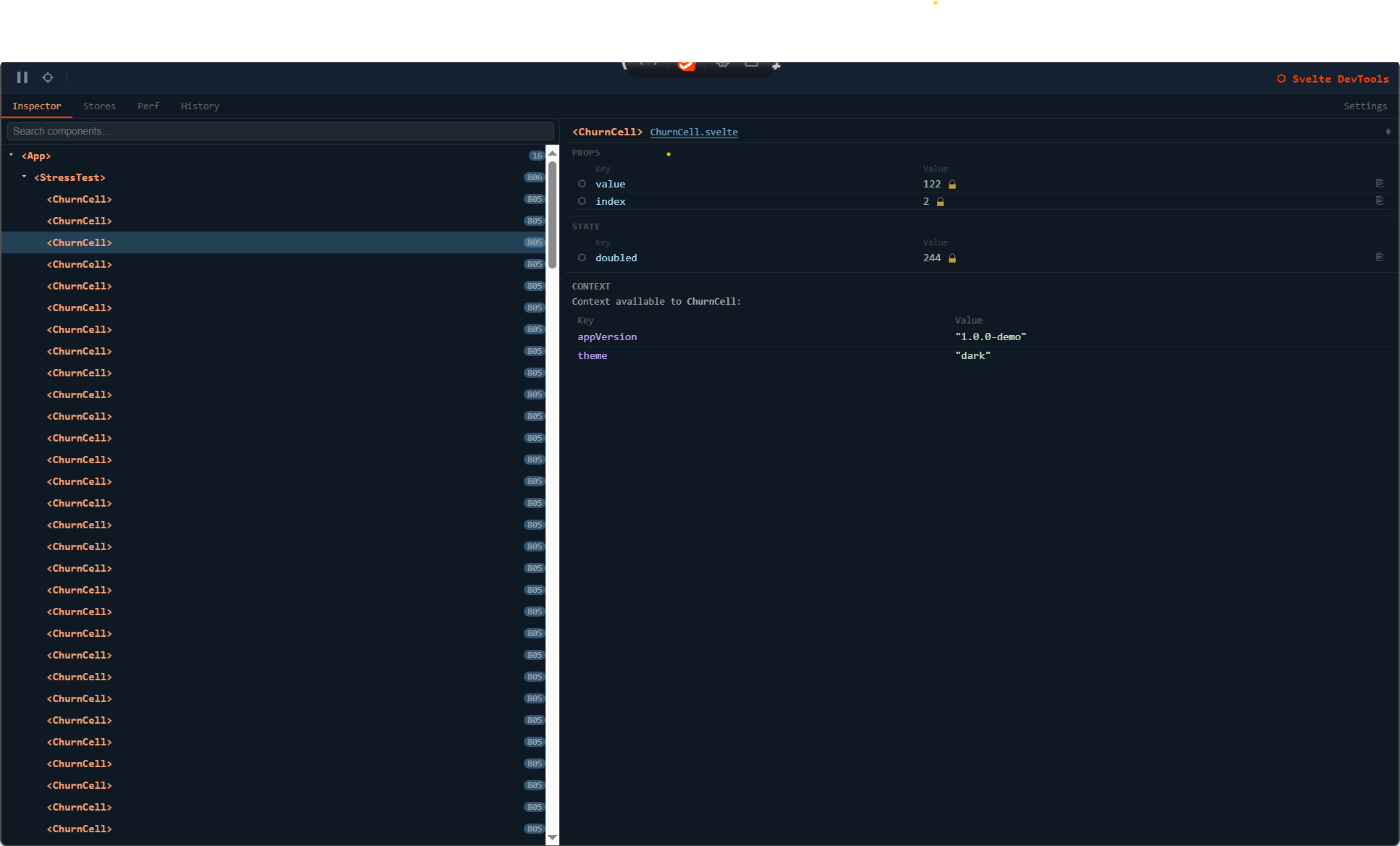
Features
| Feature | Description |
|---|---|
| Component Tree | Live hierarchy of every mounted Svelte component |
| State Inspector | Per-component $state / $derived rune snapshot |
| Props Editor | Click any prop value to edit it live in the browser |
| Store Inspector | Current value of every registered Svelte store |
| Performance Profiler | Render count and cumulative / average time per component |
| History | Pinned prop/state values with a change log |
| Component Picker | Click any element in the app to jump to its component (Alt+C or Esc to cancel) |
| Pause / Resume | Freeze tracking with zero runtime overhead while paused |
| Open in Editor | Jump directly to a component's source file |
Note — only dark mode theming is currently supported in the devtools panel.
Requirements
| Peer dependency | Version |
|---|---|
| svelte | ^5.0.0 |
| vite | ^8.0.0 |
| @vitejs/devtools | ^0.1.0 (optional, for the native panel) |
Installation
npm i -D vite-plugin-svelte-devtoolsSetup
With @vitejs/devtools (recommended — native panel)
Install the Vite DevTools plugin if you haven't already:
npm i -D @vitejs/devtoolsThen wire both plugins in your vite.config.ts:
import { defineConfig } from 'vite'
import { svelte } from '@sveltejs/vite-plugin-svelte'
import { svelteDevTools } from 'vite-plugin-svelte-devtools'
import { DevTools } from '@vitejs/devtools'

const devtools = svelteDevTools()

export default defineConfig({
  plugins: [
    DevTools(),
    svelte({ preprocess: devtools.preprocess }),
    devtools.plugin,
  ],
})
Open your app in the browser, click the Vite DevTools icon, and switch to the Svelte tab.
Standalone (floating overlay)
If you are not using @vitejs/devtools, the plugin falls back to a floating Shadow DOM panel injected directly into your app:
import { defineConfig } from 'vite'
import { svelte } from '@sveltejs/vite-plugin-svelte'
import { svelteDevTools } from 'vite-plugin-svelte-devtools'

const devtools = svelteDevTools()

export default defineConfig({
  plugins: [
    svelte({ preprocess: devtools.preprocess }),
    devtools.plugin,
  ],
})
A small ⬡ badge appears in the bottom-right corner — click it to open the panel.
Plugin options
svelteDevTools(options?)| Option | Type | Default | Description |
|---|---|---|---|
| devOnly | boolean | true | Automatically disable during vite build |
Keyboard shortcuts
| Shortcut | Action |
|---|---|
| Alt+C | Toggle component picker |
| Esc | Cancel component picker |
How it works
Components are instrumented automatically by the preprocessor at build time — no manual imports required.
Svelte component (instrumented by preprocessor)
  └─ __sdt_mount__ / __sdt_update__ / __sdt_unmount__
       └─ runtime/index.ts  (in-memory component tree)
            └─ HMR WebSocket  (Vite DevTools RPC)  /  CustomEvent (standalone)
                 └─ bridge.svelte.ts  ($state reactive store)
                      └─ DevTools panel  (Svelte SPA in iframe)
Commands flow in reverse (prop edits, highlight, pick mode) via the same channel.
License
MIT