
vite-plugin-variant
v1.0.0
Published
[中文](README.zh-CN.md) | English
Downloads
10


Readme
Vite Plugin Variant
中文 | English
Introduction
vite-plugin-variant is a vite plugin for managing multi-channel differentiated source code. Unlike other vite plugins, the principle of vite-plugin-variant is to filter out the current channel files from the multi-channel source code directory, and then update the src directory, in other words, the process from the multi-channel src(MCS) to the current channel src(FCS), instead of making some work based on the src directory, so it can be very compatible with other vite plugins.
- MCS:multi-channel src
- FCS:final channel src
Feature
- Support adding, deleting and updating files with immediate effect(HMR)
- Support dynamic switching of channels
- Support for defining multi-channel global variables
- Support All vite projects(including uniapp)
Usage
1、install
npm i vite-plugin-variant -D2、config
Add configuration in vite.config.ts:
import variant from "vite-plugin-variant";

export default defineConfig({
  plugins: [
    variant({
      mcsCurrent: "channelA", // current channel
      mcsDefine: {
        channelA: {}, // global variable for channel A ....
        channelB: {}, // global variable for channel B ....
      },
    }),
    // other plugins
  ],
});
Note:
variant()needs to be placed at the first of the plugin list for better compatibility with other plugins.- Change the value of
mcsCurrentto switch channels, and it will be automatically redeployed in dev mode。
3、Source code directory
- Create a
variants/maindirectory under the same level ofsrcto store the default project source code. - Create channel directories(such as
channelA,channelB) under thevariantsdirectory as the source code of each channel difference.
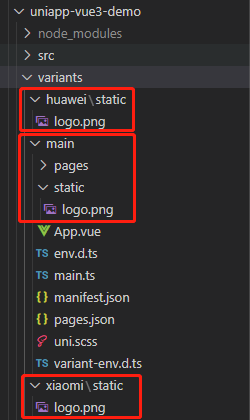
Note: Assuming that the project needs to go online on two different channels, namely Huawei and Xiaomi, and they display different logo pictures, you can place their own logo pictures in their respective channel directories. If there is no logo picture in one channel, then use the default logo image in the main directory, and the same for other source files.
4、Global variable
Configure global variables for each channel in vite.config.ts:
export default defineConfig({
  plugins: [
    variant({
      mcsCurrent: "huawei",
      mcsDefine: {
        xiaomi: {
          WEBSITE: "https://www.mi.com/",
        },
        huawei: {
          WEBSITE: "https://www.huawei.com/",
        },
      },
    }),
  ],
});
Note:
- The global variables defined in
mcsDefinehave the same effect as those defined in thedefineoption of vite, butmcsDefinecan better manager the variables of each channel。vite-plugin-variantwill automatically generatevariant-env.d.tsin thevariants/maindirectory based on the global variables of the current channel to prevent TypeScript compilation errors.
You can use the global variables directly in the code:
import { ref } from "vue";
const flavor = ref(FLAVOR);
const website = ref(WEBSITE);
5、Other
- Because the multi-channel source code is in the
variantsdirectory, andsrcis the output directory ofvite-plugin-variant, the files undder it will change at any time, so it is recommended to ignoresrcdirectory in the.gitignorefile. vite-plugin-variantwill automatically insert the necessary rules in theincludeoption oftsconfig.jsonto avoid the code in thevariantsdirectory not being recognized by TypeScript and prompting an error.