
vitepress-plugin-announcement
v0.1.10
Published
vitepress plugin, Announcement, 公告窗口

Maintainers
 atqq
atqqReadme
vitepress-plugin-announcement
English | 简体中文
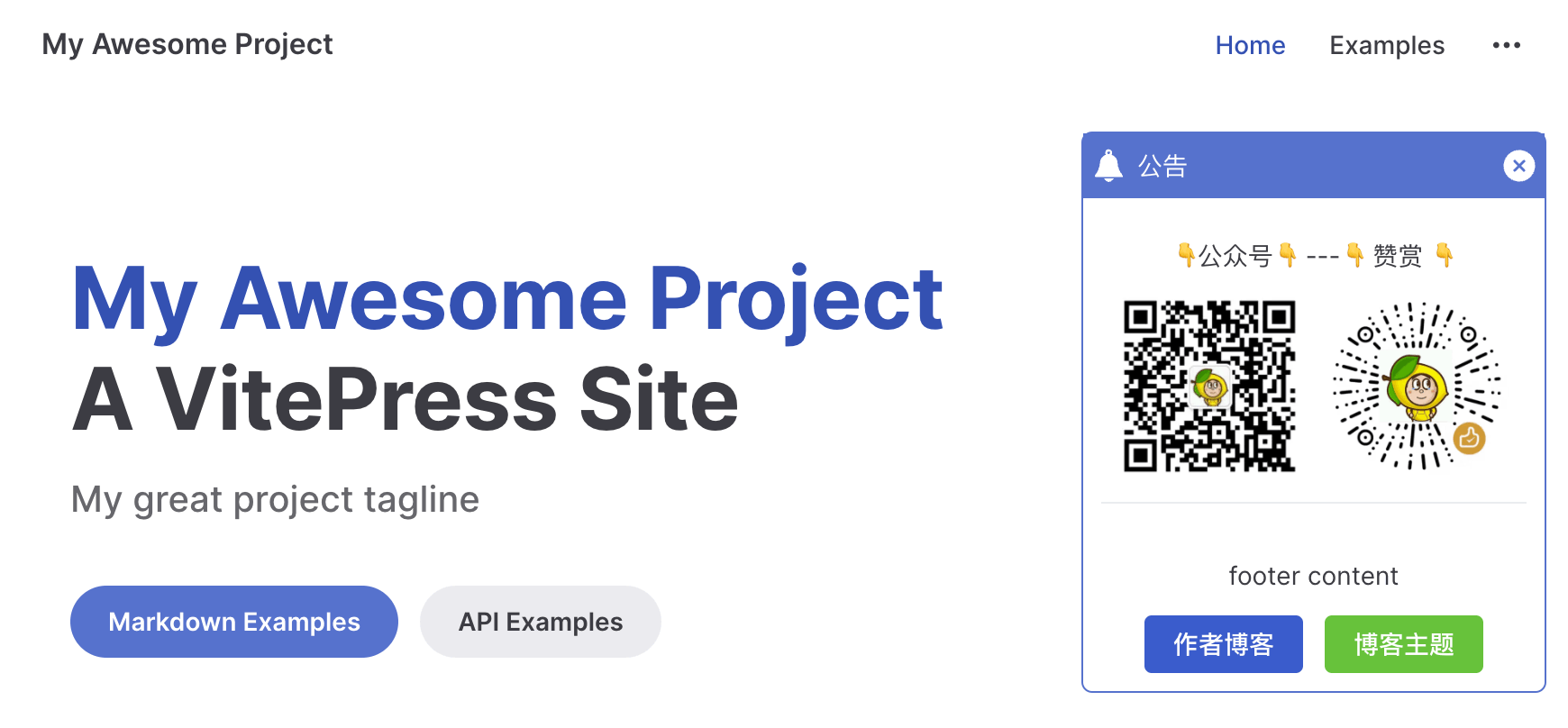
介绍文章:VitePress 公告插件开发实记 · archive · translated
使用
安装依赖 pnpm/npm/yarn
pnpm add vitepress-plugin-announcement引入插件在 .vitepress/config.ts 配置文件中
import { defineConfig } from 'vitepress'
import { AnnouncementPlugin } from 'vitepress-plugin-announcement'

export default defineConfig({
  vite: {
    // ↓↓↓↓↓
    plugins: [
      AnnouncementPlugin({
        title: '公告',
        body: [
          { type: 'text', content: '👇公众号👇 ---👇 赞赏 👇' },
          {
            type: 'image',
            src: 'https://cdn.upyun.sugarat.top/mdImg/sugar/85c9554d023be2fcc5aab94effeef033',
            style: 'display: inline-block;width:46%;padding-right:6px'
          },
          {
            type: 'image',
            src: 'https://cdn.upyun.sugarat.top/mdImg/sugar/54eacf3e730af9c1e3542a4800a422ea',
            style: 'display: inline-block;width:46%;padding-left:6px'
          }
        ],
        footer: [
          {
            type: 'text',
            content: 'footer content'
          },
          {
            type: 'button',
            content: '作者博客',
            link: 'https://sugarat.top'
          },
          {
            type: 'button',
            content: '博客主题',
            link: 'https://theme.sugarat.top',
            props: {
              type: 'success'
            }
          },
        ],
      })
    ]
    // ↑↑↑↑↑
  }
})
更多用法
关闭后不再弹出
tip:下次配置修改后再展示
AnnouncementPlugin({
  duration: -1
})
不展示再次打开按钮
AnnouncementPlugin({
  reopen: false
})
引导闪烁
AnnouncementPlugin({
  twinkle: true
})
按钮
AnnouncementPlugin({
  title: '公告',
  body: [
    {
      type: 'button',
      content: '博客主题',
      link: 'https://theme.sugarat.top',
      props: {
        type: 'success'
      }
    },
  ],
})
修改样式
行内样式
AnnouncementPlugin({
  title: '公告',
  body: [
    {
      type: '',
      content: '',
      // ↓↓↓↓↓
      style: 'color: #000; font-size: 16px;'
      // ↑↑↑↑↑
    }
  ]
})
内部样式表
AnnouncementPlugin({
  style: `.theme-blog-popover a {
      color: var(--vp-c-brand-2);
   }
  `
})
markdown
content,title 字段支持基础 markdown 语法
#标题[链接](url)链接**strong**加粗*italic*斜体
AnnouncementPlugin({
  title: '公告',
  body: [
    {
      type: 'text',
      content: '**加粗的内容 *斜体[链接](url)***'
    },
  ]
})
完整配置
import type { Ref } from 'vue'
import type { Route } from 'vitepress'

export interface AnnouncementOptions {
  /**
   * 自定义样式类名
   * @example
   * ```css
   * .theme-blog-popover a {
   *    color: var(--vp-c-brand-2);
   * }
   * ```
   */
  style?: string
  /**
   * 公告标题
   */
  title: string
  /**
   * 公告主要内容
   */
  body?: Announcement.Value[]
  /**
   * 公告底部内容
   */
  footer?: Announcement.Value[]

  /**
   * 是否只在浏览器环境渲染组件
   * @default false
   * @doc https://vitepress.dev/guide/ssr-compat#clientonly
   */
  clientOnly?: boolean

  /**
   * 展示时机控制
   *
   * -1 只展示1次;>= 0 每次都展示,一定时间后自动消失,0 不自动消失
   *
   * 配置发生改变时,会重新触发此规则
   * @default 0
   */
  duration?: number

  /**
   * 移动端自动最小化
   * @default false
   */
  mobileMinify?: boolean

  /**
   * 支持重新打开(右上角 icon 悬浮)
   * @default true
   */
  reopen?: boolean

  /**
   * 是否打开闪烁提示,通常需要和 reopen 搭配使用
   * @default false
   */
  twinkle?: boolean

  /**
   * 设置展示图标,svg
   */
  icon?: string

  /**
   * 设置关闭图标,svg
   */
  closeIcon?: string

  /**
   * 自定义展示策略
   * @param to 切换到的目标路由
   */
  onRouteChanged?: (to: Route, show: Ref<boolean>) => void

  /**
   * 国际化
   */
  locales?: Record<string, Omit<AnnouncementOptions, 'locales'>>
}

export declare namespace Announcement {
  export interface Title {
    type: 'title'
    content: string
    style?: string
  }

  export interface Text {
    type: 'text'
    content: string
    style?: string
  }

  export interface Image {
    type: 'image'
    src: string
    style?: string
  }

  export interface Button {
    type: 'button'
    link: string
    content: string
    style?: string
    props?: {
      type: 'primary' | 'success' | 'danger' | 'warning' | 'info' | 'text' | 'default'
    }
  }

  export type Value = Title | Text | Image | Button
}
Thanks
样式参考了 reco-1.x 主题 中的 @vuepress-reco/vuepress-plugin-bulletin-popover 插件