
vitepress-plugin-rss
v0.4.4
Published
vitepress plugin, generate feed.rss


Readme
vitepress-plugin-rss
English | 简体中文
Usage
install plugin via pnpm/npm/yarn
pnpm add vitepress-plugin-rssuse in .vitepress/config.ts
add basic config
import { RSSOptions, RssPlugin } from 'vitepress-plugin-rss'

const baseUrl = 'https://sugarat.top'
const RSS: RSSOptions = {
  title: '粥里有勺糖',
  baseUrl,
  copyright: 'Copyright (c) 2018-present, 粥里有勺糖',
}

export default defineConfig({
  vite: {
    // ↓↓↓↓↓
    plugins: [RssPlugin(RSS)]
    // ↑↑↑↑↑
  }
})
then run build command,you can see generate feed.rss log after rendering pages...
pnpm run build
the rss icon is also added to page nav socialLinks.

frontmatter
The RSS plugin reads the following fields from the article frontmatter to generate corresponding RSS item information:
title
Article title. If not provided, it will be automatically extracted from the first heading in the content
---
title: My First Article
---
date/published
Publication date. If not specified, uses the file's last modified time.
This field allows any Date time string.
---
date: 2024-01-15
---
If both published and date are specified, published will override date.
---
published: 2025-12-06
---
description
Article summary. If not provided, it will try in order: call renderExpect; if not configured/no result, use the excerpt extracted by gray-matter; if still empty, fall back to the first 100 characters.
---
description: An introductory article about RSS
---
author
Article author. Supports a single name (string) or an array of author objects (each may include name, email, link, avatar); falls back to the global author when omitted.
If you provide a global authors list and frontmatter.author is a string, the name will be matched against that list to auto-fill the author's extra info. When frontmatter.author is an array, if an author object only provides the name field, it will also match against the global authors list to auto-fill the other info.
---
author: John Doe
---
---
author:
- name: Xiao Wang
email: [email protected]
link: https://example.com/xiaowang
- name: Xiao Ming # If only name is provided, it will try to auto-fill from global authors config
---category
List of article categories, supporting multiple categories. Each category object can optionally contain name, domain, scheme, term fields.
---
category:
  - name: Tech
    domain: https://example.com
  - name: Frontend
---
cover
Article cover image. Can be manually specified or automatically extracted from the first image in the content
---
cover: /images/cover.png
---
layout
If the value is home, the article will be filtered (controlled by the ignoreHome option)
---
layout: home
---
publish
Posts that publish: false will not appear in the final rss file,can be used to ignore target articles (controlled by the ignorePublish option)
---
publish: false
---
guid
Custom guid/id for the item (falls back to link if omitted).
---
guid: custom-id-123
---
enclosure
RSS media attachment (audio, video, image, PDF, etc.). Most podcast clients rely on it to play/download media.
enclosure.url/enclosure_urldefines the URL pointing to the media file.enclosure.length/enclosure_length(optional) defines the file size in bytes (numeric).enclosure.type/enclosure_type(optional) defines the media MIME type (string).
Supported forms:
- String form (equivalent to
enclosure_url)
---
enclosure: https://example.com/file.jpg
---- Object form
---
enclosure:
  url: https://example.com/file.mp3
  length: 12345
  type: audio/mpeg
---- Split fields
---
enclosure_url: https://example.com/file.mp3
enclosure_length: 12345
enclosure_type: audio/mpeg
---
Advanced Usage
Example1
const RSS: RSSOptions = {
  // necessary(必选参数)
  title: '粥里有勺糖',
  baseUrl,
  copyright: 'Copyright (c) 2018-present, 粥里有勺糖',

  // optional(可选参数)
  // Enable cache (default: true)
  cache: true,

  // Custom Markdown Configuration
  markdownOptions: {
    // Enable line numbers
    lineNumbers: false
  },
  description: '大前端相关技术分享',
  language: 'zh-cn',
  author: { // Global feed author; also the default author for articles
    name: '粥里有勺糖',
    email: '[email protected]',
    link: 'https://sugarat.top'
  },
  icon: true,
  authors: [ // Author list; articles can match by name to auto-fill other fields
    {
      name: '粥里有勺糖',
      email: '[email protected]',
      link: 'https://sugarat.top'
    },
    {
      name: 'sugar',
      email: '',
      link: 'https://github.com/atqq'
    }
  ],
  filename: 'feed.rss',
  log: true,
  ignoreHome: true,
  ignorePublish: false,
  filter: (post, idx) => {
    return true
  },
  locales: {
    en: {
      // All missing options inherit from the global config (everything in RSSOptions except locales itself)
      filename: 'feed.en.rss', // only includes articles under the en locale
    },
    root: {
      filename: 'feed.zh-hans.rss', // root is the default source, excluding articles of other declared locales
    }
  }
}
svg2img
Some RSS readers do not support displaying SVG images directly. You can use the svg2img option to specify the conversion method:
const RSS: RSSOptions = {
  // ...
  markdownOptions: {
    svg2img: 'base64' // default base64
  }
}
If you need to convert to PNG images, set svg2img to png and use sharp for conversion.
const RSS: RSSOptions = {
  // ...
  markdownOptions: {
    svg2img: 'png'
  }
}
Options
support all feed Options
plugin also defines some
here is the type definition
import type { Author, FeedOptions } from 'feed'

export type RSSOptions = Omit<FeedOptions, 'id'> & {
  id?: string
  /**
   * Filter target docs
   * @param post Information related to the doc.
   */
  filter?: (value: PostInfo, index: number, array: PostInfo[]) => boolean
  /**
   * Base URL address of the site (do not add a trailing slash)
   * Actual site homepage = baseUrl + VPConfig.site.base
   * Multilingual site homepage (localeKey not root) = baseUrl + VPConfig.site.base + localeKey + '/' (where localeKey is the key of VPConfig.site.locales)
   * @example 'https://sugarat.top'
   */
  baseUrl: string
  /**
   * assetsBaseUrl Image resource base address(relative path static resource base address)
   * @example 'https://sugarat.top'
   * @default baseUrl
   */
  assetsBaseUrl?: string
  /**
   * online RSS address
   * @default
   * ```ts
   * `${baseUrl + VPConfig.site.base + (filename || 'feed.rss'}`
   * ```
   */
  url?: string
  /**
   * output filename
   * @default 'feed.rss'
   */
  filename?: string
  /**
   * RSS icon display (you can also pass in an svg string to customize, the SVG icon can be obtained by visiting https://www.xicons.org/#)
   * @default true
   */
  icon?: boolean | string
  /**
   * Whether to print process prompts
   * @default true
   */
  log?: boolean
  /**
   * Whether to filter layout:home
   * @default true
   */
  ignoreHome?: boolean
  /**
   * Whether to ignore frontmatter publish control
   * @default false
   */
  ignorePublish?: boolean
  /**
   * Global feed author info; default author for articles; also passed as feed Options author
   */
  author?: Author
  /**
   * List of authors involved in blog site content
   */
  authors?: Author[]
  /**
   * Customize doc summary generation logic
   */
  renderExpect?: (
    fileContent: string,
    frontmatter: Record<string, any>
  ) => string | Promise<string>
  /**
   * Post-processing hook for each item's rendered HTML (run after render to tweak the final HTML)
   */
  transform?: TransformHtml | TransformHtml[]
  /**
   * Limit the number of docs the output file contains
   * @default 0
   * @description (0 no limit; > 1 will adjust the output content according to date sorting)
   */
  limit?: number
  /**
   * Manually control the logic for generating HTML, or not use vitepress' built-in HTML rendering logic
   * @default true
   */
  renderHTML?: ((filecontent: string) => string | Promise<string>) | boolean
  /**
   * aria-label for the RSS social link icon (falls back to "RSS")
   */
  ariaLabel?: string
  /**
   * i18n (locale configs inherit unspecified fields from the root/global RSSOptions; locales is not recursive)
   */
  locales?: Record<string, Partial<Omit<RSSOptions, 'locales'>>>
  /**
   * Whether to cache the document rendering result
   * @default true
   */
  cache?: boolean
  /**
   * Override vitepress Markdown configuration
   */
  markdownOptions?: Omit<MarkdownOptions, 'config'> & {
    style?: string
    svg2img?: boolean | 'base64' | 'png'
  }
}
Customize the base URL for static assets
https://vitepress.dev/guide/asset-handling#referencing-static-assets According to the VitePress documentation, all referenced assets, including those using absolute paths, are copied to the output directory during the production build and are given hashed filenames.
If your article contains image assets with relative paths, then when generating the RSS file, the image paths will be automatically adjusted to ${assetsBaseUrl}${buildAssetsPath}.
The default value of the assetsBaseUrl option is baseUrl, and you can configure it as needed.
Example of the corrected value: https://theme.sugarat.top/assets/image.Dqt2QH0u.png
FAQ
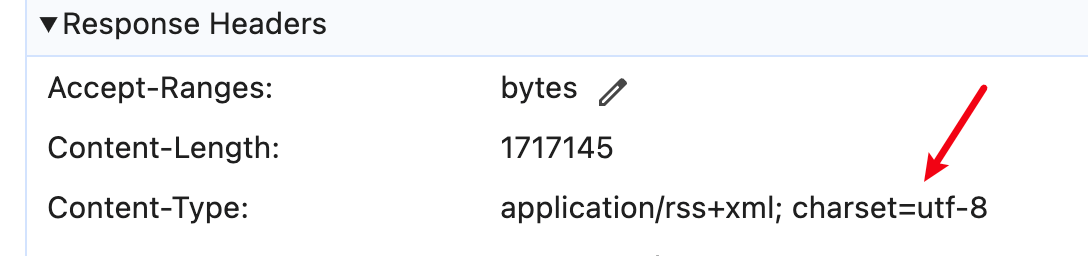
Character encoding issues when accessing RSS files
Using Nginx as an example, you can add the following configuration
location ~ \.rss$ {
  charset utf-8;
}
Alternatively, you can modify the output filename to use the .xml extension in your build config:
const RSS: RSSOptions = {
  // ...
  filename: 'rss.xml',
}
This not only aligns with the standard RSS format (RSS is essentially XML), but also avoids encoding handling issues that some servers may have with .rss files.