
vscode-translate-panel
v1.0.5
Published
Real-time translation preview panel for any text-based file
Downloads
16

Maintainers
 caveman
Readme
VS Code Translate Panel
Real-time translation preview panel for any text-based file in VS Code.
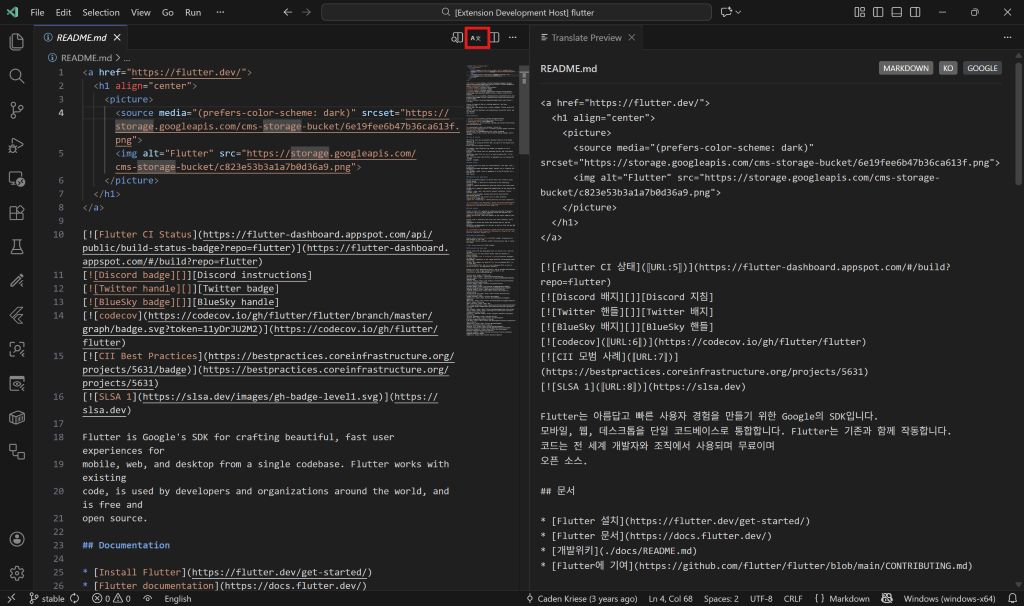


Features
- Side-by-Side Preview: Open a dedicated panel to view translated content alongside your original file
- Smart Translation:
- Code files (
.cs,.java,.ts,.py, etc.): Only comments are translated, code stays intact - Markdown: Code blocks and inline code preserved, text translated
- Plain text: Full translation
- Code files (
- Real-time Sync: Updates automatically on save or as you type
- Free Translation Engines: Google Translate (unofficial) and Gemini API support
- 20+ Languages Supported: C#, Java, JavaScript, TypeScript, Python, Go, Rust, and more
Usage
- Open any file
- Click the A文 icon in the editor title bar (top-right)
- Or use Command Palette:
Ctrl+Shift+P→Translate Panel: Open Preview
Configuration
| Setting | Default | Description |
|---------|---------|-------------|
| translatePanel.targetLanguage | System language | Target language code (ko, en, ja, zh, es, etc.) |
| translatePanel.translationEngine | google | Translation engine: google or gemini |
| translatePanel.updateMode | onSave | Update trigger: onSave or onType |
| translatePanel.geminiApiKey | - | API key for Gemini engine (optional) |
| translatePanel.debounceDelay | 500 | Delay in ms for onType mode |
Supported Languages
Code Files (Comments Only)
C#, Java, JavaScript, TypeScript, Python, Go, Rust, Swift, Kotlin, C/C++, Ruby, PHP, Lua, SQL, Shell, PowerShell, and more.
Content Files (Smart Protection)
- Markdown: Translates text, preserves code blocks, inline code, URLs
- JSON: Translates string values, preserves keys and structure
- HTML: Translates text content, preserves tags, scripts, styles
Examples
C# File
public class Example
{
    // This comment will be translated → 이 주석은 번역됩니다
    public void Method() { }
}
Markdown File
# Title → 제목
This text is translated. → 이 텍스트는 번역됩니다.
`code stays as is` → `code stays as is`
Requirements
- VS Code 1.85.0 or higher
- Internet connection for translation API
- Gemini API key (recommended)
Disclaimer
This extension uses unofficial Google Translate API for the default engine. We recommend using the Gemini API with your own key for better reliability.
License
MIT License - see LICENSE for details.