
vue-checkbox-radio
v0.6.0
Published
Checkbox and radio component for Vue.js
Downloads
2,614


Readme
vue-checkbox-radio
A Vue component to easily styling checkbox and radio inputs.



Example

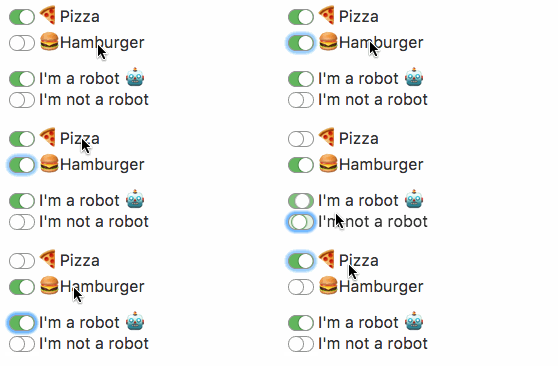
Check out demo and styling examples.
Usage
Checkbox
<checkbox name="terms" value="1">
	I agree to the <a href="#">terms of service</a>
</checkbox>
Radio
<radio name="robot" value="1">
	I'm a robot
</radio>
<radio name="robot" value="0">
	I'm not a robot
</radio>
Install
yarn
yarn add vue-checkbox-radionpm
npm install vue-checkbox-radio --saveSetup
Register the plugin.
import CheckboxRadio from 'vue-checkbox-radio';

Vue.use(CheckboxRadio);
Or register components manually.
import {Checkbox, Radio} from 'vue-checkbox-radio';

Vue.component('checkbox', Checkbox);
Vue.component('radio', Radio);
Params
Checkbox
Parameter | Type | Default
--------- | ---- | ------
id | string | checkbox-id-(element uid)
class-name | string | null
name | string | null
v-model | string, boolean or array | undefined
value | string or boolean | null
checked | boolean | false
required | boolean | false
disabled | boolean | false
Radio
Parameter | Type | Default
--------- | ---- | ------
id | string | radio-id-(element uid)
class-name | string | null
name | string | null
v-model | string or boolean | undefined
value | string or boolean | null
checked | boolean | false
required | boolean | false
disabled | boolean | false
Events
Both components emit the input event to work with v-model.
Full example
<checkbox
    id="input-terms"
    class-name="terms"
    name="terms"
    value="1"
    v-model="model"
    checked
    required>
    I agree to the <a href="#">terms of service</a>
</checkbox>
Slots
Slot input-box allow overwriting input-box for specific customizations.
<checkbox>
    <span class="input-box" slot="input-box">
        [...]
    </span>
    Test
</checkbox>
License
MIT © Mario Juárez