
vue-cosmic-background
v0.2.1
Published
Production-ready, adaptive cosmic backgrounds for Vue 3 and Three.js.

Maintainers
 bigsmartie
Readme
Vue Cosmic Background


面向 Vue 3 的通用星辰背景插件。一个组件同时提供 Three.js 点云、轻量 DOM 粒子、亮暗主题、自适应性能、确定性布局和 WebGL 降级。
效果展示
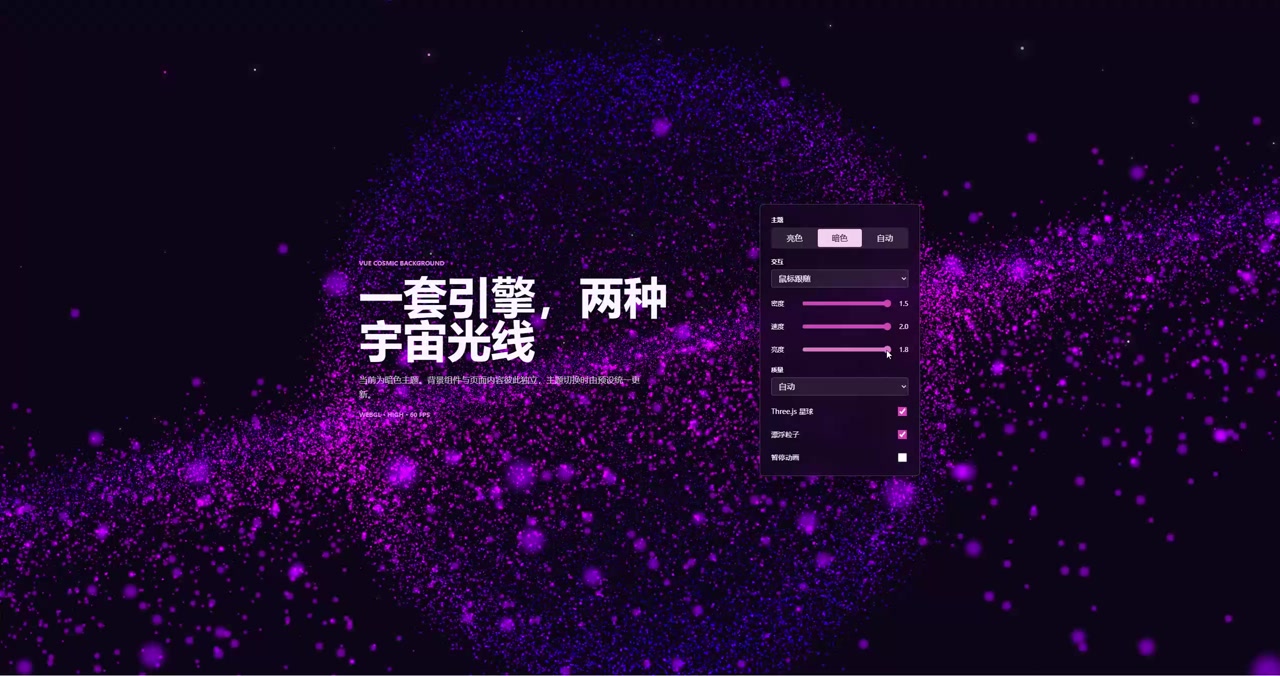
主要能力
- 使用一个
<CosmicBackground>支持亮色、暗色和跟随系统。 - Three.js 点云和 DOM 漂浮粒子可以独立启停。
- 自动选择低、中、高质量,并根据持续 FPS 动态降级和恢复。
- 使用
seed固定星空布局,便于品牌视觉和截图测试。 - 支持轻量鼠标跟随和可选 OrbitControls 操作。
- 页面隐藏、组件不可见或用户要求减少动态效果时自动暂停。
- WebGL 初始化失败或 context 丢失时自动使用 CSS 星空。
- 样式完全限定在组件内部,支持多实例、SSR 和完整资源销毁。
- Vue 与 Three.js 使用 peer dependency,不会重复打包。
安装
npm install vue-cosmic-background three在应用入口注册:
import { createApp } from 'vue'
import CosmicBackgroundPlugin from 'vue-cosmic-background'
import 'vue-cosmic-background/style.css'
import App from './App.vue'

createApp(App)
  .use(CosmicBackgroundPlugin, {
    theme: 'auto',
    quality: 'auto',
    interaction: 'pointer',
    seed: 'my-blog',
  })
  .mount('#app')
根组件中只需要使用一次:
<template>
  <CosmicBackground :theme="systemStore.theme" />
  <main class="app-content">
    <RouterView />
  </main>
</template>

<style>
.app-content {
  position: relative;
  z-index: 1;
  min-height: 100vh;
}
</style>
也可以按需导入:
import { CosmicBackground } from 'vue-cosmic-background'
import 'vue-cosmic-background/style.css'
参数
| 参数 | 类型 | 默认值 | 说明 |
| ---------------------- | --------------------------------------- | -------- | ----------------------------- |
| theme | 'light' \| 'dark' \| 'auto' | 'auto' | 背景主题。 |
| quality | 'low' \| 'medium' \| 'high' \| 'auto' | 'auto' | 渲染质量。 |
| sphere | boolean | true | Three.js 点云层。 |
| particles | boolean | true | DOM 漂浮粒子层。 |
| interaction | 'none' \| 'pointer' \| 'orbit' | 'none' | 鼠标跟随或直接旋转缩放。 |
| density | number | 1 | 粒子密度,限制为 0.05–2。 |
| speed | number | 1 | 动画速度,限制为 0–4。 |
| brightness | number | 1 | 整体亮度,限制为 0.1–3。 |
| maxPixelRatio | number | 2 | 设备像素比上限,限制为 0.5–3。 |
| verticalOffset | number | 3 | 点云在世界坐标中的垂直构图偏移,限制为 -20–20。 |
| transitionDuration | number | 400 | 主题过渡毫秒数。 |
| seed | string \| number | 随机 | 固定点云和粒子分布。 |
| adaptivePerformance | boolean | true | 自动质量是否根据持续 FPS 调整。 |
| targetFps | number | 50 | 自适应目标帧率,限制为 24–60。 |
| respectReducedMotion | boolean | true | 遵循系统“减少动态效果”。 |
| fallback | 'css' \| 'none' | 'css' | WebGL 不可用时的降级方式。 |
| paused | boolean | false | 暂停动画。 |
| fixed | boolean | true | false 时改用绝对定位。 |
| zIndex | number | 0 | 背景层级。 |
| preset | CosmicPresetOverride | - | 局部覆盖当前主题预设。 |
旧版 interactive 仍然可用,但已经废弃;它等价于 interaction="orbit"。
事件与实例方法
ready:渲染器准备完成,包含theme、quality和renderer。theme-change:解析后的亮暗主题发生变化。quality-change:环境或持续 FPS 改变实际质量。performance:约每两个活动渲染秒报告一次 FPS。fallback:WebGL 失败并进入降级。error:报告原始渲染错误。
组件实例暴露 refresh()、pause()、resume() 和 root。
自定义视觉
<CosmicBackground
  theme="dark"
  interaction="pointer"
  seed="my-brand"
  :density="0.8"
  :speed="0.7"
  :preset="{
    background: '#080b14',
    sphere: {
      colorStart: '#ff4d9d',
      colorEnd: '#4d7cff',
    },
  }"
/>
只改变颜色、透明度、速度等外观参数时,插件会复用当前 Canvas、几何缓冲和 DOM 粒子。只有点数、形状、质量、密度或 seed 改变时才重新生成布局。
Nuxt 与 SSR
组件只在 mounted 后创建浏览器资源,SSR 输出本身是安全的。Nuxt 项目如果对 Three.js 使用客户端构建,可以这样使用:
<ClientOnly>
  <CosmicBackground theme="auto" />
</ClientOnly>
从旧博客代码迁移
- 删除
CosmicSphereDark、CosmicSphereLight和动态组件计算。 - 替换为
<CosmicBackground :theme="systemStore.theme" />。 - 删除两份
particles.js的自动初始化和window.particleSystem。 - 从原主题 CSS 中移除
#particles-background、.particle及相应动画。 - 卡片、按钮、输入框等业务主题样式继续由博客维护,不属于背景插件。
systemStore.loadThemeStyles()如果仍负责业务 UI 主题,可以继续保留。
本地验证
npm run dev
npm run check
npm run pack:check
每次推送和拉取请求都会在支持的 Node.js 版本矩阵上执行完整检查。将当前 GitHub 仓库登记为 npm Trusted Publisher 后,即可通过 publish.yml 工作流进行无长期令牌的可信发布。