
vue-dark-photo
v1.4.24
Published
Downloads
295


Readme
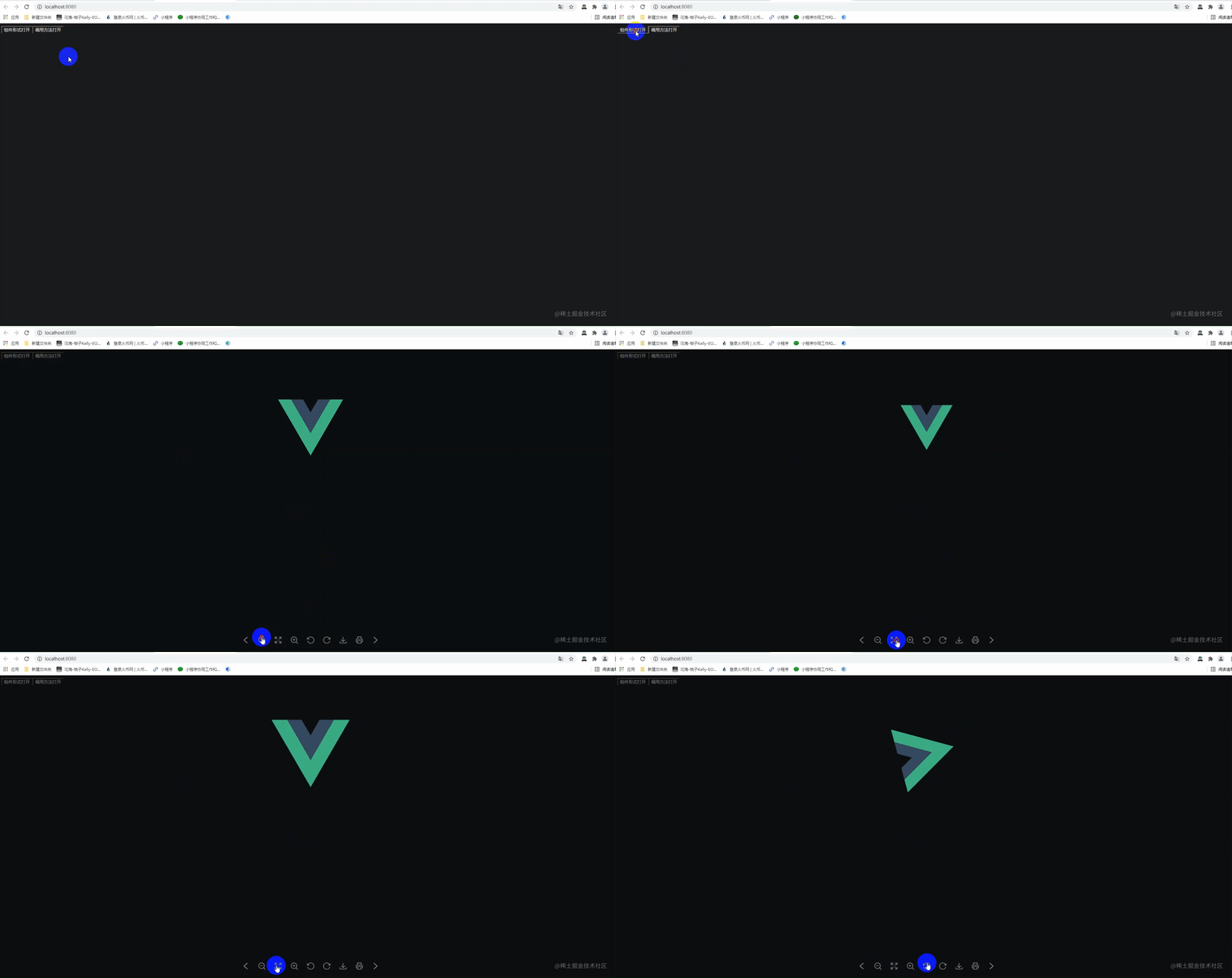
先上效果图
演示地址
https://dark2017.github.io/vue-dark-photo.github.io/
vue-dark-photo
- 基于 vue2.x 开发的预览图片组件
- 支持 放大、缩小、复原、下载、打印、旋转、拖拽等功能
- 支持png、jpg、jpge、bmp、gif等常见图片格式
- 支持查看多个图片
- 开箱即用 只需传图片数据 轻便简单
- GitHub地址:https://github.com/Dark2017/vue-dark-photo.git
- react同款:https://github.com/Dark2017/react-dark-photo.git
安装使用说明

npm i vue-dark-photo


// 在入口(main.js)中引入并挂载
import VDPhoto from 'vue-dark-photo'
// 引入vue-dark-photo 样式
import 'vue-dark-photo/lib/vue-dark-photo.css'

Vue.use(VDPhoto)
//若通过cdn引入 请引入以下链接 版本号自行调整
https://cdn.jsdelivr.net/npm/vue-dark-photo@{verison}/lib/vue-dark-photo.umd.min.js
https://cdn.jsdelivr.net/npm/vue-dark-photo@{verison}/lib/vue-dark-photo.css
示例
调用全局方法打开
this.$VDPhoto.show({
    imgData: "url",
    publish: (val) => {
        console.log(val)
    }
});
组件形式打开
<VDPhoto
    ref="VDPhoto"
    :imgData='imgData'
    @publish='publish'
    ....
/>

this.$refs.VDPhoto.show()
api
属性
| 属性值 | 类型 | 描述 | 默认值 | | --- | --- | --- | --- | imgData | string | 图片地址(url) | - | imgArr | Array | 图片地址(数组) | - | isHint | Boolean | 是否展示提示(第一张或最后一张) | true | customAction | Object | 自定义操作栏 | null | ifWave | Boolean | 是否点击波纹特效 | false
customAction
| 属性值 | 类型 | 描述 | 默认值 | | --- | --- | --- | --- | lastCard | Boolean | 是否需要上一张 | true | narrow | Boolean | 是否需要缩小 | true | reduction | Boolean | 是否需要复原 | true | enlarge | Boolean | 是否需要放大 | true | leftRotate | Boolean | 是否需要逆时针旋转 | true | rightRotate | Boolean | 是否需要顺时针旋转 | true | downloadFile | Boolean | 是否需要下载 | true | publish | Boolean | 是否需要打印 | true | nextCard | Boolean | 是否需要下一张 | true | mouseWheel | Boolean | 是否需要滚轮缩放 | true | mouseDown | Boolean | 是否需要拖拽功能 | true | custom | Array | 自定义操作栏 | -
custom
| 属性值 | 类型 | 描述 | 默认值 | | --- | --- | --- | --- | title | String | 悬浮标题 | - | onClick | function | 点击回调 | - | style | Object | 操作按钮样式 | - | content | String | 操作按钮内容 | -
事件
| 事件名 | 说明 | 回调参数 | --- | --- | --- | publish | 打印后的回调 | 打印的内容 | close | 关闭后的回调 | -
方法
| 方法名 | 说明 | | --- | --- | | show | 打开photo | | ··· | ··· |
注意
- 通过this.$refs.VDPhoto.show()来打开组件
- 若引用图片地址,相对地址使用require()包裹或使用绝对地址
- 若imgData 和 imgArr 同时传了 则只有imgData生效
- 不支持 base64
最后
- 如果对你有帮助,请star一个哦,你的鼓励是我创作的动力
- 欢迎来到我的博客,希望能对你有所帮助
- 掘金:https://juejin.cn/user/2339399368751325/posts
- csdn:https://blog.csdn.net/weixin_44083712?spm=1010.2135.3001.5343
- csdn | 掘金 | 知乎 同名: 饼干_ 或 饼干
- 最后的最后,喜欢的话一键三连噢~
更新日志
2021-7-7
travis 小版本自动部署迭代
node 大版本手动迭代版本号
2021-6-3
新增波纹特效
优化项目结构
2021-6-1
新增自定义操作栏
2021-5-22
新增提示功能
添加图片旋转动画
优化图片旋转功能
2021-5-21
新增图片数组功能;移除默认插槽和图片名
下载时截取文件名作为图片名
2021-5-20
解耦elementui、引用阿里图标库
去除word等文档预览功能
2021-5-17
支持更多图片格式、代码优化
2021-5-14
去除打印的页眉、页脚优化打印相关功能