
vue-el-mtable
v1.0.5
Published
This table component is based on elment UI


Readme
vue-el-mtable
=======
Version update
1.0.5 添加每一行可以通过binView来动态显示自定义按钮
1.0.2 修改文字按钮切换无法同时出现多个按钮问题,修改了实现方式
1.0.0 添加表格自适应高度变化 ,默认最大高度是100%,maxHeight、bottomOffset都能改变表格初始高度
0.2.0修复选中与未选中点击就切换问题,将方法在外面修改
0.1.9 修复默认高度500px问题
0.1.8 新增 select,和文字点击切换功能
Installation
npm i element-ui -D
npm install vue-el-mtable -D
MTable Attributes
| 参数 | 说明 | 类型 | 可选值 | 默认值 | | :----:| :---: | :----: |:----:|:----:| | tableData | 包含表头和渲染信息(详细见下) | Object |——| —— | | showSummary | 是否在表尾显示合计行 | Boolean |true/false| false | | stripe | 是否为斑马纹 table | Boolean |true/false| true | | border | 是否有边框 | Boolean |true/false| false | | tableSize | table的尺寸 | String |medium / small / mini| small | | tableRef | table的ref 属性 | String |——| tableRef | | pageData | 分页信息(详细见下) | Object |——| { } | | maxHeight | 表格最大高度 | string |带单位| 100% | | bottomOffset | table表距离页面底部的距离用于响应计算table高度 | number || 85 |
pageData Option
| 参数 | 说明 | 类型 | 可选值 | 默认 | | :----:| :---: | :----: |:----:|:----:| | pageSize | 每页显示的数据条数 | number |——| —— | | total | 数据总条数 | Array |——| —— | | currentPage | 当前页/查询的页数 | number |——| —— |
tableData Option
| 参数 | 说明 | 类型 | 可选值 | 默认值 | | :----:| :---: | :----: |:----:|:----:| | selection | 包含勾选列信息 | Object |——| —— | | titles | 表头 | array |——| —— | | datas | 渲染数据 | Array |——| —— |
tableData datas row Option
| 参数 | 说明 | 类型 | 可选值 | 默认值 | | | :----:| :---: | :----: |:----:|:----:| ------| | btnView | 用于过滤当前行,动态显示自定义文字按钮,为空默认显示全部 | Array |columnType 为btn时,按钮的type值| —— | |
public Option
| 参数 | 说明 | 类型 | 可选值 | 默认值 | | :----:| :---: | :----: |:----:|:----:| | width | 对应列的宽度 | string |——| —— | | minWidth | 对应列的最小宽度 | string |——| —— | | fixed | 列是否固定在左侧或者右侧 | string, boolean |true, left, right| —— | | align | 对齐方式 | String |left/center/right| —— | | headerAlign | 表头对齐方式,若不设置该则使用表格的对齐方式 | String |left/center/right| —— | | sortable | 对应列是否可以排序 | boolean, string |true, false, 'custom'| —— | | className | 列的 className | string |——| —— | | resizable | 对应列是否可以通过拖动改变宽度 (需要在 table 上设置 border 属性为真) | boolean |true| —— |
selection Option
| 参数 | 说明 | 类型 | 可选值 | 默认值 | | :----:| :---: | :----: |:----:|:----:| | select | 仅对 selection 的 列有效, 则会在数据更新之后保留 之前选中的数据(需指定 row-key row.id必须要传,datas中数据需要id) | Boolean |true| —— |
titles object Option
| 参数 | 说明 | 类型 | 可选值 | 默认值 |
| :----:| :---: | :----: |:----:|:----:|
| columnType | 列表现形式,nomal正常文本,img显示图片,input显示, btn 显示操作按钮, btnDropdown 显示操作按钮下拉菜单,switch显示switch开关(通过datas数组对象的switch来控制) | Boolean |nomal/img/input/btn/btnDropdown/switch| nomal |
| prop | 动态绑定显示页面的数据值,和列的key值(不可重复) | string |——| —— |
| label | 表头名 | string |——| —— |
| btns | 仅columnType为btn,btnDropdown,switch时,有效,type为绑定的key值,name为要显示的操作按钮名字(不可重复)如果需要动态改变按钮文字,添加select选项,同时添加unselectName为未选中的文字,同时添加prop为每个按钮的布尔值通过传递到组件的数据 datas数组中每个对象中的对应的prop来判断是否选中 | Array |示例:{type:"btnKey",name:"btnName"}| —— |
| type | selection 则显示多选框;如果设置了 index 则显示该行的索引(从 1 开始计算);如果设置了 expand 则显示为一个可展开的按钮 | string |selection/index/expand| —— |
| activeColor | switch 打开时的背景色 | string |——| #409EFF |
| inactiveColor | switch 关闭时的背景色 | tring |——| #C0CCDA |
MTable Method
| 事件名称 | 说明 | 回调参数 | | :----:| :---: | :----: | | getSummaries | 自定义的合计计算方法 | columns,data | | handleSelectionChange | 当勾选项发生变化时会触发该事件 | selection | | selectAll | 当用户手动勾选全选 Checkbox 时触发的事件 | selection | | cellClick | 当某个单元格被点击时会触发该事件 | row, column, cell, event | | rowClick | 当某一行被点击时会触发该事件 | row, column, event | | pageChage | 当前页 currentPage 改变时会触发 | 当前页 | | setSort | 输入框失去焦点触发 | row | | handleBtnClick | 点击操作按钮事件 | $event/type,row,data | | switchClick | switch改变事件 | change ,row,data |
Example
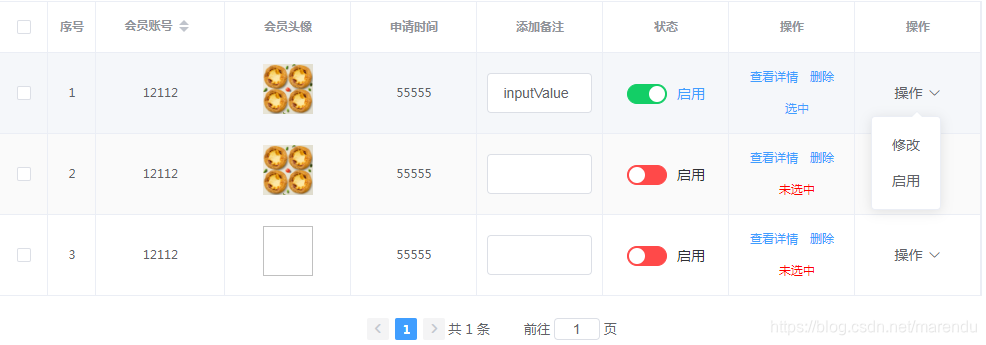
//main.js
import ElementUI from 'element-ui';
import 'element-ui/lib/theme-chalk/index.css';
import MTable from 'vue-el-mtable';
import 'vue-el-mtable/lib/MTable.css';
Vue.use(ElementUI);
Vue.use(MTable);
<template>
<div class="content">
<MTable
:table-data="tableData"
:page-data="pageData"
class="OverhangtableBox"
@handleBtnClick="handleBtnClick"
@switchClick="switchClick"
@cellClick="cellClick"
@handleSelectionChange="selectionChange"
:tableSize ="'small'"
:border="true"
@pageChage="pageChage">
</MTable>
</div>
</template>
<script>
export default {
data() {
return {
multipleSelection:[],
pageData: {
pageNum: 1,
pageSize: 10,
total: 1,
currentPage: 1
},
tableData: {
selection:{ //勾选列设置
align:'center', //对齐方式
className:'class', //列的 className
select:true
},
titles: [
{
type: 'index',
label: '序号',
align: 'center',
},
{
columnType:'nomal',
sortable:true,//对应列是否可以排序
resizable:true,
prop: 'mobile',
label: '会员账号',
align: 'center',
}, {
columnType:'img',
prop: 'imgUrl',
label: '会员头像',
align: 'center',
},
{
prop: 'gmtCreate',
label: '申请时间',
align: 'center',
},
{
columnType:'input',
prop: 'inputValue',
label: '添加备注',
align: 'center',
},
{
columnType:'switch',
prop:'switch',
label:'状态',
align: 'center',
activeColor:"#13ce66",
inactiveColor:"#ff4949",
btns:[
{
type: 'state',
name: '启用'
},
]
},
{
columnType:'btn',
prop:'btn',
label:'操作',
align: 'center',
btns:[{
type: 'view',
name: '查看详情'
},
{
type: 'del',
name: '删除'
},
{
type:"switchBtn",
prop:"change",
select:true,
name:"选中",
unselectName:"未选中"
},
{
type:"switchBtn1",
prop:"change1",
select:true,
name:"选中1",
unselectName:"未选中1"
}
]
},
{
columnType:'btnDropdown',
prop:'btnDropdown',
label:'操作',
align: 'center',
btns:[{
type: 'update',
name: '修改'
},
{
type: 'open',
name: '启用',
}
]
},
],
datas: [
{
id:1,
mobile:12112,
gmtCreate:55555,
imgUrl:'http://img.zhumengapp.com/group1/M00/01/F7/rBLFZl2umUuAEmYIAAoMmFYklEM494.jpg',
inputValue:'inputValue',
switch:true,
btnView:['del','view','switchBtn','switchBtn1'],//配合自定义按钮使用,默认为空表示全部显示
change:true,
change1:true
},
{
id:2,
mobile:12112,
imgUrl:'http://img.zhumengapp.com/group1/M00/01/F7/rBLFZl2umUuAEmYIAAoMmFYklEM494.jpg',
gmtCreate:55555,
btnView:['view','switchBtn',],//配合自定义按钮使用,默认为空表示全部显示
switch:false,
change:true,
change1:false
},
{
id:3,
mobile:12112,
gmtCreate:55555,
switch:false,
change:false,
change1:true
}
],
}
}
},
methods: {
// 操作
handleBtnClick(type, row,data) {
if(type.select){
// row[type.prop] 通过该判定来改中和未选中
row[type.prop] = ! row[type.prop]
} //表示开启了文字切换
console.log(type, row,data,'handleBtnClick');
},
// switch选择
switchClick(type, row,data) {
console.log(type, row,data,'switchClick');
},
cellClick(row, column, cell, event) { // 当某个单元格被点击时会触发该事件
console.log(row, column, cell, event,'cellClick')
},
selectionChange(val) { //当勾选项发生变化时会触发该事件
this.multipleSelection = val;
console.log(this.multipleSelection);
},
pageChage(page) {
console.log(page,'page');
this.pageData.pageNum = page
this.pageData.currentPage = page
},
},
}
</script>
<style >
body{
margin: 0;
}
.content{
width: 50%;
position: relative;
height: 200px;
margin: 0 auto;
}
</style>Contact author
first commit