
vue-elementp-form
v1.1.2
Published
vue3-elementPlus-form & vue3-elementPlus vxe-table封装 表格curd等操作

Maintainers
 dayiz.k
Readme
npm_packages
介绍
- npm包 vue-elementp-form
- json化配置表单
- 自主可控参数、动态配置
- 实现input、 inputNumber、selcet、selectTree、搜索等
- elementplus 全部表单项目
软件架构
- vue-elementp-form 基于elementUI-plus vue3 vxe-table 封装的 table、form组件库
- 目前有 k-table 组件
- 目前有 k-form 组件
- 目前有 k-feild 组件
安装教程
- npm install vue-elementp-form
使用说明
- main.js 引入 import vueElementpForm from 'vue-elementp-form'
- main.js 导入 import 'vue-elementp-form/style.css' css样式文件
- app上挂载使用 app.use(vueElementpForm)
- 全局使用组件即可
k-form 组件使用说明
示例代码
<template>
 <k-form
   :model="form"
   :ref="formRef"
   :rules="[]"
   :disabled="false"
   class="app-view-form"
   :inline="true"
   :labelPosition="'right'"
   :labelWidth="120"
   :formList="formList"
 />
 <button @click="getData">获取数据</button>
</template>
<script setup>
import { reactive, ref } from "vue";
const form = ref({})
const formRef = ref({})
/**
*  type类型介绍:
*   input(输入框)
*   secSech(下拉搜索框)
*   secTree(下拉树选择器)
*   number(input数字框)、
*   psd(密码框)
*   selectIcon(elmentUI icon选择器)
*   select(下拉框)
*   radio(单选)
*   radioBtn(单选组)
*   checkbox(多选)
*   isDate(日期)
* */
const formList = reactive([
 { field: "name", title: "角色名称", sortable: true, span: 24 },
 {
   field: "describe",
   title: "备注",
   tip: '? label或者字段说明',
   sortable: true,
   span: 12,
   type: "textarea",
 },
 {
   field: 'thirdApprovalAccounts',
   title: '管理员',
   multiple: true,
   type: 'secSech',
   span: 24,
   slots: {
     default: 'dataAdmin_default'
   },
   multiple: true,
   options: [], // 下拉搜索初始化数据
   remoteMethod: (query) => {
     if (query) {
     }
   }
 },
 {
     field: 'authIds',
     title: '功能菜单',
     sortable: true,
     span: 24,
     type: 'secTree',
     multiple: true,
     noStrictly: false,
     tData: [] // 树状初始化数据
   },
   {
   field: 'targetSystemIdsEtl',
   title: '下拉框',
   span: 24,
   type: 'select',
   filterable: true,
   multiple: true,
   options: [], // 下拉数据,可配置为数据字典
   input: (val) => {
     // change事件
     console.log('val=', val)
     getApprovalAccountsList()
   }
 },
 {
   field: 'type',
   title: '单选框组',
   type: 'radioBtn',
   span: 12
   ,
   width: 100,
   sortable: true,
   visible: false,
   options: { 1: '菜单', 2: 'TAB', 3: '按钮' },
   input: (val) => {
     console.log('val=', val)
   }
 },
]);
const getData = () => {
 console.log('formData= ', form.value)
}
</script>
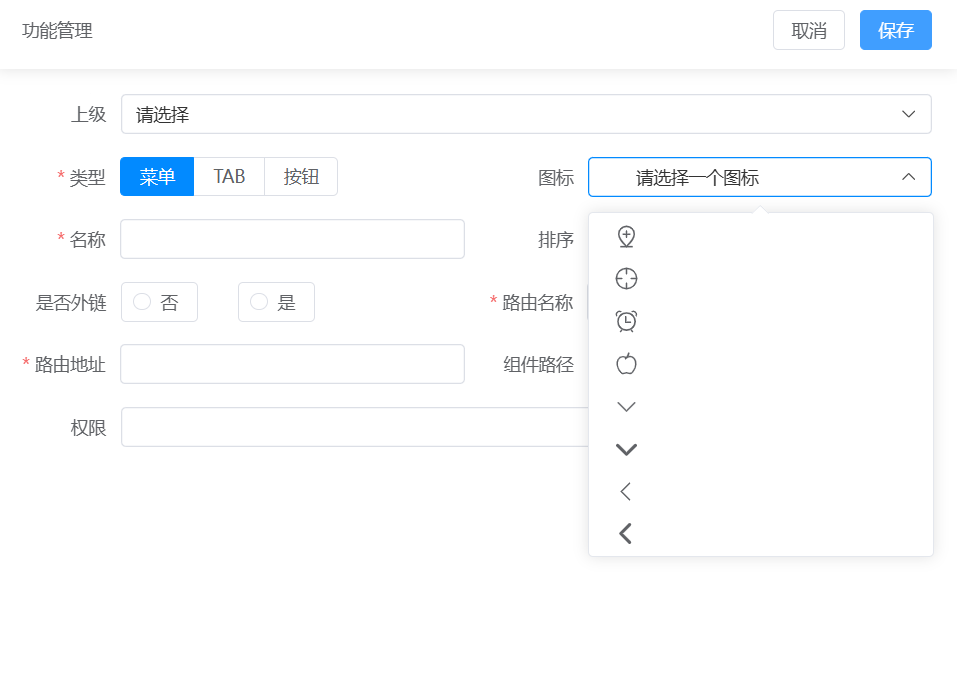
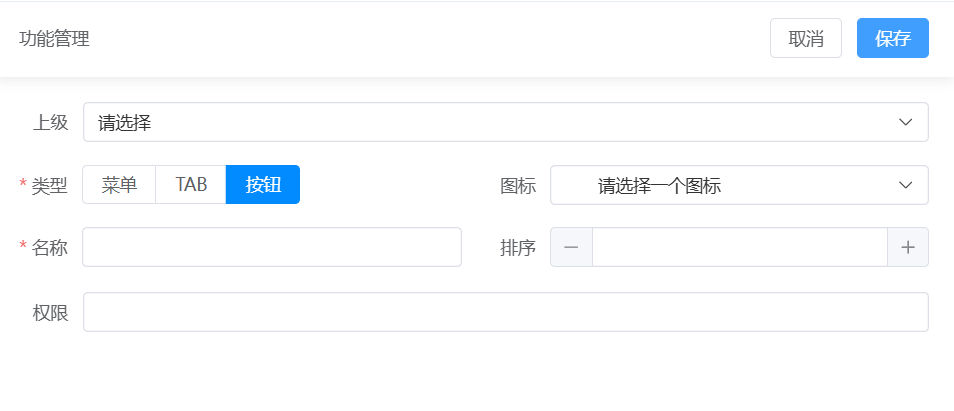
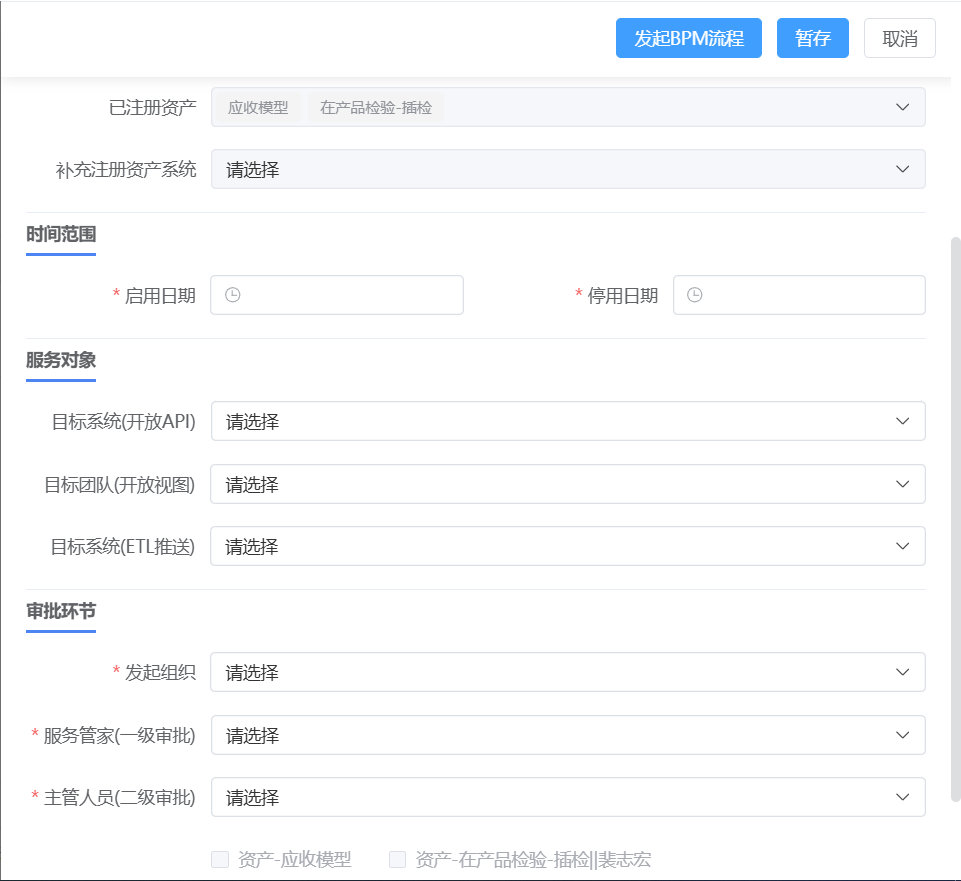
k-form组件效果预览
k-table 组件使用说明
示例代码
<template>
 <div>
   <div>
     <k-table
       :gridOptions="gridOptions"
       :pageInfo="pageInfo"
       :totalCount="totalCount"
       v-on="events"
       v-bind="events"
       :search="searchItems"
       :form="form"
       :showSearch="true"
       :hiddenPage="false"
     >
       <template #btnsGroup>
         <div>
           <el-button type="primary" @click="addRow">新增</el-button>
           <el-button type="danger" @click="someThing"
             >删除</el-button
           >
         </div>
       </template>
       <template #operate="{ row }">
         <el-button type="primary" @click="editEvent(row)" content=""
           >编辑</el-button
         >
         <el-popconfirm @confirm="removeEvent(row)" title="确认删除?">
           <template #reference>
             <el-button type="danger" content="">删除</el-button>
           </template>
         </el-popconfirm>
       </template>
       <template #header>
         <span>cool header</span>
       </template>
     </k-table>
   </div>
 </div>
</template>
<script setup>
// 集查询、分页、表格(vxe-table ^4.7.23)于一体的组件
/**
* gridOptions  为表格配置项 具体配置项 详参 vxe-table 组件
* pageInfo     为分页配置项
* totalCount   为分页总条数
* v-on="events"  v-bind="events" 固定格式 为自定义所需事件
* form         为搜索项目
* showSearch   是否显示查询条件
* hiddenPage   隐藏分页与否  false 显示  true 隐藏
* search       为查询条件  数组 具体配置项 详参 k-form 组件
* */
import { ref, onMounted, reactive } from "vue";
const selOptionsData = ref([]);
const depts = ref([]);
const loadingUser = ref(false);
const totalCount = ref(100);
const pageInfo = reactive({
 pageSize: 10,
 pageNum: 1,
});
const form = ref({});
const searchItems = reactive([
 {
   field: "departmentids",
   title: "业务组织",
   sortable: true,
   span: 6,
   type: "secTree",
   multiple: true,
   tData: depts,
 },
 {
   field: "accounts",
   title: "用户",
   multiple: true,
   type: "secSech",
   maxCollapseTags: 1,
   loading: loadingUser,
   span: 10,
   multiple: true,
   options: selOptionsData,
   remoteMethod: (query) => {
     if (query) {
     }
   },
 },
]);
const groupColumns = reactive([
 { type: "seq", width: 50, hideInform: true },
 {
   field: "ntaccount",
   title: "账号",
   sortable: true,
   hideInform: true,
 },
 {
   field: "displayname",
   title: "姓名",
   sortable: true,
   hideInform: true,
 },
 {
   field: "departmentnameFull",
   title: "组织名称",
   sortable: true,
   hideInform: true,
 },
 {
   field: "roleNames",
   title: "角色",
   sortable: true,
   type: "select",
   multiple: true,
   span: 24,
   hideInform: true,
   slots: { header: "header" },
 },
 {
   field: "roleIds",
   title: "角色",
   sortable: true,
   type: "select",
   multiple: true,
   options: [],
   visible: false,

   span: 24,
 },
 { field: "operate", title: "操作", slots: { default: "operate" } },
]);

const gridOptions = reactive({
 border: false,
 height: 450,
 align: "center",
 sortable: true,
 showOverflow: true,
 columnConfig: {
   resizable: true,
 },
 columns: groupColumns,
 data: [],
});
onMounted(() => {
 getData(pageInfo);
});
const getData = (query) => {};
const onSearch = () => {
 getData({ ...pageInfo, ...form.value });
};
const onReset = () => {
 form.value = {};
 getData({ pageNum: 1, pageSize: 10 });
};
const onPageChange = (paInfo) => {
 pageInfo = { ...pageInfo, ...paInfo };
 getData(pageInfo);
};
const events = reactive({
 search: onSearch,
 reset: onReset,
 pageChange: onPageChange,
});
</script>
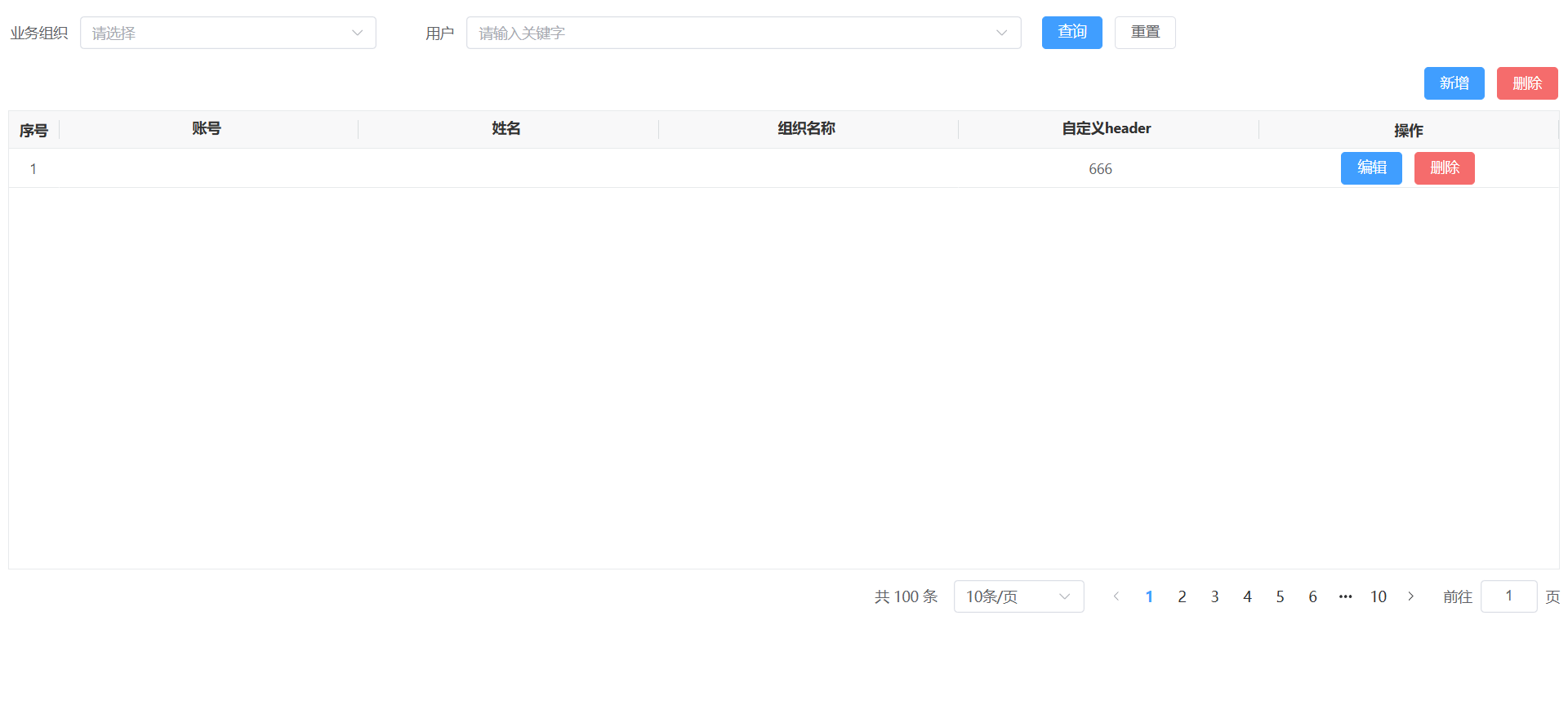
k-table组件效果预览
k-feild 组件使用说明
- 支持elementUi 表单组件 所有属性方法
版本既说明
- 当前版本号: V1.1.2 稳定版本
- 最近版本更新内容:新增了 k-table表格(vxe-table)组件、效果展示