
vue-img-clipping
v1.0.2
Published
A image crop plug-in for Vue,you can use it to rotate、zoom images and cut any size


Readme
# vue-img-clipping
简单易用的vue图片裁剪插件,支持旋转、缩放、平移,固定比例,固定尺寸,远程图片裁剪,只需要很少的代码就可以实现裁剪功能,也可以通过调整参数以适应你自己的业务需求
### 更新说明:
2021-09-09
- 新增圆形截取框, 设置为圆形取景框后,截取出图片可以设置为圆形或方形,若是设置比例咋不生效
### 特色:
- 兼容IE9+,MSEdge,Chrome,Firefox - 两种展现形式,行内或弹窗 - 可旋转、缩放图片 - 任意比例、大小裁剪 - 固定比例、大小裁剪 - 支持远程图片裁剪、跨域设置 ### 插件截图:
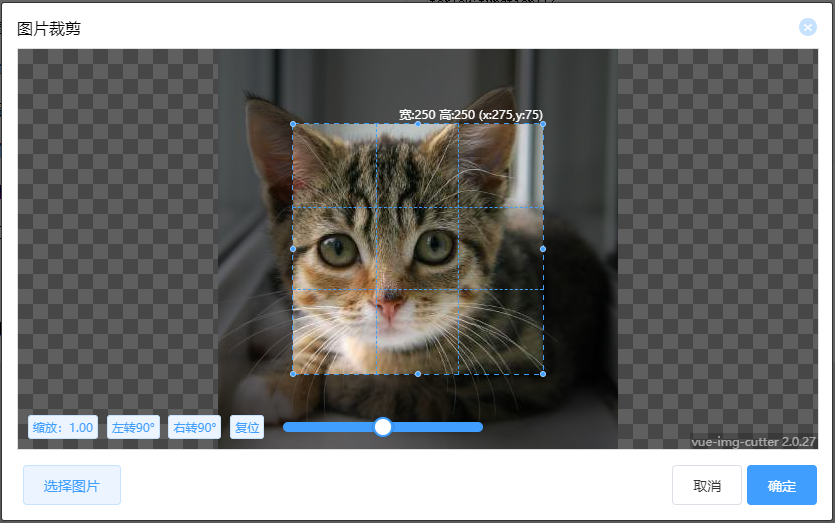
### 使用方法:
1. 安装
npm install vue-img-clipping --save-dev2. 将ImgCutter.vue文件引入项目:
import ImgClipping from 'vue-img-clipping'
export default {
        components:{
            ImgClipping
        },
...
}
3. 在页面中使用:
<ImgClipping v-on:cutDown="cutDown"></ImgClipping>4. 可使用solt
<ImgClipping v-on:cutDown="cutDown">
    <button slot="open">选择图片</button>
</ImgClipping>
5. 远程、跨域裁剪(兼容IE9)
~~需要自己写一个方法来触发裁剪工具弹出~~ ~~在方法中先将图片上传至服务器,拿到返回的url后创建一个obj,然后将对象传入裁剪工具~~ 2.1.9版本后只需要传入图片url和图片名称
// 传入的obj必须包含这四个属性
let obj = {
    name:'1.jpg',//远程图片名称
    src:'http://url/1.jpg',//远程图片url
    //width:200,//远程图片的原始宽度 2.1.9版本后不需要
    //height:200,//远程图片的原始高度  2.1.9版本后不需要
}
forIe9:function(){
// 传入name,src name中必须包含后缀名
this.$refs.imgCutterModal.handleOpen({
name:"image.jpg",
src:"http://imageServ.com/image.jpg",
});
}### 参数说明:
| 属性名 | 作用 | 类型 | 必填 | 默认值 | 说明 | |:----:|:----:|:----:|:----:|:----:|:----:| |viewfinderShape|取景框形状(square:方形,circular:圆形)|String|否|square|新属性|| |picShape|图片形状(square:方形,circular:圆形)|String|否|square|新属性| |isModal|是否为弹窗模式|Boolean|否|true| |showChooseBtn|是否显示选择图片按钮|Boolean|否|true| |lockScroll|是否在Dialog出现时将body滚动锁定|Boolean|否|true| |label|默认打开裁剪工具按钮的显示文字|String|否|选择图片| |boxWidth|裁剪工具宽度|Number|否|800| |boxHeight|裁剪工具高度|Number|否|400| |cutWidth|默认裁剪宽度|Number|否|200| |cutHeight|默认裁剪高度|Number|否|200| |tool|是否显示工具栏|Boolean|否|true| |toolBgc|工具栏背景色|String(例: "#fff")|否|#fff| |sizeChange|是否能够调整裁剪框大小|Boolean|否|true| |moveAble|能否调整裁剪区域位置|Boolean|否|true| |imgMove|能否拖动图片|Boolean|否|true| |originalGraph|是否直接裁剪原图|Boolean|否|false| |crossOrigin|是否设置跨域,需要服务器做相应更改|Boolean|否|false| |crossOriginHeader|设置跨域信息crossOrigin为true时才生效|String|否|''| |rate|图片比例|String(例: "4:3")|否|-| |WatermarkText|水印文字|String|否|''| |WatermarkTextFont|水印文字字体|String|否|'12px Sans-serif'| |WatermarkTextColor|水印文字颜色|String|否|'#fff'| |WatermarkTextX|水印文字水平位置|Number|否|0.95| |WatermarkTextY|水印文字垂直位置|Number|否|0.95| |smallToUpload|如果裁剪尺寸固定且图片尺寸小于裁剪尺寸则不裁剪直接返回文件|Boolean|否|false| |saveCutPosition|是否保存上一次裁剪位置及大小|Boolean|否|false| |scaleAble|是否允许滚轮缩放图片|Boolean|否|true| |index|自定义参数,将会同结果一起返回|Any|否|null| |previewMode|裁剪过程中是否返回裁剪结果,如果裁剪出现卡顿时将此项设置为false|Boolean|否|true| |fileType|返回的文件类型 ( png / jpeg / webp)|String|否|png|
支持slot,在组件内部使用带有slot="open"属性的元素即可自定义打开组件的按钮 ### 钩子函数: | 属性名 | 作用 | 类型 | 必填 | 返回值 | |:----:|:----:|:----:|:----:|:----:| |cutDown|完成截图后要执行的方法|Function|是|Object| |error|错误回调|Function|否|Error object| |onChooseImg|选择图片后|Function|否|Object| |onPrintImg|在画布上绘制图片|Function|否|Object| |onClearAll|清空画布|Function|否|null| ### 插槽(slot): | 插槽名称 | 作用 | |:----:|:----:| |open 或 openImgCutter|弹出裁剪框| |choose|选择本地图片| |cancel|取消/清空| |confirm|确认裁剪| |ratio|工具栏:宽高比| |scaleReset|工具栏: 重置缩放| |turnLeft|工具栏: 向左旋转| |turnRight|工具栏: 向右旋转| |reset|工具栏: 重置旋转| |flipHorizontal|工具栏: 水平翻转| |flipVertically|工具栏: 垂直翻转| ### 返回值 @cutDown:
| 属性名 | 类型 | |:----:|:----:| |fileName|文件名| |file|file类型的文件对象(IE部分版本可能不会返回)| |blob|blob类型的文件对象(IE部分版本可能不会返回)| |dataURL|dataURL| |index|Any|