
vue-kanban-board-kit
v1.0.1
Published
Vue 3 Enterprise Kanban Board Kit: ATS candidate pipelines, succession planning 9-box grids, VIP referral workflows, and agile task management with smooth drag-and-drop.

Maintainers
 mferasatali
Readme
vue-kanban-board-kit
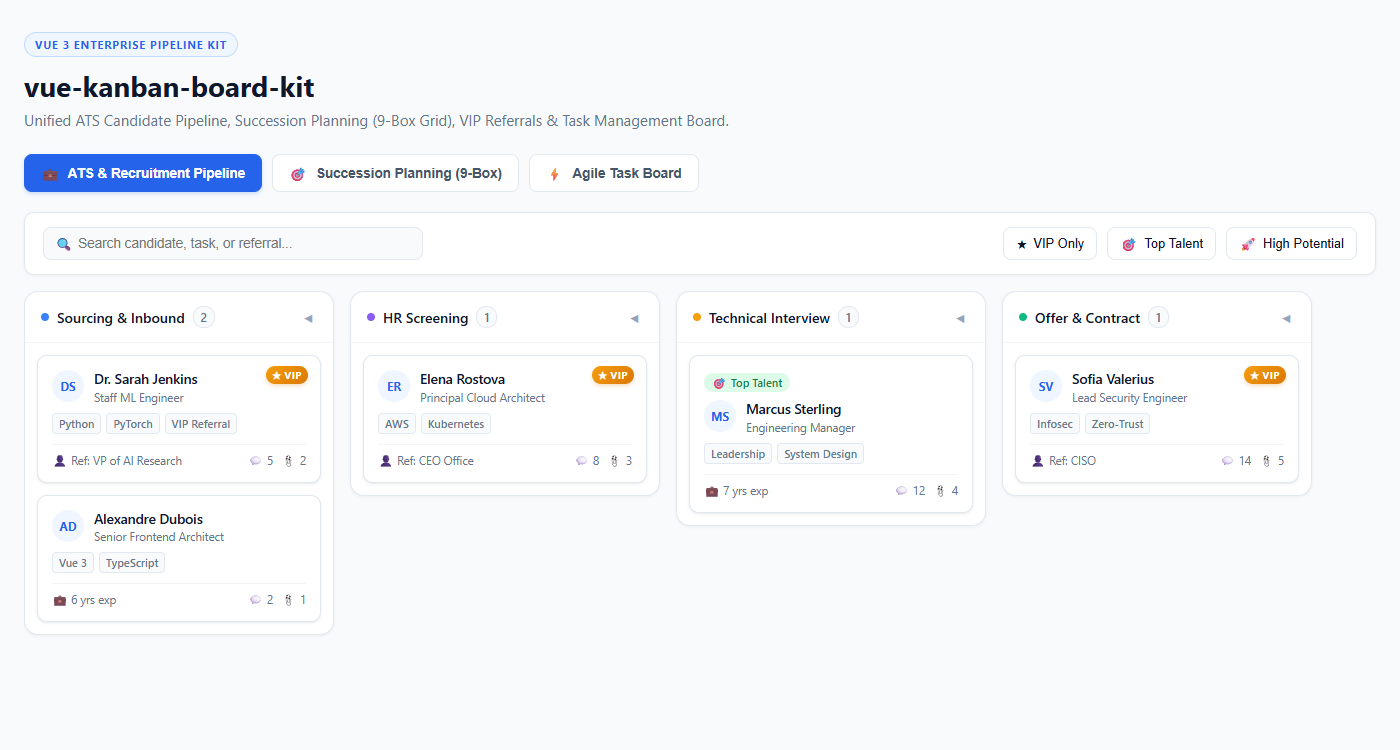
An enterprise-grade, lightweight, and customizable Vue 3 Kanban Board Kit built specifically for ATS Recruitment Pipelines, Succession Planning (9-Box Grid Integration), VIP Referrals Management, and Agile Task Boards with native drag-and-drop.
Features
- ATS & Recruitment Pipeline: Track candidates from inbound sourcing to offers with referral tags, years of experience, and interview counts.
- Succession Planning & 9-Box Grid: Native badge support for 9-Box matrix categories (Top Talent, High Potential, Star, Core Talent, etc.).
- VIP Referral Highlighting: Special VIP badges and filtering for executive/high-priority employee referrals.
- Agile Task Management: Due dates, assignees, avatars, tag chips, attachments, and comment indicators.
- HTML5 Drag & Drop: Smooth native drag-and-drop between columns with full reorder payload events.
- Composable Architecture:
useKanbancomposable provides reactive filtering, searching, and state mutations out-of-the-box. - Customizable & Headless Ready: Pre-styled modern UI with slots for custom cards, column headers, and toolbar actions.
- Zero Heavy Dependencies: Lightweight and fully typed in TypeScript.
Installation
npm install vue-kanban-board-kitQuick Start
Import the container component, composable, and CSS styles:
<template>
  <KanbanBoardContainer
    :columns="kanban.columns.value"
    :cards-map="kanban.columnCardsMap.value"
    :search="kanban.searchQuery.value"
    :filter-vip-only="kanban.filterVipOnly.value"
    :filter-nine-box="kanban.filterNineBox.value"
    @update:search="kanban.searchQuery.value = $event"
    @update:filter-vip-only="kanban.filterVipOnly.value = $event"
    @update:filter-nine-box="kanban.filterNineBox.value = $event"
    @toggle-collapse="kanban.toggleColumnCollapse"
    @card-drag-start="kanban.onDragStart"
    @card-drag-end="kanban.onDragEnd"
    @card-drop="kanban.onDrop"
    @card-click="onCardClick"
  />
</template>

<script setup lang="ts">
import { KanbanBoardContainer, useKanban, type KanbanColumn, type KanbanCard } from 'vue-kanban-board-kit'
import 'vue-kanban-board-kit/style.css'

const columns: KanbanColumn[] = [
  { id: 'sourcing', title: 'Sourcing & Inbound', color: '#3b82f6' },
  { id: 'screening', title: 'HR Screening', color: '#8b5cf6' },
  { id: 'interview', title: 'Technical Interview', color: '#f59e0b' },
  { id: 'offer', title: 'Offer & Contract', color: '#10b981' },
]

const cards: KanbanCard[] = [
  {
    id: 'c1',
    columnId: 'sourcing',
    title: 'Dr. Sarah Jenkins',
    appliedRole: 'Staff ML Engineer',
    referralName: 'VP of AI Research',
    isVip: true,
    experience: '8+ yrs exp',
    tags: ['Python', 'PyTorch'],
    commentsCount: 5,
    attachmentsCount: 2,
  },
  {
    id: 'c2',
    columnId: 'interview',
    title: 'Marcus Sterling',
    appliedRole: 'Engineering Manager',
    nineBox: 'top-talent',
    isVip: false,
    experience: '7 yrs exp',
    tags: ['Leadership', 'System Design'],
    commentsCount: 12,
  },
]

const kanban = useKanban({
  columns,
  cards,
  onCardMove: (payload) => {
    console.log('Card moved to new column / index:', payload)
  },
})

function onCardClick(card: KanbanCard) {
  console.log('Card selected:', card)
}
</script>
Required Keys & Data Types
The package enforces clear payload contracts and validates required fields:
Column Contract (REQUIRED_KEYS.column = ['id', 'title'])
interface KanbanColumn {
  id: string | number
  title: string
  color?: string
  limit?: number
  collapsed?: boolean
  headerBadge?: string | number
}
Card Contract (REQUIRED_KEYS.card = ['id', 'title', 'columnId'])
interface KanbanCard {
  id: string | number
  columnId: string | number
  title: string
  subtitle?: string
  description?: string
  avatar?: string
  assignee?: string
  priority?: 'urgent' | 'high' | 'medium' | 'low'
  tags?: (string | { label: string; color?: string; bg?: string })[]
  dueDate?: string | Date
  nineBox?: 'top-talent' | 'high-potential' | 'star' | 'core-talent' | string
  isVip?: boolean
  referralName?: string
  appliedRole?: string
  department?: string
  experience?: string
  commentsCount?: number
  attachmentsCount?: number
  meta?: Record<string, any>
}
Custom Card Slot Example
<KanbanBoardContainer
  :columns="kanban.columns.value"
  :cards-map="kanban.columnCardsMap.value"
  @card-drop="kanban.onDrop"
>
  <template #card="{ card }">
    <div class="my-custom-card">
      <h4>{{ card.title }}</h4>
      <p>{{ card.description }}</p>
    </div>
  </template>
</KanbanBoardContainer>
License
MIT License © 2026 Muhammad Ferasat Ali