
vue-live2d
v1.3.8
Published
一个适用于 Vue 2 和 Vue 3 项目的 Live2D 看板组件


Readme
🚀 效果预览
在线预览
- 私有部署示例:https://live2d.evgo2017.com/
- GitHub Pages:示例展示
本地预览
git clone https://github.com/evgo2017/vue-live2d.git
cd ./vue-live2d
npm install
npm run serve
📦 安装与使用
# 1. 安装组件
npm install vue-live2d

# 2. 在组件中引入
import vueLive2d from 'vue-live2d'
export default {
  components: { vueLive2d }
}
本组件同时支持 Vue 2 (^2.7.x) 和 Vue 3 (Options/Composition API),并提供了测试用例。
⚙️ 配置参数 (Props)
| 配置项 | 含义 | 类型 | 默认值 |
| :--- | :--- | :--- | :--- |
| apiPath | 核心地址,请求此 API 加载模型数据 | String | https://cdn.jsdelivr.net/npm/live2d-static-api@latest/indexes |
| model | 默认显示的 [模型号, 服装ID] | Array | ['Potion-Maker/Pio', 'school-2017-costume-yellow'] |
| width/height/size | 模型的宽度/高度/宽度和高度 | Number | 0 / 0 / 255 |
| direction | 模型停靠方位 (left / right) | String | right |
| tipPosition | 提示框位置 (top / bottom) | String | top |
| tips | 自定义交互提示语配置 | Object | 详见 /src/options/tips.js |
| speechApi | 语音接口,点击对话图标时请求的 API 地址 | String | https://v1.hitokoto.cn |
| speechContentFormat | 内容格式化函数,解析 API 返回的数据 | Function | 接收 API 返回的原始数据对象,并返回一个字符串 |
| homePage | 点击主页链接跳转的地址 | String | 本项目主页地址 |
| customId | 同一页面加载多个模型时的识别 ID | String | vue-live2d-main |
📡 核心参数 apiPath
方法一:项目本地集成(避开第三方接口失效) 将 live2d-static-api 的
indexes放入项目的public目录,你可以彻底告别后端维护,实现极致的加载和稳定性:apiPath="./live2d-static-api/indexes"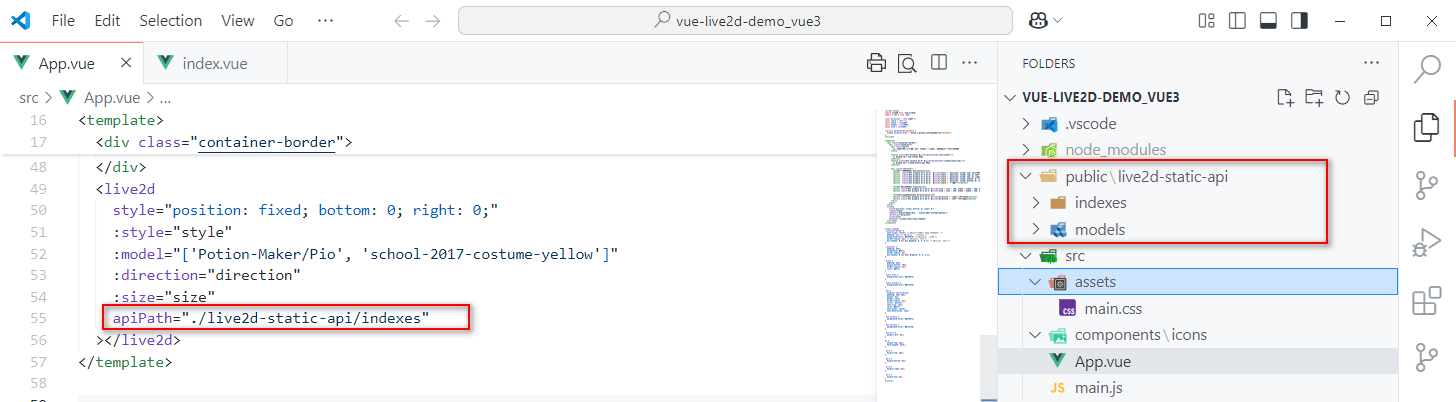
方法二:NPM / CDN 模式(推荐,极致稳定) 利用 NPM 公用 CDN 加速,实现零环境依赖的静态分发:
apiPath="https://cdn.jsdelivr.net/npm/live2d-static-api@latest/indexes" // 推荐 JSdelivr
apiPath="https://unpkg.com/live2d-static-api@latest/indexes"          // 国内 Unpkg
apiPath="https://raw.githubusercontent.com/evgo2017/live2d-static-api/main/indexes" // GitHub
其它参数说明
model:切换模型或换装时,控制台会输出相关编码信息,直接复制即可。
宽高控制:
width和height的优先级高于size。建议使用size统一缩放,以减少模型重新加载的次数。多模型同屏:通过
customId可以在同一页面渲染多个组件。但受限于核心库逻辑,同一时间通常只有一个模型支持动态交互。💬 语音对话 (Speech):你可以通过自定义接口和格式化函数,让看板接入任何内容源(如:诗词、名言、甚至 AI 回复):
<!-- 自定义用法 -->
<vue-live2d
  speechApi="https://api.xxx.com/api"
  :speechContentFormat="(content) => `自定义解析和返回内容 ${content}`"
/>
📈 Star History
参考资料与核心库
[1] fghrsh/live2d_demo [2] stevenjoezhang/live2d-widget [3] fghrsh/live2d_api
尝试过基于 Live2D 官网发布的 Live2D_SDK_WEBGL_2.1 SDK 中的
live2d.min.js、Live2DFramework.js和sampleApp1,和live2d.min.js代码进行二次梳理。技术链路遵循:Core -> Framework -> App -> vue-live2d。
联系方式
若遇到问题,请提交 issue。或访问 evgo2017.com/about。