
vue-release-notes
v0.1.6
Published
A Vue.js Release Notes Component


Readme
Vue.js Release Notes Component
Usage
Installation
Using yarn
yarn add vue-release-notes
Using npm
npm i --save vue-release-notes
Import in project
Import or require Vue and Vue Release Page in your code:
import Vue from 'vue'
import VueReleaseNotes from 'vue-release-notes'
import 'vue-release-notes/dist/vue-release-notes.css'

// OR

var Vue = require('vue')
var VueReleaseNote = require('vue-release-notes')
require('vue-release-notes/dist/vue-release-notes.css')


// Register in application components
export default {
  components: {VueReleaseNotes},
  data () {
    return {
      releases: {...}
    }
  }
}
You can then use it in your application's HTML:
<vue-release-notes v-bind:releases="releases">Schema
Here is an example schema that can be passed to the component prop.
const releases = [
  {
    version: '2.0.0',
    date: new Date(2017, 5, 18),
    changes: [
      {
        type: 'new',
        description: 'Change Description'
      }
    ]
  }
]
Fields
releases
The releases array that must be passed to the component
version
The version of the release
date
The date of the release
changes
Array of changes for the release
type
Type of change. Can be represented by any type below:
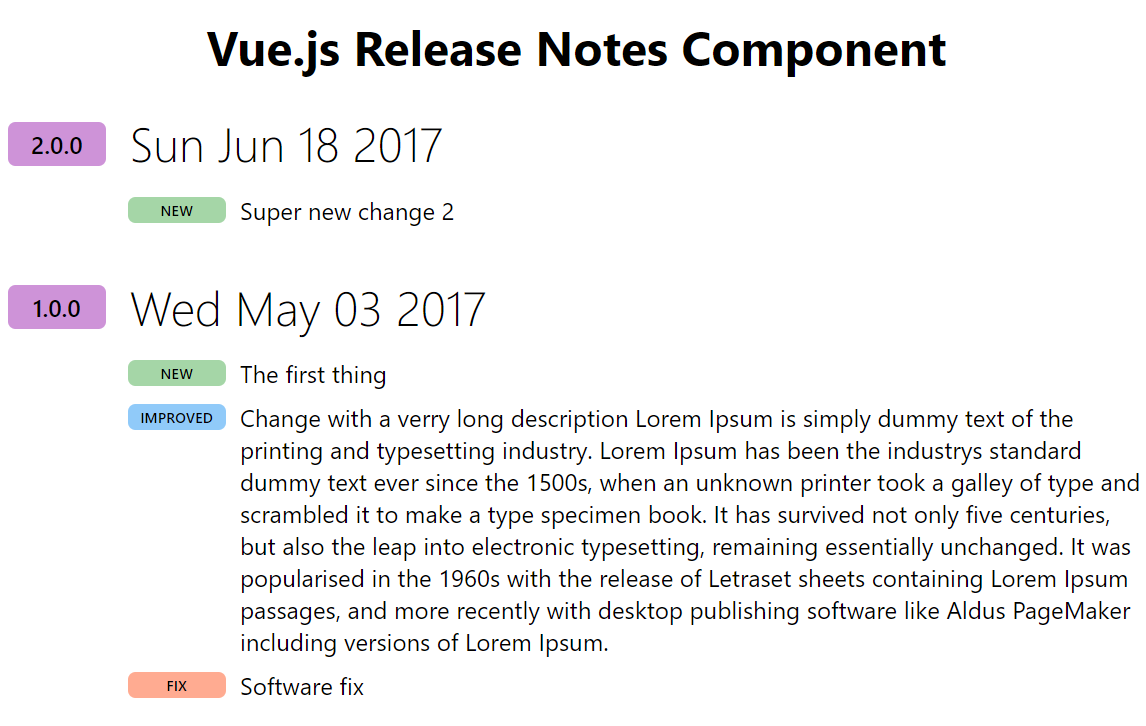
- new: (Displayed in green) Represent a new change
- fix: (Displayed in orange) Represent a fix to the code
- any others: (Displayed in blue) Any other text is displayed in blue
description
Description of the change
License
Copyright 2017 Carl St-Laurent
Licensed under the Apache License, Version 2.0 (the "License"); you may not use this file except in compliance with the License. You may obtain a copy of the License at
http://www.apache.org/licenses/LICENSE-2.0
Unless required by applicable law or agreed to in writing, software distributed under the License is distributed on an "AS IS" BASIS, WITHOUT WARRANTIES OR CONDITIONS OF ANY KIND, either express or implied. See the License for the specific language governing permissions and limitations under the License.