vue-simple-editor
v1.2.8
Published
基于 vue 3.x 轻量级富文本编辑器


Readme
🍓 vue-simple-editor
基于 vue 3.x 轻量级富文本编辑器,可用于聊天框,发布框,话题,标签 ..- ⭐ gitHub
Install
npm install vue-simple-editorUsage
import SimpleEditor from "vue-simple-editor";
const app = createApp(App);
app.use(SimpleEditor);
按需引入
需要先安装插件
npm i babel-plugin-import --save-dev在引入组件库的项目根目录新建.babelrc 文件, 配置如下
{
  "plugins": [
    [
      "import",
      {
        "libraryName": "vue-simple-editor", // 组件名
        "libraryDirectory": "packages" // 组件源码包名
      }
    ]
  ]
}
按需引入示例
<tempalte>
	<div>
        <simple-editor></simple-editor>
        <v-emoji></v-emoji>
    </div>
</tempalte>
import { SimpleEditor, VEmoji } from "vue-simple-editor";
export default {
	components:{
    	[SimpleEditor.name]: SimpleEditor,
    	[VEmoji.name]: VEmoji,
    }
}
Props
Name|Type|Default|Description --|:--:|--:|--: v-model:value|[Number, String]|-|获取纯文本
Events
Name|Parameters|Description
--|--:|--:
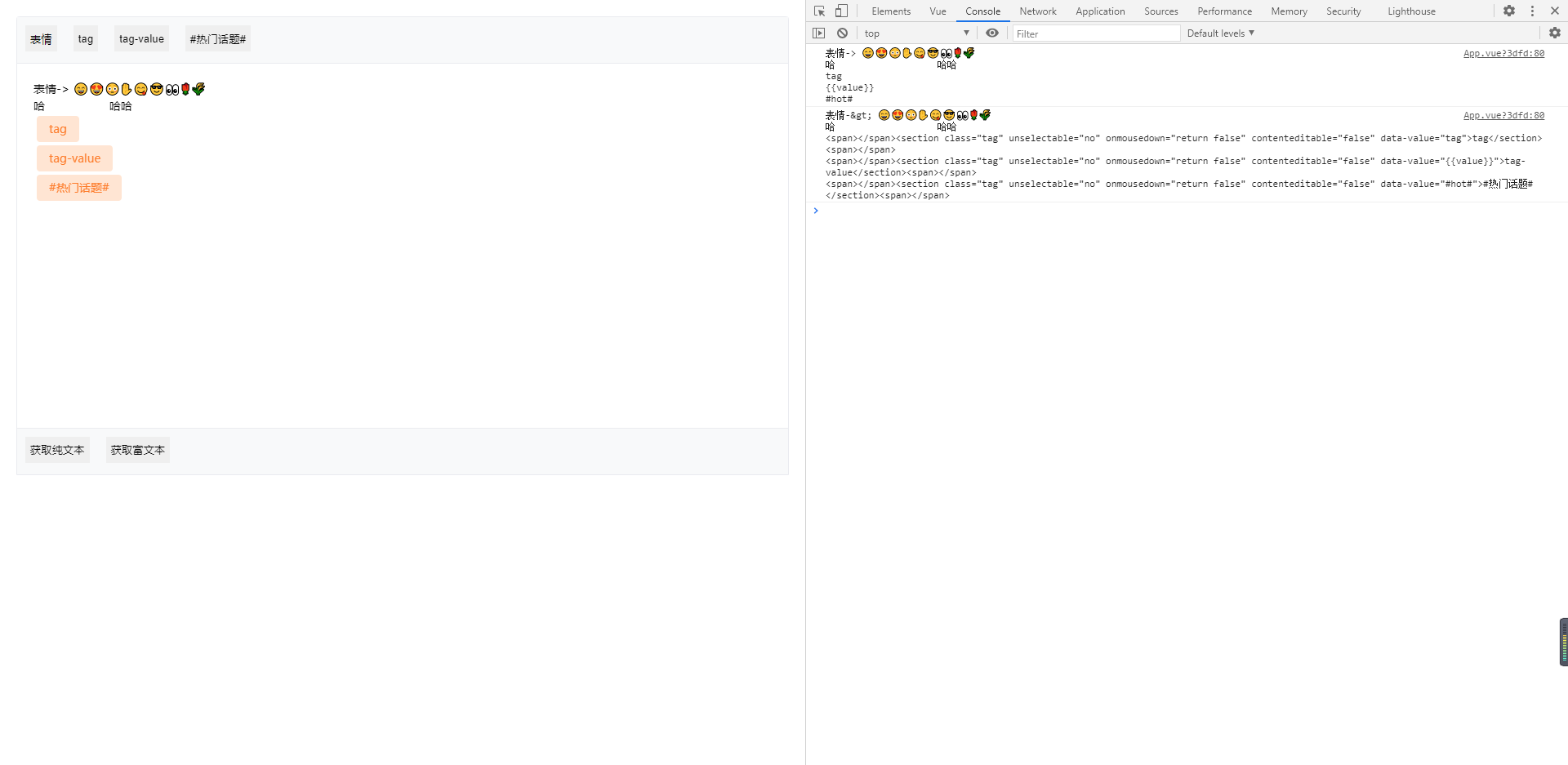
initText|text="", tags={}, type=1|初始化默认文本:text:传入内容,tags:自定义标签对象(key-value),type=1:纯文本 -> 富文本文本,type=2 :富文本,
insertNode|type="text", content, value|插入节点:type: text(文本节点)、tag(标签节点),content:显示内容, value:获取纯文本的内容
getHtml|-|获取富文本
getText|-|获取纯文本
Examples
<template>
<div class="editor-wrap">
<div class="btn-wrap">
<button class="emoji-btn" @click="show_emoji = !show_emoji">
表情
<div class="emoji-warp" v-if="show_emoji">
<v-emoji
@submit="
insertNode('text', $event), (show_emoji = false)
"
></v-emoji>
</div>
</button>
<button
v-for="(value, key) in tags"
@click="insertNode('tag', key, value)"
:key="key"
>
{{ key }}
</button>
</div>
<simple-editor
ref="EditorRef"
v-model:value="form.content"
></simple-editor>
<div class="btn-wrap">
<button @click="hanldeClick('text')">获取纯文本</button>
<button @click="hanldeClick('html')">获取富文本</button>
</div>
</div>
</template>
<script>
import { onMounted, reactive, ref, toRefs } from "vue";
import { SimpleEditor, VEmoji } from "../packages";
export default {
name: "App",
components: {
[SimpleEditor.name]: SimpleEditor,
[VEmoji.name]: VEmoji,
},
setup() {
const state = reactive({
show_emoji: false,
form: {
// 设置纯文本 ↓↓↓
content: `表情-> 😄😍😳✋😋😎👀🌹🌾
哈 哈哈
tag
{{value}}
#hot#`,
// 设置富文本 ↓↓↓
// content: `表情-> 😄😍😳✋😋😎👀🌹🌾
// 哈 哈哈
// <span></span><section class="tag" unselectable="no" onmousedown="return false" contenteditable="false" data-value="tag">tag</section><span></span>
// <span></span><section class="tag" unselectable="no" onmousedown="return false" contenteditable="false" data-value="{{value}}">tag-value</section><span></span>
// <span></span><section class="tag" unselectable="no" onmousedown="return false" contenteditable="false" data-value="#热门话题#">@全部人</section><span></span>`,
},
tags: {
tag: "tag",
"tag-value": "{{value}}",
"#热门话题#": "#hot#",
},
});
const EditorRef = ref(null);
const insertNode = (type = "text", content, value) => {
EditorRef.value.insertNode(type, content, value);
};
const hanldeClick = (type) => {
let content = "";
if (type === "text") {
content = EditorRef.value.getText();
} else {
content = EditorRef.value.getHtml();
}
console.log(content);
};
onMounted(() => {
EditorRef.value.initText(state.form.content, state.tags);
});
return {
...toRefs(state),
EditorRef,
insertNode,
hanldeClick,
};
},
};
</script>
<style lang="less">
.editor-wrap {
margin: 20px;
border: 1px solid #eaebf0;
border-radius: 4px 4px 0px 0px;
display: flex;
flex-direction: column;
height: 560px;
.emoji-btn {
position: relative;
.emoji-warp {
position: absolute;
background-color: #fff;
border-radius: 2px;
box-shadow: 0 2px 8px rgba(0, 0, 0, 0.15);
left: 0;
top: 40px;
}
}
.btn-wrap {
height: 50px;
background: #f8f9fa;
border-bottom: 1px solid #eaebf0;
padding: 10px;
display: flex;
button {
height: 32px;
min-width: initial;
border: 0;
margin-right: 20px;
}
&:last-of-type {
border-top: 1px solid #eaebf0;
border-bottom: 0;
}
}
}
</style>