
vue-toast-gooey
v1.0.0
Published
An opinionated, physics-based toast notification library for Vue 3. Ported from hiaaryan/sileo.

Maintainers
 carlosaroca
Readme
vue-toast-gooey
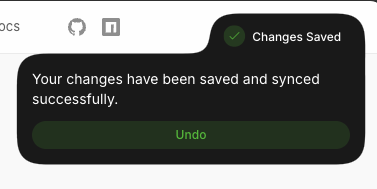
An opinionated, physics-based toast notification library for Vue 3. This is a direct port of hiaaryan/sileo from React to Vue 3, maintaining the same beautiful gooey animations and developer experience.




Features
- 🎨 Beautiful gooey animations - Physics-based morphing effects
- 🎯 Type-safe - Full TypeScript support
- 🚀 Lightweight - Zero runtime dependencies (except Vue 3)
- 📦 Tree-shakeable - ESM and CJS builds
- ⚡ Autopilot mode - Auto-expand/collapse with smart timing
- 🎭 Promise handling - Built-in loading → success/error flows
- 🎨 Customizable - Styles, icons, positions, and more
- ♿ Accessible - ARIA live regions
Installation
npm install vue-toast-gooey
# or
yarn add vue-toast-gooey
# or
pnpm add vue-toast-gooey
Quick Start
1. Add the Toaster component to your app
<!-- App.vue -->
<script setup>
import { SileoToaster } from 'vue-toast-gooey';
import 'vue-toast-gooey/style.css';
</script>

<template>
  <div id="app">
    <SileoToaster />
    <!-- Your app content -->
  </div>
</template>
2. Use the toast API anywhere
<script setup>
import { sileo } from 'vue-toast-gooey';

const showToast = () => {
  sileo.success('Operation completed!');
};

const showError = () => {
  sileo.error('Something went wrong', {
    description: 'Please try again later',
  });
};

const handleAsync = async () => {
  const id = sileo.loading('Processing...');

  try {
    await someAsyncOperation();
    sileo.update(id, {
      type: 'success',
      title: 'Done!',
      description: 'Operation completed successfully',
    });
  } catch (error) {
    sileo.update(id, {
      type: 'error',
      title: 'Failed',
      description: error.message,
    });
  }
};
</script>
Toast Stacking
Multiple toasts stack automatically when using unique IDs:
// Each toast with a unique ID will stack
sileo.success('Upload complete', {
  id: 'upload-1',
  description: 'File uploaded successfully'
});

sileo.info('New message', {
  id: 'message-1',
  description: 'You have a new message'
});

sileo.warning('Low storage', {
  id: 'storage-1',
  description: 'Running low on space'
});
How it works:
- Toasts with unique IDs stack vertically with 12px gap
- Each toast shows at least its header (icon + title) when collapsed
- Hover over any toast to expand it and see full content
- Autopilot controls automatic expansion/collapse behavior
- Toasts with the same ID replace each other (useful for updates)
Generate unique IDs:
const id = `toast-${Date.now()}-${Math.random().toString(36).slice(2, 9)}`;
sileo.success('Done!', { id });
API Reference
Toast Methods
// Basic toasts
sileo.toast(title: string, options?: ToastOptions): string
sileo.success(title: string, options?: ToastOptions): string
sileo.error(title: string, options?: ToastOptions): string
sileo.warning(title: string, options?: ToastOptions): string
sileo.info(title: string, options?: ToastOptions): string
sileo.action(title: string, options?: ToastOptions): string

// Loading toast (no auto-dismiss)
sileo.loading(title?: string, options?: ToastOptions): string

// Update existing toast
sileo.update(id: string, options: ToastOptions): void

// Dismiss toasts
sileo.dismiss(id?: string): void  // No id = dismiss all

// Promise helper
sileo.promise<T>(
  promise: Promise<T> | (() => Promise<T>),
  options: PromiseOptions<T>
): Promise<T>
Toast Options
interface ToastOptions {
  title?: string;
  description?: string | VNode;
  position?: ToastPosition;
  duration?: number | null;  // null = no auto-dismiss
  icon?: VNode | null;
  styles?: ToastStyles;
  fill?: string;  // Background color
  roundness?: number;  // Border radius
  autopilot?: boolean | { expand?: number; collapse?: number };
  button?: ToastButton;
}

type ToastPosition =
  | 'top-left'
  | 'top-center'
  | 'top-right'
  | 'bottom-left'
  | 'bottom-center'
  | 'bottom-right';
Toaster Component Props
<SileoToaster
  position="top-right"
  :offset="{ top: 16, right: 16 }"
  :options="{ duration: 5000 }"
/>
interface ToasterOptions {
position?: ToastPosition;
offset?: number | string | {
top?: number | string;
right?: number | string;
bottom?: number | string;
left?: number | string;
};
options?: Partial<ToastOptions>; // Default options for all toasts
}Advanced Usage
Promise Handling
sileo.promise(
  fetchData(),
  {
    loading: { title: 'Loading data...' },
    success: (data) => ({
      title: 'Success!',
      description: `Loaded ${data.length} items`,
    }),
    error: (err) => ({
      title: 'Error',
      description: err.message,
    }),
  }
);
Custom Icons
import { h } from 'vue';

sileo.success('Custom icon', {
  icon: h('svg', { /* ... */ }, [/* ... */]),
});
Action Buttons
sileo.info('New update available', {
  description: 'Version 2.0 is ready to install',
  button: {
    title: 'Update now',
    onClick: () => {
      console.log('Updating...');
    },
  },
});
Autopilot Mode
// Auto-expand after 150ms, auto-collapse after 4000ms
sileo.success('Message', {
  description: 'Details here',
  autopilot: true,  // Uses defaults
});

// Custom timing
sileo.success('Message', {
  description: 'Details here',
  autopilot: {
    expand: 500,   // Expand after 500ms
    collapse: 3000, // Collapse after 3000ms
  },
});

// Disable autopilot
sileo.success('Message', {
  description: 'Details here',
  autopilot: false,  // Manual hover only
});
Global Plugin (Optional)
// main.ts
import { createApp } from 'vue';
import { SileoPlugin } from 'vue-toast-gooey';
import App from './App.vue';

const app = createApp(App);

app.use(SileoPlugin, {
  position: 'top-right',
  options: {
    duration: 5000,
    fill: '#1a1a1a',
  },
});

app.mount('#app');
Then use this.$sileo in Options API components:
<script>
export default {
  methods: {
    showToast() {
      this.$sileo.success('Hello!');
    },
  },
};
</script>
Styling
The library uses CSS custom properties for easy theming:
:root {
  --sileo-state-success: oklch(0.723 0.219 142.136);
  --sileo-state-error: oklch(0.637 0.237 25.331);
  --sileo-state-warning: oklch(0.795 0.184 86.047);
  --sileo-state-info: oklch(0.685 0.169 237.323);
  --sileo-state-action: oklch(0.623 0.214 259.815);
  --sileo-state-loading: oklch(0.556 0 0);
}
Positions
Available positions:
top-lefttop-centertop-right(default)bottom-leftbottom-centerbottom-right
TypeScript
Full TypeScript support with exported types:
import type {
  Toast,
  ToastType,
  ToastPosition,
  ToastOptions,
  ToastStyles,
  ToastButton,
  ToasterOptions,
  PromiseOptions,
} from 'vue-toast-gooey';
Browser Support
- Modern browsers with ES2020 support
- CSS
color-mix()support (or fallback colors) - CSS
linear()easing support (or fallback easing)
Credits
This library is a Vue 3 port of the original sileo library for React, created by Aryan Khurana.
License
MIT License - see LICENSE for details.
This project maintains the MIT license of the original sileo library and includes proper attribution in NOTICE.md.