
vue-tree-structure
v0.0.2
Published
vue-tree-structure


Readme
安装
npm i -S vue-tree-structure

import { treeMenu,treeSelector } from 'vue-tree-structure';
案例地址
Menu
MenuDialog
DepartMentSelector
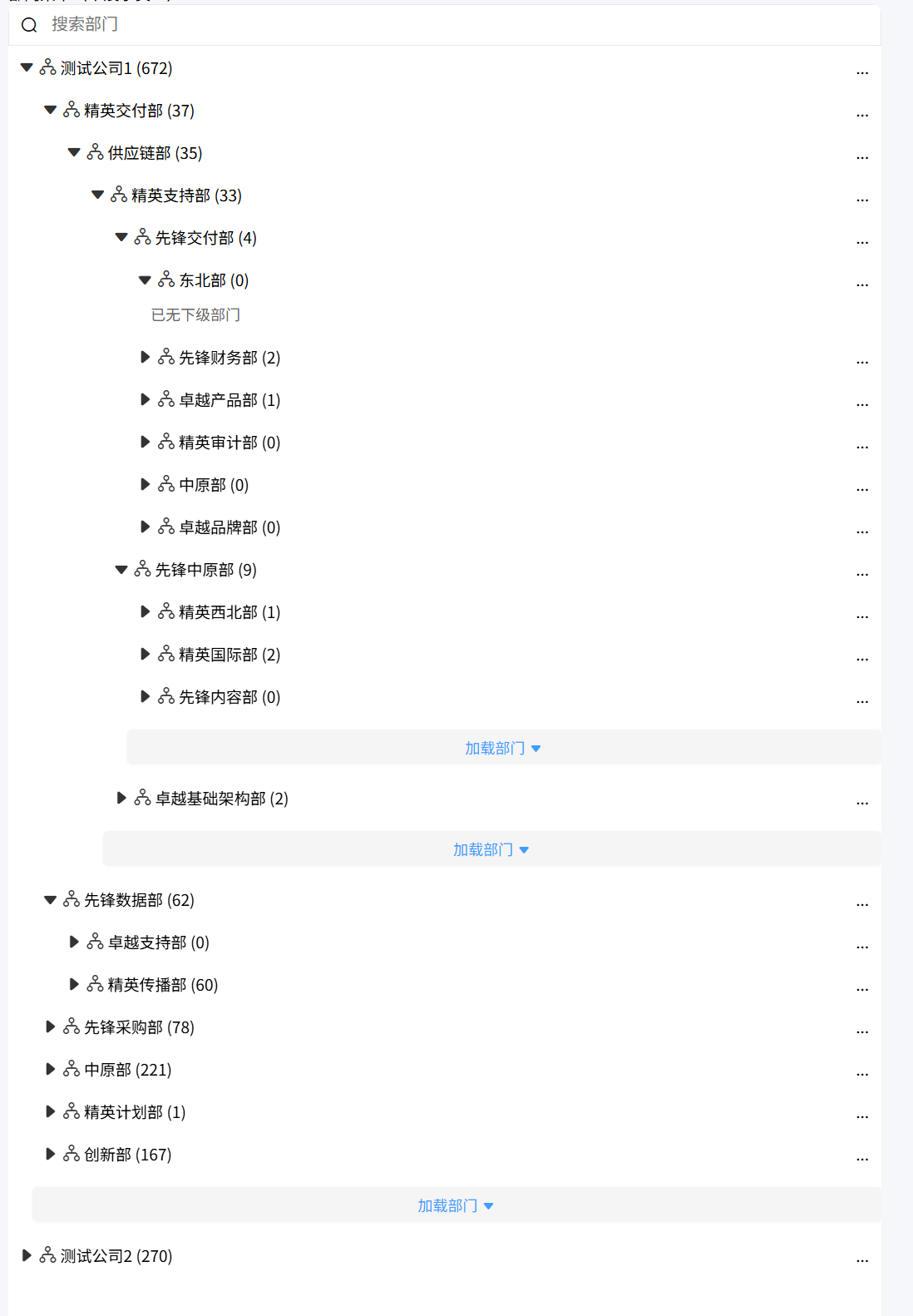
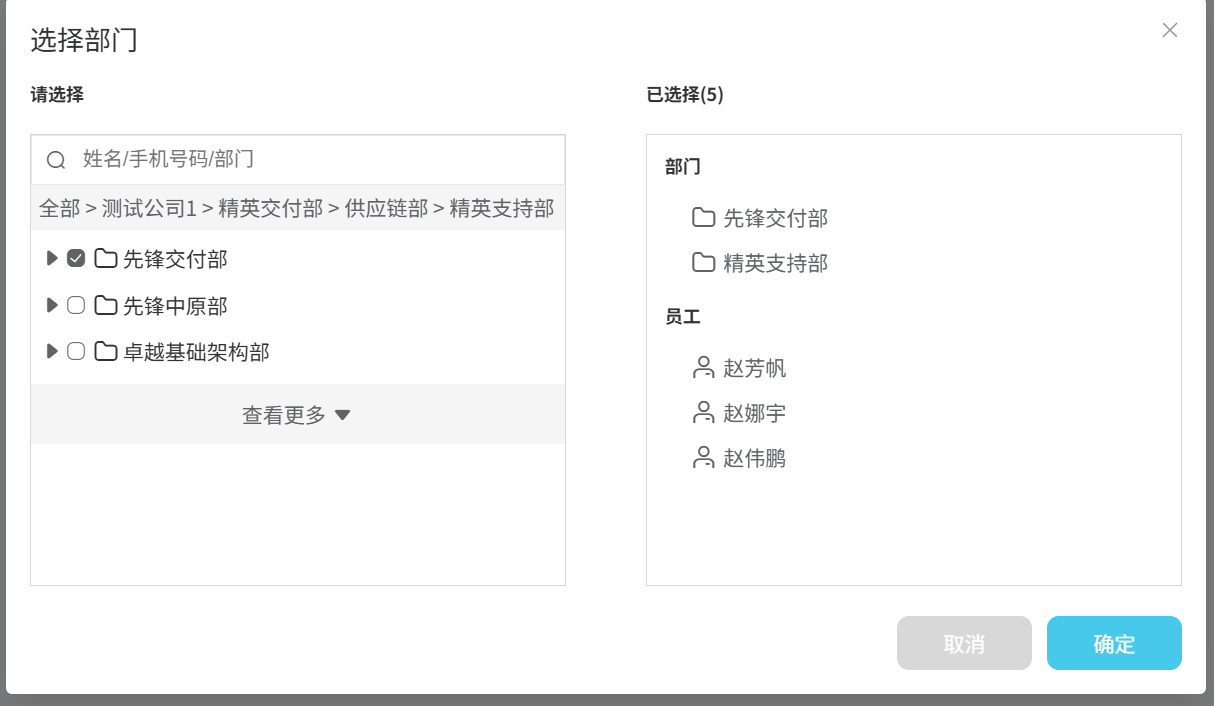
源码
cdn中使用
<link rel="stylesheet" href="/dist/vueTreeStructure.css">
<script src="/dist/vueTreeStructure.umd.js"></script>
<script>
  const { treeMenu, treeSelector } = vueTreeStructure;
</script>
使用方式
<tree-menu
:mode="mode"
:show-level="showLevel"
:page-size="pageSize"
:choose-type="chooseType"
:get-dep-list-api="getDepListApi"
@update:selected="selectionDepFn"></tree-menu>


<tree-selector
ref="departmentSelector"
:choose-type="chooseType"
:single-choice="singleChoice"
:page-size="pageSize"
:init-data="initData"
:scope-node="scopeNode"
:root-node-name="rootNodeName"
:get-dep-list-api="getDepListApi"
@confirm="handleConfirm"
@cancel="handleCancel"></tree-selector>
tree-menu
可以展开的组织架构
|--企业 1
  |--部门 1
    |--部门 1-1
      |--部门 1-1-1
        |--部门 1-1-1-1
        |--部门 1-1-1-2
      |--部门 1-1-2
        |--部门 1-1-2-1
        |--部门 1-1-2-2
    |--部门 1-2
      |--部门 1-2-1
      |--部门 1-2-2
  |--部门 2
    |--部门 2-1
    |--部门 2-2
  |--部门 3
props
// 1:无checkbox模式单选,2:有checkbox模式单选, 3:有checkbox模式 多选
  mode: {
    type: Number,
    default: 1,
  },
  // 0:都不能选择  1:选择部门,2 可以选择员工,3 部门+员工都可以选择
  chooseType: {
    type: Number,
    default: 1,
  },
  // 初始选中数据,[{ PK_Guid: "100007", Name: "法务部", Level: 1 }]
  initData: {
    type: Array,
    default: () => [],
  },
  // 增删改查后-不刷新页面,不刷新组织架构的情况下更新目录数据
  treeUpdateData: {
    type: Array,
    default: () => [],
  },
  // 请求组织架构的函数
  getDepListApi: {
    type: Function,
    default: () => {},
  },
  // 组织架构-只展示当前部门下的数据
  scopeNode: {
    type: Object,
    default: () => null,
  },
  // 分页
  pageSize: {
    type: Number,
    default: 15,
  },

  // 显示几级,0:只展示企业,1,展示企业+企业下面一级,2以此类推,默认展开第一个企业下的第一条数据,如果想要展开具体id数据,则需要配置levelList,需要按规则配置,
  showLevel: {
    type: Number,
    default: 0,
  },
  // 需要展开的部门id,["企业A-id','企业A的下一级部门B-id",部门B部门的下一级部门C-id",...],这里面的个数要和showLevel保持一致
  levelList: {
    type: Array,
    default: [],
  }
treeUpdateData
新增接口返回的数据结构 (ChildNode字段下的数据为新增的数据)
  treeUpdateData.value = [
    {
      PK_Guid: "100001", Name: "部门6", Level: 1, UserCount: 22,
      ChildNode: [{ PK_Guid: "10000a2", Name: "新增部门", Level: 1, UserCount: 0 }],
    },
    { PK_Guid: "100000", Name: "测试企业A", Level: 0, UserCount: 9, },
  ];
删除接口返回的数据结构 (新增delIdList字段,删除“10000a2”部门)
  treeUpdateData.value = [
    {
      PK_Guid: "100001", Name: "部门6", Level: 1, UserCount: 22, ChildNode: null,
      DelIdList:["10000a2"],
    },
    { PK_Guid: "100000", Name: "测试企业A", Level: 0, UserCount: 9, },
  ];
emits
@update:selected

更新选择项
tree-selector
不可展开的组织架构,只能一层一层的进入到下一次
|--企业 1 => 部门 1 => 部门 1-1 => 部门 1-1-1
// 选择类型:0-都不能选择  1-只能选择部门,2-只能选择员工,3-员工部门都可以选择
  chooseType: {
    type: Number,
    default: 3,
  },
  // 只展示当前部门下的数据
  scopeNode: {
    type: Object,
    default: () => null,
  },
  // 初始选中数据
  initData: {
    type: Array,
    default: () => [],
  },
  // 是否单选
  singleChoice: {
    type: Boolean,
    default: false,
  },
  // 请求的函数
  getDepListApi: {
    type: Function,
    default: () => {},
  },
  // 根面包屑名称
  rootNodeName: {
    type: String,
    default: "",
  },
  pageSize: {
    type: Number,
    default: 15,
  },
emits
@confirm  确认按钮
@cancel  取消按钮
注意
数据格式以及字段
后端定义接口字段的时候,严格按照下面的数据结构以及字段,否则会导致页面渲染不正确 以下数数据中,HasMore, PK_Guid, Name, Level, UserCount, ChildNode 必须要有且字段要完全一致,其他字段根据需求添加,
response: {
   "Code": 200, // 可自定义
   "ToTal": 2,// 可自定义
   "Pagesize": 10,// 可自定义
   "HasMore": true, // 不可自定义 - 是否还有更多数据
   "Data": { //  不可自定义 -
        "PK_Guid": "id", // 不可自定义 -  唯一id
        "Name": "name", // 不可自定义 -  名称
        "Level": 1, // 不可自定义 -  层级 0:企业,1部门,2员工
        "UserCount": 4, // 不可自定义 -  该部门下员工数量
        "ChildNode": [// 不可自定义 -  子节点
          {
              "PK_Guid": "id",
              "Name": "name",
              "Level": 1,
              "ChildNode": null,
              "UserCount": 2
          }
        ],
    }
}