
vuepress-plugin-tags
v1.0.2
Published
tags plugin for vuepress

Maintainers
 zhuqiang
Readme
vuepress-plugin-tags
适用于 vuepress 插件的插件
提供的功能:可以在标题下面显示标签,如下所示
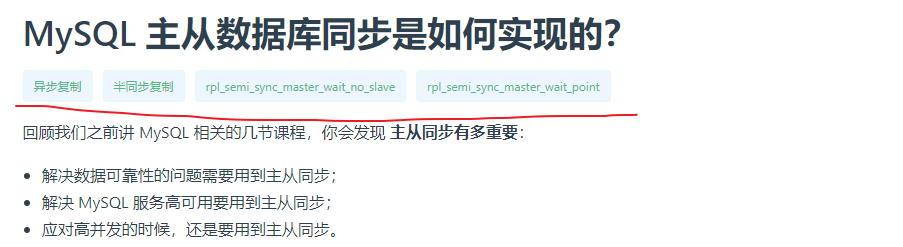
当然这需要你的这个页面顶部有 Front Matter,
本插件使用了官方预定义的 内置搜索中的 tags
来渲染,这有两个好处:
- 本来你为了搜索而设置了标签
- 当你搜索到当前页时,不能一目了然的清除,我为什么会被导航到这个页面来?
当使用本插件显示标签,以上的问题,就很好的被结合了。
那么上图的 Front Matter 对应如下
---
tags:
  - 异步复制
  - 半同步复制
  - rpl_semi_sync_master_wait_no_slave
  - rpl_semi_sync_master_wait_point
---
Install
yarn add vuepress-plugin-tags
# OR
npm install vuepress-plugin-tags
open npm : https://www.npmjs.com/package/vuepress-plugin-tags
Usage
module.exports = {
  "plugins": [
    ["vuepress-plugin-tags"]
  ]
}
详细配置参数
module.exports = {
  "plugins": [
    ["vuepress-plugin-tags", {
      type: 'default', // 标签预定义样式
      color: '#42b983',  // 标签字体颜色
      border: '1px solid #e2faef', // 标签边框颜色
      backgroundColor: '#f0faf5', // 标签背景颜色
      selector: '.page .content__default h1' // ^v1.0.1 你要将此标签渲染挂载到哪个元素后面?默认是第一个 H1 标签后面;可以提供 `document.querySelectorAll()` 支持的选择语法,将标签挂载该元素后面
    }]
  ]
}
上述配置中的 color、border、backgroundColor 只在 type=default 时生效。
type 有如下的选项:
- default 默认主题,与 vuepress 官方默认主题颜色一致;其他的 5 个则是不同的语义主题
- primary : 语义主题
- success : 语义主题
- info : 语义主题
- warning : 语义主题
- danger : 语义主题
- rainbow : 彩虹主题
其他 5 个 type 的样式如下

更多自定义配置,请参考这里
rainbow 配置
当 type=rainbow 时,使用以下配置参数
module.exports = {
  "plugins": [
    ["vuepress-plugin-tags", {
      type: 'rainbow',
      selector: '.page .content__default h1',
      rainbows: [ // 将你要随机的标签样式组在这里定义
        {
          color: '#42b983',  // 标签字体颜色
          border: '1px solid #e2faef', // 标签边框颜色
          backgroundColor: '#f0faf5', // 标签背景颜色
        },
        {
          color: '#42b983',  // 标签字体颜色
          border: '1px solid #e2faef', // 标签边框颜色
          backgroundColor: '#f0faf5', // 标签背景颜色
        }
      ]
    }]
  ]
}
Change log
v1.0.2
- 新增:type=rainbow 类型,支持在一组标签样式中随机切换
v1.0.1
- 修复:自定义配置样式无效
- 修复:直接刷新页面导致标签渲染失败
- 新增:自定义配置提供 selector 选项,可以提供
document.querySelectorAll()支持的选择语法,将标签挂载该元素后面