
wai-aria-checker
v1.5.0
Published
A comprehensive WCAG 2.1 compliance checker for web applications

Maintainers
 incrediblecrab
Readme
WCAG Checker 🎯


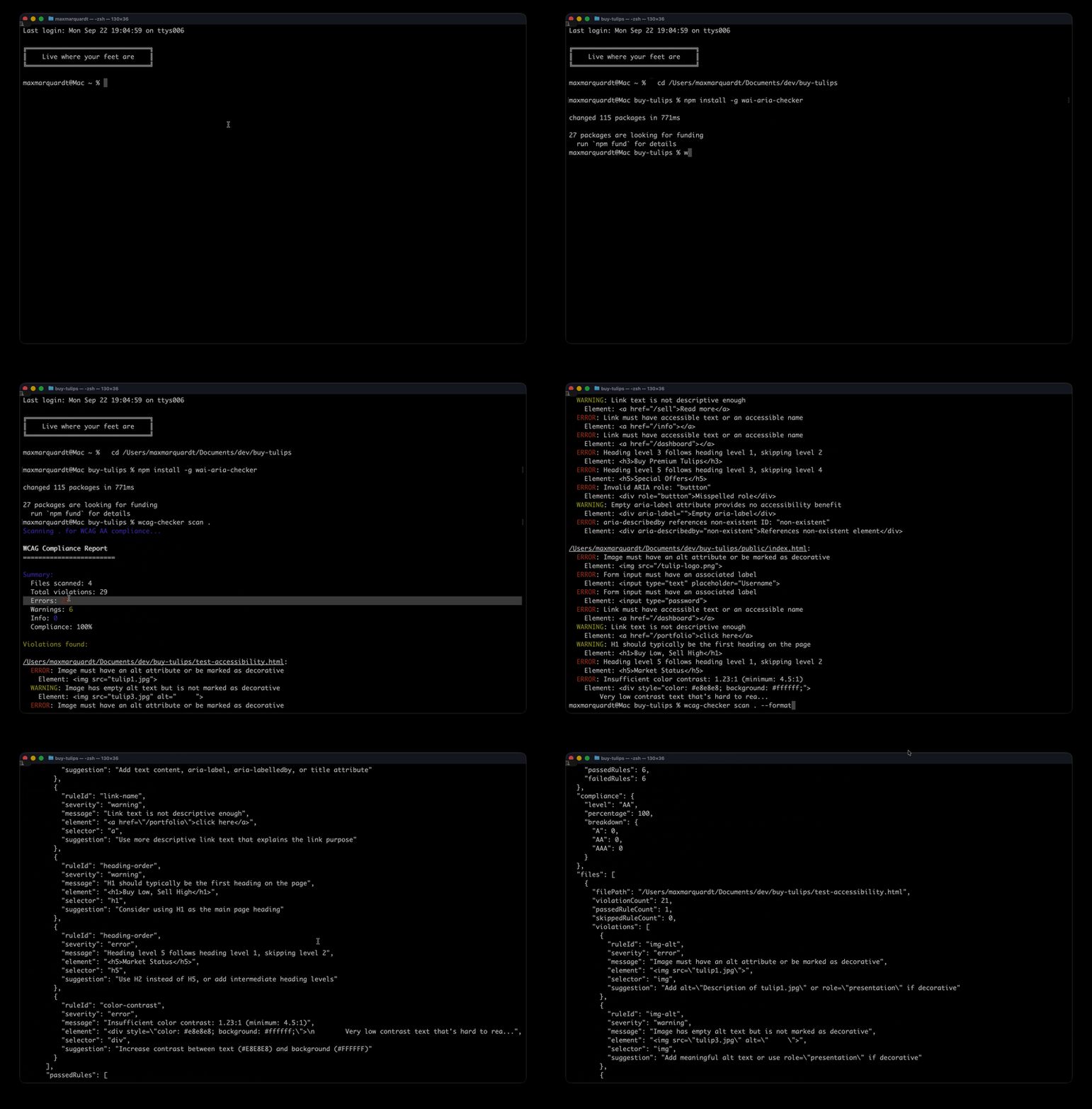
A comprehensive WCAG 2.1 compliance checker for web applications that identifies accessibility violations and provides actionable remediation guidance.
Features
- ✅ Complete WCAG 2.1 Support: Checks for A, AA, and AAA compliance levels
- 🔍 Comprehensive Rule Set:
- Image alt text validation
- Form label associations
- Link accessibility names
- Heading structure and order
- Color contrast analysis
- ARIA attribute validation
- 📊 Multiple Output Formats: Text, JSON, and interactive HTML reports
- 🎯 Actionable Suggestions: Each violation includes specific remediation guidance
- ⚡ Fast Scanning: Efficient file processing with glob pattern support
- 🔧 Configurable: Customize rules, compliance levels, and output options
- 📈 CI/CD Ready: Exit codes for build pipeline integration
Installation
npm install -g wcag-checkerOr use without installing:
npx wcag-checker scan ./srcQuick Start
Command Line Usage
# Scan current directory for WCAG AA violations
wcag-checker scan .

# Scan specific directory with custom compliance level
wcag-checker scan ./src --level AAA

# Generate HTML report
wcag-checker scan ./src --format html --output report.html

# Include specific file patterns
wcag-checker scan . --include "**/*.html" "**/*.htm"

# Exclude patterns and fail on errors (for CI)
wcag-checker scan ./src --exclude "node_modules/**" --fail-on-error
Programmatic Usage
import WCAGChecker, { ComplianceLevel } from 'wcag-checker';

const checker = new WCAGChecker({
  level: ComplianceLevel.AA,
  include: ['**/*.html'],
  exclude: ['node_modules/**'],
  failOnError: true
});

const results = await checker.scan('./src');
console.log(`Compliance: ${results.compliance.percentage}%`);
Supported Rules
Level A Rules
- img-alt: Images must have alternative text
- form-label: Form inputs must have labels
- link-name: Links must have accessible names
- aria-valid: ARIA attributes must be valid
Level AA Rules
- heading-order: Headings must be in correct order
- color-contrast: Text must have sufficient color contrast (4.5:1 for normal text, 3:1 for large text)
Additional Checks
- Empty headings detection
- Multiple H1 warnings
- Generic link text warnings
- Conflicting ARIA attributes
- Missing ID references
- Focusable elements with aria-hidden
CLI Options
| Option | Description | Default |
|--------|-------------|---------|
| --level <level> | Compliance level (A, AA, AAA) | AA |
| --format <format> | Output format (text, json, html) | text |
| --output <file> | Save report to file | - |
| --include <patterns...> | File patterns to include | **/*.html |
| --exclude <patterns...> | File patterns to exclude | node_modules/** |
| --fail-on-error | Exit with code 1 if errors found | false |
| --rules <rules...> | Specific rules to run | all |
| --ignore-rules <rules...> | Rules to ignore | none |
Configuration File
Create a .wcagrc.json file in your project root:
{
  "level": "AA",
  "include": ["src/**/*.html", "public/**/*.html"],
  "exclude": ["node_modules/**", "dist/**"],
  "rules": ["img-alt", "form-label", "heading-order"],
  "outputFormat": "html",
  "failOnError": true
}
Output Formats
Text Output
Clean, colored terminal output with summary and detailed violations.
JSON Output
Structured data perfect for integration with other tools:
{
  "timestamp": "2024-01-01T12:00:00.000Z",
  "summary": {
    "totalFiles": 5,
    "totalViolations": 12,
    "errorCount": 8,
    "warningCount": 4,
    "compliance": 73.2
  },
  "files": [...],
  "compliance": {...}
}
HTML Output
Interactive report with:
- Visual compliance dashboard
- Expandable file sections
- Syntax-highlighted code snippets
- Actionable suggestions with links to WCAG documentation
Integration Examples
GitHub Actions
name: Accessibility Check
on: [push, pull_request]
jobs:
  accessibility:
    runs-on: ubuntu-latest
    steps:
      - uses: actions/checkout@v2
      - uses: actions/setup-node@v2
        with:
          node-version: '16'
      - run: npx wcag-checker scan ./src --fail-on-error
      - uses: actions/upload-artifact@v2
        if: always()
        with:
          name: accessibility-report
          path: report.html
Pre-commit Hook
{
  "husky": {
    "hooks": {
      "pre-commit": "wcag-checker scan ./src --fail-on-error"
    }
  }
}
npm Scripts
{
  "scripts": {
    "a11y": "wcag-checker scan ./src",
    "a11y:ci": "wcag-checker scan ./src --fail-on-error --format json --output a11y-report.json",
    "a11y:report": "wcag-checker scan ./src --format html --output accessibility-report.html"
  }
}
API Reference
WCAGChecker Class
class WCAGChecker {
  constructor(options?: Partial<ScanOptions>)
  async scan(directory: string): Promise<ScanResult>
  updateOptions(options: Partial<ScanOptions>): void
  registerRule(rule: BaseRule): void
}
Types
interface ScanOptions {
  level: ComplianceLevel;
  include: string[];
  exclude: string[];
  rules: string[];
  ignoreRules: string[];
  outputFormat: 'json' | 'html' | 'text';
  outputFile?: string;
  failOnError: boolean;
  maxWarnings: number;
}

interface ScanResult {
  files: FileResult[];
  summary: {
    totalFiles: number;
    totalViolations: number;
    errorCount: number;
    warningCount: number;
    infoCount: number;
    passedRules: number;
    failedRules: number;
  };
  compliance: {
    level: ComplianceLevel;
    percentage: number;
    breakdown: Record<ComplianceLevel, number>;
  };
}
Contributing
- Fork the repository at https://github.com/incrediblecrab/wai-aria
- Create a feature branch:
git checkout -b feature/new-rule - Run tests:
npm test - Submit a pull request
Adding New Rules
import { BaseRule } from './core/compliance-engine';

export class CustomRule extends BaseRule {
  id = 'custom-rule';

  analyze(file: ParsedFile, analyzer: HTMLAnalyzer): Violation[] {
    // Rule implementation
    return violations;
  }
}
Roadmap
- [ ] CSS analysis support
- [ ] JavaScript accessibility patterns
- [ ] React/Vue component scanning
- [ ] VS Code extension
- [ ] Custom rule plugins
- [ ] Performance optimizations
- [ ] Additional WCAG 2.2 rules
License
MIT License - see LICENSE file for details.
Support
Resources
Publisher
Max's Lab of Things Visit mlot.ai
Built with ❤️ for web accessibility