
wavebird
v0.1.5
Published
TypeScript SDK for requesting, rendering, and tracking ads on AI surfaces with wavebird.

Maintainers
 wavebirdai
Readme
wavebird SDK





Monetize AI apps, chat products, agents, copilots, and other generative interfaces with contextual sponsored placements. wavebird keeps the developer in control of when ads are requested, where they render, and which events are reported, without sending prompts or chat history to ad partners.
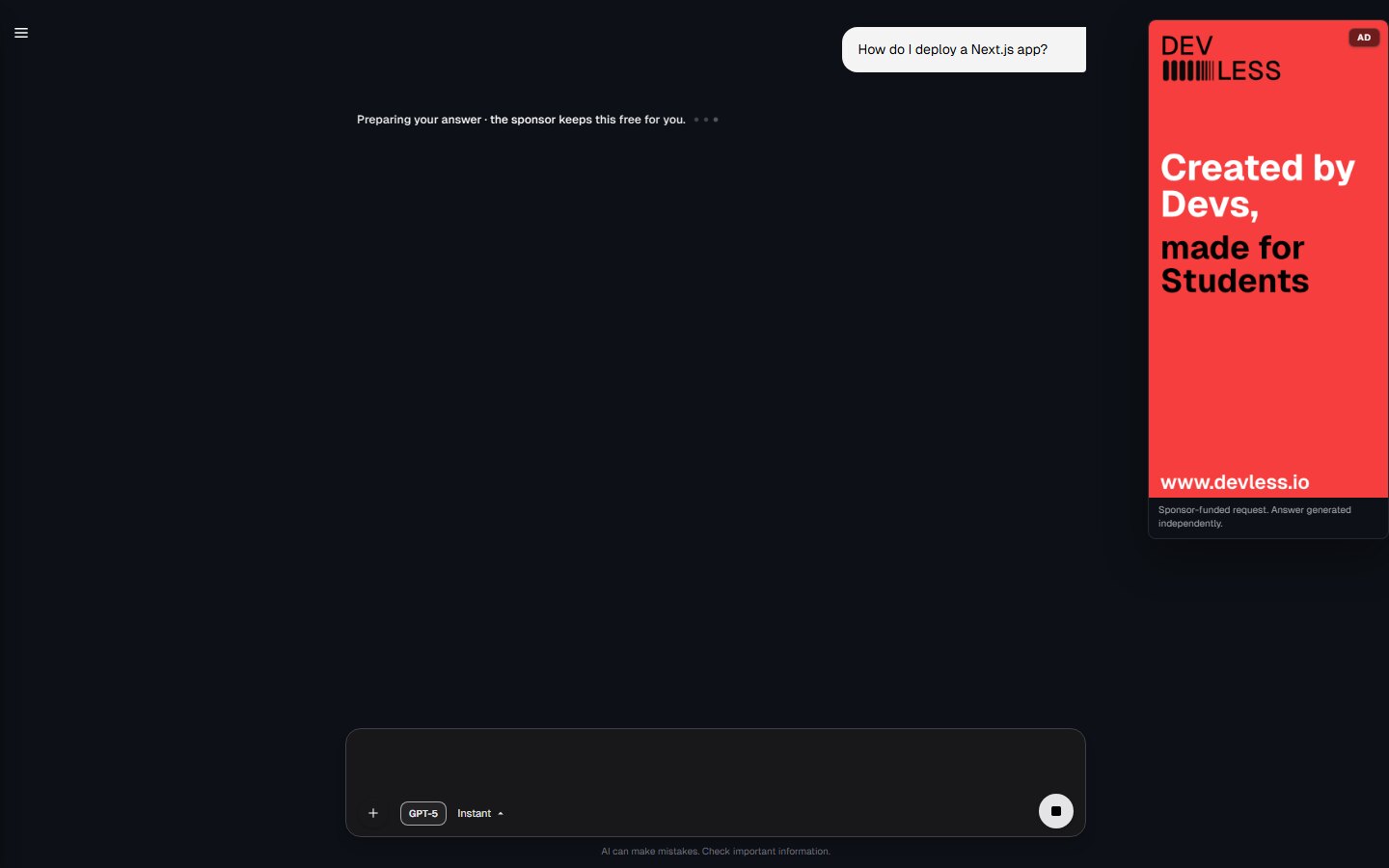
30-Second Server Smoke
npm install wavebirdimport { WavebirdClient } from "wavebird";
const client = new WavebirdClient({
baseUrl: "https://api.wavebird.ai",
getApiKey: () => process.env.WAVEBIRD_SECRET_KEY ?? "",
decisionDelivery: "polling",
publisher: {
app_name: "My AI App",
app_domain: "example.com",
},
});
const job = await client.createJob({
job_type: "chat",
slots_requested: 1,
context: { topic: "software deployment" },
consent: {
gdpr_applies: false,
semantic_targeting: false,
prompt_shared: false,
},
slot_config: {
allowed_formats: ["banner", "native"],
position_hint: "below",
max_width: 728,
max_height: 90,
},
});
const slotId = job?.slot_ids[0];
const decision = slotId ? await client.getDecision(slotId) : null;
if (decision?.fill === true) {
console.log(decision.creative.url);
}The package is ESM-only, includes TypeScript definitions, and requires Node.js 20 or newer. React rendering helpers are optional peer integrations.
Visual Examples
The linked examples show SDK-rendered ad surfaces only. They are not claims about production fill rates or revenue.
Try It Live
- Open the browser example on StackBlitz
- Open the browser example on CodeSandbox
- Read the full SDK guide
What You Control
The SDK is the package-level integration path for teams that want explicit control over jobs, decisions, rendering helpers, consent state, generation lifecycle events, and beacons. Showing an ad during model waiting or generation time is one supported pattern. The SDK can also support server-controlled slots, browser-controlled rendering, callback delivery, custom renderers, and typed access to the public wrapper and SSP contracts.
wavebird is data-minimizing by design. The standard ad-market path uses reduced delivery signals such as topic category, language, format, publisher metadata, consent, and placement rules. Prompts and chat history are not sent to SSPs, DSPs, advertisers, or other ad partners.
Account and keys
Before the SDK can call the wavebird API, create a wavebird account and project:
- Open https://wavebird.ai and choose Get your API key, or go directly to https://dashboard.wavebird.ai/wavebird-start.
- Complete onboarding with your app domain, company country, and the ad formats you want to test.
- Start in sandbox mode. Copy the sandbox secret key from the dashboard and keep it server-side.
- If you use the browser SDK, copy a publishable key and configure every allowed origin that may call wavebird, including local, staging, and production origins.
- Switch to live keys only after your dashboard setup shows the project is ready for production traffic.
Key types
| Key | Where to use it | Environment variable | Notes |
| --- | --- | --- | --- |
| Sandbox secret key | Server-side SDK testing | WAVEBIRD_SECRET_KEY=sk_test_... | Returns sandbox decisions and does not send live SSP traffic. |
| Publishable key | Browser SDK, React helper, DOM mount helper, or Script Tag activation | NEXT_PUBLIC_WAVEBIRD_PUBLISHABLE_KEY=pk_... | Browser-safe, but only from allowed origins configured in the dashboard. |
| Live secret key | Production server traffic | WAVEBIRD_SECRET_KEY=sk_live_... | Use only after production readiness is approved in the dashboard. Never expose this key in browser code. |
| API base URL | Server or browser SDK | WAVEBIRD_BASE_URL=https://api.wavebird.ai | Optional; the public API base is https://api.wavebird.ai. |
3-Minute Quickstart
Set your wavebird API base and sandbox server-side secret key:
WAVEBIRD_BASE_URL=https://api.wavebird.ai
WAVEBIRD_SECRET_KEY=sk_test_replace_me
Create a server-side client:
import { WavebirdClient } from "wavebird";

const client = new WavebirdClient({
  baseUrl: process.env.WAVEBIRD_BASE_URL ?? "https://api.wavebird.ai",
  getApiKey: () => process.env.WAVEBIRD_SECRET_KEY ?? "",
  decisionDelivery: "polling",
  publisher: {
    app_name: "My AI App",
    app_domain: "example.com",
    categories: ["IAB19"],
  },
});
Create a job when your app has an ad opportunity:
const job = await client.createJob({
  job_type: "chat",
  slots_requested: 1,
  context: {
    topic: "software deployment",
  },
  consent: {
    gdpr_applies: true,
    semantic_targeting: false,
    prompt_shared: false,
  },
  slot_config: {
    allowed_formats: ["banner", "native"],
    position_hint: "below",
    max_width: 728,
    max_height: 90,
  },
});
Fetch a decision for the returned slot:
const slotId = job?.slot_ids[0];
const decision = slotId ? await client.getDecision(slotId) : null;

if (decision?.fill === true) {
  console.log(decision.creative.url);
}
Report generation lifecycle events and delivery beacons when you have them:
if (job) {
  await client.reportGeneration(job.job_id, "finished", {
    generation_id: "gen_123",
    model_id: "gpt-4o-mini",
  });
}

if (decision?.fill === true) {
  await client.sendBeacon({
    beacon_id: "beacon_123",
    asset_token: decision.asset_token,
    beacon_type: "rendered",
    occurred_at_ms_client: Date.now(),
  });
}
Browser and Rendering Helpers
The browser entry uses publishable keys and browser activation. Add the exact browser origin in the dashboard before testing. Do not put secret keys in browser code.
import { WavebirdClient } from "wavebird/browser";

const browserClient = new WavebirdClient({
  baseUrl: "https://api.wavebird.ai",
  publishableKey: process.env.NEXT_PUBLIC_WAVEBIRD_PUBLISHABLE_KEY ?? "",
  decisionDelivery: "auto",
  publisher: {
    app_name: "My AI App",
    app_domain: "example.com",
  },
});
React and DOM rendering helpers are available when you want wavebird to mount a returned creative:
import { WavebirdAd } from "wavebird/react";
import { mountWavebirdAd } from "wavebird/mount";
For custom renderers, pass the returned DecisionResponse into your own UI and call sendBeacon() for rendered, visibility, playback, and click events.
Public Package Surface
| Import path | What it exposes |
| --- | --- |
| wavebird | Node/server WavebirdClient, core types, WavebirdSdkError, placement and timing helpers |
| wavebird/browser | Browser WavebirdClient with publishable-key activation |
| wavebird/react | React creative renderer component |
| wavebird/mount | DOM mounting helper for non-React apps |
| wavebird/consent | Consent storage, parsing, and DOM consent dialog helpers |
| wavebird/consent/react | React consent dialog component |
| wavebird/public-contracts | Public wrapper and SSP contract types and validators |
| wavebird/public-contracts/wrapper | Wrapper contract types and validators |
| wavebird/public-contracts/ssp | SSP contract types and validators |
Backend/admin observability contracts are intentionally not exported by the public SDK package.
Configuration
Server client
new WavebirdClient({
  baseUrl: "https://api.wavebird.ai",
  getApiKey: () => process.env.WAVEBIRD_SECRET_KEY ?? "",
  decisionDelivery: "auto",
  publisher: {
    app_name: "My AI App",
    app_domain: "example.com",
  },
  options: {
    timeout_ms: 2000,
    decision_timeout_ms: 30000,
    long_poll_wait_ms: 1500,
    short_poll_interval_ms: 250,
    onError: (error) => {
      console.error(error.code, error.message);
    },
  },
});
Browser client
new WavebirdClient({
  baseUrl: "https://api.wavebird.ai",
  publishableKey: "pk_test_replace_me",
  decisionDelivery: "auto",
  options: {
    origin: "https://app.example.com",
    onError: (error) => {
      console.error(error.code, error.message);
    },
  },
});
Supported delivery modes are auto, websocket, polling, and callback. Callback delivery requires a callback_url in the createJob() request.
Privacy Boundary
prompt is optional. If you can provide a reduced topic yourself, prefer context.topic. If you choose to provide prompt text, wavebird uses it only inside the wavebird middleware path for classification and policy checks before the outbound ad-market request is built. The outbound programmatic request is based on reduced signals such as topic categories, language, publisher metadata, slot configuration, brand-safety controls, and consent. It does not include prompt text or chat history.
Error Handling
SDK operations are fail-silent by default: network, parse, timeout, and contract errors return null, a pending decision, or a fallback beacon result rather than throwing from public methods. Use options.onError and options.logger to observe failures:
const client = new WavebirdClient({
  baseUrl: "https://api.wavebird.ai",
  getApiKey: () => process.env.WAVEBIRD_SECRET_KEY ?? "",
  options: {
    onError: (error) => {
      console.error(error.code, error.message, error.cause);
    },
  },
});
Links
- Website: https://wavebird.ai
- Create account: https://dashboard.wavebird.ai/wavebird-start
- Dashboard: https://dashboard.wavebird.ai/wavebird/overview
- API docs: https://wavebird.ai/api
- SDK docs: https://wavebird.ai/sdk
- npm: https://www.npmjs.com/package/wavebird
- Repository: https://github.com/wavebird-ai/wavebird