
webgpu-instanced-lines
v1.1.0
Published
GPU-accelerated line rendering for WebGPU with joins and caps

Maintainers
 rreusser
Readme
WebGPU Instanced Lines
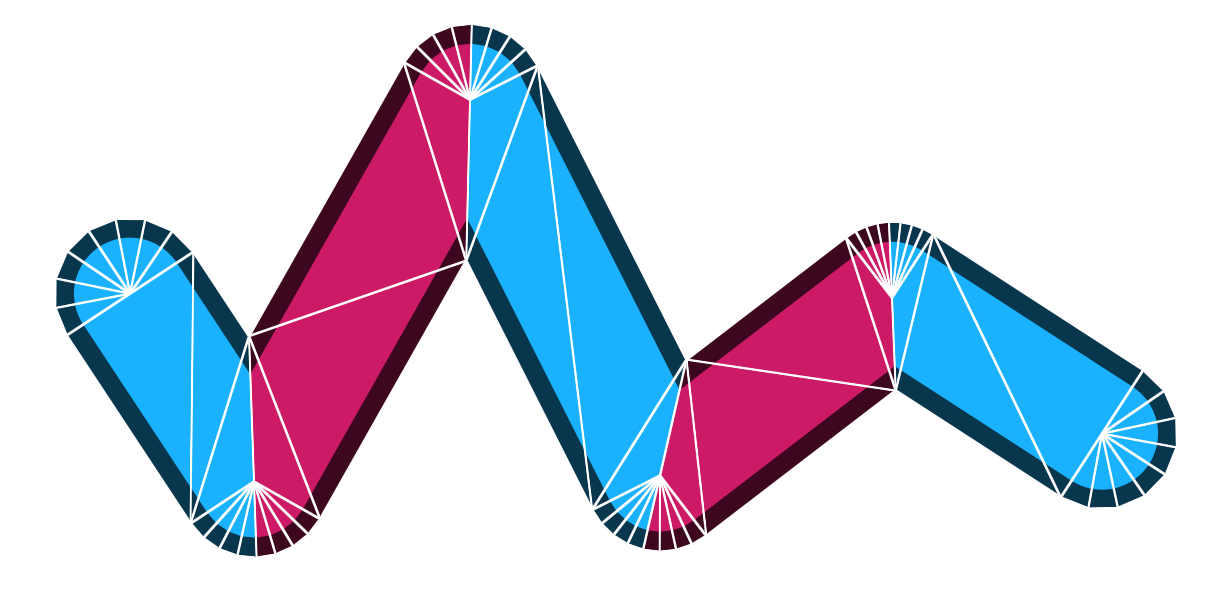
High-performance, flexible GPU-accelerated line rendering for WebGPU. A direct port of regl-gpu-lines to WebGPU.
For background on GPU line rendering, see Matt DesLauriers' Drawing Lines is Hard and Rye Terrell's Instanced Line Rendering.
Installation
npm install webgpu-instanced-linesUsage
import { createGPULines } from "webgpu-instanced-lines";

const gpuLines = createGPULines(device, {
  format: canvasFormat,
  join: "round",
  cap: "round",
  vertexShaderBody: /* wgsl */ `
    @group(1) @binding(0) var<storage, read> positions: array<vec4f>;

    struct Vertex {
      position: vec4f,
      width: f32,
    }

    fn getVertex(index: u32) -> Vertex {
      return Vertex(positions[index], 20.0 * ${devicePixelRatio.toFixed(1)});
    }
  `,
  fragmentShaderBody: /* wgsl */ `
    fn getColor(lineCoord: vec2f) -> vec4f {
      return vec4f(0.2, 0.5, 0.9, 1.0);
    }
  `,
});

// In render loop:
gpuLines.draw(
  pass,
  {
    vertexCount: numPoints,
    resolution: [canvas.width, canvas.height],
  },
  [dataBindGroup],
);
API Reference
See docs/API.md for full API documentation.
How It Works
The renderer uses instanced rendering with triangle strips. For a line with N points, it draws N-1 instances, where each instance renders one line segment plus half of the join geometry on each end. End caps are simply joins stretched around to form a cap.
The geometry is carefully generated to optimize for high-performance rendering without the full rigor of stroke expansion algorithms, which handle self-intersection more carefully. The lineCoord varying is constructed so that length(lineCoord) gives consistent radial distance from the line center across both segments and caps, permitting uniform stroke widths.
Features
- Instanced rendering with triangle strips
- Screen-projected lines using a custom vertex function that can read geometry from buffers, textures, or procedural computation
- Bevel, miter, and round joins
- Round, square, and butt end caps
- Line breaks via
w = 0sentinel value - A
lineCoordvarying that can be used to construct SDF stroke outlines with anti-aliasing
Limitations
- Does not apply special handling for self-intersecting lines.
- Does not implement dashed lines (though you can compute a line distance attribute and implement dashes)
- Does not implement stroke borders (though it exposes
lineCoordto make it straightforward) - World-space line widths require custom computation in the vertex shader function.
- Does not implement
arcsend cap type. - Rapidly varying line widths render incorrectly.
Examples
See the examples directory for working examples. Each demonstrates a different feature:
- basic - Simple sine wave with round joins and caps
- closed-loop - Seven-sided star (closed path)
- variable-width - Per-vertex width with cosine function
- border - SDF border effect with mouse interaction
- dash - Dashing with cumulative distance tracking
- multiple - Multiple separate lines with line breaks
- depth - Blended closed loop with transparency
- msaa - 4x multi-sample anti-aliasing
- lorenz - A strange attractor, iterated in a compute shader, with vertex positions computed from buffer lookups and rendered in a single draw call
License
© 2026 Ricky Reusser. MIT License.