
webtweak
v0.8.1
Published
Local visual editor for hand-coded HTML/CSS - captures edits as patches, Claude reconciles them into source
Downloads
71

Maintainers
 stueydubs
Readme
webtweak
▶ Live demo & site: https://stueydubs.github.io/webtweak/
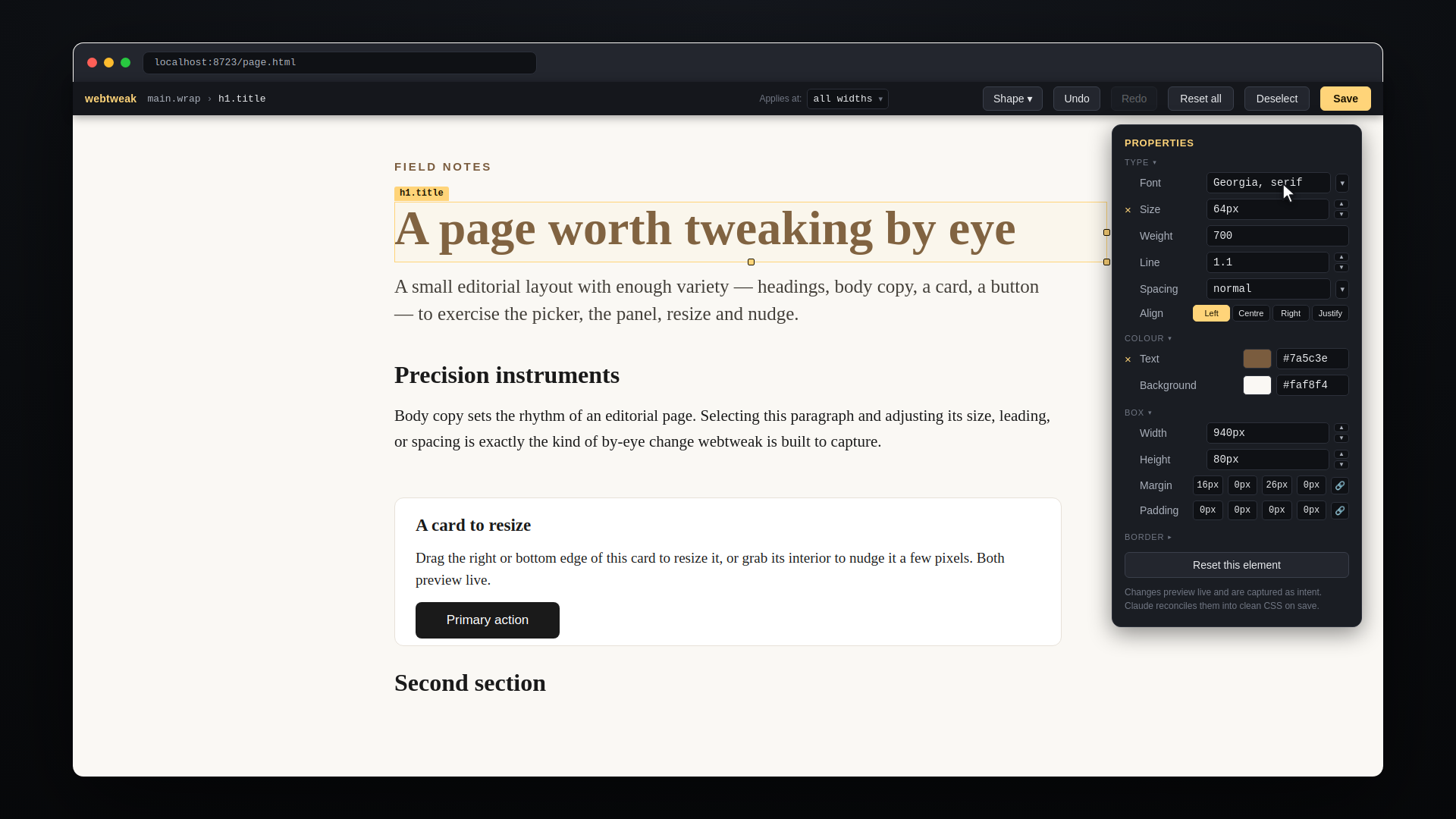
A local, open-source visual editor for hand-coded HTML/CSS pages. You drag, resize, and restyle an existing page by eye; webtweak captures what you changed as machine-readable patches; Claude reconciles those patches into the real source (and pushes only if you ask).
It is deliberately half of a loop. webtweak never rewrites your source - it only captures intent. The judgment-heavy work of locating elements and writing clean CSS is done by Claude on reconcile. That asymmetry is why a tool that would otherwise rival Pinegrow fits in one dependency-free script plus a browser overlay. See docs/adr/0001.
You need Claude for the second half. Claude Code with the bundled skill is the smooth path (webtweak --install-skill), but any Claude conversation works - paste reconcile/SKILL.md and your edits file. And without an LLM at all, page.webtweak.json is still a plain readable list of exactly what you changed, which you can apply by hand.
What it is for: layout and appearance work on hand-coded pages - resize, restyle, nudge, and drop in decorative shapes. Type, colour and box changes can also be scoped to one of the breakpoints your page already declares, so "smaller, but only on mobile" is expressible and previews as you resize. It does not reorder your DOM and it does not edit copy. Full list under What it does not do.
Install
Requirements: Node.js 18+ for the editor. Python 3 as well if you want the reconcile helper. No npm packages required.
npm install -g webtweakOr run without installing:
npx webtweak page.htmlFrom source:
git clone https://github.com/stueydubs/webtweak
cd webtweak
npm link
Then run webtweak --help to confirm it's working.
Usage
webtweak path/to/page.htmlThis boots a local server, serves the page's own directory (so CSS, images, and fonts resolve as in production), injects the editing overlay, and opens your browser.
| Flag | Effect |
|---|---|
| --root DIR | Serve DIR as the web root instead of the page's own folder. Use it when the page lives in a subfolder and references root-absolute assets (/css/site.css) |
| --port N | Serve on port N (default 8723; --port 0 picks any free port) |
| --no-browser | Don't auto-open the browser |
| --install-skill | Copy the reconcile skill into ~/.claude/skills/ and exit |
| -v, --version | Print the version |
| -h, --help | Show help |
In the browser:
- Click any element to select it (a breadcrumb shows where it sits).
- Drag the interior to nudge its position (snaps to a 4px grid).
- Drag the right, bottom, or corner grip (the gold handles on the selection box) to resize it.
- Edit properties in the right-hand panel - font, size, weight, line-height, letter-spacing, alignment, colours, width/height, margin, padding, border, corner radius and shadow.
- Fold away what you're not using. Every group heading collapses, and stays collapsed as you click between elements - the panel is tall enough to scroll on a short window, so a group you aren't using costs you the one you are.
- Undo one property. An edited row shows a small × beside its label; click it to put just that property back. Previously you had to know that clearing the field did this.
- Sizes take any unit. Size, Width and Height are stepper fields showing their unit, so
2rem,80%and4chwork as well as px - a bare number still means px. Before this they were number inputs, which made a fluid width impossible to enter at all. - Colours show their hex. Each swatch has an editable hex beside it, so you can read what colour something currently is and paste a brand value straight in - with or without the
#. - Margin and padding are per side. Four boxes, one per side, so changing just the bottom padding means typing in the bottom box rather than rewriting a shorthand in your head. Each takes any unit - or
auto, so centring is something you can set here. The link button writes all four at once when that is what you meant. Only the sides you touch are recorded, which is what stops a reconcile from flattening anautoyou never asked it to. - Pick a font from your own page. The Font field's ▾ lists every font stack the page already uses, plus any family it declares as
@font-face. Picking one writes the whole stack, so its fallbacks survive the edit; typing a stack by hand still works for a font you're introducing for the first time. - Give an element a border. Width, Style and Colour compose one
borderdeclaration. On an element with no border, touching any one of them fills in the other two so a border appears immediately - otherwise a colour on its own would render nothing at all. Stylenoneremoves a border; clearing a field abandons the change.- If the element already has a rule on one side only (a line under a heading), the controls edit that side and the group says which - so recolouring a divider leaves it a divider instead of boxing the element in. If several sides differ, the controls switch off with an explanation rather than replacing a deliberate design with a box.
- Nudge line-height, pick tracking. Line has up/down arrows so you can walk it 0.1 at a time by eye, and it still takes
normal, an em or a px if you'd rather type. Spacing has a ▾ of tracking presets in em, from tightened display type to opened-up uppercase labels. - Add a shadow from presets. The Shadow field's ▾ offers a hairline, a card lift, a modal lift, a dramatic drop, an inset press, and
noneto take one off - so the property nobody remembers the syntax of is one you pick. Typing your own still works. - Draw a shape from the shape button - square, circle, triangle, star, pentagon, hexagon. Drag on the page to draw one at the size you want, or click to drop it at a default size. Each is one inline
<svg>with editable fill, stroke, corner radius and rotation (snapped to 45°). - Undo and redo from the buttons in the top bar or the keyboard: Cmd/Ctrl+Z undoes your last change of any kind, Shift+Cmd/Ctrl+Z (or Ctrl+Y) puts it back. Each button dims when there is nothing left in that direction, so you can see where you are in history. Making a new edit drops the redo trail, so stepping forward can never splice in work you had abandoned.
- Peek under the Overlay. Press H and the whole Overlay vanishes, so you can see your page and click straight through to anything that was underneath it - a top nav, a right-hand sidebar, a corner widget. Click an element and the Overlay comes back with it selected; press H again to just put it back. Before this, anything under the bar, the panel or the change list could not be selected at all: the click worked whatever control was there instead, so a page whose nav sat in its top 56px could not have that nav edited at any window width.
- Reset this element discards all your edits to the selected element (also undoable).
- Review before you save. A "N elements changed" list sits bottom-left; open it to see every element you've touched and what changed on it, and click an entry to jump back to that element.
- Save when you're happy. Cmd/Ctrl+S saves, H peeks under the Overlay, Esc backs out of whatever is on top - a peek first, then a field you are typing in, then the selection.
A reload mid-session is safe: webtweak restores the current session's pending edits, and warns you if you have unsaved changes.
Watching the loop close
The bar carries a badge showing where your changes are: N pending once saved, reconciled once Claude has folded them into your source.
webtweak also watches the files it serves. When Claude rewrites your CSS, the page reloads itself and the badge flips - so you see your drag become real CSS instead of guessing and reloading by hand. If you have unsaved edits when the source changes, it will never reload over them; it offers you the reload instead.
The loop
- You make visual changes and hit Save.
- webtweak writes a running-history edits file next to the page:
page.webtweak.json. Each editing session is one batch of patches; re-saving overwrites that session's batch, and reconciled batches are kept as a permanent changelog. - You tell Claude "I've adjusted page.html, reconcile it."
- Claude reads the pending batches, locates each element in your real source by its fingerprint, writes clean CSS in your conventions, and marks the batches reconciled. Reconcile stops at source - it never pushes, commits, or deploys unless you explicitly ask.
Your source is never touched until that reconcile step - running webtweak is consequence-free.
Add these to your site's .gitignore if you don't want the artefacts tracked (though the edits file makes a decent visual changelog if you do):
*.webtweak.json.*.tmp
*.webtweak.json.*.bak
Installing the reconcile skill
The reconcile step is packaged as a Claude Code skill. Install it from wherever webtweak lives:
webtweak --install-skillRe-run that after upgrading webtweak. The skill is copied into your own skills directory, so an installed copy from an earlier version will not know about properties a newer overlay can emit - 0.4.0's border, border-radius and box-shadow among them.
That works for a git clone, a global install, and npx alike. To copy it by hand from a clone instead:
mkdir -p ~/.claude/skills
cp -r reconcile ~/.claude/skills/webtweak-reconcile
Then from any Claude Code conversation, in your site's project directory:
/webtweak-reconcileClaude reads the pending patches, proposes CSS changes, writes them to source, and marks the batch done. If you don't use Claude Code, reconcile/SKILL.md documents the full process as plain instructions you can give any Claude conversation.
What it does not do
- No structural reordering. Moving an element above another (rewriting the DOM order in source) is deferred. Today it is resize, restyle, and nudge.
- No copy editing. Changing the actual words is spoken to Claude, not done in the overlay.
- Per-breakpoint editing is partial. Type, colour and box changes can be scoped to a breakpoint your page already declares - they preview only inside it, and Claude merges them into the
@mediablock your stylesheet already has rather than adding a second one. But border, per-side spacing and every shape control stay base-only whatever you pick, and so does every gesture edit - a drag-nudge, a grip-resize or a shape move always records at base regardless of the scope shown; the panel says so rather than quietly ignoring the scope you chose. There is no device frame either: you resize your own window, so you can only author at widths your screen can actually show. Shipped in 0.7.0; if you are upgrading, reinstall the bundled reconcile skill, because an edits file carrying amediamap needs a skill from this release to fold it into source. Edits files written before it have nomediakey and reconcile exactly as they always did. - The Overlay takes real estate from the page while you are in it - about 26% of a 1280px window once something is selected, and about 61% of a 360px one. Below 520px the properties panel moves to the bottom of the window rather than the side, so the page keeps its full width, and H peeks under the whole thing whenever you need the rest of it back. Shipped in 0.8.0, which is also when anything sitting under the chrome became selectable at all.
- Limited property set. Flex/grid alignment editors and hover/focus states are out of the panel. Borders and shadows are in as of 0.4.0, but not per-side border controls or per-corner radii - and in both cases the overlay declines rather than flattens: an element whose sides carry different borders, or whose corners carry different radii, has those controls switched off with an explanation, so a deliberate design can't be silently replaced with a box.
- Serves one directory as web root. By default that is the page's own folder, so a page in a subfolder referencing site-root-absolute assets (
/assets/...,/css/site.css) will 404 them. Pass--rootat the real site root to fix it. Pages needing a build step (Tailwind compile, server-side partials) still won't render identically to production.
Development
There are two suites. The stdlib one needs nothing but pytest:
python3 -m pytest -m "not browser" # unit + HTTP integration, no browser neededA not browser run is not full coverage - it excludes every test that drives the overlay in a real page, which is most of what webtweak does. The browser suite needs two more steps:
python3 -m venv .venv
.venv/bin/pip install -r requirements-dev.txt
.venv/bin/playwright install chromium    # pip fetches the library, not the browser
.venv/bin/python -m pytest               # everything, nothing skipped
Browser tests skip as a single line per module when Playwright is absent, so a suite missing them still reads green - check the skip count rather than the colour. They carry the browser marker and CI selects on it, never on a filename: a new browser module that CI does not know about would otherwise read green while never executing.
The unit tests drive webtweak.js itself (via tests/_wtjs.py), so they guard the code the package actually ships. CI runs the stdlib suite across Node 18/20/22/24 and the browser suite in a job where Playwright is always present.
No runtime dependencies. interact.js is vendored under overlay/ for the drag/resize physics.
Layout
webtweak.js- the CLI/server: pure functionsinjectOverlayandapplyBatchplus a thin HTTP handler. Node stdlib only. This is what ships.overlay/- the browser overlay (overlay.js,overlay.css, vendoredinteract.min.js)fixtures/sample.html- a sample editorial page for manual testing and the e2efixtures/chrome-collision.html- a page whose nav, sidebar and corner widget sit deliberately underneath the Overlay's own bar, panel and change list, so the peek tests can prove both that the chrome swallows them and that peek hands them backtests/- unit, integration, and browser testsreconcile/- the Claude Code reconcile skill (SKILL.md) and thewtreconcile.pyhelper (Python 3)CONTEXT.md,docs/- the domain language, the PRD, the ADRs, and the issue breakdown
License
MIT - see LICENSE.
overlay/interact.min.js is interact.js by Taye Adeyemi, also MIT. Version, upstream and checksum are recorded in overlay/VENDOR.md.